
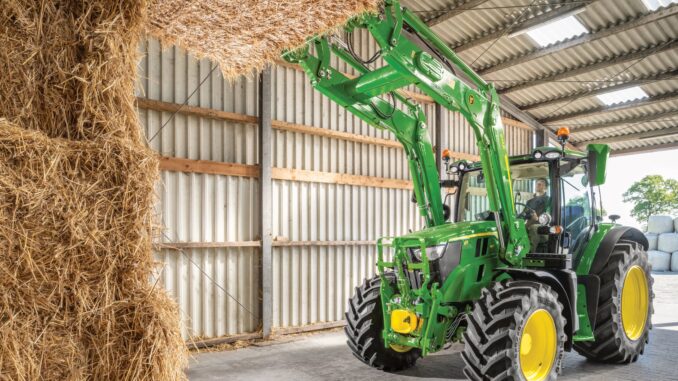
Introduction – John Deere 3 Series overview
The John Deere 3 Series compact utility tractors are mid‑size machines designed for homeowners, small property owners and acreage users who need more capability than a lawn tractor but don’t want to step up to full agricultural tractors. They typically feature diesel engines, hydrostatic or gear drive transmissions, and compatibility with mid‑mount mower decks, loaders and rear PTO implements.
In normal use, a John Deere 3 Series tractor will handle lawn mowing on larger properties, loader work, light grading, snow removal and general utility tasks around home acreages and small farms. This guide focuses on practical repair, troubleshooting and maintenance for common 3 Series issues, with clear boundaries between realistic DIY work and jobs that are better left to a John Deere dealer or experienced mechanic.
General overview of the John Deere 3 Series
In the Deere lineup, the John Deere 3 Series sits above the 1 and 2 Series residential compact tractors and below the larger 4 Series compacts and row‑crop machines. These tractors are heavier, more capable and more feature‑rich than small lawn tractors, with options like cab, MFWD (4‑wheel drive), and a wide range of implement compatibility for loaders, backhoes and specialty attachments.
Key systems you’ll deal with on a John Deere 3 Series include:
-
Engine and fuel system – typically 3‑cylinder liquid‑cooled diesel, mechanical or common‑rail injection, spin‑on fuel filters and water separators.
-
Mower system – mid‑mount mower decks in various sizes, belt‑driven with gauge wheels and anti‑scalp rollers.
-
Drive system – hydrostatic or gear transmission, rear PTO, mid PTO (on mower‑equipped units), front axle MFWD components and final drives.
-
Hydraulic system – implement hydraulics for loader and 3‑point hitch, hydraulic oil and filter, control valves, hoses and quick couplers.
-
Electrical system – battery, starter, alternator, safety switch network, fuses and lighting.
Owners of John Deere 3 Series tractors commonly purchase service parts such as engine oil filters, fuel filters, hydraulic filters, air filters, mower deck drive belts, mower blades, spark plugs for gasoline variants, batteries, safety switches and coolant hoses. Typical OEM part examples include:
-
Engine oil filter – John Deere branded filter matched to your engine code.
-
Primary and secondary fuel filters – spin‑on or cartridge filters specific to the 3 Series engine model.
-
Hydraulic/transmission filter – main hydraulic system filter and sometimes a separate charge filter.
-
Air filter set – outer and inner elements for the engine air cleaner housing.
-
Mower deck belt – deck‑specific drive belt (e.g. 60″ or 72″ deck).
-
Mower blades – high‑lift or standard blades sized to your deck width.
Troubleshooting approach on John Deere 3 Series
For any John Deere 3 Series problem, start from what you see and feel as the operator rather than guessing which part has failed. Think in terms of “symptom buckets” and then work through simple checks before ordering parts or attempting major repairs.
Common symptom categories for John Deere 3 Series tractors include:
-
Starting and cranking issues.
-
Running performance problems (loss of power, stalling, smoke).
-
Cut quality problems when using a mid‑mount mower deck.
-
Vibration and noise from the deck, driveline or loader.
-
Overheating or fluid leaks (engine coolant, hydraulic oil, fuel).
-
Transmission or drive problems (poor traction, hydrostatic slipping, MFWD issues).
-
Electrical and safety switch problems (no crank, PTO won’t engage, lights dead).
Emergency and immediate repair needs – John Deere 3 Series
Some John Deere 3 Series faults must be treated as urgent because they either make the machine unsafe to operate or can cause rapid damage to expensive components, such as the engine or hydraulic pump. In general, stop use immediately if you see major leaks, overheating warnings, violent vibration or repeated electrical faults that prevent normal starting or stopping.
Below, each symptom category is broken down into what it looks like, why it matters and the basic checks you can safely do before calling a dealer.
Starting issues on John Deere 3 Series
A John Deere 3 Series starting problem usually shows up as the tractor not cranking at all, cranking slowly, or cranking normally but refusing to fire. You may see dash lights flickering, click sounds from the starter relay, or a glow plug indicator that doesn’t behave normally on diesel units.
Common causes:
-
Weak or dead battery.
-
Poor battery cable/ground connections.
-
Faulty seat, PTO or neutral safety switches.
-
Blown fuse or bad key switch.
-
Fuel system air or empty tank (diesel engine not getting fuel).
Basic checks:
-
Confirm the PTO is off, transmission is in neutral and parking brake is set.
-
Check battery terminals for corrosion; clean and tighten if loose.
-
Use a multimeter to confirm battery voltage is healthy before cranking.
-
Inspect main fuses and relays in the fuse panel.
-
Try starting while sitting firmly in the seat; wiggle the seat switch harness if needed.
Cut‑quality problems on John Deere 3 Series
When mowing with a John Deere 3 Series mid‑mount deck, cut quality issues show up as uneven height, scalping, striping, uncut trails or clumps of grass. The tractor may feel fine mechanically, but the lawn looks poor after a pass.
Common causes:
-
Dull, bent or mismatched blades.
-
Incorrect deck leveling front‑to‑rear or side‑to‑side.
-
Wrong deck height setting for the terrain.
-
Deck belt slipping or partially off pulleys.
-
Deck wheels set too high or damaged.
Basic checks:
-
Park on a flat surface and inspect blades for damage; replace if dull or bent.
-
Check deck inflation (tire pressure) and deck wheels for correct height settings.
-
Verify the deck belt is correctly routed and tensioned.
-
Measure cut height on both sides of the deck to confirm level.
-
Mow a small test area at a slower ground speed to see if cut improves.
Vibration and noise – John Deere 3 Series
Vibration and unusual noise in a John Deere 3 Series typically come from the mower deck, driveline or loader attachment. You may feel shudder through the seat or steering wheel, hear grinding or knocking, or notice the PTO lever causing more vibration when engaged.
Common causes:
-
Bent blades or packed debris in the deck.
-
Worn spindle bearings or idler pulleys.
-
Loose deck mounting hardware.
-
Worn U‑joints in PTO shafts or loader mounts.
-
Engine misfire or loose engine mounts (gas variants).
Basic checks:
-
Disengage PTO, shut down the tractor and safely inspect the deck for debris.
-
Spin each blade by hand (engine off, key removed) to feel for rough bearing spots.
-
Check idler pulleys and tensioners for looseness or wobble.
-
Inspect PTO shafts and loader mounting pins for play.
-
If noise remains, limit use and schedule a dealer inspection.
Overheating and leaks – John Deere 3 Series
Overheating on a John Deere 3 Series is often indicated by warning lights, temperature gauge climbing into the red, loss of power or coolant boil‑over. Leaks may appear as puddles under the tractor, wet areas on hoses or residue around seals and gaskets.
Common causes:
-
Radiator or grille screen packed with grass and dust.
-
Low coolant level or failed cap.
-
Failed water pump or thermostat.
-
Hydraulic hose damage or loose fittings.
-
Fuel lines and filters not sealing correctly.
Basic checks:
-
Safely stop and let the machine cool before opening the hood.
-
Clean radiator and side screens; blow out with air (not high‑pressure water).
-
Check coolant reservoir level and look for obvious hose leaks.
-
Inspect hydraulic hoses and fittings for dampness or drips.
-
If overheating persists, avoid work under load and contact a dealer.
Transmission/drive problems – John Deere 3 Series
Drive issues on a John Deere 3 Series show up as poor forward or reverse movement, surging, difficulty climbing slopes, MFWD not engaging properly or rough shifting on gear units. On hydrostatic models, you might feel hesitation when pressing the pedals.
Common causes:
-
Low hydraulic/transmission oil level.
-
Clogged transmission filter or suction screen.
-
MFWD mechanical damage or worn driveline components.
-
Linkage misadjustment for hydro pedals or gear levers.
-
Incorrect tire pressure affecting traction and performance.
Basic checks:
-
Confirm transmission/hydraulic fluid level is within the correct range.
-
Check for recent filter changes; replace filters if overdue.
-
Inspect front axle and MFWD components for leaks or damage.
-
Ensure tire pressures match the operator’s manual recommendations.
-
If drive still feels weak or noisy, avoid heavy loads and seek dealer diagnosis.
Electrical problems – John Deere 3 Series
Electrical faults on a John Deere 3 Series often appear as intermittent cranking, PTO or hydraulics refusing to work, dead lights or warning indicators that don’t match actual machine behavior. Safety circuits play a big role in these tractors.
Common causes:
-
Failed seat, PTO or neutral safety switches.
-
Corroded grounds and harness connectors.
-
Blown fuses from shorted wiring or accessories.
-
Bad ignition switch or starter solenoid.
-
Battery nearing end of life.
Basic checks:
-
Verify all safety conditions (seat, PTO off, neutral, brake set) before testing.
-
Inspect fuse box, replacing any blown fuses with the correct rating.
-
Check main ground point from battery to chassis for corrosion.
-
Try gently moving harnesses near safety switches while starting to spot intermittent faults.
-
If electrical problems remain, document symptoms before contacting a dealer.
DIY or dealer? Repair decision guide for John Deere 3 Series
For John Deere 3 Series tractors, the realistic DIY boundary usually sits at routine maintenance and straightforward bolt‑on parts, plus basic troubleshooting of obvious issues. Anything involving internal engine work, hydraulic system internals, transmission teardown or complex electronics is better suited to a John Deere dealer or experienced independent technician with proper tools and manuals.
Good DIY jobs:
-
Engine oil and filter changes.
-
Air and fuel filter replacement.
-
Mower deck belt and blade changes.
-
Battery replacement and simple electrical checks.
-
Greasing loader and 3‑point hitch pivot points.
Advanced DIY or dealer jobs:
-
Hydraulic pump replacement or internal valve repairs.
-
Transmission or rear axle teardown.
-
MFWD front axle gear and differential work.
-
Engine injection pump or injector replacement.
-
Complex electrical diagnostics using scan tools or advanced test equipment.
Skill level guide:
-
Beginner – oil and filter changes, air filter swaps, checking tire pressures, cleaning radiator screens.
-
Intermediate – deck belt and blade replacement, basic electrical troubleshooting, replacing safety switches, adjusting linkages.
-
Advanced – hydraulic and transmission repairs, engine fuel system work, MFWD and differential repairs, in‑depth diagnostics following technical manuals.
Parts needed for John Deere 3 Series – OEM vs aftermarket
Before ordering parts for a John Deere 3 Series tractor, gather complete identification details so you can match the correct components. Write them down before you go online or visit a dealer.
You’ll need:
-
Full tractor model name (e.g. 3032E, 3038E, 3046R).
-
Product Identification Number (PIN) from the tractor frame.
-
Engine model and serial number from the engine plate.
-
Deck size and model if using a mid‑mount mower (e.g. 60″ AutoConnect deck).
Key John Deere 3 Series service parts
Below is a general example of parts commonly used on John Deere 3 Series tractors. Always verify against your specific model and PIN, as numbers vary between engines and years.
For John Deere 3 Series tractors, OEM parts are usually the best choice for belts, hydraulic components, safety‑critical items and parts where fit and durability are crucial, such as filters and spindles. Aftermarket parts can work well for certain consumables like mower blades, batteries and some filters, provided you use reputable brands and a clear cross‑reference to your Deere OEM numbers.
Where to find John Deere 3 Series parts diagrams and manuals
To work on your John Deere 3 Series with confidence, use official diagrams and manuals alongside this practical guide. Key online sources include:
-
John Deere Manuals and Training – operator’s manuals and technical publications for 3 Series tractors:
-
https://www.deere.com/en/parts-and-service/manuals-and-training/
-
-
John Deere Quick Reference Guides – maintenance part numbers and service intervals for residential machines (some 3 Series information):
-
https://www.deere.com/en/parts-and-service/manuals-and-training/quick-reference-guides/
-
-
John Deere Technical Publications / Shop.Deere – searchable technical manuals, parts catalogs and diagnostic tools (Customer Service ADVISOR):
-
https://shop.deere.com/technical-publications
-
-
Reputable Deere‑focused parts site with model‑specific pages (example):
-
https://therepairmanual.com/john-deere/
-
Use the operator’s manual for routine maintenance, fluids and basic adjustments. Technical manuals and parts catalogs are best for in‑depth repair steps, torque values and exploded parts diagrams. Third‑party parts sites can provide convenient access to PDFs, component kits and cross‑references, but always confirm compatibility with your PIN.
How to locate model, serial and engine numbers on John Deere 3 Series
Model and serial numbers matter because John Deere 3 Series tractors often change components across years and sub‑models, and parts will not always interchange correctly. A belt, filter or hydraulic fitting for one 3 Series variant may not fit another, even if the tractors look similar.
To find your numbers:
-
Locate the tractor Product Identification Number (PIN) plate, usually on the right‑hand frame rail, front corner or rear axle housing area.
-
Read and record the full model designation from the hood decal and PIN plate.
-
Look for the engine identification plate or sticker on the engine block or valve cover area; write down engine model and serial number.
-
If you have a mid‑mount mower deck, find its model sticker on the deck shell or near the discharge chute.
-
For loaders or other major attachments, check the main boom or mounting frames for model/serial plates.
Buying John Deere 3 Series parts online and in stores
A smart parts‑buying strategy combines online ordering for known items with dealer visits for complex or serial‑specific components. For John Deere 3 Series tractors, you’ll often find the best mix of price and accuracy by using official resources first and then shopping around.
-
Online – use your OEM part numbers and PIN to search through official John Deere sites and reputable aftermarket stores; avoid “universal” parts that don’t list your exact model.
-
Dealer counter – ideal for hydraulic components, transmission parts, MFWD internals and anything where the parts person can cross‑check your PIN in the Deere system.
-
Retail stores – suitable for engine oil, grease, coolant, basic batteries and sometimes filters or blades, but only buy if the packaging clearly lists your 3 Series model.
Useful URLs include:
-
John Deere Parts: https://partscatalog.deere.com
-
Shop.Deere.com for digital tools and Customer Service ADVISOR: https://www.deere.ca/en/parts-and-service/manuals-and-training/
-
Reliable third‑party manual and parts site: https://therepairmanual.com/john-deere/
Step‑by‑step fitting guide – John Deere 3 Series common DIY jobs
Below are straightforward, high‑impact jobs a typical John Deere 3 Series owner can tackle safely with basic tools. Always follow your operator’s manual safety instructions and work on a level surface with the tractor secured.
Changing the engine oil and filter on a John Deere 3 Series
This job improves engine life and reliability, especially on diesel 3 Series tractors working under load.
-
Warm the engine for a few minutes, then park on level ground and shut it down.
-
Place a drain pan under the oil drain plug; remove the plug and let the oil drain completely.
-
Remove the old oil filter using a filter wrench; check that the old gasket comes off with it.
-
Lightly oil the gasket on the new OEM filter and spin it on by hand until snug, then tighten per the manual.
-
Reinstall the drain plug with a new washer if needed and refill with the specified oil type and quantity.
-
Start the engine, check for leaks, then re‑check oil level and top up if necessary.
Replacing the air filter on a John Deere 3 Series
Clean air prevents premature engine wear and helps maintain performance on your 3 Series tractor.
-
Open the hood and locate the engine air cleaner housing.
-
Release the latches or screws holding the air cleaner cover and remove it.
-
Withdraw the outer air filter element; inspect and replace if dirty or damaged.
-
If equipped with an inner safety element, carefully remove and replace it as specified.
-
Wipe the inside of the housing with a clean, dry cloth and reinstall the new elements.
-
Refit the cover, secure latches and ensure there are no gaps or misalignments.
Changing mower blades on a John Deere 3 Series mid‑mount deck
Fresh blades on your John Deere 3 Series deck improve cut quality and protect spindle bearings from shock.
-
Lower the deck to the ground, set the parking brake and turn off the tractor; remove the key.
-
Use a suitable jack or ramps to gain safe access under the deck, blocking it securely.
-
Wear gloves and use the correct socket to remove each blade mounting bolt.
-
Install new OEM or correctly cross‑referenced blades, ensuring they face the right direction.
-
Tighten bolts to the torque specified in the operator’s manual.
-
Spin blades by hand to check clearance and ensure they rotate freely before mowing.
Replacing the mower deck belt on a John Deere 3 Series
A good deck belt keeps your John Deere 3 Series mowing smoothly without slipping or burning.
-
Lower the deck fully, shut off the tractor and disengage the PTO.
-
Remove any belt guards or covers to expose the deck belt and pulleys.
-
Note the belt routing or refer to the diagram in the operator’s manual.
-
Release belt tension using the idler spring or tensioner adjustment, then slip off the old belt.
-
Route the new OEM belt along the correct path, making sure it sits fully in each pulley groove.
-
Re‑engage the tensioner, reinstall guards and check belt tension and alignment before a test mow.
Maintenance to prevent John Deere 3 Series problems
Regular maintenance on a John Deere 3 Series prevents most of the common failures owners encounter, from starting problems to poor cut quality and hydraulic issues. Many breakdowns trace back to dirty filters, neglected fluid changes and over‑looked safety checks.
Key focus areas:
-
Starting reliability – keep the battery healthy, terminals clean, and safety switches functioning properly.
-
Cut quality – maintain sharp blades, correct deck level, proper belt tension and clean deck surfaces.
-
Fire and overheating prevention – clean radiator screens, check coolant levels, and remove built‑up grass and oil from hot components.
-
Drive performance – maintain correct hydraulic/transmission fluid levels, replace filters on schedule, and monitor tire pressures.
-
Electrical reliability – inspect wiring, fuses and grounds; avoid adding accessories without proper protection.
Maintenance schedule and year‑round checklist – John Deere 3 Series
The following schedule is based on typical compact tractor charts and adapted to John Deere 3 Series use. Always cross‑check with your specific operator’s manual and follow its intervals and torque values.
Daily / before each use
-
Check engine oil level and look for leaks.
-
Inspect radiator and air intake screens; clean if dusty or packed.
-
Verify tire pressures are within recommended range.
-
Confirm all lights and safety systems function correctly.
After approximately 8 hours (or end of workday)
-
Grease loader pins and front axle pivot points as needed.
-
Inspect mower deck for debris; clean underside if safe to do so.
-
Check fuel level and look for water contamination in clear fuel bowls.
Every 25 hours
-
Check and adjust mower deck level and blade condition.
-
Inspect hydraulic hoses and couplers for chafing or leaks.
-
Clean battery terminals and check electrolyte if applicable.
Every 50 hours or yearly
-
Change engine oil and replace the oil filter following the manual.
-
Inspect and, if needed, replace engine air filters.
-
Lubricate steering and 3‑point hitch pivot points.
-
Check drive belts for wear and tension.
Every 200 hours (or as specified)
-
Replace fuel filters and bleed the system according to procedures.
-
Change hydraulic/transmission fluid and filters if specified for your model.
-
Inspect MFWD front axle oil and change if required.
-
Conduct thorough inspection of brake, clutch (if equipped) and linkage adjustments.
Seasonal checklist – John Deere 3 Series tractors
Spring:
-
Perform full fluid and filter checks before heavy mowing season.
-
Inspect deck blades, belts and gauge wheels; replace worn parts.
-
Clean radiator and screens thoroughly after storage.
Mid‑season:
-
Re‑check cut quality, deck level and blade sharpness.
-
Inspect hydraulic and electrical systems for any mid‑season wear.
Fall/end‑of‑season:
-
Complete oil change if hours are near the interval.
-
Clean deck and underside; prevent rust by removing built‑up debris.
-
Treat diesel fuel for storage and check battery charge if storing the tractor.
John Deere 3 Series – repair, upgrade or replace?
For John Deere 3 Series tractors, it’s usually worth repairing the machine when the frame, engine and transmission are fundamentally sound, as these tractors are long‑life assets. Upgrades make sense when you want better performance from an otherwise healthy unit, while replacement may be the right call if major systems are failing and repair costs approach the value of the tractor.
Repair if…
-
Problems are limited to filters, belts, hoses, safety switches or minor leaks.
-
The engine starts and runs reliably with only moderate service needs.
-
The transmission and hydraulics still deliver strong performance under load.
Upgrade if…
-
You want improved lighting, better seat comfort or enhanced controls.
-
You’re adding a loader, new mower deck or specialized implements for new tasks.
-
You’re considering tire upgrades (e.g. R4 industrial or R1 ag) for better traction.
Replace if…
-
The tractor has severe engine or transmission damage and multiple major systems failing.
-
Repair estimates approach or exceed the value of a newer 3 Series or similar tractor.
-
Your acreage needs have grown beyond what the 3 Series can realistically handle.
Expanded troubleshooting FAQ – John Deere 3 Series
1. Why will my John Deere 3 Series not start?
Most non‑starting problems on a 3 Series are caused by a weak battery, poor cable connections or safety switches preventing the starter from engaging. Verify that the PTO is off, transmission is in neutral and the seat switch is satisfied before turning the key. Check battery voltage with a multimeter and clean the terminals if they are corroded. If the tractor still won’t crank, inspect fuses and listen for a click from the starter relay to narrow down the issue.
2. Why does my John Deere 3 Series crank but not fire?
If your 3 Series cranks but refuses to start, look at the fuel system first, especially on diesel models. You may have air in the lines after a filter change, a blocked fuel filter or simply an empty tank. Confirm fuel level, then refer to your manual to bleed the fuel system after filter replacement. Also check that the glow plug system is functioning and that the fuel shutoff solenoid is operating correctly when the key is turned.
3. Why does my John Deere 3 Series start and then stall?
Stalling soon after start often points to restricted fuel flow or air leaks in the fuel lines. Inspect both primary and secondary fuel filters and replace them if they are overdue. Look for wet spots around fuel connections that might indicate leaks drawing air into the system. It can also be caused by a blocked tank vent or contaminated fuel; if you suspect bad fuel, drain and refill with fresh diesel from a trusted source.
4. Why is my John Deere 3 Series hard to start when cold?
Cold‑start problems are common on diesels if glow plugs or intake heaters are not working properly. Confirm that the glow plug indicator behaves normally and that you are following the recommended pre‑heat procedure for your tractor. Use the correct seasonal grade of diesel fuel and check that the battery is strong enough to maintain cranking speed in low temperatures. If the engine still struggles, have a dealer test the glow plugs and starting circuit.
5. Why does my John Deere 3 Series blow white or blue smoke?
White smoke at startup can indicate unburned fuel or cold combustion, which may settle once the engine warms up. Persistent white smoke, however, might signal injector problems or coolant entering the combustion chamber. Blue smoke points to oil burning, often related to worn piston rings or valve seals. Check oil level and consumption trends; if smoking persists, schedule a professional inspection to prevent long‑term damage.
6. Why is my John Deere 3 Series losing power under load?
Power loss under load can stem from clogged fuel filters, restricted air intake, low‑quality fuel or hydraulic problems affecting the transmission. Check and replace air and fuel filters as a first step. Make sure the radiator and intake screens are clean so the engine can stay cool while working. If a hydrostatic transmission feels weak, verify fluid level and filter condition, and consider a dealer diagnostic if performance doesn’t improve.
7. Why does my John Deere 3 Series overheat?
Overheating is usually due to debris packed into the radiator and screens, low coolant level or failed cooling components. Inspect and clean all cooling surfaces, blowing out fines with compressed air instead of using high‑pressure water. Check the coolant reservoir and top up with the recommended mix if necessary. If the tractor continues to run hot, the thermostat, water pump or fan drive may need professional attention.
8. Why is coolant leaking from my John Deere 3 Series?
Coolant leaks appear as puddles under the tractor or residue around hoses and radiator joints. Examine all coolant hoses, clamps and the radiator cap for signs of failure or looseness. Look at the water pump weep hole and gasket areas for dampness. Minor hose leaks can often be resolved by tightening clamps or replacing the hose, but cracks in the radiator or pump usually require dealer repair or replacement.
9. Why is hydraulic fluid leaking from my John Deere 3 Series?
Hydraulic leaks on a 3 Series often come from hoses rubbing against frame components, damaged quick couplers or seals on cylinders. Clean the area and look for fresh dampness to pinpoint the source. Replace worn hoses and O‑rings in couplers as needed. Avoid operating the tractor with significant hydraulic leaks, as low fluid levels can cause serious pump and transmission damage.
10. Why won’t the mower deck engage on my John Deere 3 Series?
If the deck won’t engage when you operate the PTO, start with safety circuits and basic mechanical checks. Ensure you are seated, the parking brake is set correctly and the PTO switch or lever is fully actuated. Listen for the PTO clutch click or observe whether the belt and pulleys move at all. Check fuses, the PTO switch and belt routing; if the clutch is electrically controlled, a bad switch or wiring fault may be the culprit.
11. Why is the cut uneven on my John Deere 3 Series mower deck?
Uneven cutting is usually a combination of deck mis‑level and worn blades. Park on a flat surface and measure blade height on both sides of the deck, adjusting linkage to get proper side‑to‑side and front‑to‑rear pitch. Inspect blades for bends, nicks and dull edges; sharpen or replace them if needed. Also check tire pressures, as uneven tires on the tractor can throw deck level off.
12. Why does my John Deere 3 Series leave uncut strips?
Uncut strips can be caused by missing blades, wrong blade types, incorrect deck ground speed or a deck that is not fully engaged. Confirm all blades are present and rotating when the PTO is engaged. Make sure belt routing is correct and pulleys are tight. Try mowing more slowly and overlap passes slightly; if strips persist, inspect spindle alignment and deck leveling more closely.
13. Why is my John Deere 3 Series mower deck scalping the lawn?
Scalping occurs when the deck sits too low or the anti‑scalp wheels are incorrectly set. Raise the deck and reset height to a more moderate level for uneven terrain. Adjust anti‑scalp wheels so they are close to the ground but not constantly rolling; they should only touch when the deck dips. If the lawn surface is very rough, consider mowing at a higher setting or resmoothing uneven areas.
14. Why is my John Deere 3 Series mower deck vibrating badly?
Strong deck vibration is commonly due to bent blades, debris buildup or damaged spindle bearings. Safely inspect the deck and remove any trapped material around blades and pulleys. Spin each blade by hand to check for roughness or play; replace bearings or spindles that feel loose. Verify all mounting hardware and pulley fasteners are tight, and replace the belt if it shows glazing or cracks.
15. Why do I hear grinding noises from my John Deere 3 Series deck?
Grinding sounds often come from failing bearings in spindles or idler pulleys, or from foreign objects caught in the deck. Shut down the tractor, remove the key and inspect underneath for stones, pieces of wire or other debris. Check each spindle and pulley for side‑to‑side movement or rough rotation. Replace any components with obvious wear before using the deck again to avoid catastrophic failure.
16. Why won’t my John Deere 3 Series hydrostatic transmission move?
On hydrostatic 3 Series tractors, no movement can be caused by low fluid, failed drive linkage, parking brake left engaged or internal transmission problems. Check that the parking brake is fully released and that the hydro pedals move smoothly. Verify hydraulic/transmission fluid level and look for leaks. If the tractor still won’t move, internal hydro components may require professional diagnosis.
17. Why does my John Deere 3 Series jerk or surge when driving?
Jerking or surging may be due to air in the hydraulic system, clogged transmission filters or worn linkages. Start by checking and replacing the transmission filter if it’s near or beyond its interval. Inspect pedal linkage for smooth movement and lubrication. If surging continues, a dealer should perform pressure tests to determine whether pump or valve issues are present.
18. Why won’t the MFWD engage on my John Deere 3 Series?
Failure of MFWD (4‑wheel drive) to engage often relates to mechanical linkages, internal gears or hydraulic engagement problems. Make sure you are engaging MFWD according to the manual, and listen for any changes in driveline noise when switching it on. Check for visible damage or leaks around the front axle. If MFWD still does not function and you hear grinding, stop use and get a professional inspection.
19. Why is my John Deere 3 Series battery always going flat?
Repeated battery discharge points to either a failing battery, charging system problems or parasitic drains. Inspect the battery age and condition; older units may simply be at the end of their life. Check alternator output using a multimeter while the engine runs to confirm proper charging voltage. If the charging system is fine, look for added accessories or faulty circuits drawing current while the tractor is off.
20. Why do the lights not work on my John Deere 3 Series?
Non‑working lights can be caused by blown fuses, bad bulbs or wiring issues. Start with the fuse panel and replace any blown fuses using the correct rating. Then inspect each light for visible damage and test bulbs where possible. If multiple lights fail simultaneously, trace the harness and switches looking for loose connectors or chafed wires, and repair with proper connectors and insulation.
21. Why does my John Deere 3 Series PTO shut off randomly?
Random PTO shutoff is often related to seat switches, safety circuits or overload protection. Ensure you remain seated properly and that the seat switch is functioning, especially on rough terrain. Check the PTO switch or lever for wear and intermittent contact. If the PTO is tripping due to overload, inspect the driven attachment for binding or excessive load and correct the root cause.
22. How often should I change oil on my John Deere 3 Series?
Oil change intervals depend on the specific 3 Series model and usage, but many compact tractors call for engine oil changes around every 50 to 100 hours or annually, whichever comes first. Check your operator’s manual for the exact hour recommendation and fluid type. If you run your tractor under heavy loads or in dusty conditions, more frequent changes may be wise to protect the engine.
23. How often should I change hydraulic fluid on my John Deere 3 Series?
Hydraulic and transmission fluid intervals vary by model, but compact tractors commonly require changes around every 200 to 400 hours or at multi‑year intervals. Your manual will list the precise schedule and filter replacement requirements. Because hydraulic components are expensive, it’s important not to exceed these intervals, especially if you use front loaders or rear implements heavily.
24. When should I replace fuel filters on my John Deere 3 Series?
Fuel filter replacement is typically recommended around every 200 hours, or more often if your fuel quality is uncertain. Diesel engines are sensitive to water and contamination, so staying ahead of filter changes reduces the risk of injector and pump damage. Monitor starting behavior and engine performance; if you notice hesitation or power loss, inspect filters even if hours are below the official interval.
25. How can I improve cut quality on my John Deere 3 Series mower?
To improve cut quality, focus on blade sharpness, deck level, belt tension and ground speed. Start by sharpening or replacing blades and verifying that the deck is leveled correctly according to your manual. Check belt routing and tension so the blades spin at proper speed. Mow at a sensible ground speed, avoid cutting more than one‑third of grass height in a single pass and overlap passes slightly for best results.
26. What’s the best way to store my John Deere 3 Series over winter?
For winter storage, clean the tractor thoroughly, especially the mower deck and radiator area. Change engine oil if near the interval, fill the fuel tank and add appropriate stabilizer for diesel or gasoline. Disconnect or maintain the battery using a smart charger. Park in a dry, sheltered area, lower attachments to the ground and consider blocking the tractor so tires aren’t heavily loaded in one spot for months.
27. Why does my John Deere 3 Series jerk when I engage the PTO?
A harsh PTO engagement can occur when engine speed is too high or when attachment components are stiff. Reduce engine RPM before engaging PTO, then gradually increase speed once the implement is running. Check attachment bearings and driveline for lubrication and smooth operation. If the clutch itself engages abruptly even at low RPM, consult your manual for any clutch adjustment procedures.
28. Why does my John Deere 3 Series smell like burning rubber when mowing?
Burning rubber smells usually come from slipping belts or debris contacting hot surfaces. Inspect the mower deck belt for glazing, cracks or misrouting and make sure it is properly tensioned. Check for plastic or rubber debris caught near pulleys or the engine exhaust. If the smell persists and belts appear fine, have a technician examine the clutch and pulleys for misalignment or excessive heat.
29. Why does my John Deere 3 Series make clicking sounds but won’t start?
Clicking sounds without cranking typically point to a weak battery, bad starter solenoid or poor connections. Confirm the battery voltage is above the recommended threshold, and clean and tighten cables. Listen for whether the starter itself attempts to engage or if the clicks come from a relay. If voltage is good and connections are sound, the starter or solenoid may need professional testing and replacement.
30. Can I use aftermarket filters on my John Deere 3 Series?
You can use quality aftermarket filters on a John Deere 3 Series as long as they are correctly cross‑referenced to the OEM part numbers and meet or exceed the manufacturer’s specifications. Stick with recognized brands and avoid generic filters that only list “compact tractor” without naming your exact model. For critical systems like hydraulics and fuel, many owners still prefer OEM filters to ensure fit, sealing and long‑term durability.
31. How do I check tire pressure correctly on my John Deere 3 Series?
Use a reliable tire gauge and compare readings to the specifications in your operator’s manual. Check tires cold, before the tractor has been driven for an extended period. Adjust pressure for front and rear tires separately, especially if you use a loader or heavy rear implements. Maintaining proper pressure improves traction, cut quality and component life, and helps prevent sidewall damage.
32. How do I know if my John Deere 3 Series needs a new battery?
Signs of a failing battery include slow cranking, dim lights, needing frequent jumps and visible corrosion or swelling on the case. Check the age of the battery; many tractor batteries last around 4 to 6 years under typical use. Test with a load tester or have a dealer perform a battery health check. If cranking is marginal and the battery is old, replacement is usually the most reliable solution.
33. Why is the steering stiff on my John Deere 3 Series?
Stiff steering may be caused by low hydraulic fluid, contamination in the steering system or mechanical issues in the front axle. Verify fluid level and look for leaks near steering cylinders and hoses. Inspect front axle pivot points and wheel bearings for lubrication and wear. If steering effort remains high and hydraulic fluid is correct, professional diagnosis of steering valves and cylinders may be warranted.
34. Why does my John Deere 3 Series squeal when I turn?
Squealing sounds while turning often come from belts, hydraulic relief valves or tires slipping on hard surfaces. Determine whether the sound changes with PTO engagement or steering alone. Check belts and pulleys for wear, and inspect hydraulic fluid level. If the noise occurs only during hard steering on concrete, it may just be tires scrubbing; however, persistent hydraulic squealing under normal use should be checked by a dealer.
35. What safety checks should I do regularly on my John Deere 3 Series?
Regular safety checks include verifying that seat and PTO safety switches operate correctly, ensuring brakes and parking brake hold properly, checking ROPS and seatbelt condition, and confirming lights and warning indicators function. Inspect guard shields on the PTO and mower deck, and make sure all safety decals remain legible. Performing these simple checks before and during the season keeps your John Deere 3 Series safe to operate and reduces the risk of accidents.