
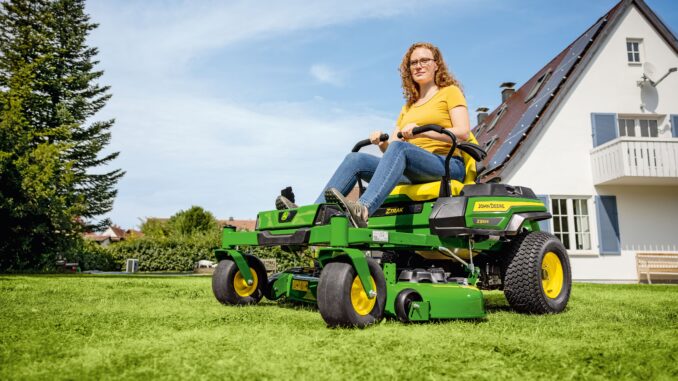
Introduction – John Deere Z540R overview
The John Deere Z540R is a residential zero‑turn rider with a high‑capacity 60‑inch mower deck, built for larger home lawns and light estate work rather than small urban gardens. It sits at the top end of the ZTrak residential lineup, offering faster mowing, better comfort, and stronger components than entry‑level zero turns.
This John Deere Z540R Service and Repair Guide is written for homeowners in the USA & Canada who are comfortable with basic maintenance and want clear boundaries between sensible DIY work and jobs that should go to a dealer.
You’ll find symptom‑based troubleshooting, emergency repair priorities, parts lists, links to diagrams and manuals, fitting guides for common jobs, and a full maintenance and FAQ section to keep your Z540R running reliably.
John Deere Z540R in the Deere lineup
The John Deere Z540R is part of the ZTrak zero‑turn mower family, positioned as a premium residential unit with a 60″ high‑capacity side‑discharge deck and a robust frame and seat package. It’s designed for owners who need to cover more ground quickly, with good cut quality and strong comfort features like armrests and an adjustable seat.
Key systems you’ll deal with on the Z540R include:
-
Engine and fuel system – twin‑cylinder gasoline engine, fuel filter, pump, carburetion/fuel injection and ignition.
-
Mower system – 60″ deck, three blades, deck drive belt, spindles, idlers, deck lift and height control.
-
Drive system – dual hydrostatic transmissions, drive belt, wheel motors and control levers.
-
Electrical system – battery, charging system, starter, safety interlock switches, PTO switch and wiring harness.
Common service parts owners buy for the John Deere Z540R include:
-
Engine oil filter (e.g. AM125424 or kit‑equivalent).
-
Fuel filter (e.g. AM116304 or MIU‑series equivalent, depending on engine variant).
-
Air filter elements (foam pre‑cleaner and paper main element).
-
Spark plugs for the twin‑cylinder engine.
-
Mower blades for the 60″ deck (set of three, high‑lift or mulching depending on your setup).
-
Deck drive belt and sometimes hydro drive belt.
-
Grease for deck spindles and front caster wheels.
-
Battery and common safety switches (seat switch, PTO switch, brake switch) as the machine ages.
Troubleshooting approach for the John Deere Z540R
With the John Deere Z540R, always start from the symptom the owner sees, not the part you think might be bad. Watch and listen to what the machine is doing, then group the issue into a main category before you start testing or buying parts.
Typical symptom categories for the Z540R include:
-
Starting issues – won’t crank, cranks but won’t fire, intermittent starting.
-
Running issues – stalls when hot, surging, loss of power under load, fuel starvation.
-
Cut quality problems – uneven cut, scalping, stragglers, poor discharge or excessive clippings left behind.
-
Vibration and noise – deck vibration, grinding or rumbling from spindles, rattles from loose guards.
-
Overheating and leaks – engine running hot, oil leaks, fuel smells, hydraulic fluid drips.
-
Transmission and drive – mower moves slowly, one side weak, jerky steering, or won’t move at all.
-
Electrical and safety switches – dead machine, PTO won’t engage, engine cuts out when you release the brake or move the levers.
For each symptom category, work through simple visual checks, basic tests and safe cleaning before you jump to parts replacement or dealer work.
Emergency and immediate repair needs on a John Deere Z540R
Some issues on the John Deere Z540R must be addressed immediately because they make the machine unsafe or can quickly damage expensive components such as the engine, deck spindle assemblies or hydrostatic drives. This section is symptom‑organised so you can quickly decide whether you should stop using the machine and prioritize repairs.
Starting issues on the John Deere Z540R
Starting problems often show up as a click with no crank, slow cranking, or cranking without the engine firing. While most starting issues are not catastrophic, repeated attempts with a weak battery or bad starter connections can overheat components and leave you stranded.
Common causes:
-
Weak or failing battery.
-
Loose or corroded battery terminals or ground connections.
-
Faulty safety switch (seat, brake, PTO, control levers).
-
Blown fuse or poor electrical connection in the start circuit.
-
Empty fuel tank, incorrect fuel, or stale fuel.
Owner checklist (basic steps):
-
Check that the PTO is off, park brake is set, and control levers are in the neutral/start position.
-
Verify fuel level and that the fuel shutoff (if fitted) is open.
-
Inspect battery terminals for corrosion; clean and tighten.
-
Check main fuse and any visible inline fuses.
-
Try a jump‑start from a known good battery; if it starts, plan for a battery test or replacement.
Cut‑quality problems on the John Deere Z540R
Cut quality issues show up as uneven stripes, missed grass, scalping, or poor clipping discharge. These problems can be frustrating and, if ignored, can point to bent deck components or worn blades that stress the deck drive system.
Common causes:
-
Dull, damaged or incorrect blades for the deck.
-
Deck not level side‑to‑side or pitched incorrectly front‑to‑back.
-
Deck belt slipping, worn or contaminated with oil.
-
Incorrect tire pressures causing the deck to sit unevenly.
-
Build‑up under the deck from wet grass or infrequent cleaning.
Owner checklist:
-
Check tire pressures and set to the values in the operator’s manual.
-
Inspect blades for nicks, bends or heavy wear; replace or sharpen as needed.
-
Clean the underside of the deck (safely, with the engine off and plugs removed or PTO locked out).
-
Verify deck height settings and check deck level according to the manual.
-
Inspect the deck belt and pulleys for wear, cracking or contamination.
Vibration and noise on the John Deere Z540R
Vibration or unusual noise is a “stop now” symptom if it becomes severe, especially when it comes from the mower deck at full PTO speed. Persistent vibration can destroy deck spindles, crack the deck shell, and damage bearings and pulleys.
Common causes:
-
Bent or out‑of‑balance blades.
-
Damaged or failing spindle bearings.
-
Debris wrapped around blades, spindle shafts or pulleys.
-
Loose deck hardware or missing guards.
-
Worn idler or tensioner components.
Owner checklist:
-
Disengage PTO, shut down engine and wait for all rotating parts to stop.
-
Visually inspect blades for bends and check tightness (using the correct torque procedure).
-
Look for debris or foreign objects stuck in or around the deck and remove safely.
-
Spin each blade by hand (engine off) to feel for roughness in spindle bearings.
-
If vibration remains after blade replacement and cleaning, plan for dealer assessment of spindles.
Overheating and leaks on the John Deere Z540R
Overheating or fluid leaks can quickly lead to catastrophic failure. If the Z540R smells strongly of fuel, shows visible oil or hydraulic leaks, or feels unusually hot, treat it as an immediate repair issue.
Common causes:
-
Low engine oil level or incorrect oil grade.
-
Blocked engine cooling fins or air intake screens.
-
Fuel line cracks or loose hose clamps.
-
Hydraulic fluid leaks from hoses, fittings or reservoirs.
-
Overfilled or contaminated oil.
Owner checklist:
-
Stop the mower, allow the engine and drives to cool, and park in a safe, ventilated area.
-
Check engine oil level and correct immediately if low or overfilled.
-
Inspect visible fuel lines and connections for wet spots or strong fuel smell.
-
Clean cooling fins and air intake screens according to the manual.
-
If you see significant hydraulic leaks, avoid further use and consult a dealer.
Transmission and drive problems on the John Deere Z540R
Drive issues appear as one side being weak or slow, jerky steering, or the mower not moving at all when the levers are pushed forward. Because the Z540R uses hydrostatic drives, ignoring these symptoms can cause internal damage or uneven wear.
Common causes:
-
Drive belt wear or slipping.
-
Low or contaminated hydraulic fluid (on serviceable systems).
-
Air in the system after service or long storage.
-
Bent linkage or misadjusted control levers.
-
Internal hydro unit problems (dealer‑level).
Owner checklist:
-
Check that the parking brake is fully released and the drive bypass valves (if fitted) are in the “operate” position.
-
Inspect drive belt condition and tension.
-
Look for obvious linkage damage or obstructions.
-
Purge the hydrostatic system if advised in the manual (short forward/reverse cycles with wheels off the ground).
-
If one side remains significantly weaker, consult a dealer about hydro unit diagnosis.
Electrical and safety switch problems on the John Deere Z540R
Electrical and safety interlock issues often show up as the mower randomly shutting down, refusing to start, or dropping PTO engagement when you move in certain directions. While these are rarely catastrophic, they can be persistent and frustrating.
Common causes:
-
Loose seat, brake, PTO or control lever switches.
-
Chafed or damaged wiring harness.
-
Failing ignition switch or PTO switch.
-
Weak battery affecting the entire electrical system.
Owner checklist:
-
Wiggle the seat and check that it fully engages the seat switch with your weight.
-
Confirm that the brake pedal and PTO switch feel positive and latch correctly.
-
Inspect visible harness sections for rub‑through, broken insulation or loose connectors.
-
Test battery with a multimeter or at a parts store.
-
Replace obviously faulty switches one at a time, starting with the highest‑suspect component.
DIY or dealer? Repair decision guide for the John Deere Z540R
On the John Deere Z540R, drawing a clear DIY vs dealer line saves money and reduces risk. Most routine maintenance and basic bolt‑on parts replacement are realistic DIY jobs; internal engine work, hydrostatic drivetrain repairs and complex wiring diagnosis are better left to dealers with the proper tools and diagnostic information.
Good DIY jobs for a John Deere Z540R:
-
Engine oil and filter changes.
-
Air and fuel filter replacement.
-
Spark plug replacement.
-
Blade removal, sharpening and replacement.
-
Deck belt replacement and deck cleaning.
-
Battery replacement and basic electrical checks.
-
Seat and minor hardware replacement.
Advanced DIY or dealer jobs for a John Deere Z540R:
-
Hydrostatic drive belt replacement and drive system adjustments.
-
Internal hydro unit repairs and fluid changes (on serviceable units).
-
Major wiring harness repairs or diagnostic work on intermittent electrical faults.
-
Engine internal work (valve adjustments, head gaskets, timing components).
-
Frame or deck welding, straightening and structural repair.
Skill level guide:
-
Beginner: Oil changes, filter swaps, battery replacement, blade changes with proper safety practices.
-
Intermediate: Deck belt replacement, deck leveling and pitch adjustment, basic switch replacement and linkage adjustments.
-
Advanced: Hydro belt work, internal drive system repairs, carburetor or fuel injection diagnostics, complex electrical tracing and repair.
Parts needed for the John Deere Z540R – OEM vs aftermarket
To buy the correct parts for your John Deere Z540R, you need a few key pieces of information gathered before you start searching online or visiting a dealer. Always confirm:
-
Full model name and deck configuration (John Deere Z540R with 60″ high‑capacity deck).
-
Product Identification Number (PIN), usually starting with “1GXZ540R…” or similar.
-
Engine model and serial number (e.g. Briggs & Stratton, Kawasaki or other twin configuration depending on build).
-
Any attachment or accessory models fitted (bagger system, mulch kit, etc.).
Key service and repair parts for the John Deere Z540R
Below is a typical parts table for the John Deere Z540R zero‑turn mower. Always cross‑check these against your PIN and engine configuration before ordering, as part numbers may change by region and build year.
OEM vs aftermarket guidance for the John Deere Z540R:
-
Use OEM parts for belts, safety‑critical components (switches, steering linkages, brake parts), and fit‑sensitive items like deck spindles and pulleys.
-
Aftermarket parts are often acceptable for oil and air filters, spark plugs, blades and batteries, provided the listing explicitly cross‑references your Z540R model and engine.
-
When mixing brands, always follow the tighter maintenance intervals and inspect more frequently until you are confident in the part quality.
Where to find John Deere Z540R parts diagrams and service manuals
For detailed diagrams and service information on the John Deere Z540R, use a mix of official John Deere resources and reputable parts sites. These give you exploded views, torque values and maintenance charts that are essential for more involved repairs.
Recommended sources:
-
John Deere Z540R Owner Information page – operator’s manual, parts diagrams and safety info:
-
Example: search “John Deere Z540R Owner Information” on the official John Deere site (US or Canada) and bookmark the model‑specific page.
-
-
John Deere Technical Publications – digital copies of technical manuals, service guides and diagnostic information for the ZTrak series.
-
JDParts or the John Deere online parts catalog – exploded diagrams, part numbers and availability by PIN.
-
A reputable John Deere‑focused parts site with a Z540R maintenance guide and parts list:
-
Example: a Z540R maintenance guide and parts list from a specialist retailer that lists service intervals and common consumables.
-
Use the operator’s manual for day‑to‑day maintenance schedules and safety procedures, then step up to technical manuals when you need torque specs, hydraulic service information or detailed wiring diagrams.
How to locate model, serial and engine numbers on a John Deere Z540R
Model and serial numbers matter because they determine the exact parts and diagrams that apply to your mower. John Deere often changes engines, electrical components and deck configurations across years, so two Z540R units can have different part numbers under the same name.
Follow these steps to find the key numbers:
-
Locate the main product identification plate, typically on or near the frame under the seat or at the rear of the mower; note the full model and PIN.
-
Check the deck for any additional labels or stickers indicating deck size and specific deck model codes.
-
Find the engine data plate on the engine block or blower housing; record the engine manufacturer, model code and serial number.
-
If you have attachments like baggers or mulch kits, look for labels on the housing or frame and record these model numbers.
-
Keep these numbers written down or photographed on your phone so you can quickly reference them when ordering parts or consulting diagrams.
Buying John Deere Z540R parts online and in physical stores
Your parts strategy for the John Deere Z540R should balance convenience, price and accuracy. Online sources are excellent for routine consumables when you already know the OEM numbers, while dealer counters shine when the mower’s PIN and engine serial are critical for choosing the correct component.
Online options:
-
Use trusted equipment retailers and marketplaces where listings show OEM part numbers, compatible models and engine codes.
-
Search using “John Deere Z540R [part type]” plus your OEM number to filter out generic listings.
-
Check for maintenance kits that bundle filters and oil for a given service interval.
Dealer counter:
-
Best choice for hydrostatic drive components, wiring harness parts, and anything where the dealer will look up your PIN and confirm current superseded part numbers.
-
Useful when you need help interpreting diagrams or diagnosing complex faults.
Retail stores:
-
Good for common consumables such as oil, grease, universal batteries and sometimes blades, as long as the packaging clearly lists the John Deere Z540R or the correct OEM reference.
-
Double‑check cross‑reference charts in‑store before buying universal parts.
For online purchases, prioritize official johndeere‑branded sites or specialist partners, and then fall back to major marketplaces with strong model‑specific support when needed.
Step‑by‑step fitting guide – common John Deere Z540R DIY jobs
This section covers a few high‑impact DIY tasks for the John Deere Z540R. Always work on a level surface, set the parking brake, remove the key and follow all safety instructions in your operator’s manual.
Changing engine oil and filter on a John Deere Z540R
Regular oil changes are crucial to engine life on the Z540R, especially if you mow in dusty or hot conditions.
Steps:
-
Warm the engine for a few minutes to thin the oil, then park on level ground and shut it off.
-
Place a drain pan under the oil drain point and open the drain valve or remove the plug as described in the manual.
-
Allow oil to drain fully, then close the drain and wipe down the area.
-
Remove the old oil filter, lightly oil the gasket on the new filter, and install hand‑tight.
-
Refill with the recommended grade and quantity of oil, start the engine briefly to circulate, then re‑check the oil level and top up as required.
Replacing the air filter on a John Deere Z540R
A clean air filter prevents dust and debris entering the engine, improving performance and reliability.
Steps:
-
Lift the seat or open the engine cover to access the air filter housing.
-
Release the housing clips or fasteners and carefully remove the cover.
-
Take out the foam pre‑cleaner and paper main element; inspect for dirt and damage.
-
Clean the housing, avoiding any debris falling into the intake.
-
Install the new paper element and foam pre‑cleaner, then refit the cover and fasteners securely.
Changing mower blades on a John Deere Z540R 60″ deck
Sharp blades are essential for good cut quality and reduce strain on the deck drive components.
Steps:
-
Park on level ground, set the brake and block the deck or raise it safely according to the manual.
-
Remove the key and ensure the engine cannot start; wear gloves and eye protection.
-
Use the correct socket and breaker bar or impact wrench to loosen each blade bolt.
-
Remove blades, noting their orientation and position; inspect spindles for damage.
-
Install sharpened or new blades in the correct orientation, torque bolts to spec, then test run at low speed and listen for abnormal vibration.
Replacing the deck belt on a John Deere Z540R
Deck belt replacement restores reliable power transfer to the blades and is a common intermediate DIY job.
Steps:
-
Lower the deck fully, remove the key and set the brake.
-
Remove any belt shields or guards, noting their position for reassembly.
-
Release belt tension via the idler arm or spring as described in the manual.
-
Remove the old belt from pulleys, checking pulleys and bearings for wear or damage.
-
Route the new belt according to the belt routing diagram, re‑apply tension, reinstall shields and test the deck’s operation at low throttle before mowing.
Maintenance to prevent John Deere Z540R problems
Preventive maintenance on the John Deere Z540R targets the systems most likely to cause breakdowns: starting, cutting, overheating and drive performance. Small routine steps dramatically reduce the chance of a mid‑season failure.
Focus areas:
-
Starting reliability: Keep the battery charged, terminals clean, and replace the fuel and air filters on schedule.
-
Cut quality: Inspect and sharpen blades regularly, clean the deck after mowing wet or heavy grass, and keep the deck properly leveled.
-
Fire and overheating prevention: Maintain proper engine oil level, keep cooling fins and intake screens clear, and fix fuel leaks promptly.
-
Drive performance: Check tire pressures, inspect drive belt condition, and purge or service hydro units as recommended.
-
Electrical reliability: Periodically check switch operation, harness condition and grounds, tightening or replacing components as needed.
John Deere Z540R maintenance schedule and year‑round checklist
The following maintenance outline is based on typical ZTrak schedules adjusted for the John Deere Z540R. Always cross‑check with your operator’s manual for exact intervals and tasks on your specific machine.
Daily / before each use
-
Check engine oil level and top up if needed.
-
Inspect tires for damage and verify pressures.
-
Look over the deck for loose hardware or obvious damage.
-
Ensure all safety shields and guards are in place.
-
Clear grass and debris from around the engine and deck areas.
After approximately 8 hours of mowing
-
Quick deck cleaning to reduce buildup and corrosion.
-
Visual check of deck belt, idlers and pulleys for wear or misalignment.
Every 25 hours
-
Grease front caster wheel bearings and other recommended points.
-
Inspect blades for sharpness and damage; sharpen or replace if required.
-
Check battery terminals and clean if corrosion is present.
Every 50 hours or yearly (whichever comes first)
-
Change engine oil and replace the oil filter.
-
Inspect fuel filter and replace if contamination is suspected.
-
Check deck level and adjust pitch to maintain proper cut quality.
-
Inspect drive belt and steering linkages for wear and play.
Every 100–200 hours (depending on conditions)
-
Replace fuel filter as part of scheduled service.
-
Replace air filter elements (foam and paper) as a set.
-
Replace spark plugs and check ignition components.
-
On serviceable systems, inspect hydrostatic fluid and follow the manual for changes or checks.
Seasonal checklist for a John Deere Z540R
Spring (pre‑season):
-
Full visual inspection of frame, deck, hoses and harness.
-
Install sharpened blades or replace with new ones.
-
Check all safety switches and interlock operations.
Mid‑season:
-
Re‑check deck level and clean thoroughly.
-
Verify tire pressures and inspect belt condition.
-
Top up grease points and look for early signs of leaks.
Fall / end‑of‑season:
-
Perform an oil and filter change before storage.
-
Clean the mower thoroughly, removing packed grass and dirt.
-
Stabilize fuel or drain according to your manual and climate.
-
Store the Z540R in a dry, covered area with battery maintenance as needed.
John Deere Z540R – repair, upgrade or replace?
Deciding whether to repair, upgrade or replace your John Deere Z540R depends on age, hours, overall condition and whether the failure is localized or involves multiple major systems. Because the Z540R is a higher‑end residential machine, it often makes economic sense to repair and upgrade, especially when the frame and deck are sound.
Repair if…
-
The issue is limited to consumables or bolt‑on parts (filters, belts, blades, battery, simple switches).
-
The mower has moderate hours and the frame and deck remain structurally sound.
-
The engine and hydro units are fundamentally healthy, with good compression and strong drive.
Upgrade if…
-
You want better cut quality via new blade types (mulching vs high‑lift) or a deck chute/deflector change.
-
Comfort upgrades like better seat, armrests or suspension kits will extend your usable mowing time.
-
Lighting, 12V accessories or storage upgrades can improve usability without major structural changes.
Replace if…
-
Multiple major systems (engine, hydro, deck structure) are failing and repair costs approach the value of a newer machine.
-
The mower no longer fits your property size or terrain and you need a different deck width or machine class.
-
Frame or deck cracking is extensive, especially if corrosion and damage are widespread.
Expanded troubleshooting FAQ – John Deere Z540R (30+ questions)
1. Why will my John Deere Z540R not start?
If your Z540R won’t start, begin with the basics: PTO off, brake on, control levers in neutral, and a known good fuel supply. Most non‑start issues come down to battery, safety switches or fuel problems. Check the battery voltage and connections, verify that the seat switch is engaging, and confirm that the fuel is fresh and the fuel filter is not blocked before suspecting more complex faults.
2. Why does my John Deere Z540R only click when I turn the key?
A single click usually indicates the starter solenoid is trying to work, but there isn’t enough battery power or the main connections are poor. Clean and tighten battery terminals and grounds, then test the battery with a meter or at a parts store. If voltage is low, charge or replace the battery; if voltage is good, the solenoid or starter may need further testing.
3. Why does my John Deere Z540R crank but not fire?
Cranking without firing often points to fuel or ignition problems. Make sure there is fuel in the tank and that any fuel shutoff valves are open. Inspect the fuel filter and check that the choke or enrichment system is working correctly. If fuel seems fine, remove and inspect spark plugs for fouling; clean or replace them and verify spark as per the manual.
4. Why does my John Deere Z540R start but stall after a few minutes?
Stalling after a brief run can be caused by restricted fuel flow, a blocked tank vent or overheating of an ignition component. Check the fuel cap vent, inspect the fuel filter and lines, and ensure the engine cooling fins and intake screens are clean. If the problem persists, consider having the dealer test the fuel pump and ignition modules.
5. Why does my John Deere Z540R surge or run unevenly?
Surging typically indicates inconsistent fuel or air flow. Dirty air filters, partially blocked jets or injectors, or vacuum leaks can all contribute. Replace the air filter elements, ensure all intake connections are secure, and consider a fuel system cleaning or professional carburetor/fuel system service if surging continues.
6. Why is my John Deere Z540R losing power under load?
Power loss under load can result from dull blades, a slipping deck belt, clogged air or fuel filters, or engine wear. Confirm that blades are sharp and correctly installed, inspect belts for wear and tension, and replace filters if they are due. If the engine still struggles, have compression and engine health checked by a dealer.
7. Why is the cut uneven on my John Deere Z540R 60″ deck?
Uneven cut is often due to deck not being level or incorrect tire pressures. Start by setting tire pressures to the specified values, then follow the manual to check deck level side‑to‑side and front‑to‑back. Replace any worn or bent blades, and ensure all deck hangers and lift components are intact and correctly adjusted.
8. Why does my John Deere Z540R leave stragglers or uncut patches?
Stragglers usually mean dull blades or too high a ground speed for conditions. Sharpen or replace blades and slow down when mowing thicker grass. Also verify that the deck is set to the appropriate height and that the deck belt is not slipping, which can reduce blade tip speed and cutting effectiveness.
9. Why is my John Deere Z540R scalping the lawn?
Scalping occurs when the deck rides too low or the lawn has uneven terrain. Raise the deck height slightly, check tire pressure, and consider adjusting anti‑scalp wheels or deck pitch as the manual suggests. Avoid mowing aggressively over steep or bumpy areas without adjusting speed and deck height.
10. Why does my John Deere Z540R discharge poorly or clump grass?
Poor discharge and clumping often happen with wet grass, dull blades or a dirty deck underside. Mow when conditions are dry where possible, keep blades sharp, and clean the underside of the deck regularly to maintain a smooth airflow path. Inspect the discharge chute for obstructions and damage.
11. Why is my John Deere Z540R vibrating heavily when I engage the PTO?
Strong vibration when engaging PTO typically means a bent blade, damaged spindle or debris lodged under the deck. Disengage PTO and shut down immediately, then inspect blades for straightness and check spindle bearings. Remove any debris and replace damaged blades or have spindles serviced before resuming use.
12. Why does my John Deere Z540R make grinding or rumbling noises from the deck?
Grinding or rumbling usually indicates failing bearings in spindles or idler pulleys. With the engine off, spin blades and pulleys by hand and feel for roughness or play. Replace worn components promptly to avoid costly deck damage and improve safety.
13. Why does my John Deere Z540R rattle or buzz at certain speeds?
Rattles may come from loose guards, covers or hardware rather than major components. Check belt shields, deck covers and fasteners, tightening or replacing hardware as needed. Also inspect the seat, control levers and fuel tank mounts for looseness and secure them.
14. Why is my John Deere Z540R engine running hot?
An engine that feels unusually hot can indicate low oil level, blocked cooling fins or overloading. Verify oil level and grade, clean the cooling fins and intake screens, and avoid running at full load under extreme heat without breaks. If the engine continues to overheat, have a dealer check for internal issues.
15. Why do I smell fuel around my John Deere Z540R?
A persistent fuel smell may come from loose hose clamps, cracked fuel lines, a leaking fuel filter or a venting cap. Inspect all visible fuel components for wet spots, tighten clamps and replace any suspect lines or filters. Do not operate the mower until fuel leaks are resolved to reduce fire risk.
16. Why is my John Deere Z540R leaking oil?
Oil leaks often occur at the filter seal, drain plug, gaskets or around the crankcase breather. Check that the oil filter is correctly tightened with an oiled gasket, examine the drain area for damage and confirm correct oil level. If leaks persist, clean the area and note the source, then consult a dealer if it involves major seals or internal components.
17. Why won’t my John Deere Z540R move when I push the levers?
If the Z540R won’t move, ensure the parking brake is released and any drive bypass valves are in the operating position rather than tow mode. Check the drive belt for breaks or dislodgement, and verify that the engine is reaching normal operating speed. If the belt and linkages look fine, hydrostatic components may need professional diagnosis.
18. Why does one side of my John Deere Z540R drive slower than the other?
Uneven drive speed can result from linkage misadjustment, partial hydrostatic issues or tire pressure differences. Confirm tire pressures, examine control linkage for bent rods or misadjusted arms, and follow the manual’s procedure for neutral and tracking adjustments. Persistent weakness on one side suggests hydro unit service or replacement.
19. Why is my John Deere Z540R steering jerky or difficult to control?
Jerky steering usually indicates air in the hydro system, worn linkages or drive belt issues. Purge the hydrostatic system if appropriate, inspect the drive belt, and lubricate or adjust steering linkages as needed. If steering remains inconsistent, a dealer should assess hydro performance.
20. Why does my John Deere Z540R battery keep going flat?
Chronic battery discharge can be caused by an aging battery, poor charging system or parasitic draw. Test the battery’s health, then check charging voltage with the engine running. Ensure all electrical accessories are off when not in use, and inspect wiring for shorts or poor grounds if charging appears normal.
21. Why does my John Deere Z540R shut off when I leave the seat?
This is usually normal behaviour: the seat switch cuts the engine or PTO when you leave the seat with PTO engaged or without the brake applied. If it shuts down unexpectedly, test the seat switch for proper engagement and adjust or replace it if intermittent. Review the interlock logic in the manual to understand when shutdown is expected.
22. Why won’t the PTO engage on my John Deere Z540R?
A PTO that won’t engage can be due to a faulty PTO switch, a blown fuse, low battery, or interlock conditions not being met. Check fuses and battery first, then confirm that all safety requirements (seat, brake, control positions) are satisfied. If the switch feels loose or inconsistent, consider replacing it and inspect wiring to the PTO clutch.
23. Why does the PTO on my John Deere Z540R drop out while mowing?
PTO dropout while mowing can result from vibration affecting safety switches, weak battery/charging, or a failing PTO clutch. Inspect seat and brake switches for play, test the charging system, and check wiring to the clutch. If electrical checks look normal, the clutch itself may need adjustment or replacement.
24. Why are my John Deere Z540R blades not spinning even though PTO is on?
If the PTO is engaged but blades don’t spin, the deck belt may be broken, off the pulleys or extremely loose. With the engine off, inspect belt routing and tension, and look for damaged pulleys or broken guides. Replace the belt and any damaged components before using the mower again.
25. Why are my John Deere Z540R blades scalping in only one area?
Localized scalping can point to a bent blade, damaged spindle or deck hanger issue. Inspect blades on the affected area, check spindle straightness and examine deck hangers for bends or missing hardware. Correcting these mechanical issues usually restores consistent deck height.
26. How often should I change engine oil on my John Deere Z540R?
For typical residential use, change engine oil and filter every 50 hours or at least once per season, whichever comes first. In dusty, hot or heavy conditions, shorten this interval and follow the more frequent guidance in the official maintenance chart.
27. How often should I change the air filter on my John Deere Z540R?
Most Z540R engines call for air filter inspection every 25 hours and replacement around 100–200 hours depending on conditions. If you mow in very dusty environments, check more often and replace whenever the element shows significant dirt or damage.
28. How often should I replace the fuel filter on my John Deere Z540R?
Fuel filters are usually scheduled around the 100–200‑hour mark, with inspection and possible earlier replacement if you experience running issues. Regular changes help prevent fuel starvation and protect pumps and injectors or carburetor circuits from contamination.
29. How do I know if the hydrostatic drives on my John Deere Z540R need service?
Sluggish response, unusual noises, or persistent tracking issues after linkage adjustments may indicate hydro service needs. Consult your operator’s manual to see whether fluid changes are owner‑serviceable or dealer‑only, and monitor performance over time. If drive performance degrades steadily, plan for dealer inspection.
30. What grease points does my John Deere Z540R have?
Common grease points include front caster wheel bearings, steering pivots, some deck components and other moving joints indicated in the lubrication chart. Refer to the manual’s lubrication diagram and use a suitable multi‑purpose grease at the recommended intervals.
31. Which jobs on my John Deere Z540R should I avoid as a DIY owner?
Avoid internal engine repairs, deep hydrostatic drive work, major wiring harness replacements and structural frame or deck welding unless you are highly experienced. These jobs require specialized tools, torque specs and safety considerations that are best handled by a John Deere dealer or professional workshop.
32. Can I use non‑John‑Deere oil and filters on my Z540R?
You can use non‑Deere oil and filters provided they meet or exceed the specifications in the manual and explicitly cross‑reference your engine. However, sticking with OEM or high‑quality equivalents reduces risk and simplifies troubleshooting if problems arise later.
33. How should I store my John Deere Z540R over winter?
For winter storage, clean the mower thoroughly, change the oil and filter, stabilize the fuel or drain the system as advised, and store in a dry, covered area. Maintain the battery with a charger if possible, and block tyres or move slightly during storage to reduce flat‑spotting.
34. How can I improve comfort on my John Deere Z540R for long mowing sessions?
Comfort upgrades include adjusting or upgrading the seat, setting control levers to fit your reach, and adding armrests or suspension seat options if compatible. Keeping tyres at correct pressures and mowing at an appropriate speed also reduces vibration and operator fatigue.
35. How do I keep my John Deere Z540R safe for family and bystanders?
Always use the mower with guards and shields in place, avoid mowing when children or pets are nearby, and follow the safety instructions in the operator’s manual. Regularly check safety switches, brakes and interlocks to ensure they function correctly. Never bypass safety devices or operate with damaged components.