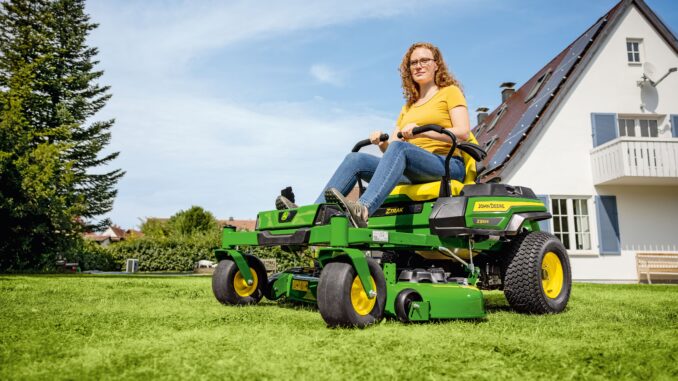
Introduction: John Deere Z525E overview
The John Deere Z525E is a residential EZtrak zero‑turn mower built for medium to larger home lawns, with a focus on fast mowing and tight maneuvering rather than towing or ground‑engaging work. It typically runs a 22 hp Briggs & Stratton V‑twin engine with a mid‑size mower deck, hydrostatic drive to the rear wheels, and an electric PTO clutch to engage the blades.
This guide is written for homeowners in the USA and Canada who handle their own maintenance and light repairs. You’ll find symptom‑based troubleshooting, clear DIY vs dealer boundaries, common parts and numbers, links to diagrams and manuals, and an expanded FAQ so you can confidently keep your Z525E running and cutting properly.
And See:
General overview of the John Deere Z525E
The John Deere Z525E sits in the EZtrak zero‑turn mower lineup, above smaller residential units that have less power and deck width, but below heavy commercial ZTrak machines. It’s designed for homeowners who want the speed and maneuverability of a zero‑turn rather than a traditional lawn tractor, with a focus on cut quality and productivity on flat to gently sloping lawns.
Key systems on the John Deere Z525E include:
-
Engine and fuel system (Briggs & Stratton V‑twin, carbureted)
-
Mower deck system (PTO clutch, deck belt, blades, spindles, idlers)
-
Drive system (dual hydrostatic drives, drive belts, control levers)
-
Electrical and safety system (battery, starter, seat and brake interlocks, PTO switch)
Common service parts owners actually buy for the Z525E include:
-
Engine oil filter – typically AM125424
-
Engine air filter cartridge – often MIU11515
-
Engine air filter pre‑cleaner – often MIU11517
-
Fuel filter – commonly AM116304
-
Spark plugs – V‑twin plugs such as MIU11020
-
Mower deck drive belt – deck‑specific belt for your deck size
-
Blades – high‑lift or standard blades matched to the deck
-
Hydrostatic drive belt – main belt driving the hydro pumps
-
Battery – lawn & garden size, 12V
-
Common switches – PTO switch, seat switch, brake switch (model‑specific)
Always confirm exact part numbers against your serial number and deck size before ordering.
Troubleshooting approach for John Deere Z525E
Diagnosing the John Deere Z525E should always start with the symptom you see, not the part you think is bad. Begin by noting exactly what happens: does it fail to crank, crank but not start, start then die, cut poorly on one side, vibrate when blades are on, or lose drive after warming up?
For the Z525E, the main symptom categories are:
-
Starting issues (won’t crank, cranks but won’t start)
-
Running issues (stalling, surging, power loss)
-
Cut‑quality problems (uneven cut, scalping, streaks, clumping)
-
Vibration and noise (only with deck on or always)
-
Overheating and leaks (engine, fuel, hydraulic)
-
Transmission/drive problems (won’t move, weak drive, one side only)
-
Electrical and safety switch problems (PTO won’t engage, intermittent shut‑off)
Work through this guide section by section, starting with the symptom that best matches your problem. Use the checklists to rule out simple issues before assuming you need major repairs.
Emergency and immediate repair needs on a John Deere Z525E
Some John Deere Z525E problems must be addressed immediately because they make the mower unsafe or can quickly damage expensive components. When in doubt, shut the machine down and investigate before continuing to mow.
John Deere Z525E starting issues
If your Z525E will not start, or starts and dies quickly, you may be tempted to keep cranking or bypass safety switches. That’s risky and can damage the starter, battery, or wiring.
Common causes:
-
Battery discharged or failing
-
Loose or corroded battery terminals
-
Brake not set / levers not in neutral (safety interlock active)
-
Faulty seat or PTO safety switch
-
Fuel supply issues (blocked filter, empty tank, old fuel)
-
Choke/throttle not correctly set for cold start
Basic owner checks:
-
Confirm the parking brake is fully engaged and control levers are out in neutral.
-
Inspect battery terminals for corrosion; clean and tighten them.
-
Check that the battery reads adequate voltage with a simple multimeter or tester.
-
Verify there’s fresh fuel in the tank and the fuel shutoff (if fitted) is open.
-
Try starting with proper choke for a cold engine; reduce choke once it fires.
John Deere Z525E cut‑quality problems
Cut quality issues can be urgent when they indicate a loose deck component or blade safety issue. If something sounds wrong or the deck feels unstable, do not keep mowing.
Common causes:
-
Dull, nicked or bent blades
-
Deck belt slipping or partially off
-
Deck not level side‑to‑side or front‑to‑back
-
Build‑up under deck, especially wet grass
-
Incorrect deck height or mowing too fast
Basic owner checks:
-
Inspect blades for damage; replace any that are bent or severely worn.
-
Check deck belt routing and tension; ensure it’s on all pulleys properly.
-
Use a deck leveling gauge or ruler to confirm deck level and adjust linkages.
-
Clean underside of the deck, removing packed grass and debris.
-
Mow at a moderate speed, not full travel speed, for best cut quality.
John Deere Z525E vibration and noise
Severe vibration or new grinding noises, especially when the blades are engaged, can indicate a loose blade, failing spindle, or broken pulley. Stop immediately and investigate.
Common causes:
-
Loose blade bolts
-
Bent blades or spindles after hitting an object
-
Worn spindle bearings
-
Damaged or misaligned pulleys and idlers
-
Debris (wire, rope, branches) wrapped around spindles
Basic owner checks:
-
Disengage PTO, shut off the engine, and remove the key.
-
Inspect each blade for tightness and visible damage.
-
Spin each spindle by hand (with ignition off) to feel for roughness.
-
Check pulleys and idlers for wobble or obvious misalignment.
-
Clear any debris wrapped around deck components.
John Deere Z525E overheating and leaks
Overheating and fuel or oil leaks are serious. Fuel leaks can be a fire risk, while low oil or hydraulic fluid can lead to major engine or drive damage.
Common causes:
-
Low engine oil level
-
Blocked cooling fins or shrouds
-
Fuel line cracks or loose clamps
-
Leaking fuel filter or carburetor
-
Hydraulic reservoir low (hydro drive)
Basic owner checks:
-
Check engine oil level and top up to the correct mark if necessary.
-
Inspect around the engine for fuel smells and visible wet spots.
-
Examine fuel lines, filter connections, and clamps for leaks.
-
Remove debris from cooling fins and around the engine shroud.
-
Inspect hydro reservoirs as per the operator’s manual and do not overfill.
John Deere Z525E transmission and drive problems
On the Z525E, drive issues can leave you stranded or cause loss of control, especially if one side loses drive and the mower veers unexpectedly.
Common causes:
-
Drive belt worn, slipping, or broken
-
Hydrostatic oil issues (level or contamination)
-
Linkage or control arm misadjustment
-
Air in hydro system after a leak or service
-
Internal hydro drive failure
Basic owner checks:
-
Inspect the main drive belt for wear, cracks, or missing chunks.
-
Confirm belt routing over the engine pulley and hydro pulleys.
-
Check control levers and linkages for loose hardware or bent arms.
-
Follow the operator’s manual procedure for purging air after service.
-
If drive weakens badly after warming up, consider dealer diagnosis.
Electrical and safety problems on John Deere Z525E
Electrical and safety switch issues can cause no‑start conditions, intermittent stalling, or prevent the PTO from engaging.
Common causes:
-
Weak or failing battery
-
Faulty seat or brake switch
-
Damaged wiring harness under the seat or along frame
-
PTO switch failure
-
Corroded grounds
Basic owner checks:
-
Inspect visible wiring for chafing, damage, or pulled‑out connectors.
-
Gently test seat switch wiring under the seat for secure connection.
-
Check that the brake switch operates when the brake pedal is pressed.
-
Try cycling the PTO switch on and off several times to clear minor contact issues.
-
Clean obvious ground points and battery connections.
DIY or dealer? John Deere Z525E repair decision guide
For the John Deere Z525E, the “line” between realistic DIY and dealer work typically falls between bolt‑on maintenance items and internal engine/hydro repairs. If a job involves opening the engine or hydrostatic units, or requires special tools like pullers and gauges, it is usually best handled by a dealer or experienced mechanic.
Good DIY jobs on Z525E:
-
Engine oil and filter change
-
Air and fuel filter replacement
-
Spark plug replacement
-
Blade removal, sharpening, and replacement
-
Deck belt replacement and deck leveling
-
Battery replacement
-
Basic electrical checks and switch replacement (when accessible)
Advanced DIY or dealer jobs:
-
Carburetor overhaul or replacement
-
Internal engine repairs (head gasket, piston/rings, valves)
-
Hydrostatic drive unit replacement or rebuild
-
Major wiring harness replacement
-
Frame or structural repairs after an accident
Skill level guide:
-
Beginner: Oil changes, air filter, fuel filter, blade cleaning and simple replacement, battery swap.
-
Intermediate: Deck belt replacement, deck leveling, minor electrical switch replacement, adjusting control levers.
-
Advanced: Carburetor work, hydro drive replacement, internal engine repairs, hydraulic system diagnostics.
Parts needed for John Deere Z525E: OEM vs aftermarket
Before ordering parts for your John Deere Z525E, gather these details:
-
Full model name: “John Deere Z525E EZtrak”
-
Product Identification Number (PIN) from the frame
-
Engine model and serial (Briggs & Stratton label on engine)
-
Deck size (e.g. 48″ or 54″ deck, depending on your machine)
-
Any existing part numbers from the operator’s manual or parts diagrams
John Deere Z525E service parts reference table
Use this table as a starting point and always cross‑check with your serial number and deck configuration:
OEM parts are strongly recommended for belts, safety‑critical items (PTO and safety switches), and fit‑sensitive components like blades and spindles. Aftermarket is often acceptable for filters, batteries, and sometimes blades, as long as you use a reputable brand and cross‑reference correctly to the OEM part number.
Where to find John Deere Z525E parts diagrams and manuals
You’ll typically need three types of documentation: the operator’s manual, a parts catalog, and sometimes a technical/repair manual.
Useful online sources:
-
John Deere Z525E Owner Information page – the official John Deere site normally provides the operator’s manual, safety information, and sometimes maintenance charts.
-
Official John Deere Technical Publications – search for “Z525E” to find operator and parts manuals, and purchase technical manuals if needed.
-
JDParts or the John Deere online parts catalog – lets you look up diagrams and part numbers by model and PIN.
-
A reputable Deere‑focused parts site, such as Green Farm Parts’ John Deere Z525E parts page, which groups common service kits and parts for this specific model.
Use the operator’s manual for routine maintenance and safety procedures, the parts catalog for exploded diagrams and part numbers, and technical manuals if you plan deeper diagnostics or repairs.
How to locate model, serial and engine numbers on a John Deere Z525E
Model and serial numbers matter because John Deere often updates components, and certain parts differ across serial ranges or deck configurations. Having your PIN and engine serial ready will reduce ordering mistakes and returns.
Typical locations:
-
Tractor PIN and model plate: Look on the frame, usually under or near the seat area on the right‑hand side or near the rear of the machine, for a metal or sticker plate listing “Z525E” and the product identification number.
-
Deck model/serial: Many decks have a decal on the deck shell, often near the right side or front, listing deck size and serial.
-
Engine model and serial: On Briggs & Stratton engines, find the stamped or sticker label on the engine shroud or near the valve cover, listing model, type, and code.
-
Record these numbers in a notebook or your phone so you have them when ordering parts or talking to a dealer.
Buying John Deere Z525E parts online and in stores
A simple strategy is to use online sources to identify part numbers and pricing, then decide whether to buy online or locally based on urgency and shipping time.
Options:
-
Online: Use OEM part numbers and your PIN to order from John Deere’s online parts catalog or reputable parts sites. Make sure the listing specifically mentions “John Deere Z525E.”
-
Dealer counter: Ideal for complex or serial‑specific parts, and when you need confirmation from trained staff. Take a photo of your PIN plate with you.
-
Retail stores: Big‑box and farm stores often stock generic filters, batteries, blades and belts. Only buy if the packaging specifically lists compatibility with “John Deere Z525E” or the exact OEM cross reference.
Useful URLs to keep bookmarked:
-
John Deere Z525E owner information page (on the official John Deere site)
-
John Deere Technical Publications search page
-
A dedicated Z525E parts page on a Deere‑focused retailer such as Green Farm Parts
Step‑by‑step fitting guide: common John Deere Z525E DIY jobs
1. John Deere Z525E engine oil and filter change
Changing the oil and filter is one of the most important routine jobs for engine life.
Steps:
-
Park the Z525E on a level surface, set the parking brake and shut off the engine.
-
Place a suitable drain pan under the oil drain point and open the drain valve or remove the plug as described in the operator’s manual.
-
Allow oil to drain completely, then close the drain and wipe up any spills.
-
Remove the old oil filter (AM125424) with an oil filter wrench; lightly oil the new filter’s gasket and install hand‑tight, then snug per instructions.
-
Refill the engine with the recommended oil grade and quantity; check level on the dipstick.
-
Start the engine briefly, then shut down and recheck for leaks and final oil level.
2. John Deere Z525E air filter and pre‑cleaner replacement
A clean air filter prevents dust from entering the engine and helps maintain power.
Steps:
-
Lift the hood or access panel to reach the air filter housing.
-
Release the housing clips or cover and remove the old air filter cartridge (MIU11515) and pre‑cleaner (MIU11517).
-
Wipe out any loose dust in the housing with a clean, dry cloth—do not use compressed air directly on the filter.
-
Install the new pre‑cleaner around the new cartridge if required, and seat the assembly correctly in the housing.
-
Refit the cover and clips securely, ensuring no gaps where dust can bypass the filter.
3. John Deere Z525E mower blade removal and replacement
Sharp, properly installed blades are essential for cut quality and safety.
Steps:
-
Disengage PTO, turn the key off, remove it, and block the rear wheels.
-
Use a suitable jack or ramps to gain safe access under the deck, following all safety recommendations.
-
Wear gloves and use a block of wood to hold the blade; loosen the blade bolt with the correct socket.
-
Remove the blade, inspect the spindle for damage, and clean the area.
-
Install a sharpened or new blade of the correct type and orientation, with any washers or spacers as specified.
-
Torque the blade bolt to the specified value from the manual, then check that blades rotate freely.
4. John Deere Z525E deck drive belt replacement (typical deck)
Replacing a worn or cracked deck belt helps maintain proper blade speed and cut quality.
Steps:
-
Park the mower on level ground, disengage PTO, and remove the key.
-
Lower the deck fully and remove any belt guards or covers.
-
Note the belt routing or take a photo before removal.
-
Release belt tension via the idler arm or spring, and remove the old belt from pulleys.
-
Install the new belt following the routing diagram, making sure it sits correctly in pulley grooves.
-
Re‑engage the tensioner, reinstall guards, and test‑run the deck at moderate throttle to confirm smooth operation.
Maintenance to prevent problems on the John Deere Z525E
Regular maintenance is the cheapest way to keep your Z525E reliable and avoid major repairs. Focus on the areas most likely to cause headaches if neglected.
Key focus areas:
-
Starting reliability: Keep the battery charged, terminals clean, and fuel system fresh.
-
Cut quality: Maintain sharp blades, proper deck leveling, and clean deck underside.
-
Overheating and fire prevention: Check for oil and fuel leaks, clear debris from around the engine and exhaust.
-
Drive performance: Inspect drive and deck belts regularly, and keep hydro reservoirs at correct levels.
-
Electrical reliability: Protect wiring from abrasion, keep connectors clean, and avoid bypassing safety switches.
John Deere Z525E maintenance schedule and year‑round checklist
Base your maintenance on the official chart in the operator’s manual, adjusted for dusty or extreme conditions. The outline below reflects typical zero‑turn practices for a Z525E‑type machine; always verify against your manual.
Daily / before each use
-
Check engine oil level.
-
Visually inspect for fuel or oil leaks.
-
Check tire pressures and overall tire condition.
-
Clear debris from the mower deck and around the engine and exhaust.
-
Confirm safety interlocks appear to work (brake, seat, PTO).
After roughly 8 hours of mowing
-
Grease specified fittings if the manual calls for frequent greasing.
-
Inspect deck belt and pulleys for wear or damage.
-
Check blades for nicks or damage; touch up sharpening as needed.
Every 25 hours
-
Clean or replace the air filter pre‑cleaner (foam).
-
Inspect battery terminals; clean and tighten if needed.
-
Check steering/drive levers for smooth operation and adjust if required.
Every 50 hours or once per season
-
Change engine oil and replace the oil filter.
-
Thoroughly clean the deck underside and check for rust or cracks.
-
Inspect and adjust deck leveling.
-
Check hydro reservoirs and hoses for signs of leaks or damage.
Every 100 hours (or yearly, whichever comes first)
-
Replace fuel filter.
-
Replace air filter cartridge and pre‑cleaner.
-
Replace spark plugs.
-
Inspect drive belt and deck belt; replace if heavily worn or cracked.
Seasonal checklist for John Deere Z525E
Spring (pre‑season):
-
Full inspection of belts, blades, tires, and battery.
-
Change oil and filter if not done at end of last season.
-
Verify deck leveling and cut height settings.
Mid‑season:
-
Re‑sharpen or replace blades.
-
Check battery health and charging system.
-
Clean engine cooling fins and shrouds.
Fall / end‑of‑season:
-
Clean the mower thoroughly, including deck underside.
-
Change oil if hours are near a service interval.
-
Stabilize fuel or drain system per your preferred storage method.
-
Store under cover, with battery maintained or disconnected.
John Deere Z525E: repair, upgrade, or replace?
The John Deere Z525E is typically worth repairing when normal wear items fail, as long as the frame and major components are in good condition. At some point, however, the cumulative cost of repairs or a major engine/hydro failure may make upgrading or replacing more sensible.
Repair if:
-
Issues involve wear parts (belts, blades, filters, battery, switches).
-
The mower has generally been reliable and is within a reasonable age/hours.
-
You can perform the work yourself or have a trusted local dealer.
Upgrade if:
-
You need a wider deck or more power for a growing property.
-
You want features like better seat suspension or commercial‑grade components.
-
You find yourself outgrowing the Z525E’s capacity or comfort.
Replace if:
-
The frame is damaged or heavily rusted.
-
The engine or hydro drives require major rebuilds and the mower is already old and high‑hours.
-
The cost of major dealer repairs approaches a substantial fraction of a newer model.
Expanded troubleshooting FAQ – John Deere Z525E (30+ questions)
1. Why will my John Deere Z525E not start at all?
First confirm whether the engine is cranking when you turn the key. If it doesn’t crank, suspect battery, connections, or safety interlocks. Make sure the parking brake is set and the control levers are out in neutral. Clean and tighten battery terminals and test the battery. If it still won’t crank, the starter, key switch, or a safety switch may need diagnosis.
2. Why does my John Deere Z525E crank but not fire?
When the engine cranks but doesn’t start, you may have a fuel or ignition issue. Check that there is fresh fuel in the tank and that the fuel filter isn’t clogged. Confirm the choke and throttle are set correctly for a cold start. Inspect the spark plugs and plug wires; replace worn plugs. If the problem persists, carburetor or ignition coil issues are possible and may warrant dealer service.
3. Why does my John Deere Z525E start then stall after a few seconds?
Stalling soon after starting can indicate fuel starvation, a blocked fuel cap vent, or a safety interlock cutting power. Try loosening the fuel cap to see if venting improves. Replace the fuel filter if it’s old or suspect. Check that you remain seated and the brake and PTO switches are in the correct positions. If the engine dies when you engage the blades, the PTO clutch or deck load may be at fault.
4. Why does my John Deere Z525E lose power under load?
Loss of power when mowing thick grass often points to tired engine components, dirty air filter, or fuel restrictions. Replace the air filter cartridge and pre‑cleaner if dirty. Make sure the fuel filter is fresh. Slow down your travel speed and raise deck height slightly in heavy conditions. If the engine still bogs severely, a carburetor or ignition problem may need professional diagnosis.
5. Why is my John Deere Z525E hard to start when cold?
Cold‑start difficulty is usually related to choke use, fuel quality, or a weak battery. Use full choke for a truly cold engine and reduce choke as soon as it fires. Ensure the battery is strong and fully charged. Replace old fuel and avoid starting the machine with stale gas from last season. If the choke mechanism is stiff or not fully engaging, inspect the control and consider lubrication or repair.
6. Why does my John Deere Z525E idle rough or surge?
Rough idle or surging often indicates carburetor contamination or a vacuum leak. Start by checking and replacing the fuel filter and making sure the fuel is fresh. Inspect air filter condition and ensure all intake components are properly seated. If surging persists, the carburetor may require cleaning or rebuilding, which is best handled by an experienced technician.
7. Why is the cut uneven on my John Deere Z525E?
Uneven cut is commonly caused by an unlevel deck, worn or mismatched blades, or incorrect tire pressures. Measure deck height at all four corners and follow the manual to level front‑to‑back and side‑to‑side. Verify that both blades are the correct type and not bent. Check tire pressures and set them to the manufacturer’s recommendation. Mowing too fast over rough ground can also cause scalping.
8. Why does my John Deere Z525E leave streaks of uncut grass?
Streaks usually result from dull blades, poor deck leveling, or deck belt slippage. Inspect blades for dull or nicked edges and sharpen or replace as needed. Confirm deck belt tension and routing, and replace if worn or glazed. Slow down slightly and overlap passes more when mowing. Wet grass also tends to clump and streak, so aim to mow when the lawn is reasonably dry.
9. Why is my John Deere Z525E scalping the lawn?
Scalping (cutting down to soil in spots) often happens when deck height is set too low or the terrain is uneven. Raise deck height one or two notches and try again. Reduce speed over bumps or dips. Check deck leveling to ensure the front is slightly lower than the rear, as recommended. If scalping occurs mainly on slopes, consider mowing across the slope rather than up and down, within safety limits.
10. Why does my John Deere Z525E clump and clog under the deck?
Clumping under the deck is common in wet or tall grass. Mow more frequently and avoid mowing immediately after rain. Clean the underside of the deck regularly to prevent a thick layer of packed grass. Use high‑lift blades if your lawn and bagging setup benefit from more airflow. Correct engine speed and blade RPM are important; always mow at full throttle for the deck once engaged.
11. Why does my John Deere Z525E vibrate badly when blades are engaged?
Severe vibration with blades on typically indicates blade or spindle issues. Stop immediately and inspect each blade for tightness and damage. Replace any bent blades. Spin spindles by hand to feel for rough bearings. Check pulleys and idlers for wobble or misalignment. If vibration persists after blade replacement, a spindle assembly may need replacement.
12. Why is there a grinding or squealing noise from my John Deere Z525E deck?
Grinding or squealing sounds often come from failing bearings or misaligned pulleys. Examine spindle housings and idler pulleys for play or noise when turned. Replace worn pulleys and spindle assemblies as necessary. Ensure the deck belt is correctly tensioned and not rubbing on guards. Operating the deck with failing bearings can cause sudden breakdowns and costly damage.
13. Why does my John Deere Z525E smell like burning rubber?
A burning rubber smell typically indicates a slipping belt. Check both the deck belt and hydro drive belt for glazing, cracks, or heat damage. Inspect pulleys for seized bearings that force the belt to slip. Adjust belt tension if applicable, and replace any heavily worn belts. Ignoring belt slippage can lead to sudden belt failure in the middle of mowing.
14. Why is my John Deere Z525E leaking fuel?
Fuel leaks are serious and should be dealt with immediately. Look closely at the fuel filter connections and hoses for wet spots. Check clamps and replace brittle lines. Inspect around the carburetor bowl and fittings for seepage. Do not operate the mower until the leak is fixed. If the leak comes from the tank or hard‑to‑access fittings, dealer repair is recommended.
15. Why is oil leaking from my John Deere Z525E engine?
Oil leaks may come from the drain plug, filter seal, valve cover, or crankshaft seals. Wipe the engine clean and recheck after running briefly to locate the source. Ensure the oil filter is properly tightened and the drain plug is secure. Small valve cover leaks may be fixed with a new gasket. Crank seals or internal leaks usually require dealer‑level repairs.
16. Why does my John Deere Z525E overheat?
Overheating can result from low oil, blocked cooling fins, or operating in extreme conditions. Check engine oil level first. Remove debris around the engine and cooling fins. Mow at recommended engine speed and avoid overloading the deck in heavy grass. Persistent overheating may indicate internal engine issues, which warrant professional inspection.
17. Why does my John Deere Z525E suddenly lose drive on one side?
Loss of drive on one side can point to a hydro unit problem, linkage issue, or drive belt trouble. Inspect the drive belt and pulleys for damage or dislodgement. Check that the affected control lever linkage is intact and properly adjusted. If the hydro unit itself has failed, you’ll typically need dealer service or replacement, as internal hydro repairs are advanced work.
18. Why does my John Deere Z525E creep forward or backward when levers are in neutral?
Creeping in neutral indicates a need for control lever or linkage adjustment. Refer to the operator’s manual for the neutral adjustment procedure. Usually, this involves loosening hardware and fine‑tuning linkage so the mower stays still. Operating with creep is unsafe, especially on slopes, so adjust promptly or have a dealer do it.
19. Why won’t my John Deere Z525E move at all?
If the engine runs but the mower won’t move, suspect drive belt, hydro release valves, or major hydro failure. Confirm that any tow or bypass valves on the hydros are in the operating position, not tow mode. Check the drive belt condition and routing. If both hydros are engaged and the belt is intact, internal hydro issues may be present and require dealer diagnostics.
20. Why won’t the blades engage on my John Deere Z525E?
A non‑engaging deck can be due to PTO switch problems, safety interlocks, or a failed PTO clutch. Ensure the engine is at sufficient RPM and that all safety conditions (seat, brake, levers) are met. Try cycling the PTO switch several times. Inspect wiring to the PTO clutch for damage. If you hear no click and the clutch does not energize, the clutch or wiring may need testing or replacement.
21. Why do my John Deere Z525E blades stop after a few minutes of mowing?
Blades that stop under load may indicate belt slippage, overheating PTO clutch, or electrical supply issues. Check belt tension and condition first. Ensure you are mowing at full throttle so the clutch has adequate power. If the clutch disengages due to heat or internal failure, replacement may be necessary. Electrical issues such as weak battery or bad connections can also cause intermittent PTO operation.
22. Why does my John Deere Z525E battery keep going flat?
Chronic battery drain often means the charging system isn’t working or the battery is failing. Test battery voltage at rest and with the engine running. The voltage should rise when the engine runs if charging is active. Check wiring to the charging system, including regulator and stator connections. Replace an old battery that fails load tests, and have charging components tested if charging appears weak.
23. Why does my John Deere Z525E shut off when I get off the seat?
This is normal behavior driven by the seat safety switch, depending on brake and PTO status. If the mower shuts off even when the brake is set and PTO is disengaged, the seat switch or wiring may be faulty. Inspect the switch under the seat and ensure it’s properly mounted and connected. Replace a worn or failed seat switch with the correct part.
24. Why does my John Deere Z525E shut off when I engage the PTO?
Shut‑off at PTO engagement typically means a safety condition isn’t met or the engine is bogging. Check that you’re seated, the brake is correctly set or released per manual, and the levers are in the proper position. Ensure the engine is at sufficient throttle before engaging the PTO. If the engine dies from load, inspect blades and deck for binding or objects jammed in the deck.
25. Why won’t my John Deere Z525E start after winter storage?
Stored mowers often suffer from stale fuel, drained batteries, and corroded connections. Start by fully charging or replacing the battery. Drain old fuel or add fresh fuel after checking the manual’s storage recommendations. Replace the fuel filter and inspect carburetor for varnish issues. Clean and check all major electrical connections. For severe varnish problems, carburetor cleaning may be needed.
26. What maintenance should I do on my John Deere Z525E each spring?
In spring, focus on making the mower ready for a full season. Change engine oil and filter if due. Inspect and sharpen or replace blades. Check deck and drive belts, replacing any that show cracking or glazing. Verify tire pressures and deck leveling. Clean the mower thoroughly and confirm that all safety switches operate correctly.
27. What maintenance should I do mid‑season on my John Deere Z525E?
Mid‑season, revisit blades and belts. Re‑sharpen or replace blades as needed for cut quality. Clean the deck underside to prevent buildup. Check engine air filter and pre‑cleaner, replacing if heavily dirty. Inspect battery and charging system performance. Grease all fittings per the manual.
28. What end‑of‑season steps should I take for my John Deere Z525E?
At season’s end, clean the mower thoroughly, including deck and frame. Change engine oil if close to an interval, so it sits with clean oil over winter. Stabilize fuel with a suitable additive or drain the system depending on your preference and manual guidance. Store the mower under cover. Disconnect or maintain the battery to prevent deep discharge.
29. How often should I change oil on my John Deere Z525E?
Follow the operator’s manual intervals, which typically specify an initial early change (such as after 8 hours) and then a regular pattern (such as every 50 hours or annually). If you operate in very dusty or hot conditions, shorten the interval. Always replace the oil filter when changing oil to protect the engine.
30. How often should I replace the fuel filter on my John Deere Z525E?
Fuel filters are usually replaced every 100 hours or yearly, depending on usage and fuel quality. If you notice stalling or power loss, replacing the fuel filter early is a low‑cost diagnostic step. Using clean, fresh fuel and keeping the tank sealed helps extend filter life.
31. How often should I replace the air filter on my John Deere Z525E?
Under normal conditions, the air filter cartridge and pre‑cleaner are commonly replaced around every 100 hours or yearly. In dusty environments, inspect more often and replace when clogged or damaged. Never run the engine without an air filter; it will greatly accelerate wear.
32. How do I know if my John Deere Z525E belts need replacing?
Look for cracks, missing chunks, glazing (shiny surfaces), or fraying. If belts slip, squeal, or the blades/drive feel weak despite correct adjustment, replacement is likely due. Compare belt length and width against the new OEM belt. Always route and tension belts per the diagrams.
33. Can I use aftermarket blades on my John Deere Z525E?
You can use quality aftermarket blades if they are properly cross‑referenced to the OEM blade for the Z525E and deck size. Ensure hole pattern, length, and lift profile match OEM specifications. Cheap, incorrect blades can damage spindles and ruin cut quality. Many owners prefer OEM or high‑quality aftermarket from reputable brands.
34. Can I do my own carburetor work on a John Deere Z525E?
Basic cleaning is possible for experienced DIY owners, but carburetor rebuilds or replacements are considered advanced jobs. If you are not comfortable with small engine carburetors, it is safer to have a dealer or small engine shop handle this work. Incorrect carburetor repair can lead to poor running, high fuel consumption, or engine damage.
35. When should I consider replacing my John Deere Z525E instead of repairing it?
Consider replacement when the mower has very high hours, needs major engine or hydro rebuilds, or has structural frame damage. If annual repair costs are rising and reliability is falling, upgrading to a newer or more suitable model may be more economical in the long run. However, if most issues are wear‑item related and the frame and hydros remain solid, continuing to repair and maintain the Z525E is usually sensible.