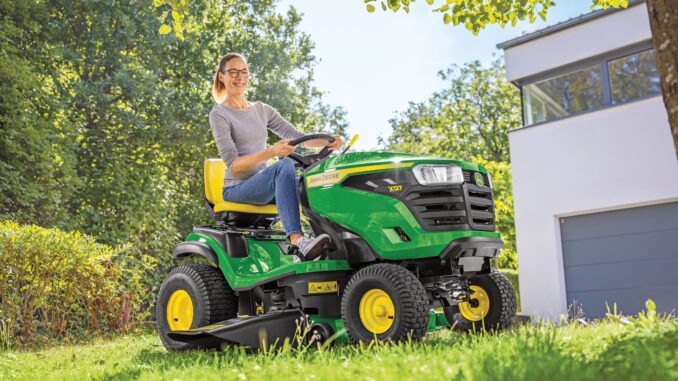
The John Deere X320 is a mid‑range lawn and garden tractor in the Select Series X300 lineup, aimed at homeowners who want more capability than an entry‑level box‑store mower without jumping to a full garden tractor. It’s a very capable machine, but like any mower, it needs regular maintenance and occasional repair to stay reliable and safe.
This John Deere X320 repair guide walks through the main systems, typical symptoms, DIY repair boundaries, key parts and numbers, where to find diagrams and manuals, and a large troubleshooting FAQ. It’s written for USA & Canada homeowners who are comfortable with basic maintenance and may tackle intermediate repairs, but who still need clear guidance on when to stop and call a dealer.
John Deere X320 model overview
The John Deere X320 is a Select Series lawn tractor from the X300 family with power steering and a more capable chassis than the base X300/X304 units. It typically runs a Kawasaki FH661V V‑twin gasoline engine paired with a hydrostatic drive and a mid‑mount mower deck. Common deck sizes on the X320 are 42″, 48″ and 54″ Edge/X decks, but the tractor itself is the same core platform across those deck options.
In typical use, the John Deere X320 is a step up from big‑box mowers for homeowners with medium to large lawns, light acreage, and mixed terrain. It’s designed for regular mowing, light towing, and yard work, not heavy ground‑engaging tasks (that’s garden tractor territory). This guide focuses on X320 repair, troubleshooting and maintenance so you can diagnose what you see, order the right parts, use diagrams and manuals correctly, and know when a job is DIY‑friendly versus dealer‑only.
General overview of the John Deere X320
Within Deere’s lineup, the John Deere X320 sits in the X300 Select Series as a mid‑spec machine, above the basic X300 but below the heavier X500 tractors. It offers power steering, a stronger frame and more comfort than base models, but shares many service parts and procedures with other X300 series units. The mowing system is a mid‑mount Edge deck driven by a belt off the engine PTO, and the tractor uses a hydrostatic transaxle for infinitely variable forward and reverse speeds.
Key systems and components on the John Deere X320 include:
-
Engine and fuel system: Kawasaki FH661V V‑twin, carbureted, with in‑line fuel filter and conventional spark plugs.
-
Mower system: Edge mower deck (42″/48″/54″), belt‑driven with spindle assemblies, idler pulleys and tensioning hardware.
-
Drive system: Hydrostatic transaxle, drive belt from engine to transmission, front steering and front wheel bearings.
-
Electrical system: Starter, battery, alternator/stator, key switch, safety interlock switches and fuses.
Common John Deere X320 service parts owners actually buy include:
-
Engine oil: Turf‑Gard 10W‑30, typically around 2.1 qt capacity.
-
Engine oil filter: AM107423 or AM125424, depending on engine spec.
-
Air filter elements: Foam and paper elements such as M140295 / MIU12554 (foam) and M150949 / MIU12555 (paper).
-
Fuel filter: AM116304 in‑line fuel filter.
-
Spark plugs: M805853 (two required).
-
Mower deck drive belt: Deck‑specific belt numbers for 42″, 48″ or 54″ decks.
-
Battery: Group‑size compatible lawn & garden battery, Deere or aftermarket.
-
Miscellaneous: Grease (TY6341 multi‑purpose SD polyurea), deck leveling gauge (AM130907), blades, idler pulleys and common switches.
Always confirm part numbers against your exact deck size and serial (PIN) before ordering, as Deere often revises components or uses different belts and blades across deck variants.
John Deere X320 troubleshooting approach
The best way to troubleshoot a John Deere X320 is to start with the symptom you see, not the part you think is bad. Owners usually notice things like “it won’t start,” “cut is uneven,” or “I smell something hot,” long before they know which component is responsible.
For the X320, think in these major symptom categories:
-
Starting issues: No‑crank, slow crank, or crank‑no‑start.
-
Running issues: Stalling, surging, power loss, fuel starvation.
-
Cut‑quality problems: Uneven cut, scalping, poor discharge, grass left standing.
-
Vibration and noise: Deck vibration, whining, grinding, rattling.
-
Overheating and leaks: Hot smells, oil spots, fuel drips, cooling fin blockage.
-
Transmission/drive problems: Won’t move, weak on hills, jerky movement.
-
Electrical and safety switches: Dead machine, intermittent shut‑offs, blown fuses.
Work symptom‑first, then drill down into system checks. Use the FAQ at the end of this guide for detailed symptom breakdowns when you run into a specific issue.
John Deere X320 emergency and immediate repair needs
Certain John Deere X320 issues need immediate attention because they are either unsafe or they can quickly cause expensive damage. This section walks through the main emergency categories so you know what to stop for right away.
John Deere X320 starting issues
Starting problems can range from a simple battery issue to a safety switch fault or fuel system problem. The emergency concern is mainly around repeatedly cranking a weak system, which can damage the starter or leave you stranded.
Common causes:
-
Weak or dead battery.
-
Loose or corroded battery cables and grounds.
-
Faulty safety switches (seat, brake, PTO).
-
Blown fuse or bad ignition switch.
-
Fuel starvation (empty tank, clogged fuel filter).
Basic checks for the owner:
-
Verify fuel level and that the fuel shutoff (if fitted) is open.
-
Check battery age, connections and corrosion; clean and tighten as needed.
-
Ensure PTO is off, brake pedal is pressed and you are seated (for safety interlocks).
-
Inspect main fuses under the hood; replace blown fuses with correct rating.
-
If it still won’t start, stop and test battery with a proper tester or consult a dealer to avoid repeated cranking on a weak electrical system.
John Deere X320 cut‑quality problems
Cut‑quality issues matter because they can indicate worn blades, deck mis‑level or spindle problems. Continuing to mow with a bad deck setup can scalp the lawn, stress belts and damage spindles.
Common causes:
-
Dull, nicked or bent blades.
-
Deck not level side‑to‑side or front‑to‑back.
-
Wrong tire pressures.
-
Deck drive belt slipping or worn.
-
Grass buildup under the deck.
Basic owner steps:
-
Check tire pressures and set them to spec before any deck leveling.
-
Inspect blades for damage; sharpen or replace if they’re rounded, bent or chipped.
-
Clean the underside of the deck to remove packed grass.
-
Use a deck leveling gauge to set deck height and pitch according to the manual.
-
Check the deck belt for cracks, glazing or slack; replace if worn.
John Deere X320 vibration and noise
Vibration and noise from the John Deere X320 often come from the mower deck area. Severe vibration can damage spindles, belts and bearings, and can be unsafe if a blade or spindle is failing.
Common causes:
-
Blade damage or being installed incorrectly.
-
Worn or failing spindle bearings.
-
Bent deck components or loose hardware.
-
Worn or misrouted deck belt.
-
Debris impacting the blades or pulleys.
Owner checklist:
-
Disengage PTO and turn off the tractor before inspecting.
-
Verify blades are installed correctly, with the cutting edge oriented properly.
-
Rotate blades by hand (engine off) to feel for roughness or wobble in spindles.
-
Check pulleys and idlers for play, wobble or seized bearings.
-
If vibration remains severe after blade and pulley checks, stop using the deck and have a dealer inspect spindles and shaft components.
John Deere X320 overheating and leaks
Overheating or fluid leaks from a John Deere X320 can lead to engine damage or fire risk if ignored. Hot smells or visible oil/fuel drips are immediate‑action items.
Common causes:
-
Clogged cooling fins and shrouds.
-
Oil leaks from filter, drain, or gaskets.
-
Fuel leaks from cracked lines or loose clamps.
-
Debris buildup around engine and exhaust.
Owner steps:
-
Park safely, shut down and let the engine cool fully.
-
Remove the hood and inspect around the engine for debris; clean fins, shrouds and screens.
-
Check oil filter and drain points for leaks; tighten or replace as needed.
-
Inspect fuel lines and filter connections; replace cracked lines immediately.
-
If you smell raw fuel or see an active fuel leak, do not run the tractor until repaired.
John Deere X320 transmission/drive problems
Drive issues on the John Deere X320 can either be mild (slipping on hills) or serious (no movement). Running a failing hydrostatic system or a broken drive belt can damage the transmission.
Common causes:
-
Worn or broken transmission drive belt.
-
Low or overheated transmission oil (sealed unit on most homeowner models).
-
Linkage or pedal issues.
-
Towing heavy loads beyond the tractor’s limits.
Owner checklist:
-
Confirm that the free‑wheel lever at the rear is in the correct operating position.
-
Inspect the transmission drive belt (beneath the tractor) for wear or breakage.
-
Avoid towing heavy loads or trailers if the tractor seems weak on hills.
-
If the tractor will not move or moves only intermittently, treat it as a stop‑use condition and have a dealer inspect the hydrostatic unit.
John Deere X320 electrical problems
Electrical faults on the John Deere X320 can cause intermittent shut‑off, sudden loss of power or complete no‑start situations. Short circuits can damage wiring or blow fuses repeatedly.
Common causes:
-
Blown fuses.
-
Chafed wiring harnesses under the seat or hood.
-
Faulty safety switches.
-
Failing ignition switch or starter solenoid.
Owner checks:
-
Lift the hood and inspect main fuses; replace blown fuses, but investigate the cause if they blow again.
-
Look for obvious wire damage, pinch points or corrosion at connectors.
-
Wiggle seat and brake switches lightly (engine off) to see if they feel loose or broken.
-
If electrical issues persist or if you see signs of burned wiring, stop and consult a dealer or qualified technician.
John Deere X320 DIY or dealer? Repair decision guide
On the John Deere X320, the “DIY line” usually sits between normal maintenance and any job that involves opening the engine, hydrostatic transmission or complex wiring diagnostics. Most owners can handle routine service, belts, blades and simple bolt‑on parts, but internal repairs are best left to experienced technicians with the right tools and manuals.
Good DIY jobs on a John Deere X320
These are realistic for most owners with basic tools:
-
Engine oil and filter changes.
-
Air filter and fuel filter replacement.
-
Spark plug replacement.
-
Battery replacement and basic electrical checks (fuses, terminals).
-
Mower blades and deck belt replacement.
-
Deck leveling and tire pressure adjustment.
-
Simple external linkages and pedal adjustments following the manual.
Advanced DIY or dealer jobs
These jobs require more skill, tools or diagnostic capability:
-
Carburetor cleaning or rebuild, and fuel system troubleshooting beyond a simple filter.
-
Hydrostatic transmission issues beyond belt replacement.
-
Internal engine work (head gaskets, valve work, major leaks).
-
Steering system repairs involving tie rods, bushings and sector gears.
-
Complex electrical diagnostics involving safety interlocks, harness repairs or charging systems.
John Deere X320 skill level guide
-
Beginner: Oil changes, air and fuel filter replacement, spark plug swaps, basic deck cleaning and blade replacement.
-
Intermediate: Deck belt replacement, deck leveling, battery and cable work, simple linkage adjustments and minor electrical troubleshooting.
-
Advanced: Carburetor and fuel system diagnosis, transmission or engine internal repairs, and wiring harness or safety‑switch diagnostics. These are usually dealer jobs unless you have strong mechanical experience.
John Deere X320 parts needed, OEM vs aftermarket, and key information
Before ordering parts for your John Deere X320, gather:
-
Full model name: “John Deere X320”.
-
Product Identification Number (PIN): stamped plate on the tractor frame.
-
Engine model and serial: Kawasaki FH661V, with its own tag.
-
Deck size and type: 42″, 48″ or 54″ deck, Edge/X type, plus any serial breaks.
This information ensures you get the correct belts, blades, filters and electrical parts. Decks in particular can share model names but use different belt lengths or blade styles depending on production runs and options.
John Deere X320 common service parts table
Below is a typical set of service parts for an X320 with a common Edge deck. Always verify against your PIN and deck size before buying, as Deere uses multiple part numbers across variants.
OEM vs aftermarket guidance for John Deere X320
-
Use OEM parts for belts, safety‑critical items (safety switches, steering components), and fit‑sensitive parts like certain pulleys and spindles. These are designed specifically for the X320’s geometry and loads.
-
Aftermarket is usually acceptable for oil and air filters, blades and batteries, as long as they cross‑reference properly to the X320 and your engine/deck combination. Stick with reputable brands, and check that packaging explicitly lists “John Deere X320” and your deck size.
Where to find John Deere X320 parts diagrams and service manuals
Accurate diagrams and manuals make John Deere X320 repair much easier. Key online sources include:
-
John Deere operator’s manual: Available from John Deere’s official manuals site. Search for “John Deere X320 operator’s manual” and your language/region. This covers safety, controls, basic maintenance and the standard service chart.
-
John Deere X320 parts catalog: Accessible through the JDParts system or John Deere’s online parts catalog. Exploded diagrams show every component, from the deck belt route to transaxle linkages.
-
John Deere technical publications: For more advanced repair, a Technical Manual (TM2308 for X300 series) is the dealer‑level service document with diagnostics, test procedures and repair instructions.
-
Model‑specific aftermarket/maintenance platforms: Sites like MaintainX and some Deere‑focused parts retailers host X320 maintenance plans, parts lists and kits for common services.
Use the operator’s manual for routine maintenance and safety procedures, the parts catalog for diagrams and exact part numbers, and the technical manual if you plan to go beyond basic DIY work.
How to locate John Deere X320 model, serial and engine numbers
Model and serial (PIN) tags matter because John Deere often changes parts mid‑production. The X320’s PIN tells you which variant you own and ensures you order the right belts, blades and filters.
Typical locations:
-
Tractor PIN plate: Usually on the tractor frame, near the front right wheel or under the hood on the frame rail. Wipe the area clean to read the stamped plate.
-
Engine tag: On Kawasaki engines, the label is typically on the engine blower housing or side of the engine. It lists the FH661V model and serial number.
-
Mower deck model/serial: Look for a sticker or plate on the deck shell, often near a corner or near the discharge side. This tag identifies the deck type and serial breaks.
-
If you have attachments (carts, front implements), each has its own sticker or plate, usually near the mounting point or on a side panel.
Write these numbers down or photograph them so you can refer to them when ordering parts or talking to your dealer.
Buying John Deere X320 parts online and in physical stores
A simple strategy keeps John Deere X320 parts buying efficient and accurate:
-
Online: Use OEM part numbers from your manual or parts catalog when ordering from official John Deere sites or reputable retailers. Check that listings explicitly mention “John Deere X320” and your deck size.
-
Dealer counter: Ideal for complex or serial‑specific items like unique belts, transmission components, steering parts or safety switches. Bring your PIN and deck model so they can pull the correct diagrams.
-
Retail stores: Good for common consumables (oil, filters, batteries, blades) if the packaging clearly lists the X320 or cross‑references your engine and deck.
For official resources, good starting URLs include:
-
John Deere manuals: https://www.deere.com/en/manuals/
-
John Deere online parts catalog: https://partscatalog.deere.com/
-
JDParts or dealer portals: Accessible via your local dealer’s website or Deere’s parts link.
Step‑by‑step fitting guide for common John Deere X320 DIY jobs
This section focuses on 4 high‑impact DIY jobs for a John Deere X320 owner: oil and filter change, air and fuel filter replacement, spark plug replacement, and mower blade/deck belt work. Always park safely, disengage PTO, remove the key and let the engine cool before working.
1. John Deere X320 engine oil and filter change
This job improves engine life and prevents premature wear.
-
Park the X320 on level ground, set the parking brake and stop the engine. Allow it to cool.
-
Lift the hood and locate the oil drain valve and filter. Place a drain pan under the valve.
-
Open the drain valve (or remove the drain cap) and allow oil to drain completely. Remove the old oil filter.
-
Wipe the mounting surface clean, apply a thin film of fresh oil to the new filter’s gasket, and install the new filter snugly by hand.
-
Close the drain valve, install the dipstick and refill with the correct amount of Turf‑Gard 10W‑30 oil. Start the engine briefly, check for leaks, then shut off and confirm oil level.
2. John Deere X320 air and fuel filter replacement
Fresh filters improve starting, running and fuel economy.
-
With the engine off and cool, remove the hood and locate the air cleaner cover. Release the clips or screws and remove the cover.
-
Take out the foam pre‑cleaner and paper element. Clean dust from the housing, then install new elements in the correct order (foam around paper where applicable).
-
For the fuel filter, locate the in‑line filter along the fuel line. Clamp or pinch the line if needed to prevent spillage.
-
Loosen the hose clamps, remove the old filter and install the new one in the same flow direction. Tighten clamps securely.
-
Check for leaks after starting the engine. If you see seepage, stop and retighten or replace clamps.
3. John Deere X320 spark plug replacement
New spark plugs help with easier starting and smoother operation.
-
Remove the hood and locate both spark plugs on the V‑twin engine, one per cylinder.
-
Carefully pull off the plug boots (twisted, not yanked) and clean around each plug to prevent debris from falling into the cylinder.
-
Use a proper spark plug socket to remove each plug. Compare the old plugs to the new ones to confirm type and reach.
-
Check and set the gap on the new plugs according to the operator’s manual. Install them by hand, then snug with the socket—do not overtighten.
-
Push the boots firmly back onto the plugs until they click or feel fully seated.
4. John Deere X320 mower blade and deck belt replacement
This job directly affects cut quality and deck reliability.
-
Park the tractor, disengage the PTO and lower the deck fully. For many owners, removing the deck entirely makes blade and belt work easier—follow the manual to drop the deck.
-
With the deck off and supported safely, remove the old blades using the correct socket, holding the blade with a block of wood to prevent rotation. Note orientation.
-
Install new blades with the cutting edge facing the correct direction and torque bolts to spec.
-
For the deck belt, note the belt routing using the diagram on the deck or in the manual. Remove belt guards and slip the old belt off pulleys.
-
Route the new belt according to the diagram, ensuring it sits correctly in pulley grooves and around idlers. Reinstall guards, refit the deck and test PTO engagement at low speed.
John Deere X320 maintenance to prevent recurring problems
Regular maintenance on the John Deere X320 prevents most of the common failures owners see. Think of it as targeting these main areas:
-
Starting reliability: Keep the battery, terminals, spark plugs and fuel filter in good shape.
-
Cut quality: Maintain sharp blades, correct deck leveling, clean underside and proper belt tension.
-
Overheating and fire prevention: Keep cooling fins, shrouds and engine surfaces clean; check for leaks and remove debris near the exhaust.
-
Drive performance: Inspect the transmission drive belt, keep tires inflated correctly and avoid overloading the tractor.
-
Electrical reliability: Inspect fuses, switches and wiring periodically, and protect harnesses from chafing or rodent damage.
Staying ahead of maintenance is much cheaper than replacing major components after a failure.
John Deere X320 maintenance schedule and year‑round checklist
Use the official John Deere X320 maintenance chart as your baseline. The following is a typical pattern adapted for homeowner use—always confirm details in your specific operator’s manual.
Daily / before each use
-
Check engine oil level and top up if needed.
-
Walk around the tractor to look for leaks, loose hardware or obvious damage.
-
Check tire pressures and adjust to spec for even cut and stable drive.
-
Verify that safety systems (seat switch, brake, PTO) feel normal.
After approximately 8 hours
-
Clean debris from the engine air intake screens and exterior surfaces.
-
Inspect the mower deck for grass buildup and remove packed clippings.
-
Look over the deck belt and pulleys for obvious wear.
Every 25 hours
-
Grease key pivot points, spindle fittings and front axle fittings according to the lubrication chart.
-
Check battery terminals for corrosion and clean if necessary.
-
Inspect brake and drive linkages for free movement and adjust if required.
Every 50 hours or yearly
-
Change engine oil and filter (often listed as every 50 hours or annually for typical home use).
-
Inspect and clean or replace air filter elements if needed.
-
Check fuel filter condition and replace if due or dirty.
-
Inspect and adjust deck leveling and blade condition, sharpening or replacing as required.
Every 100–200 hours
-
Replace air filter foam and paper elements according to the chart (often at 100/200 hours).
-
Replace fuel filter and spark plugs as specified (commonly in the 100–200 hour range).
-
Conduct a thorough inspection of steering components, deck spindles and drive belt for wear.
Seasonal checklist (spring, mid‑season, fall)
-
Spring (pre‑season): Perform oil and filter change if not done in fall, check battery health, inspect deck, blades and belts before mowing starts.
-
Mid‑season: Re‑check blade sharpness, deck leveling and belt condition; clean cooling fins and deck thoroughly.
-
Fall/end‑of‑season: Clean the tractor and deck, perform any due services, stabilize fuel or drain tank if recommended, and store the X320 in a dry area.
John Deere X320: repair, upgrade, or replace?
For most homeowners, the John Deere X320 is worth repairing if the core tractor (frame, engine, transmission) is still in good condition. Many problems can be solved with maintenance or moderate repair. However, there are moments when upgrade or replacement makes more sense.
Repair if…
-
The core issues are maintenance‑related (filters, plugs, belts, blades, minor leaks).
-
The hydrostatic transmission still pulls well and doesn’t show signs of internal failure.
-
The engine runs strong and starts reliably with only minor adjustments needed.
-
You can fix most problems with realistic DIY jobs or affordable dealer work.
Upgrade if…
-
You need better cut quality or performance and can benefit from improved blades or deck options.
-
You want comfort or capability upgrades like better seat, mulching kits, or light kits.
-
You need a wider deck or additional attachments but the X320’s base platform still suits your property.
Replace if…
-
The engine or transmission is failing and the cost of repair approaches the value of the tractor.
-
The frame or structure is cracked or seriously damaged.
-
Your property needs have changed dramatically (much larger area, heavy ground engagement tasks) and you’d be better served by a garden tractor or compact utility tractor.
-
Multiple major systems (engine, transmission, steering, deck) are failing at once on an older unit.
Expanded troubleshooting FAQ – John Deere X320 (30+ questions)
Below is a practical FAQ covering the most common John Deere X320 owner questions. Each answer is written from a symptom‑first perspective to help you diagnose quickly.
1. Why will my John Deere X320 not start at all?
If your X320 doesn’t crank when you turn the key, start with the basics: battery, fuses and safety switches. Confirm the battery isn’t dead by testing voltage or trying another machine, and clean any corrosion on the terminals. Make sure you’re seated, the brake is pressed and the PTO is off, because safety interlocks will block starting if any of these are wrong. If fuses are good and power is present, but there’s still no crank, suspect the key switch, starter solenoid or a faulty safety switch and consider dealer‑level diagnosis.
2. Why does my John Deere X320 crank but not fire?
Crank‑no‑start on a John Deere X320 usually points to fuel or spark issues. Check that there’s fresh gasoline in the tank and that the in‑line fuel filter isn’t clogged. Inspect the spark plugs and plug wires for damage or heavy fouling; replacing worn plugs often solves marginal starting. If fuel and spark look fine, the carburetor may be dirty or flooded, requiring cleaning or professional service. Repeated cranking without solving the root cause can drain the battery and overheat the starter.
3. Why does my John Deere X320 start but then stall?
An X320 that starts and dies after a short period may be suffering from fuel starvation or a restricted air path. Look at the fuel filter and lines for blockage or air leaks, and ensure the tank cap vent isn’t plugged so fuel can flow freely. Clean or replace air filter elements if they’re dirty enough to choke the engine. If the problem only happens after warming up, the carburetor might have internal debris or the ignition system could be failing under heat, which usually requires a more advanced diagnosis.
4. Why is my John Deere X320 hard to start when hot?
Hot starting difficulties often come from borderline ignition components or fuel boiling issues. Make sure the spark plugs are fresh and correctly gapped, and check the battery health, as a weak battery may struggle after repeated starts. Inspect fuel routing near the engine to ensure lines aren’t too close to hot surfaces causing vapor lock. If hot starts consistently fail while cold starts are fine, a dealer may need to test ignition modules and carb settings.
5. Why does my John Deere X320 idle roughly?
A rough idle on the John Deere X320 usually means the engine isn’t getting consistent fuel or air. Clean or replace the air filter elements and make sure the foam pre‑cleaner isn’t soaked with oil or dirt. Check the fuel filter and look for water or debris in the fuel. Inspect spark plugs for fouling and replace them if they’re worn. If all basic items are good, a carburetor adjustment or cleaning may be required, which is an intermediate to advanced job better done with the manual in hand.
6. Why is my John Deere X320 down on power when mowing?
When the X320 feels weak under load, start by checking blade sharpness and deck condition; dull blades and a dirty deck force the engine to work harder. Confirm the throttle is set to full for mowing, and make sure the engine air filter and fuel filter are clean. Then look at the deck belt and pulleys—if the belt slips or the deck has excessive drag from bad bearings, power transfer to the blades suffers. If the tractor still bogs badly, inspect the carburetor, ignition system and, in rare cases, compression; a dealer can test these more precisely.
7. Why is the cut uneven on my John Deere X320?
Uneven cut on a John Deere X320 nearly always ties back to deck leveling, tire pressure and blade condition. Set tire pressures to factory specs first; uneven tires will tilt the deck regardless of adjustments. Use a deck leveling gauge to set side‑to‑side and front‑to‑back pitch according to the manual. Examine blades for bending or wear and replace them if they’re out of shape. Also check that the deck hangers and lift linkages aren’t bent or loose, which would prevent proper deck alignment.
8. Why is my John Deere X320 scalping the lawn?
Scalping happens when the deck rides too low or is pitched incorrectly relative to the terrain. Raise the cutting height one or two notches and recheck deck leveling and pitch. Verify tire pressures, as low tires can drop the deck closer to the ground. If you consistently scalp on uneven ground, consider adjusting your mowing pattern, slowing down, or using anti‑scalp wheels correctly. In some cases, damaged deck wheels or brackets must be replaced to keep the shell from digging in.
9. Why does my John Deere X320 leave strips of uncut grass?
Strips of uncut grass usually come from dull or mismatched blades, or from incorrect blade installation. Inspect each blade to ensure it’s the proper type for your deck and that they’re installed with the cutting edge facing the right direction. Look for bends or missing chunks that would leave gaps between cutting paths. Also verify that blade overlap is correct by following the deck manual—certain decks rely on precise blade position for complete coverage. Replacing all blades as a set often solves striping problems.
10. Why is my John Deere X320 blowing grass poorly out the chute?
Poor discharge from the X320’s deck often stems from packed clippings, dull blades or a slipping deck belt. Clean the underside of the deck thoroughly, scraping off accumulated grass. Sharpen or replace the blades to restore clean cutting and airflow. Inspect the deck belt and pulleys; if the belt slips, the blades slow and discharge suffers. Also make sure you’re mowing at full throttle and reasonable ground speed, not creeping too slowly or cutting overly wet, tall grass in a single pass.
11. Why does my John Deere X320 deck vibrate heavily?
Heavy deck vibration on a John Deere X320 is a warning sign that something mechanical is out of balance or failing. Check blade installation and condition first—one bent blade or incorrect mounting can cause significant vibration. Rotate the blades by hand with the engine off to feel for roughness in spindle bearings. Inspect pulleys and idlers for wobble or seized bearings. If vibration remains after replacing blades and checking pulleys, the spindle assembly may be damaged and should be evaluated by a dealer.
12. Why do I hear grinding or squealing from my John Deere X320 deck?
Grinding or squealing noises from the deck often indicate failing bearings or a belt rubbing somewhere it shouldn’t. With the PTO off and the engine off, inspect pulleys, idlers and spindle tops for play or roughness. Look for belt contact with guards, brackets or debris, and correct routing if the belt has been misinstalled. If a pulley or spindle makes grinding noises when spun by hand, replacement is usually required. Running the deck with failing bearings can lead to shaft damage and belt failure.
13. Why does my John Deere X320 smell hot or smoky?
Hot smells or a faint smoky odor from the X320 usually mean debris is collecting around the engine or exhaust, or fluids are leaking onto hot surfaces. Remove the hood and clean grass and leaves from the engine shroud, cooling fins and exhaust area. Check for oil leaks around the filter and drain, and fuel leaks around lines and connections. If the smell persists after cleaning and leak checks, do not continue to operate until the source is found—overheating can damage the engine or present a fire risk.
14. Why is my John Deere X320 leaking oil?
Oil leaks on a John Deere X320 most commonly come from the oil filter seal, drain valve or fill points. Inspect the filter area to ensure the gasket is seated properly and that the filter is snug but not overtightened. Check the drain valve or plug for proper closure and gasket condition. If oil appears higher up on the engine, look for valve cover gasket issues or other seals that may be failing. Light seepage can sometimes be monitored, but active drips should be addressed promptly to avoid low oil levels and damage.
15. Why does my John Deere X320 leak fuel or smell like gasoline?
Fuel leaks are serious; they can lead to fire or engine damage. Inspect the in‑line fuel filter for cracks and ensure hose clamps are tight. Follow the fuel line from tank to carburetor, checking for brittle, cracked or swollen hoses. Also verify the tank cap is sealing properly, not allowing vapors to escape constantly. Replace any suspect fuel lines and components immediately. If you smell strong raw fuel without obvious leaks, have a dealer inspect the system before further use.
16. Why won’t my John Deere X320 move forward or reverse?
If your X320 won’t move at all, first confirm the free‑wheel or tow valve at the rear is in the correct operating position. Check the transmission drive belt underneath the tractor for breakage, heavy wear or derailing. If the belt is intact and the engine runs but the tractor still won’t move, the hydrostatic transmission may have a serious internal fault. In that case, towing or forcing the tractor is not recommended; call a dealer for diagnosis and possible repair or replacement options.
17. Why is my John Deere X320 slow or weak on hills?
Weak hill performance can come from worn drive belts, low tire pressure or an aging hydrostatic transmission. Inspect the transmission drive belt for wear and proper tension. Confirm tire pressures are at spec, as soft tires increase load on the transmission. Avoid towing heavy loads that exceed the tractor’s intended use. If performance has gradually declined over years of use, the hydrostatic unit may be wearing out; a dealer can evaluate whether belt replacement or transmission service is needed.
18. Why does my John Deere X320 jerk or surge when driving?
Jerky or surging movement can be caused by linkage issues, drive belt problems or hydrostatic concerns. Inspect the forward/reverse pedal linkages for binding, wear or loose connections. Check the drive belt for glazing or uneven wear that could cause intermittent grip. If the tractor surges without obvious mechanical causes, internal transmission issues may be at play. Smooth hydrostatic operation is expected; anything noticeably jerky warrants further inspection.
19. Why does my John Deere X320 lose drive after warming up?
When an X320 drives fine cold but loses drive when hot, the hydrostatic transmission may be overheating or suffering from internal wear. Ensure debris is not blocking the transmission cooling fins or fan, and verify that the drive belt is in good condition and properly tensioned. If cooling and belt are fine but warm performance still drops, internal repair or replacement of the transaxle is likely a dealer job. Continuing to work a failing hydrostatic system can lead to complete loss of drive.
20. Why does my John Deere X320 keep blowing fuses?
Repeated blown fuses indicate a short or overload in the electrical system. Look for chafed or pinched wiring under the hood, under the seat and around the frame, especially near moving parts. Inspect aftermarket accessories or repairs that may be drawing too much current or wired incorrectly. Replace fuses only after inspecting and correcting obvious wiring issues; using larger‑than‑specified fuses is unsafe and can lead to harness damage. If the cause isn’t clear, a dealer should trace the circuit using wiring diagrams.
21. Why does my John Deere X320 shut off when I release the brake?
If the X320 dies when you release the brake, the safety interlock system likely thinks conditions are unsafe. Confirm the PTO is off and that you’re seated properly—many models require both seat and brake conditions to be satisfied before releasing. Check the seat and brake switch connections for looseness or corrosion. If switches or wiring are damaged, they may falsely trigger shutdown. Replacement of faulty switches or harness repair is sometimes necessary to restore proper operation.
22. Why does my John Deere X320 die when I engage the PTO?
An X320 that stalls when the PTO is engaged may be facing a heavy deck load or a safety interlock issue. Ensure engine speed is set to full throttle before engaging the PTO. Inspect the deck for packed grass or debris that could over‑load the blades. Check that blades spin freely by hand (engine off); seized spindle bearings can stall the engine as soon as the PTO clutch engages. If everything mechanical is free but the problem persists, the PTO clutch or its wiring may need attention.
23. Why won’t the headlights or electrical accessories work on my John Deere X320?
If your X320’s lights or accessories don’t work, check the relevant fuses and bulb connections first. Inspect the wiring to the lights for damage or corrosion, especially at connectors. Confirm the key switch is in the correct position for accessory power. If the bulbs and fuses are good but lights remain dead, the problem may lie in the switch or wiring harness, which requires testing with a multimeter and potentially dealer assistance.
24. Why does my John Deere X320 battery keep going flat?
Frequent dead batteries can result from an aging battery, parasitic draws or charging system issues. Confirm the battery is of suitable capacity and not beyond its expected servicing life. Check for accessories that might draw current when the tractor is off. Then have the charging system tested—on many X300 series, a stator or regulator handles charging and can fail. Fixing the underlying cause is important; simply replacing batteries without addressing charging or draws won’t solve the issue.
25. How often should I change the oil on my John Deere X320?
Most John Deere X320 owners should follow the manual’s guidance—commonly an oil and filter change every 50 hours or annually, whichever comes first. Light users might lean toward annual changes even if hours are low, while heavy users should adhere closely to the hour intervals. If you mow in dusty or hot conditions, consider staying toward the shorter end of the interval ranges to protect engine health.
26. How often should I change the air and fuel filters on my John Deere X320?
Air and fuel filter intervals vary by environment, but typical guidance is around every 100–200 hours for the X320, with visual inspections more frequently. In dusty or dirty conditions, replace the foam pre‑cleaner and paper element sooner if they appear clogged. Fuel filters should be changed at least at the recommended intervals or whenever performance or starting issues suggest restriction. Following the manual’s schedule is the safest baseline.
27. How often should I sharpen or replace blades on my John Deere X320?
Blade sharpening frequency on a John Deere X320 depends on lawn size and terrain. Many homeowners will sharpen blades at least once per season, and more often on rough or sandy ground. Inspect blades every 25–50 hours of mowing for rounding, nicks or bending. Replace blades when they can no longer be sharpened to a proper edge or if they’ve been damaged by rocks or hard objects.
28. Which oil should I use in my John Deere X320 engine?
John Deere typically recommends Turf‑Gard 10W‑30 engine oil for the X320’s Kawasaki engine, but always check your operator’s manual for the correct specification. Use quality oil that meets or exceeds the manufacturer’s requirements, and ensure you fill to the proper capacity. Avoid mixing oil types or significantly deviating from recommended viscosity unless the manual explicitly allows alternative grades for certain climates.
29. How do I know which deck belt fits my John Deere X320?
To match the correct deck belt, you need your John Deere X320’s deck size, deck model and sometimes the PIN. Look for the deck tag on the shell and note the width (42″, 48″, 54″) and any model codes. Then consult the parts catalog or your dealer to cross‑reference the exact belt part number. Never buy belts purely by length from generic listings; a slightly wrong belt can cause routing issues, poor tension and premature failure.
30. Can I use aftermarket filters and blades on my John Deere X320?
You can use reputable aftermarket filters and blades on a John Deere X320 if they cross‑reference correctly to your engine and deck. Choose brands with good track records and packaging that clearly lists the X320 and your deck size. Keep in mind that OEM parts are generally preferred for critical fit areas, but aftermarket options can save money and still provide reliable performance when chosen carefully.
31. When should I take my John Deere X320 to a dealer instead of doing it myself?
You should involve a dealer when problems extend beyond basic maintenance and bolt‑on parts. That includes internal engine or transmission repairs, complex electrical issues involving harnesses and safety interlocks, and any situation where you lack the tools or confidence to work safely. If you’ve gone through the basic symptom checks in this guide and still can’t identify or resolve the issue, dealer diagnostics with technical manuals and test equipment are the next step.
32. How do I use the John Deere X320 manuals and diagrams effectively?
Start with the operator’s manual for safety, controls and routine service. Use the parts catalog diagrams when ordering parts or understanding how assemblies fit together—especially deck components, linkages and belts. If you have access to the Technical Manual, use its diagnostics and test procedures when tackling intermediate to advanced jobs. Keep PDFs or printed sections handy in the shop, and match what you see on the tractor to the diagram before disassembling parts.