
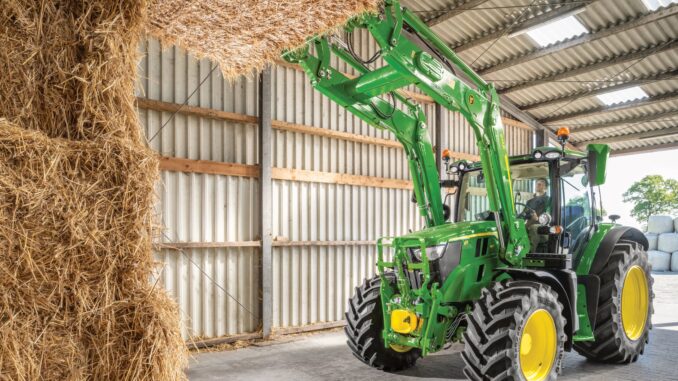
The John Deere 5075E is a 5E Series utility tractor built for property owners, acreage operators, livestock work, loader jobs, mowing, light fieldwork, and general year-round utility use rather than simple lawn care alone.
This guide is written for USA and Canada owners who want a practical, symptom-first reference covering John Deere 5075E troubleshooting, routine maintenance, common repair decisions, parts planning, and realistic DIY limits before a small problem turns into a larger one.
Compared with lighter lawn tractors, the 5075E sits in Deere’s utility tractor range and brings together diesel engine, fuel, cooling, hydraulic, PTO, steering, electrical, and drivetrain systems that all affect reliability. That means the most useful troubleshooting approach is to start with the exact symptom you can see, hear, smell, or feel, then narrow the problem down by system instead of replacing parts at random.
John Deere 5075E model overview
The John Deere 5075E belongs to the 5E utility tractor family, alongside related models such as the 5055E and 5065E covered in the same operator literature. For most owners in the USA and Canada, it is used for loader work, rotary cutting, pasture maintenance, grading, hauling, PTO jobs, and property upkeep where more weight and hydraulic capability are needed than a lawn or garden tractor can provide.
The key systems on the John Deere 5075E are the diesel engine and fuel system, air intake system, cooling system, transmission-hydraulic system, MFWD front axle where equipped, electrical starting and charging system, and PTO/3-point hitch hardware. Deere’s operator information also points owners toward routine service items such as engine oil and filters, fuel filters, air filters, hydraulic filters, coolant, fan belt, battery service items, and axle oils because these are the parts most closely tied to reliability.
Common John Deere 5075E service parts owners often buy
-
Engine oil filter RE519626 for scheduled oil services.
-
Hydraulic oil filter RE45864 for transmission-hydraulic service.
-
FT4 engine fuel filter R536698 on applicable FT4 tractors, or RE60021 on listed Tier 2 and iT4 versions.
-
Primary air filter RE282286 and secondary air filter RE282287 on the listed 5075E maintenance guide.
-
Alternator/fan belt R216949, a common replacement item when charging or cooling performance drops.
-
Ignition switch RE61717, battery TY25272, thermostat RE501052, and common lighting bulbs for repairs outside normal service intervals.
Troubleshooting the John Deere 5075E by symptom
The operator manual breaks troubleshooting into engine, transmission, hydraulic, brakes, rockshaft/3-point hitch, remote cylinder, and electrical categories, which fits a symptom-first repair method very well. In practice, most owner complaints on a John Deere 5075E fall into starting issues, poor running, overheating, hydraulic or steering weakness, charging faults, transmission or drive complaints, and noises or leaks that show up before a complete failure.
The best order is simple: confirm the symptom, check fluids and obvious safety issues first, inspect for loose or damaged parts, and only then move toward testing switches, belts, filters, battery condition, or dealer-level fuel and hydraulic faults. This saves money, avoids unnecessary downtime, and reduces the risk of masking the real fault with random parts swapping.
Emergency John Deere 5075E repair needs
Some John Deere 5075E problems need immediate attention because they can create unsafe operation or quickly damage costly components. Stop using the tractor right away if you have loss of braking, major fuel leaks, overheating, severe vibration, hydraulic hose damage, charging-system smoke, or driveline noises that appear suddenly under load.
John Deere 5075E starting issues
A no-start John Deere 5075E usually shows up as slow cranking, clicking, cranking without firing, or firing briefly and dying. It matters because repeated cranking can drain the battery, overheat wiring, and hide a fuel or safety-interlock issue that is easier to catch early.
Common causes:
-
Weak or dirty battery connections.
-
Poor battery condition.
-
Water or sediment in the fuel system.
-
Restricted fuel filter or air filter.
-
Neutral-start or related safety-switch problems.
-
Fuel bleeding issues after service.
Basic checks:
-
Verify the battery is fully charged and both terminals are clean and tight.
-
Drain water and sediment from the fuel tank and fuel filter area as specified in Deere’s 10-hour checks.
-
Confirm the tractor is in the correct starting condition and the neutral-start system has not gone out of adjustment.
-
Inspect fuel and air filters if starting became worse gradually rather than all at once.
-
If the tractor recently ran out of fuel or had filter work, follow the proper fuel bleeding procedure from the manual family for the pump type used.
John Deere 5075E running and power-loss problems
When a John Deere 5075E starts but runs rough, lacks power, smokes excessively, or bogs under PTO or loader work, the problem is often fuel, air, cooling, or service-related. These faults matter because low power under load can raise exhaust temperature, increase fuel use, and leave the tractor working harder than it should.
Common causes:
-
Dirty primary or secondary air filter.
-
Fuel filter restriction.
-
Water-contaminated fuel.
-
Belt condition affecting cooling and charging.
-
Dirty radiator, screen, or oil cooler area.
-
Engine idle or fuel-system issues needing deeper diagnosis.
Basic checks:
-
Inspect and service the air cleaner if dust conditions have been heavy.
-
Replace the fuel filter at the proper interval or sooner if contaminated fuel is suspected.
-
Clean grille, screens, radiator, and oil cooler fins carefully.
-
Inspect the alternator/fan belt for wear, cracking, looseness, or slippage.
-
If rough running remains after these checks, move toward injector, pump, or dealer-level fuel diagnosis.
John Deere 5075E overheating and leaks
Overheating on a John Deere 5075E typically shows up as a rising temperature reading, coolant smell, boiling, or loss of power once the tractor is hot. This needs fast attention because overheating can damage the engine, hoses, thermostat area, and cooling-system seals.
Common causes:
-
Low coolant level.
-
Plugged screen, grille, radiator, or oil cooler.
-
Worn or loose fan belt.
-
Loose hose clamps or aging hoses.
-
Thermostat or cooling-system service issues.
Basic checks:
-
Check coolant level only when the engine is cool.
-
Clean external cooling surfaces before replacing hard parts.
-
Inspect upper and lower radiator hoses and clamp tightness.
-
Check fan-belt condition and tension adjustment.
-
If overheating continues or coolant is being pushed out, stop and move toward dealer diagnosis.
John Deere 5075E transmission, hydraulic, and drive problems
Owners usually notice these problems as weak loader response, slow steering, poor 3-point lift, unusual transmission behavior, or axle noise on MFWD machines. These faults matter because running with low or dirty hydraulic oil can damage expensive internal components quickly.
Common causes:
-
Low transmission-hydraulic oil level.
-
Restricted hydraulic filter or dirty pickup screen.
-
MFWD axle oil neglected on equipped tractors.
-
Loose hardware, worn bearings, or axle service needs.
-
Hydraulic or transmission problems beyond basic owner checks.
Basic checks:
-
Check transmission-hydraulic oil level during the scheduled 50-hour inspection routine.
-
Verify service history for hydraulic oil and filter replacement.
-
Check MFWD axle oil if your tractor is front-wheel assist equipped.
-
Inspect for visible leaks, loose fittings, and damaged hoses.
-
If steering, hitch, or drive performance is still poor, stop before contamination or pressure loss causes bigger failures.
John Deere 5075E electrical problems
Electrical trouble on a John Deere 5075E often appears as slow cranking, dead battery, poor lighting, charging warnings, or intermittent starting. The reason to act quickly is that battery, cable, belt, and switch faults are often small repairs at first but can become no-start breakdowns at the worst time.
Common causes:
-
Dirty or weak battery.
-
Loose or corroded cables.
-
Worn alternator/fan belt reducing charging output.
-
Blown fuse or fusible-link issue.
-
Ignition switch failure.
-
Lighting bulb failures.
Basic checks:
-
Clean and test the battery as part of Deere’s 50-hour service routine.
-
Inspect belt condition before assuming the alternator has failed.
-
Check fuses, fusible link, and visible wiring damage.
-
Test the ignition switch if dash power is inconsistent.
-
Replace failed bulbs with the correct listed type rather than mixed substitutes.
Summary:
John Deere 5075E transmission options explained
SyncShuttle vs PowrReverser John Deere 5075E loader work
For regular loader work, the PowrReverser is the clear better choice on a John Deere 5075E. The SyncShuttle can operate a loader perfectly well for occasional jobs, but the PowrReverser is designed around repetitive forward/reverse cycles: it gives 12 forward and 12 reverse speeds, a steering-column shuttle lever, wet clutch packs, and clutch-free changes of direction.hutsoninc+1
Core difference
The published 5075E specifications list the SyncShuttle as a 9F/3R, dry-clutch transmission and the PowrReverser as a 12F/12R, wet-clutch option.hutsoninc+1
What changes in practice
With a SyncShuttle, a normal loader cycle tends to be:
-
Drive into a pile in a low forward gear.
-
Depress the clutch.
-
Move the shuttle/gear control to reverse.
-
Release the clutch smoothly while controlling the loader.
-
Repeat for every bucket cycle.
That is acceptable for occasional gravel, a few pallets, seasonal mucking-out, or loading a trailer once in a while. But after a few hundred reversals in a day, the clutching becomes tiresome and slows the job.
With a PowrReverser, you set a gear/range and use the steering-column shuttle lever to select forward, neutral or reverse. Deere describes the system as allowing the operator to manoeuvre back and forth “without ever touching the clutch,” which is why it is especially valuable for loader work.deere+1
Your normal cycle becomes:
-
Select an appropriate low or mid-range gear.
-
Drive into the material.
-
Lift/curl the bucket.
-
Flick the reverser lever to reverse.
-
Back away while raising the load.
-
Flick back to forward and repeat.
Because your left hand works the reverser and your right hand stays near the loader joystick, the operation is quicker, smoother and more controlled.
Why 12 reverse gears matter
The often-overlooked PowrReverser advantage is not merely the clutch-free shuttle—it is the 12 reverse ratios.
On a 9F/3R SyncShuttle, if forward gear 2 in B range is ideal for entering a pile, the corresponding reverse choice may feel too fast or too slow. You may have to stop, clutch, and change range or gear to get a sensible reversing speed.
On a 12F/12R PowrReverser, the tractor has more closely matched forward and reverse ratios. That gives more useful choices for:
-
Driving into compacted manure, soil or aggregate slowly.
-
Reversing precisely away from a trailer or building.
-
Handling pallet forks near sheds, gates, livestock areas or vehicles.
-
Carrying a raised load safely at a controlled speed.
-
Switching between light materials and heavier bucket loads.
This also reduces the temptation to work too fast—important because Deere’s operator guidance says not to carry a loader load at more than 10 km/h (6 mph), due to stability, tyre and rollover risks.georgiaffa
Cost versus productivity
A SyncShuttle may make sense if all of these are true:
-
Loader use is genuinely occasional.
-
The tractor will primarily mow, pull a trailer, run PTO equipment or do field work.
-
Budget and mechanical simplicity matter more than daily loader convenience.
-
The operator is comfortable using a clutch continuously.
-
The loader is not the reason for buying the tractor.
The PowrReverser is worth paying for if the tractor will regularly:
-
Feed livestock.
-
Load muck, compost, gravel, soil or woodchip.
-
Handle round or square bales.
-
Move pallets, bulk bags and fencing materials.
-
Clean sheds or scrape yards.
-
Load trailers frequently.
-
Be used by more than one operator.
-
Spend even a meaningful part of its working week with a front loader attached.
For a loader-first 5075E, the PowrReverser usually has better resale appeal as well, because prospective buyers understand its practical advantage over a basic 9F/3R mechanical shuttle.
Operating considerations
The PowrReverser is not a licence to reverse harshly under every condition:
-
Reduce engine speed and pause briefly at neutral when reversing with a heavy bucket, pallet, bale or trailer load.
-
Use the appropriate gear and range rather than repeatedly forcing the shuttle to compensate for an unsuitable travel speed.
-
Keep the loader load low while moving, especially on uneven ground or slopes.
-
Use rear ballast or a suitable rear implement; front-loader work transfers substantial load to the front axle and reduces rear-tyre grip.
-
If engagement feels excessively abrupt or sluggish, have the dealer check the reverser calibration/modulation rather than simply living with poor behaviour.
Recommendation
If you are comparing two otherwise similar used 5075Es and one has 9F/3R SyncShuttle while the other has 12F/12R PowrReverser, choose the PowrReverser for any serious loader role—even if it costs more.
Choose the SyncShuttle only when the loader is incidental and you value its simpler, conventional dry-clutch mechanical layout more than faster, easier shuttling. Deere’s own UK product description explicitly positions the 5075E’s PowrReverser as a key feature for front-loader manoeuvring.
How does the PowrReverser lever work on a 5075E
How to calibrate John Deere 5075E PowrReverser transmission
Common error codes for John Deere PowrReverser transmission
On a 5075E, PowrReverser-related faults commonly appear with the PTR controller prefix. A code identifies the affected circuit or condition—not necessarily the failed part—so use the exact code, tractor serial number, and transmission version before replacing anything. The most frequent fault families involve clutch-pedal switches, the reverser lever/neutral circuits, solenoid driver circuits, wheel-speed feedback, calibration values, and low/high sensor supply voltage.qualityservicemanual
Common PowrReverser codes
The listed codes and descriptions come from diagnostic coverage for 5045E/5055E/5065E/5075E variants, including 5075E Stage IIIB/Stage V coverage. They may not all apply to every 5075E model year or market.qualityservicemanual+1
Reading the suffix
In a code such as PTR 521235.05:
-
PTR identifies the tractor/transmission controller family.
-
521235 identifies the monitored circuit or condition.
-
.05 is the failure mode identifier, often signalling an electrical circuit/driver problem in codes of this type.
The suffix matters. For example, a .03 and .04 on the same base number can distinguish a high-voltage condition from a low-voltage condition, as shown by PTR 003509.03 and PTR 003509.04.qualityservicemanual
Diagnose by code family
Electrical and switch codes
Codes such as PTR 000598, PTR 524021 and PTR 524160 usually justify starting with electrical basics rather than opening the transmission:
-
Fully charge and load-test the battery.
-
Clean and tighten battery terminals and earth/ground straps.
-
Inspect the harness around the clutch pedal, steering column, transmission case and areas where it can rub, stretch or trap water.
-
Disconnect and inspect relevant plugs for green corrosion, pushed-back terminals, oil ingress or loose locking tabs.
-
Check clutch-switch and directional-lever-switch adjustment using the serial-number-correct technical manual.
A single low supply voltage or poor ground can create multiple apparently unrelated PTR codes.qualityservicemanual
Solenoid/valve codes
Codes in the PTR 521233–521235 group point more directly toward the electrical control of a transmission valve. Do not assume that means the valve itself is bad:
-
Check harness continuity and connector pin condition first.
-
Measure solenoid resistance only against the Deere specification for the exact transmission.
-
Check controller command/output with correct diagnostic equipment.
-
If electrical tests pass, investigate the valve spool, hydraulic supply pressure, contamination, and calibration results.
The listed high-, low-, and reverse-valve driver codes indicate distinct controlled valve circuits.qualityservicemanual
Calibration and speed-signal codes
PTR 000084.07, PTR 000630.14 and PTR 523959.31 require more caution. A calibration failure may result from a wheel-speed signal problem, incorrect setup, incorrect controller configuration, low hydraulic pressure, a slipping clutch pack, an incorrect fluid condition, or a genuine transmission fault. Do not repeatedly force calibration until the underlying cause is found.qualityservicemanual+1
Practical response
If a PowrReverser fault appears:
-
Photograph the complete code exactly as displayed, including PTR, all digits and the suffix.
-
Record the conditions: cold/hot, engine rpm, selected range/gear, forward or reverse, loader load, and whether the tractor actually moved.
-
Do not clear the code before it has been recorded; intermittent codes can be valuable evidence.
-
Check battery voltage, grounds, fuses, fluid level and the relevant external wiring/connectors.
-
If the code concerns a valve driver, reverser lever, wheel-speed input, calibration, or the tractor has no drive/unsafe engagement, stop demanding use and have it diagnosed with Deere-compatible equipment.
Important limitation
This list is a useful starting map, not a universal codebook. John Deere changed controllers, emissions generations, dash formats and transmission packages across 5075E production and between North American, UK/EU, Indian, African and Latin American models. Match the code to the official operator/technical manual using the tractor’s serial number; John Deere provides official manual and service-resource channels for that purpose.
Troubleshooting John Deere 5075E neutral switch issues
DIY limits on the John Deere 5075E
For most owners, the John Deere 5075E DIY line sits between routine service and light bolt-on repair on one side, and fuel-system calibration, internal hydraulic work, clutch/transmission teardown, major electrical diagnosis, or engine internal work on the other. If the job requires splitting the tractor, press tools, hydraulic pressure testing, injector work, or deep transmission diagnosis, dealer or specialist help is usually the smarter route.
Good DIY jobs
-
Engine oil and filter changes.
-
Fuel filter replacement and basic fuel-system bleeding.
-
Air filter service and replacement.
-
Battery cleaning, testing, and replacement.
-
Fan-belt inspection and replacement.
-
Cooling-pack cleaning and basic hose inspection.
Advanced DIY or dealer jobs
-
Hydraulic filter and transmission-hydraulic oil service if you can safely manage fluid volume and cleanliness.
-
Water separator and fuel-system troubleshooting on hard-start or no-start tractors.
-
Clutch adjustment and neutral-start system checks.
-
MFWD axle service, bearing work, and front-end repairs.
-
Electrical fault tracing beyond battery, fuses, bulbs, and switch replacement.
Skill guide
-
Beginner: fluid checks, battery cleaning, air-filter service, radiator screen cleaning.
-
Intermediate: engine oil/filter service, fuel filter replacement, fan-belt replacement, battery replacement.
-
Advanced: hydraulic service, clutch free-play adjustment, fuel bleeding after repairs, axle and steering component work.
John Deere 5075E parts, OEM numbers, and ordering details
Before ordering parts for a John Deere 5075E, gather the full model name, tractor PIN, engine serial number, and any equipment details that affect fit, such as transmission type, MFWD vs 2WD, emissions version, or cab/HVAC equipment. That matters because Deere lists some service items by tractor version, and even common parts such as fuel filters or cab air filters can change with configuration.
OEM parts are usually the safest choice for belts, filters with specific fit requirements, electrical switches, cooling-system parts, and anything safety-critical because the fit and specification matter more than a small upfront saving. Aftermarket parts can be fine for selected batteries, some filters, bulbs, and general maintenance items, but only when the cross-reference is exact and the supplier is reputable.
John Deere 5075E manuals and parts diagrams
The most useful sources for a John Deere 5075E owner are the official operator’s manual, Deere parts lookup resources, and a Deere-focused model-specific maintenance page that lists common service parts. Used together, they help you confirm intervals, identify systems, and avoid ordering the wrong variant of a filter or electrical part.
-
Official operator’s manual — best for service intervals, controls, safety, troubleshooting categories, storage, and identification-number locations.
-
John Deere Technical Information Store — useful for deeper technical publication lookup and service-manual references tied to 5075E family tractors.
-
Green Farm Parts 5075E maintenance guide — useful for quick part-number checks on common service items and selected repair parts.
-
Deere parts support — good starting point for official parts lookup and dealer-backed ordering in North America.
How to find John Deere 5075E serial and engine numbers
Correct identification numbers matter because John Deere separates information for tractor serial number, front axle serial number, transmission serial number, ROPS serial number, and engine serial number in its operator literature. If you skip this step, you increase the risk of ordering the wrong filter set, switch, axle part, or technical manual.
-
Find the tractor identification information using the operator manual’s identification-number section as your guide.
-
Record the tractor serial number or PIN exactly as shown on the machine plate.
-
If the tractor is MFWD equipped, record the front-axle serial information as well.
-
Record the engine serial number from the engine identification area before ordering engine or fuel-system parts.
-
Keep these numbers with your service log and parts records so you do not need to re-check them every time.
Buying John Deere 5075E parts online and in stores
The smartest buying strategy is to confirm the OEM number first, then compare seller reputation, return policy, and serial-number fit before you order. That approach matters more on a utility tractor than on a basic mower because there are more configuration differences and more expensive consequences if the wrong part is installed.
-
Online: best for price comparison and verifying OEM numbers, especially for filters, switches, belts, and consumables, but always check PIN-sensitive fit first.
-
Dealer counter: best for serial-specific parts, hydraulic items, axle parts, and anything that changed by emissions tier or configuration.
-
Retail stores: acceptable for batteries, bulbs, oils, grease, and selected filters if the packaging clearly cross-references the exact Deere number.
Useful sources include John Deere parts support, Green Farm Parts, and Farming Parts for model-based browsing and cross-checking.
Step-by-step John Deere 5075E fitting guide
These are the highest-value owner maintenance jobs on a John Deere 5075E because they directly affect starting, power, cooling, and long-term reliability. Always park safely, lower implements, shut the engine off, and follow the operator manual’s maintenance safety rules before starting work.
Change the John Deere 5075E engine oil and filter
This service protects the engine and is required at the listed 100-hour break-in point and again at the regular oil-service intervals shown in Deere’s schedule.
-
Warm the engine briefly so the oil drains more completely, then park safely and shut it down.
-
Drain the engine oil into a suitable container.
-
Remove the old oil filter and install the correct new filter, such as RE519626 where applicable to your version.
-
Refill with the correct engine oil specification from the operator manual.
-
Start the tractor, check for leaks, shut it off, and re-check the oil level.
Replace the John Deere 5075E fuel filter
A fresh fuel filter helps cure hard starting, weak running, and fuel starvation caused by contamination or restricted flow.
-
Clean around the filter area first so dirt does not enter the system.
-
Remove the old fuel filter and install the correct replacement for your tractor version, such as R536698 or RE60021 where applicable.
-
Check seals and seating surfaces carefully.
-
Bleed the fuel system using the correct procedure for the fuel-system type in your tractor family.
-
Start the engine and inspect for leaks or air-entry problems.
Service the John Deere 5075E air cleaner
Air-filter service helps restore power and reduces the risk of dust damage in dirty mowing, loader, and field conditions.
-
Open the air-cleaner housing and remove the primary element.
-
Inspect both the primary and secondary elements and replace them if dirty, damaged, or due by schedule.
-
Clean the housing and sealing surfaces without forcing dirt into the intake.
-
Refit the elements correctly, using RE282286 and RE282287 where applicable.
-
Recheck restriction symptoms after the tractor is run under load.
Replace or adjust the John Deere 5075E fan belt
A worn belt can reduce alternator output and cooling airflow at the same time, so it is one of the most important small repairs on this tractor.
-
Inspect the belt for cracking, glazing, fraying, or looseness.
-
Loosen the adjustment hardware and remove the old belt if replacement is needed.
-
Fit the correct belt, such as R216949 where applicable.
-
Adjust belt tension to specification and ensure pulley alignment is correct.
-
Run the engine and verify charging and cooling performance afterward.
Prevent repeat John Deere 5075E problems
Regular maintenance prevents many John Deere 5075E failures because the tractor’s starting, cooling, and hydraulic systems all depend on clean fluids, proper filter service, and early inspection of wear items. Owners who stay ahead on scheduled maintenance usually catch leaks, weak batteries, plugged cooling packs, and filter restriction before those faults become expensive repairs.
Focus areas:
-
Starting reliability: keep the battery clean, charged, and securely connected; drain fuel-system water and sediment regularly.
-
Engine performance: service air and fuel filters on time and use clean fuel.
-
Overheating prevention: keep radiator, screens, oil cooler, and belt condition in check.
-
Hydraulic and drive performance: monitor transmission-hydraulic oil and filters, and do not ignore leaks.
-
Electrical reliability: inspect bulbs, switches, fuse protection, and charging-belt condition before failures strand the tractor.
John Deere 5075E maintenance schedule
The official operator manual lays out the John Deere 5075E service schedule in clear hour-based intervals, with additional annual and multi-year tasks. Owners should treat heavy dust, heat, mud, or loader-intensive work as reasons to inspect more often, even when the book interval has not fully arrived.
Daily or before each use on the John Deere 5075E
-
Check engine oil level.
-
Check coolant level.
-
Drain water and sediment from fuel tank and fuel filter.
-
Lubricate as necessary.
Every 50 hours
-
Check transmission-hydraulic system oil level.
-
Check MFWD axle oil level.
-
Clean and check battery.
-
Inspect all tires.
-
Lubricate front axle pivot pins and steering spindles.
-
Inspect tractor for loose hardware.
First 100 hours
-
Change engine oil and filter for break-in service.
Every 250 hours
-
Change engine oil and filter.
-
Service air cleaner.
-
Inspect and adjust alternator/fan belt.
-
Lubricate 3-point hitch.
-
Check neutral-start system.
-
Check and adjust clutch pedal free play.
Every 500 hours
-
Replace fuel filter.
Every 600 hours
-
Change oil in MFWD axle if equipped.
-
Clean engine crankcase vent tube.
-
Pack front wheel bearings on adjustable front axle versions.
-
Check hoses and hose clamps for tightness.
-
Lubricate rear axle bearings.
-
Check engine idle speeds and front axle pivot pin.
Every 1000 to 1100 hours
-
Change transmission-hydraulic oil and filter at 1000 hours.
-
Clean transmission-hydraulic pickup screen at 1000 hours.
-
Check and replace water separator bowl at 1100 hours.
Annual and 2-year tasks
-
Replace air cleaner elements annually.
-
Flush cooling system every 2 years or 2000 hours.
Seasonal checklist
-
Spring: inspect battery, fluids, filters, belts, hoses, and cooling-pack cleanliness before mowing or loader season.
-
Mid-season: recheck air cleaner condition, cooling surfaces, tire condition, and loose hardware more often in dust or heat.
-
Fall or winter prep: complete overdue fluid services, inspect coolant condition, and prepare the tractor for storage or cold-weather use.
Repair, upgrade, or replace a John Deere 5075E?
With a utility tractor like the John Deere 5075E, the right decision usually depends on whether the problem is a routine wear item, a repeated system weakness, or a major driveline or hydraulic failure. Because the tractor is built around serviceable systems and scheduled maintenance, many issues are worth repairing, but expensive multi-system faults can change the math quickly.
Repair if
-
The problem is limited to filters, battery, belt, hoses, switchgear, bulbs, or scheduled maintenance items.
-
The tractor starts, drives, and hydraulically functions normally once routine service is caught up.
-
You can confirm the fault without splitting the tractor or opening major assemblies.
Upgrade if
-
Your current setup lacks the ballast, tires, lighting, or attachment compatibility needed for your workload.
-
Repeated overheating, dust, or loader-use problems are partly due to how the tractor is equipped or maintained rather than a single failed part.
-
You are comparing a major repair cost against moving to a newer configuration with features you now need.
Replace if
-
The tractor has major engine, transmission, and hydraulic issues at the same time.
-
Repair cost is approaching the value of the machine in your market.
-
The machine no longer matches your workload, even after sensible repairs and setup changes.
John Deere 5075E troubleshooting FAQ
1. Why will my John Deere 5075E not start?
A John Deere 5075E that will not start usually comes down to battery condition, dirty or loose cable connections, fuel contamination, filter restriction, or a neutral-start issue. Start with battery health and connection cleanliness, then drain any water or sediment from the fuel system and confirm the tractor is in the correct start condition. If it recently had fuel work done, air in the system may need to be bled out properly.
2. Why does my John Deere 5075E crank but not fire?
Cranking without firing usually points more toward fuel delivery or air in the fuel system than toward the starter itself. Check for contaminated fuel, overdue fuel-filter replacement, and whether the system was bled correctly after running out of fuel or after filter service. If those checks do not solve it, the fault may be deeper in the injection system.
3. Why is my John Deere 5075E hard to start when cold?
Cold starting gets harder when battery output is weak, fuel quality is poor, or routine maintenance has been neglected. Deere’s manual also includes cold-weather fuel guidance, which matters because diesel condition and fuel handling affect winter starts directly. A weak battery plus a partially restricted fuel or air system is a very common combination on seasonal-use tractors.
4. Why does the John Deere 5075E battery keep going dead?
A dying battery often traces back to poor battery condition, dirty terminals, infrequent charging, or a belt problem that reduces alternator output. Clean and test the battery first, then inspect the alternator/fan belt before assuming the alternator itself is bad. Also check for lighting or switch issues that may be leaving a drain behind.
5. What does clicking mean when I try to start my John Deere 5075E?
A click with no proper crank usually suggests insufficient battery power, poor cable contact, or starter-circuit resistance. The fastest owner checks are battery voltage, terminal cleanliness, cable tightness, and visible ground condition. If the battery and cables test well, deeper electrical diagnosis may be needed.
6. Why does my John Deere 5075E start and then die?
Starting and then dying usually points to fuel starvation, air entering the fuel system, or contaminated fuel. Check whether the fuel filter is overdue, whether water or sediment is present, and whether the tractor recently had filter or fuel-line work. A partially blocked tank vent or pickup issue can also mimic this symptom, but that moves closer to advanced diagnosis.
7. Why is my John Deere 5075E low on power?
Low power often comes from a restricted air filter, restricted fuel filter, dirty cooling pack, or a service issue that only shows under load. Start with the simple items because they are common and inexpensive: air cleaner, fuel filter, fuel quality, and radiator-screen cleanliness. If the engine still lugs badly, the problem may be in fuel delivery or engine condition.
8. Why is my John Deere 5075E blowing smoke?
Smoke complaints often relate to fuel quality, air restriction, load conditions, or deeper injection issues. Since the operator literature centers heavily on fuel, air, and cooling maintenance, those are the first areas to inspect before assuming internal engine trouble. The exact smoke color still matters, but all colors justify checking service basics first.
9. Why does my John Deere 5075E overheat?
Overheating is commonly caused by low coolant, plugged screens or radiator fins, hose problems, or a slipping fan belt. Clean the cooling package and inspect the belt and hoses before replacing thermostats or other hard parts. If coolant is being pushed out or the temperature climbs rapidly, stop using the tractor until the cause is found.
10. Why is coolant leaking from my John Deere 5075E?
Coolant leaks usually come from hoses, clamps, connections, or cooling-system components that need inspection. Deere specifically includes hose and clamp checks in the service schedule, which is a clue that these are expected wear points. Do not keep topping off coolant without finding the leak, because overheating can follow quickly.
11. Why is hydraulic performance weak on my John Deere 5075E?
Weak hydraulics usually show up as slow loader response, weak steering assist, or poor 3-point lift. Start with hydraulic oil level and service history because low oil, dirty oil, or a restricted filter can all reduce performance. If the oil level is correct and service is current, pressure or internal component testing may be needed.
12. Why is my John Deere 5075E 3-point hitch not lifting correctly?
Poor hitch lift can be caused by low hydraulic oil, internal hydraulic faults, linkage problems, or control adjustment issues. The owner checks are fluid level, visible leakage, and whether the hitch controls and linkage move normally. If those checks do not reveal anything obvious, dealer-level hydraulic diagnosis is usually the next step.
13. Why does the steering feel heavy on my John Deere 5075E?
Heavy steering often overlaps with hydraulic system issues, low hydraulic oil, or front-end mechanical resistance. Check transmission-hydraulic oil level, inspect the front axle and steering points for service neglect, and confirm lubrication intervals have not been missed. A hydraulic fault is more likely if steering and hitch performance are both weak.
14. Why is the John Deere 5075E transmission acting strangely?
Transmission complaints can include poor response, shifting concerns, or drive behavior that feels different from normal. Start with oil level, service history, and whether the clutch free play and neutral-start system are in adjustment where applicable. Internal transmission faults are possible, but fluid and adjustment checks come first.
15. Why won’t my John Deere 5075E move properly?
If the tractor will not move normally, check for transmission-hydraulic oil issues, clutch adjustment problems, brake drag, or driveline faults. Do not continue forcing the machine under load, because low lubrication or internal drive trouble can become much worse quickly. This is one of the symptoms where owner checks should stay basic and cautious.
16. Why is my John Deere 5075E making a whining hydraulic noise?
Hydraulic whine commonly points to oil level problems, restriction, aeration, or pressure-related issues. Confirm the oil level first and review whether hydraulic oil, filter, and pickup-screen service are overdue. If the noise came on suddenly after service, suspect air entry or an installation issue before assuming a pump failure.
17. Why does my John Deere 5075E have a fuel leak?
Fuel leaks are immediate-stop problems because Deere’s safety guidance repeatedly emphasizes fire prevention and safe fuel handling. Check filter seals, hose condition, clamp security, and any recently serviced fuel components. Do not operate the tractor until the leak is fixed and the area is cleaned.
18. Why does my John Deere 5075E shake or vibrate?
Vibration can come from engine misfire, loose hardware, driveline imbalance, axle issues, tire problems, or worn front-end parts. Since Deere includes tire inspection and hardware inspection in routine service, start there before chasing more complex causes. Sudden severe vibration is a stop-now symptom, especially if it appeared with a new noise.
19. Why is there a rattling noise from my John Deere 5075E?
Rattles often come from loose shields, hardware, brackets, or worn driveline-related parts. The manual specifically calls for inspection of loose hardware, and that makes it a sensible first check. If the noise changes with engine speed or PTO load, narrow the diagnosis to the system under that load.
20. Why does the John Deere 5075E fan belt squeal?
A squealing belt usually means wear, glazing, low tension, contamination, or pulley-alignment issues. Because the same belt affects cooling and charging, do not ignore the noise for long. Inspect it promptly and replace or adjust it before the tractor develops overheating or charging complaints.
21. How often should I change John Deere 5075E engine oil?
The official schedule shows an engine oil and filter change at 100 hours, then again at 250-hour service intervals in the operator manual used here. Some parts listings also note interval variations depending on oil and filter combination, so it is smart to follow the official manual for your exact tractor version first. Heavy-duty use can justify closer monitoring between intervals.
22. How often should I replace the John Deere 5075E fuel filter?
The operator manual lists fuel-filter replacement at 500 hours. If contaminated fuel or water intrusion is suspected, replacing it sooner is sensible. Always verify whether your tractor uses the FT4 or earlier listed filter version before ordering.
23. How often should I service the John Deere 5075E air filter?
The official schedule calls for air-cleaner service at 250 hours and annual air-cleaner element replacement in the manual used here. Dusty mowing, loader, and field conditions can require earlier attention because restriction builds faster in real-world use. A loss of power or visible dirt loading means check it sooner, not later.
24. What hydraulic filter does a John Deere 5075E use?
The model-specific maintenance guide lists hydraulic oil filter RE45864 for the 5075E. Because hydraulic parts can vary with version and service package, verify fit by PIN before ordering. That is especially important if you are buying from a non-dealer source.
25. What oil filter does a John Deere 5075E use?
The maintenance guide lists engine oil filter RE519626 for the 5075E. As with any service part, confirm the exact tractor version and serial information before ordering, especially on used machines with unclear history. Keeping the old filter box or service record helps avoid repeat guesswork.
26. What fuel filter does a John Deere 5075E use?
That depends on the emissions/version grouping shown in the service-parts listing: R536698 is listed for FT4 tractors, while RE60021 is listed for Tier 2 and iT4 versions. This is a good example of why serial and emissions verification matters before clicking buy. Do not assume all 5075E tractors use the same filter just because the model badge matches.
27. What battery fits a John Deere 5075E?
The listed common replacement battery on the 5075E maintenance page is TY25272. Even so, battery fit should still be confirmed by terminal layout, dimensions, and dealer or catalog cross-reference before purchase. Cold-weather owners should also think about starting performance, not just physical fit.
28. Can I use aftermarket filters on a John Deere 5075E?
Aftermarket filters can work if the cross-reference is exact and the supplier is trustworthy, but the safest approach is still OEM when fit or filtration quality is especially important. This matters more on diesel fuel and hydraulic systems than on a casual convenience purchase. If there is any doubt, use the Deere number first and cross-reference from that point rather than searching by model name alone.
29. Is the John Deere 5075E realistic for DIY maintenance?
Yes, for routine service and basic repairs it is realistic for an owner with normal tools and safe work habits. Oil service, filter changes, belt inspection, battery work, and cooling-system cleaning are all sensible DIY tasks. Hydraulic teardown, injector diagnosis, transmission problems, or split-tractor repairs are a different category entirely.
30. When should I take my John Deere 5075E to a dealer?
Dealer help makes sense when the John Deere 5075E has repeated no-start issues after basic checks, hydraulic weakness that is not explained by fluid level or filters, internal transmission symptoms, persistent overheating, or major electrical faults. It is also the right move when the repair requires special tools, pressure testing, service software, or tractor splitting. In those cases, early diagnosis is usually cheaper than extended guessing.
31. Why is the John Deere 5075E neutral-start system important?
The service schedule specifically includes checking the neutral-start system, which shows Deere treats it as an important operating safeguard. If it is out of adjustment or faulty, the tractor may not start correctly or may behave inconsistently during starting attempts. It is worth checking before blaming more expensive components.
32. Why should I clean the radiator and screen so often on a John Deere 5075E?
Deere includes cleaning guidance because debris buildup reduces airflow and directly increases overheating risk. Utility tractors doing mowing, loader work, or dusty field chores collect chaff and dirt quickly around the cooling pack. Frequent cleaning is one of the cheapest ways to prevent heat-related repairs.
33. Why is my John Deere 5075E using more fuel than usual?
Higher fuel use can be linked to dirty air filters, poor operating technique, heavy loads, cooling issues, or engine condition problems. Start by checking service basics and whether the tractor is operating at the recommended engine speeds for the job. If performance is down while fuel use rises, think restriction or tuning rather than assuming the tractor is simply working harder.
34. How should I store a John Deere 5075E?
The operator manual includes a tractor-storage section, which means storage prep is part of normal ownership rather than an afterthought. Before storage, clean the tractor, catch up on overdue maintenance, and address battery, coolant, and fuel-condition concerns so the machine is easier to recommission. Proper storage reduces start-up problems when the tractor goes back to work.
35. Is a John Deere 5075E worth repairing?
In many cases yes, because the tractor is built around scheduled service and replaceable wear parts rather than throwaway assemblies. If the issue is limited to normal maintenance items, electrical repairs, or external components, repair is usually sensible. If the machine has simultaneous engine, hydraulic, and transmission problems, replacement or upgrade deserves a harder look.