
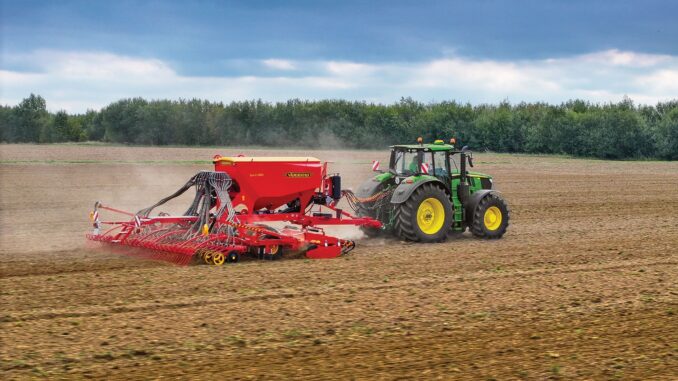
Introduction – John Deere R Series overview
The John Deere R Series is a line of compact and utility tractors designed for heavier yard, small-acreage and light farm work rather than just basic lawn mowing. These machines sit above entry-level lawn tractors in size and capability, with more robust frames, hydraulics and implements, while still being manageable for homeowner and smallholding use.
This guide is written for DIY-oriented owners in the USA and Canada who want clear, symptom‑first troubleshooting, realistic repair advice, and a straightforward maintenance schedule. You can use it as a reference when the tractor will not start, runs poorly, moves strangely, or needs routine service and parts like filters, belts and batteries.
And See:
General overview of the John Deere R Series
Within the John Deere lineup, R Series tractors typically sit in the mid‑range compact and utility segment, offering more power and features than basic lawn tractors but without the sheer size of full farm tractors. They commonly support front loaders, rear implements and mid‑mount mower decks, making them versatile machines for mowing, material handling and light field work.
Key systems you will interact with on a John Deere R Series include the diesel or gasoline engine and fuel system, the cooling system, the hydraulic system (for steering and implements), the transmission and drive axles, the PTO and mower system, and the electrical and safety‑interlock circuits. Understanding how these systems connect will make troubleshooting quicker and safer.
Common service parts R Series owners regularly buy include engine oil filters, fuel filters, hydraulic filters, air filter elements, engine drive belts, mower deck belts, battery, glow plugs or spark plugs (depending on engine type), PTO switches, safety switches, and front/rear work‑light bulbs. Keeping the most common items to hand reduces downtime when the tractor acts up mid‑season.
Troubleshooting approach for John Deere R Series owners
On any John Deere R Series tractor, diagnosis is easiest if you start from the symptom the owner sees, not from guessing a specific failed part. Think in categories like “does it crank?”, “does it move?”, “does the PTO run?” and “does anything feel or sound wrong while operating”.
The main symptom categories for John Deere R Series machines are starting issues, running and power problems, cut-quality or implement performance issues, vibration and unusual noise, overheating and fluid leaks, transmission or drive problems, and electrical or safety‑switch faults. Work through one category at a time, keeping notes on what you observe and which checks you have already performed.
Emergency and immediate repair needs on John Deere R Series
Some faults on a John Deere R Series must be treated as “stop now” issues, because they either make the tractor unsafe to operate or can quickly damage expensive components like the engine or transmission. Examples include severe coolant or oil leaks, loss of steering assist, sudden loss of drive, burning smells, and hard mechanical knocks.
Other urgent faults are electrical or safety-related, such as intermittent PTO engagement, failing park brake switches, or damaged wiring near moving parts. When in doubt, stop the tractor, secure it on level ground, and work through the basic checks before attempting to complete the job.
John Deere R Series starting issues
A starting problem on a John Deere R Series usually appears as either “no crank at all”, “cranks but will not fire”, or “starts only when boosted or after multiple attempts”. This matters because repeated cranking with poor fuel or weak battery can strain the starter and wiring, and using starting aids unsafely can risk fire.
Common causes:
-
Weak or failing battery.
-
Loose or corroded battery terminals and ground connections.
-
Faulty seat, park brake or PTO safety switches preventing crank.
-
Fuel system air ingress or clogged fuel filter.
-
Glow plugs or pre‑heat system issues on diesel R Series tractors.
Basic owner checks:
-
Verify the battery is correctly charged and that terminals are clean and tight.
-
Check that the park brake is set, PTO is off and operator is properly seated.
-
Inspect battery ground strap and main cables for corrosion or broken strands.
-
Confirm fuel level and, if diesel, use the correct bleed procedure after filter changes.
-
Try starting after cycling the pre‑heat/glow plug system per the operator’s manual.
John Deere R Series cut-quality and implement performance problems
For R Series tractors fitted with mower decks or rear implements, owners often report uneven cut, scalping, streaks, poor material discharge, or implements that do not lift as expected. These issues matter because they point to deck setup, hydraulic performance or PTO drive faults that can worsen over time.
Common causes:
-
Dull or damaged mower blades.
-
Incorrect deck level or tire pressure.
-
Clogged discharge chute or packed deck underside.
-
Low hydraulic oil level or air in hydraulic lines affecting lift speed.
-
PTO shaft or coupler wear.
Basic owner checks:
-
Inspect blades for damage and wear; replace or sharpen as needed.
-
Measure deck height at all corners and adjust to recommended settings.
-
Clean the deck underside and discharge chute thoroughly.
-
Check hydraulic reservoir level and look for obvious leaks.
-
Inspect PTO shaft, couplers and safety shields for damage or excessive play.
John Deere R Series vibration and noise
A John Deere R Series that suddenly vibrates or sounds different is telling you something important. New rattles, shudders through the seat, or metallic noises from under the tractor can indicate loose hardware, failing bearings, misaligned shafts or damaged driveline components.
Common causes:
-
Loose engine or deck mounting bolts.
-
Bent blades or shafts.
-
Worn universal joints or PTO shafts.
-
Failing wheel bearings or hub components.
-
Items left on the platform or toolboxes causing resonance.
Basic owner checks:
-
Safely stop, lower all implements, remove the key and let moving parts stop.
-
Inspect blades, deck hardware and visible fasteners for looseness or damage.
-
Check PTO shafts and joints for play, noise or binding.
-
Spin wheels by hand (if safe) and listen for grinding or knocks.
-
Remove loose items from the platform and re‑test.
John Deere R Series overheating and leaks
Overheating or visible fluid leaks on a John Deere R Series tractor must be addressed immediately to avoid engine or transmission damage. Symptoms include temperature gauges spiking, warning lights, steam from the radiator, oily residue under the tractor, or puddles of coolant or hydraulic fluid.
Common causes:
-
Blocked radiator or screen.
-
Low coolant level or failed radiator cap.
-
Split hoses, clamps or seals in coolant or hydraulic circuits.
-
Engine oil leaks at filter, drain plug or gasket surfaces.
-
Transmission or axle seals leaking.
Basic owner checks:
-
Shut the engine down and allow it to cool before opening the hood.
-
Inspect the radiator, screens and side panels for debris and clean gently.
-
Check coolant level once cool and look for white or colored residue around hoses.
-
Inspect engine oil filter and drain plug for leaks; tighten to spec if needed.
-
Look under the tractor for wet areas tracing back to hydraulic lines or seals.
John Deere R Series transmission and drive problems
Drive issues on John Deere R Series tractors show up as poor acceleration, no movement, difficulty engaging ranges, or jerky or noisy travel. Ignoring these can lead to internal transmission or axle damage and, in some cases, unsafe operation on slopes.
Common causes:
-
Low or contaminated transmission/hydraulic oil.
-
Incorrect range selection or selector linkage wear.
-
Failing hydrostatic pedals or mechanical linkages.
-
Damaged drive shafts or couplings.
-
Rear axle or differential problems.
Basic owner checks:
-
Confirm the correct range is selected and that linkages move freely.
-
Check transmission/hydraulic oil level on the dipstick or sight glass.
-
Inspect hydrostatic pedals for binding, damage or debris underneath.
-
Look at visible shafts and couplers for twists, cracks or missing hardware.
-
Test on flat ground at low speed to see if the symptom is consistent.
Electrical and safety problems on John Deere R Series
Electrical faults in a John Deere R Series often appear as intermittent starting, dash lights cutting out, PTO that starts and stops unexpectedly, or warning lights that do not behave normally. Safety‑interlock faults can prevent starting or implement operation altogether.
Common causes:
-
Worn or misaligned seat, brake or PTO safety switches.
-
Damaged wiring looms rubbing on sharp edges or moving parts.
-
Failing ignition switch or relays.
-
Poor ground connections.
-
Aftermarket accessories wired incorrectly.
Basic owner checks:
-
With the key off, visually inspect wiring looms near the seat, frame and PTO area.
-
Check safety switches for secure mounting and obvious damage.
-
Wiggle the key in the ignition and note any flicker of dash lights.
-
Clean main ground connections to bare metal and retighten.
-
Temporarily disconnect non‑factory accessories to see if symptoms change.
John Deere R Series DIY vs dealer repair decision guide
On a John Deere R Series, the practical “line” between DIY and dealer work is usually drawn at jobs requiring special tools, lifting equipment, electronic diagnostics, or opening major assemblies like the engine, transmission, hydraulic pump or steering valve. Routine maintenance and light repairs are realistic for careful owners; deep mechanical or electronic work is best left to experienced technicians.
Good DIY jobs on R Series tractors:
-
Engine oil and filter changes.
-
Air and fuel filter replacement.
-
Battery, glow plug or spark plug replacement.
-
Mower blade changes and deck belt replacement.
-
Greasing pivot points and checking tire pressures.
Advanced DIY or dealer jobs:
-
Internal transmission or hydraulic repairs.
-
Steering and brake system overhaul.
-
Injector or high‑pressure fuel system work.
-
PTO clutch or internal driveline repairs.
-
Complex electrical diagnostics and harness replacement.
Skill level guide:
-
Beginner: Oil changes, air filter replacement, battery checks, greasing, visual inspections.
-
Intermediate: Fuel filter changes, blade and belt replacement, basic wiring repairs, switch replacement.
-
Advanced: Hydraulic and transmission diagnostics, steering and brake repair, internal engine work, full electrical troubleshooting.
Parts information for John Deere R Series – OEM vs aftermarket
Before ordering parts for your John Deere R Series tractor, gather the exact model designation, Product Identification Number (PIN) or serial number, engine model and serial, and details of any mower deck or major attachment fitted. This information ensures you receive parts that match your specific build and production run.
The PIN is particularly important for R Series tractors because Deere often changes specification and part numbers mid‑series or mid‑production year. Engine model and serial will determine filters, glow plugs or spark plugs, and sometimes belts. Deck size and attachment type determine belt lengths, blades, and hardware.
Key John Deere R Series service parts table
Use this table as a starting point and confirm exact numbers for your specific R Series tractor and PIN using official parts diagrams or dealer support.
For belts, safety‑critical components (brakes, steering, PTO clutches) and fit‑sensitive items like filters and hydraulic components, OEM parts are strongly recommended. For consumables such as some filters, blades and batteries, quality aftermarket parts that list the correct cross‑reference for your R Series model and deck are acceptable, as long as you verify compatibility.
John Deere R Series parts diagrams and service manuals
Owners of John Deere R Series tractors have several useful online resources for parts diagrams, operator’s manuals and technical information:
-
John Deere Bookstore – use the official John Deere Bookstore to view operator’s manuals for free and purchase detailed technical manuals covering your R Series tractor.
-
John Deere Parts catalog – the online parts catalog allows you to search your exact model and PIN, view exploded diagrams and confirm OEM part numbers before ordering.
-
John Deere owner’s support and maintenance pages – these pages provide quick reference guides, maintenance interval charts and service videos tailored to many R Series machines.
-
A reputable Deere‑focused parts site – many aftermarket sites host model‑specific pages where you can cross‑reference common wear parts for your particular R Series tractor.
Operator’s manuals are ideal for day‑to‑day use and basic service intervals, while technical manuals provide in‑depth diagnostics, wiring diagrams and step‑by‑step repair procedures. Parts catalogs are your go‑to for confirming bolts, seals, belts and filters before purchasing.
Locating model, serial and engine numbers on John Deere R Series
Model, serial and engine numbers are critical for accurate parts ordering and correct repair information on any John Deere R Series tractor. They tie your machine to specific production runs, component suppliers and configuration choices made at the factory.
To find them:
-
Look for the main identification plate or sticker on the tractor frame, often on the right‑hand side of the frame near the rear wheel or under the cab/seat area. This plate lists the model and PIN/serial number.
-
If you have a mower deck fitted, check the deck shell or a small plate on the top or side of the deck for a model and serial label. Deck size and model affect belt and blade choice.
-
For front loaders or other major attachments, look for a decal or plate on the loader frame or attachment arm listing its model and serial.
-
To find the engine model and serial, look for a stamped or plated tag on the engine block or rocker cover; it may be on the side of the engine, sometimes partially hidden by hoses or wiring.
-
Keep a record of all model and serial numbers in your maintenance log or a note on your phone so you have them readily available when ordering parts or consulting manuals.
Buying John Deere R Series parts online and in stores
A simple strategy works well when buying parts for John Deere R Series tractors: use online resources to identify and price OEM numbers, then decide whether to buy online, from your local dealer, or from a reputable retail store.
-
Online: Use the official John Deere parts catalog or shop site to look up OEM numbers by model and PIN. Once you have the number, you can purchase directly or compare with aftermarket options.
-
Dealer counter: Your local John Deere dealer is best for complex or serial‑specific items, hydraulic components, or when you are unsure which variant your tractor uses. Bring your PIN and part list.
-
Retail stores: Farm and equipment stores often carry common consumables like oil, filters and batteries listed for R Series tractors. Always check packaging to ensure your exact model appears in the compatibility list.
Useful starting points include the official John Deere parts site, your regional John Deere dealer website, and a well‑known agricultural supplies retailer that lists John Deere compatibility by model.
Step‑by‑step fitting guide – common John Deere R Series DIY jobs
The following short guides cover typical DIY service jobs on John Deere R Series tractors. Always park on level ground, lower implements, set the park brake and remove the key before working.
Changing the engine oil and filter on a John Deere R Series
Regular oil changes protect the engine on your R Series from wear and contamination, improving starting, power and longevity.
-
Warm the engine briefly to thin the oil, then shut down and remove the key.
-
Place a suitable drain pan under the engine drain plug and remove the plug, allowing oil to drain completely.
-
Remove the old oil filter, wiping the mounting surface clean.
-
Lightly oil the gasket on the new OEM‑spec filter and install it hand‑tight, then snug to the manufacturer’s recommendation.
-
Refit the drain plug with a new washer if required, then refill the engine with the correct grade and quantity of oil.
-
Start the engine, check for leaks, shut down and recheck oil level, topping up as needed.
Replacing the fuel filter on a John Deere R Series diesel tractor
A clean fuel filter helps prevent hard starting, loss of power and injector wear on diesel‑powered R Series machines.
-
Park safely, shut off the engine and close any fuel shut‑off valve if fitted.
-
Place a rag or small container under the existing fuel filter to catch spills.
-
Remove the old filter or filter element according to the design (spin‑on or cartridge).
-
Install the new filter, ensuring seals are correctly placed and tightened.
-
On diesel models, follow the bleed procedure from the operator’s manual to remove air from the system (usually using a hand primer or cracking injector lines).
-
Start the tractor and let it idle while you check for leaks and smooth running.
Changing mower blades on a John Deere R Series deck
Sharp blades are essential for good cut quality and reduce strain on the mower system of your R Series tractor.
-
Lower the deck fully, set the park brake and remove the key. If necessary, remove the deck for easier access following the manual.
-
Use appropriate supports or blocks to keep the deck stable and safe to work under.
-
With a correct‑size socket or wrench, remove the blade bolts while holding the blade securely with a block of wood.
-
Fit new OEM or properly‑matched blades, ensuring they face the correct direction (cutting edge leading) and torque the bolts to specification.
-
Check all blades for secure fit and clearance, then refit the deck if removed.
-
Test‑mow a small area, listening for unusual noise and checking cut quality.
Replacing the mower deck drive belt on a John Deere R Series
The deck drive belt transfers power from the PTO to the mower blades; a worn belt can cause slippage, poor cut and noise.
-
Lower the deck, remove the key and, if required, remove the deck from the tractor.
-
Note the belt routing around pulleys, idlers and the PTO pulley; take a photo for reference.
-
Release belt tension using the idler or tensioning mechanism described in the operator’s manual.
-
Remove the old belt from all pulleys and inspect them for wear or damage.
-
Fit the new belt along the correct path, making sure it sits fully in each pulley.
-
Reapply tension, check alignment and spin pulleys by hand to ensure smooth movement before test‑running the mower.
Maintenance to prevent recurring John Deere R Series problems
Most of the common faults seen on John Deere R Series tractors are preventable with consistent, basic maintenance. Keeping filters clean, fluids fresh, belts and blades in good condition, and regularly inspecting wiring and hoses dramatically reduces the chance of mid‑season breakdowns.
Focus areas:
-
Starting reliability: Maintain battery charge, clean terminals, replace filters on schedule and check glow plug or spark plug condition.
-
Cut quality and implement performance: Keep blades sharp, adjust deck level, monitor hydraulic oil level and avoid overloading implements.
-
Fire and overheating prevention: Clean radiator screens and deck undersides, avoid oil buildup on engine and exhaust, and fix leaks promptly.
-
Drive performance: Maintain correct fluid levels in transmission and axles, inspect pedals and linkages, and avoid sudden load changes.
-
Electrical reliability: Inspect wiring looms regularly, protect them from chafing, and replace worn switches before they fail.
John Deere R Series maintenance schedule and year‑round checklist
Use the following schedule as a practical framework, then refine it based on the official maintenance chart for your specific R Series tractor model.
Daily / before each use
-
Walk‑around inspection for leaks, loose hardware and damaged wiring.
-
Check engine oil level and coolant level.
-
Verify tire pressures and look for obvious damage.
-
Confirm lights, horn and safety‑interlocks function correctly.
-
Clean radiator screen and air intake screens if operating in dusty conditions.
After roughly 8 hours of operation
-
Clean mower deck underside to prevent buildup.
-
Check hydraulic oil level and look for foaming or discoloration.
-
Grease key pivot points, loader pins and steering components as specified.
-
Inspect belts for glazing, cracks or fraying.
Every 25 hours
-
Check battery terminals and ground connections; clean as needed.
-
Inspect air filter and pre‑cleaner; clean or replace if dirty.
-
Inspect safety switches and linkages for secure mounting and correct operation.
-
Verify wheel lug torque and front axle components for looseness.
Every 50 hours or yearly
-
Change engine oil and filter following the official specification.
-
Replace fuel filter and bleed the system as required.
-
Clean or replace air filter elements according to condition.
-
Inspect and adjust mower deck level, blades and belt tension.
-
Check steering and brake performance; adjust or schedule service as needed.
Every 200 hours (or as specified)
-
Change transmission/hydraulic oil and filter(s) per the official chart.
-
Inspect hydraulic lines, fittings and cylinders for wear and seepage.
-
Check PTO and driveline components, including universal joints and couplers.
-
Perform a full electrical system inspection, including charging voltage and wiring looms.
Seasonal checklist for John Deere R Series tractors (spring, mid‑season, fall)
Spring:
-
Perform full fluid level checks and top up as required.
-
Replace oil and filters if due or if last season’s hours were heavy.
-
Inspect and service blades, belts and deck setup for the mowing season.
-
Test‑run all implements and hydraulics.
Mid‑season:
-
Repeat walk‑around and belt/blade inspections.
-
Check battery health and charging system performance.
-
Clean radiators, screens and deck thoroughly.
-
Address minor leaks or electrical issues before they become major.
Fall:
-
Clean tractor and implements thoroughly.
-
Change engine oil and filters if approaching interval.
-
Treat fuel for off‑season storage, especially diesel in cold climates.
-
Store the R Series tractor under cover if possible, with battery on maintenance charge.
John Deere R Series – repair, upgrade or replace?
For John Deere R Series owners, deciding whether to repair, upgrade or replace depends on overall machine condition, hours, safety and the cost of major repairs versus the benefit of modern features. A well‑maintained R Series tractor with manageable repair needs is worth keeping; a machine with multiple failing systems and severe corrosion may be better replaced.
Repair if:
-
The issue is limited to wear parts like filters, belts, blades, switches or minor leaks.
-
The tractor is structurally sound and has no major frame or axle damage.
-
You have a clear diagnosis and reasonable parts availability.
Upgrade if:
-
You need additional implements, better lighting, improved seating or safety features.
-
You can add options like loader attachments, rear hydraulics or tire upgrades to meet new tasks.
-
The core tractor is solid but could benefit from comfort or efficiency improvements.
Replace if:
-
Multiple major systems (engine, transmission, hydraulics, electrics) are failing or heavily worn.
-
Safety is compromised by frame damage, severe rust or unrepairable components.
-
The cost of repair approaches or exceeds the value of a newer R Series or equivalent tractor.
Expanded troubleshooting FAQ – John Deere R Series (30–35 questions)
1. Why will my John Deere R Series not start?
If your R Series will not start, begin by checking whether it cranks at all or cranks without firing. No crank usually points to battery, wiring or safety‑switch issues, while cranking without starting often indicates fuel delivery or glow plug problems on diesel models. Confirm battery health, safety switch positions and fuel filter condition before moving into deeper diagnostics.
2. Why does my John Deere R Series only start with a booster or jump pack?
Needing a booster suggests the battery is weak, undersized or not charging properly. On R Series tractors, long cranking or glow plug use can further drain an already tired battery. Test the battery with a load tester, inspect terminals and grounds, and check alternator output; replace the battery if it repeatedly fails to hold charge.
3. Why does my John Deere R Series crank slowly?
Slow cranking often comes from a weak battery, dirty terminals, poor ground connections or a failing starter motor. Cold weather increases resistance in diesel engines, making these issues more obvious. Clean all battery connections, verify ground straps, check battery voltage under load and listen for starter noise changes before condemning the starter itself.
4. Why does my John Deere R Series start and then stall?
A start‑then‑stall pattern is commonly linked to fuel delivery issues, such as partially blocked filters, air in diesel lines or water contamination in fuel. It can also relate to safety switches cutting power shortly after movement. Replace fuel filters, bleed the system properly, drain water separators if fitted and check that seat and brake switches are secure and functioning.
5. Why does my John Deere R Series run rough or lack power?
Rough running and low power in R Series tractors typically point to fuel, air or ignition/glow plug problems. Check the air filter for blockage, ensure the fuel filter is clean, and verify that the correct grade of fuel is used. On diesel models, worn injectors or weak glow plugs may need professional testing; on gasoline variants, inspect plugs and ignition components.
6. Why is my John Deere R Series smoking excessively?
Excessive smoke can indicate over‑fueling, poor combustion, oil burning or coolant entering the combustion chamber. Color matters: black smoke suggests too much fuel or restricted air, blue smoke indicates oil burning, and white smoke may point to unburned fuel or coolant. Start with air filter inspection, fuel quality checks and oil level observation; internal engine issues may require dealer support.
7. Why does my John Deere R Series overheat?
Overheating is often caused by blocked radiators, dirty screens, low coolant, faulty caps or failing thermostats. Ensure external radiator fins and screens are clean, check coolant level once the engine is cool, and inspect hoses for leaks or collapse. Persistent overheating after basic cleaning and checks warrants professional diagnostics, as internal cooling system faults can be serious.
8. Why is coolant leaking from my John Deere R Series?
Visible coolant leaks usually come from hoses, clamps, radiator seams or the water pump area. Look for colored residue and damp spots under the tractor and around the engine bay. Tighten clamps gently, replace cracked hoses and monitor the radiator and cap; a leak from the water pump or core may justify dealer repair due to the labor involved.
9. Why is hydraulic oil leaking on my John Deere R Series?
Hydraulic leaks on R Series tractors typically appear at hose connections, fittings, cylinder seals or around the transmission/hydraulic housing. Clean the area and trace the leak source; small weeps may be monitored, but active leaks should be repaired promptly to avoid loss of steering or implement power. Never ignore hydraulic leaks near high‑pressure lines.
10. Why will my John Deere R Series not move in gear?
If the tractor will not move, verify that the correct range is selected and the park brake is released. Check hydraulic/transmission oil level and look for warning lights. On hydrostatic models, blocked filters or internal faults can prevent drive. If the oil level is correct and there are no obvious leaks, avoid forcing the tractor and seek dealer inspection to protect the transmission.
11. Why is my John Deere R Series jerky when driving?
Jerky movement may stem from low or aerated hydraulic oil, worn pedals or linkages, or issues within the transmission. Check fluid levels and look for bubbles or discoloration. Inspect pedals for binding and free movement, and ensure nothing obstructs their travel. Persistent jerking under load may need professional diagnosis to rule out internal wear.
12. Why does my John Deere R Series lose drive after warming up?
Loss of drive once warm can indicate fluid breakdown, filter blockage or internal transmission wear. As oil heats and thins, marginal components show their weaknesses. Replace hydraulic/transmission filters on schedule, use the correct oil grade, and monitor whether symptoms change immediately after service; if not, deeper transmission testing is likely required.
13. Why does the steering feel heavy on my John Deere R Series?
Heavy steering often results from low hydraulic oil, air in the hydraulic system, worn steering cylinders, or mechanical steering linkage issues. Check hydraulic level first, then inspect front axle and steering joints for lubrication and wear. If steering remains heavy with correct fluid and well‑greased joints, steering hydraulics or pump performance should be evaluated.
14. Why does my John Deere R Series make a whining noise when moving?
A whining noise while driving is common in hydrostatic transmissions but should not be excessively loud. Over‑revving, low fluid, or airflow changes around the transmission can affect noise. Check fluid level, ensure the correct oil type is used, and operate within recommended speeds and loads. Sudden changes in noise level or pitch warrant professional attention.
15. Why is my John Deere R Series PTO not engaging?
When the PTO fails to engage, look first at the PTO switch, safety‑interlock conditions and wiring to the PTO clutch. Ensure the seat and brake switches are working, and that the PTO switch clicks positively. If power reaches the clutch but it does not engage, the clutch itself may be worn or have incorrect air gap, calling for professional adjustment or replacement.
16. Why does my John Deere R Series PTO drop out under load?
PTO drop‑out under load can indicate a weak PTO clutch, voltage loss to the clutch, or belt slippage on the deck. Check electrical connections to the clutch, inspect belts for tension and wear, and ensure the engine maintains proper RPM under load. If problems persist with good belts and voltage, clutch rebuild or replacement may be necessary.
17. Why is cut quality poor on my John Deere R Series mower deck?
Poor cut quality usually stems from dull blades, incorrect deck leveling or improper ground speed. Inspect blades for damage or rounding, adjust deck height and level according to the manual, and mow at sensible speeds. Cutting too fast or with a saturated deck underside will result in uneven cutting and clumping.
18. Why is my John Deere R Series scalping the lawn?
Scalping occurs when the deck rides too low or follows ground contours poorly. Verify tire pressures, adjust deck height and ensure anti‑scalp wheels (if fitted) are set correctly. Avoid mowing at the lowest possible setting unless the lawn is very smooth; raising the deck slightly often eliminates scalping while preserving appearance.
19. Why is my John Deere R Series leaving uncut strips?
Uncut strips can be caused by misaligned blades, incorrect deck level, worn blade tips or operator overlap errors. Make sure blades are installed correctly and not bent, confirm deck level side‑to‑side and front‑to‑back, and slightly overlap passes rather than trying to mow with perfect precision. If the problem persists in the same zone, inspect that area of the deck for damage.
20. Why is my John Deere R Series mower deck noisy?
Deck noise often results from worn bearings, loose pulleys, failing idlers or bent blades striking the deck. With the tractor off and key removed, spin pulleys by hand and listen for grinding or roughness. Check blade clearance and mounting hardware. Replace noisy bearings promptly; running them to failure can damage the deck shell.
21. Why does the mower belt keep coming off my John Deere R Series?
Belts that repeatedly jump off usually indicate misaligned pulleys, worn or incorrect belt, or missing belt guides. Confirm that the belt matches your deck model, inspect pulleys for wobble or damage, and ensure all belt guides and guards are present and correctly adjusted. Replace damaged pulleys and use OEM‑spec belts.
22. Why is my John Deere R Series vibrating badly when mowing?
Severe vibration when mowing points to bent blades, damaged spindles or major deck imbalance. Stop immediately, remove the key and inspect blades for bends or missing chunks. Check spindle shafts for straightness and pulleys for balance. Do not continue mowing with excessive vibration, as it can damage spindles, bearings and frame components.
23. Why is my John Deere R Series battery always going flat?
A battery that regularly discharges can be undersized, old, or failing, but parasitic drains and charging system issues are also common. Test alternator output, inspect wiring for shorts or aftermarket accessories wired directly to the battery, and confirm the battery rating matches R Series requirements. Replace both the battery and any faulty charging components as needed.
24. Why are warning lights flickering on my John Deere R Series?
Flickering warning lights often suggest loose connections, failing ignition switches or marginal battery/ground paths. Check connectors behind the dash, ignition switch feel and battery terminals. Secure any loose wiring looms and monitor whether flickering corresponds to vibration or rough ground; targeted tightening may resolve many cases.
25. Why does my John Deere R Series shut off suddenly?
Sudden shutdowns can be caused by safety‑switch activation, fuel starvation or electrical faults. Confirm seat, brake and PTO switch positions and wiring. Look for clogged fuel filters or restricted fuel lines. Wiring rubbing against moving parts may intermittently short or break; inspections around the frame and engine bay can reveal the culprit.
26. Why does my John Deere R Series glow plug light stay on or not come on?
On diesel R Series tractors, glow plug indicators that misbehave may signal relay, switch or wiring problems. If the light never comes on, glow plugs may not receive power, making cold starts hard. If it stays on too long or at odd times, control circuitry may be at fault. Basic owners can check fuses and visible wiring; more detailed diagnostics are a dealer job.
27. Why does my John Deere R Series loader lift slowly or not at all?
Loader performance depends on hydraulic pressure, flow and correct valve operation. Slow or weak lifting often means low hydraulic oil, clogged filters or worn pump components. Check fluid levels first, inspect for leaks and ensure quick‑couplers are fully engaged. If the loader still struggles, hydraulic testing is needed to avoid further component damage.
28. Why is my John Deere R Series three‑point hitch not lifting correctly?
A sluggish or non‑lifting three‑point hitch suggests hydraulic issues, incorrect control settings or mechanical binding. Verify draft and position control levers are set appropriately, inspect linkage for rust or mechanical interference, and check hydraulic oil level. Internal hitch valve or cylinder problems are usually dealership repairs.
29. Why are my John Deere R Series tires wearing unevenly?
Uneven tire wear is typically due to incorrect pressure, misalignment, overloaded use or frequent operation on rough surfaces. Check and set pressures according to the manual, avoid prolonged travel with heavy front loader loads without counter‑weighting, and inspect steering and axle components for looseness. Correcting the underlying cause early prevents premature tire replacement.
30. Why does my John Deere R Series feel unstable on slopes?
Instability on slopes may result from improper ballast, incorrect tire pressures, high deck or implement position, or operator technique. Ensure the tractor is ballasted appropriately for loader or implement use, follow the manual’s guidance on slope angle limits, and travel slowly with low implements. If the tractor continues to feel unstable, reassess your use case and potential upgrades like wider tires.
31. Why is my John Deere R Series making a clunking noise in the rear?
Rear clunks often come from loose hitch components, worn drawbar hardware, differential issues or axle problems. Inspect hitch pins and brackets, check drawbar bolts, and listen carefully while moving slowly. If internal differential or axle noises are suspected, avoid heavy loads and seek professional diagnosis.
32. Why does my John Deere R Series horn or lights not work?
Non‑functioning horn or lights may result from blown fuses, damaged switches or wiring, or failed bulbs. Check relevant fuses and replace any that have blown, then test switches for positive feel and continuity if you have tools. Replace bulbs with the correct type and inspect wiring around the front and rear of the tractor for damage.
33. Why is my John Deere R Series seat switch causing problems?
Seat switches on R Series tractors can become worn or misaligned, causing unexpected shutdowns or starting problems. If small movements in the seat cause the tractor to cut out, inspect the switch mounting, springs and wiring. Minor adjustments or replacement of the switch usually restores consistent operation; never bypass safety switches as a permanent fix.
34. Why does my John Deere R Series engine make knocking noises?
Engine knocking can indicate serious problems such as bearing wear, fuel timing issues or piston damage. If you hear consistent knocks, stop using the tractor and avoid high loads. Check oil level and quality, listen for changes with RPM, and consult a dealer quickly; internal engine repairs are not typical DIY work.
35. Why does my John Deere R Series service light or reminder come on?
Service reminders are designed to prompt routine maintenance at specific hour intervals. When a service light appears, consult the operator’s manual to see which tasks are due, such as oil changes, filter replacements or inspections. Reset the reminder only after completing the recommended service so you maintain the intended maintenance rhythm.