
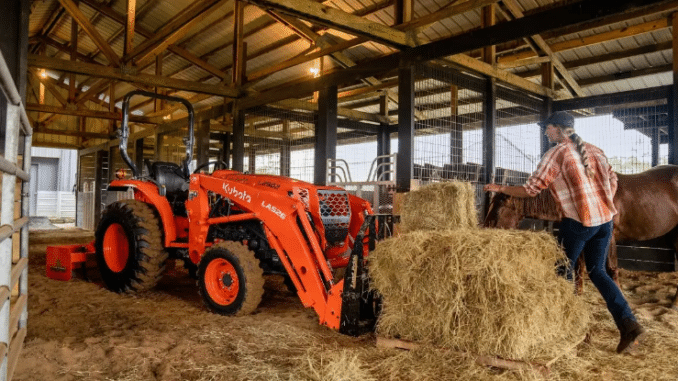
Kubota Loaders, Backhoes, Mower Decks and Implements: Model and Serial Number Identification Guide
A Kubota implement serial number lookup starts with the attachment’s own identification—not simply the serial number of the tractor carrying it.
A loader, backhoe, mower deck, snowblower, or other implement may have its own model designation, serial number, and parts catalog. Those details should be recorded separately from the tractor’s identification.
There is no single identification-plate position that applies to every Kubota attachment. Start with the exact implement model and its identification diagram rather than assuming that all plates are mounted on the same side or in the same location.
This guide explains how to identify Kubota attachments, distinguish model and serial information, interpret parts-catalog restrictions, and prepare accurate replacement-parts and compatibility enquiries.
Why Attachment Identification Matters
A tractor and an attachment are related pieces of equipment, but they are not necessarily identified by the same number.
The tractor serial number identifies the tractor. The attachment identification establishes which loader, backhoe, deck, or other implement you are investigating.
That distinction matters when ordering components such as:
-
Loader cylinders.
-
Backhoe linkage parts.
-
Mower belts.
-
Blades and spindle assemblies.
-
Implement gearboxes.
-
Snowblower components.
-
Attachment mounting hardware.
The tractor model is useful supporting information, but it does not automatically establish the identity of every attachment currently fitted.
Do Not Assume the Attachment Is Original
For a used machine, establish what is fitted now.
Keep any information about the original sale separate from the identification on the installed attachment.
A clear equipment record distinguishes:
Tractor supplied with: [documented original equipment]
Attachment currently fitted: [verified present identification]
Replacement history: [documented information or not established]
Do not turn an assumption about the original package into a confirmed parts application.
Kubota Attachment Identification: Quick Guide
| Equipment | Primary information to collect | Supporting information |
|---|---|---|
| Front loader | Complete loader model and serial number, where provided | Tractor model, serial number, and mounting arrangement |
| Backhoe | Complete backhoe model and serial number, where provided | Tractor identity and installation details |
| Mid-mount mower deck | Complete deck model and serial number, where provided | Tractor or mower identity |
| Rear-mounted mower | Implement manufacturer, model, and serial number | Tractor and PTO application details |
| Snowblower | Complete implement model and serial number | Mounting and drive-equipment identification |
| Broom or blade | Complete implement model and serial number | Carrier machine and mounting system |
| Powered attachment | Manufacturer, model, and serial number | Hydraulic or PTO requirements specified by the manufacturer |
Use this table to organize an enquiry. It is not a compatibility chart.
Where Are Kubota Attachment Serial Numbers Located?
Use the identification illustration in the exact attachment’s operator’s manual.
Do not assume that a location mentioned for one loader, backhoe, or deck applies to another.
For an initial inspection, examine accessible permanent surfaces and identification labels on the attachment itself. Record what you find without assigning an unverified meaning to every marking.
What to Look For
Useful identification may include:
-
Manufacturer name.
-
Complete model designation.
-
Serial-number heading.
-
Product identification.
-
Specification information.
-
A barcode.
-
Safety or certification information.
Read the entire label.
The largest printed number is not automatically the attachment serial number.
Identification Plate Versus Component Marking
A cylinder, gearbox, valve, or casting may have its own markings.
Those numbers can support a parts enquiry, but they do not necessarily identify the complete attachment.
For example:
Number found on lift cylinder: [number]
Loader model: [model]
Loader serial number: [number or not established]
Keep those fields separate.
How to Inspect Attachment Identification Safely
An identification search should not require working beneath unsupported equipment.
Prepare the Machine
Follow the parking and isolation instructions for the tractor and attachment.
As applicable:
-
Park on firm, level ground.
-
Lower the loader and other implements fully.
-
Disengage the PTO.
-
Place controls in the prescribed parked positions.
-
Apply the parking brake.
-
Stop the engine and remove the key.
-
Allow hot components to cool.
Do not rely on hydraulic controls alone to protect you beneath raised equipment.
Inspect Without Unnecessary Disassembly
Begin with visible identification.
Use a torch, inspection mirror, or safely positioned camera where necessary.
Do not:
-
Disconnect hydraulic lines.
-
Remove mounting pins.
-
Detach a backhoe.
-
Tilt or lift a mower.
-
Remove guards.
-
Raise loader arms.
Those tasks require their own model-specific procedures and should not be undertaken merely because a general description suggests a label may be hidden.
Clean Gently
Remove loose dirt with a soft cloth or brush.
Avoid grinding, sanding, heavy scraping, strong solvents, or pressure-washing directly at a deteriorated label.
If paint or corrosion prevents reading the identification, preserve the area and request advice before attempting restoration.
Kubota Front Loader Identification
For a front loader, record the complete loader model and any serial identification provided.
Keep the tractor information alongside it.
A useful loader record includes:
Loader manufacturer:
Complete loader model:
Loader serial number:
Tractor model:
Tractor serial number:
Mounting or installation details:
Photographs retained:
Do not shorten the loader designation when selecting documentation.
Loader Model Versus Tractor Model
A tractor described as an L2502 and a loader described as an LA526 have different model identities.
Likewise, a BX tractor and an LA-series loader should be recorded separately.
These examples illustrate the distinction between machine and attachment identification. They are not a general statement that a particular loader fits every tractor in a family.
Loader Cylinder Enquiries
For a lift or bucket-cylinder repair, provide:
-
Loader model.
-
Loader serial number.
-
Cylinder location and function.
-
Cylinder markings.
-
Photographs of the complete cylinder.
-
Description of the required repair.
Make clear whether you need:
-
A seal kit.
-
A rod assembly.
-
A complete cylinder.
-
Mounting hardware.
-
Another component.
Do not assume a number stamped on the cylinder is the loader serial number.
Loader Valve and Hose Enquiries
Describe the assembly in context.
For example:
Hose connected between the loader control valve and the lift-cylinder circuit.
Include photographs showing both the component and its installation.
Do not identify a replacement hose solely by its approximate length. Ask the supplier to confirm the appropriate assembly for the application.
Buckets and Quick-Attach Equipment
Record any separate identification available on the bucket or attachment interface.
Do not assume that the loader model alone proves compatibility with every bucket, coupler, or powered attachment.
Compatibility should be confirmed for the actual combination of loader, mounting system, and attachment.
Kubota Backhoe Identification
For a backhoe, collect the complete model and serial information where provided.
Retain the tractor identity and installation details as supporting information.
Backhoe Identification Record
Complete backhoe model:
Backhoe serial number:
Tractor model:
Tractor serial number:
Mounting equipment identification:
Bucket or coupler identification, where available:
Photographs retained:
Do not use a number found on a hydraulic cylinder as the complete backhoe identifier without confirmation.
BH and BT Model Designations
Kubota backhoe documentation includes different model families and variants.
Retain the full designation, including letters following the main number.
For example, a catalog listing for a model with an additional suffix should not automatically be replaced by the entry for the shorter base name.
If several entries appear similar, ask the dealer which applies to the identification on your equipment.
Backhoe Linkage Parts
For linkage enquiries, describe the affected area:
-
Boom.
-
Dipper.
-
Bucket linkage.
-
Stabilizer.
-
Swing assembly.
-
Mounting system.
Provide photographs of the assembly in place.
A plain-language description is better than selecting an unfamiliar parts term at random.
Pins, Bushings and Hardware
Give the backhoe model and serial number first.
Add measurements only where requested, and identify the exact joint being repaired.
Do not treat the diameter of a worn pin as sufficient proof of the required replacement.
Ask whether the repair requires associated:
-
Bushings.
-
Seals.
-
Spacers.
-
Retainers.
-
Fasteners.
Tractor Loader Backhoe Machines
For a purpose-built tractor-loader-backhoe machine, record the complete machine identity and any separately provided loader or backhoe identification.
Do not assume that integration removes the need to distinguish assemblies during a parts enquiry.
Tell the dealer whether you are investigating the base machine, loader, backhoe, or a separately fitted attachment.
Kubota Mower-Deck Identification
Record the complete mower-deck model, not simply its cutting width.
If a deck is marked with a designation such as RCK60B-22BX, preserve the entire designation. Do not reduce it to “60-inch Kubota deck.”
The full identity is the useful starting point for selecting documentation.
Finding the Deck Identification
Use the deck’s identification illustration where available.
Inspect accessible labels and permanent surfaces without placing yourself beneath unsupported equipment.
Do not remove covers or lift the deck solely because a photograph of another model shows a label in a different position.
Deck Serial Number Versus Tractor Number
Keep separate fields:
Tractor or mower model:
Machine serial number:
Complete deck model:
Deck serial number, where provided:
The tractor number does not automatically establish which deck is currently installed.
Belt Identification
For a belt enquiry, supply:
-
Complete deck model.
-
Deck serial number.
-
Machine identification.
-
Existing belt markings.
-
Belt function.
-
Photographs of the relevant assembly.
Distinguish a deck belt from other drive belts.
Do not rely solely on measurements taken from a worn or damaged belt.
Blade Identification
Provide the deck model and any readable blade markings.
Ask the supplier to confirm:
-
Correct blade application.
-
Quantity required.
-
Associated mounting hardware.
-
Any relevant application notes.
Do not select blades solely because the overall length appears similar.
Spindles and Gearboxes
Record visible component markings, but keep them separate from confirmed orderable part numbers.
Photograph:
-
The installed component.
-
Its label or markings.
-
Mounting arrangement.
-
Relevant surrounding assembly.
Ask for confirmation before choosing a replacement based on appearance.
Rear-Mounted Mowers and Rotary Cutters
A rear-mounted mower or rotary cutter should be identified by its own manufacturer and model.
Do not assume it is Kubota-manufactured because it is attached to a Kubota tractor.
Your record should include:
Implement manufacturer:
Complete model:
Serial number:
Tractor model:
PTO or drive information specified for the implement:
Photographs retained:
Use the implement’s own documentation for service and parts.
Gearbox Identification
For a gearbox enquiry, provide both implement and gearbox information.
Do not assume that a gearbox label alone establishes the complete mower application.
Ask the supplier to confirm the appropriate assembly or service parts for the implement.
PTO Driveline Enquiries
Identify the implement and provide the driveline information requested by the supplier.
Do not choose a replacement solely from appearance or a single length measurement.
Compatibility and installation requirements should be checked against the equipment documentation.
Snowblowers, Brooms, Blades and Other Implements
Kubota implement catalogs contain separate models and application qualifications for equipment such as snowblowers, rotary brooms, blades, and other attachments.
Record the full implement designation and serial number where provided.
Snowblower Identification
Keep separate records for:
-
Snowblower.
-
Carrier tractor.
-
Mounting equipment.
-
Drive equipment.
-
Other separately identified assemblies.
A number on a mounting component should not automatically be treated as the snowblower serial number.
Brooms and Sweepers
Identify the complete broom or sweeper before ordering bearings, brush components, drive parts, or hydraulic items.
Include the serial number where provided and describe the assembly requiring attention.
Blades and Mounting Assemblies
Distinguish the blade itself from its mounting system and any hydraulic equipment.
Provide photographs of the actual installation rather than assuming that every blade fitted to the tractor uses the same mounting parts.
Understanding Kubota Parts-Book Columns
A parts book may include several columns that must be read together.
| Column | General meaning |
|---|---|
| Reference number | Connects the illustration to the parts list |
| Part number | Identifies the listed service part at publication |
| Part name | Describes the component |
| Quantity | Shows the listed quantity for that assembly |
| Serial number | Restricts application to a particular equipment range |
| Interchangeability | Explains whether listed alternatives can replace one another |
| Remarks | Provides additional application information |
Read the instructions included with the specific parts book.
Symbols and presentation can differ between publications.
Reference Number Is Not the Order Number
A number beside a drawing identifies the item within the illustration.
Use the corresponding parts-list entry to establish the proposed orderable part number.
Do not send a supplier only “item 12” without naming the catalog and assembly.
Serial-Number Range Symbols
Common notation includes:
-
Greater than or equal to a stated number.
-
Less than or equal to a stated number.
-
A bounded range.
-
“And up.”
-
Other application wording.
Read the boundary carefully.
For illustration only:
| Hypothetical note | Meaning |
|---|---|
| Serial 50000 and up | Applies from 50000 onward |
| Up to serial 49999 | Applies through 49999 |
| Serial 50000–59999 | Applies within the stated range |
These are invented examples, not actual Kubota application data.
Interchangeability and Replacement Parts
Do not assume that two listed components are interchangeable simply because they appear beside each other.
Parts-book instructions may distinguish:
-
Parts that work across earlier and later serial ranges.
-
Parts that are not interchangeable.
-
Replacements permitted in one direction but not the other.
Read the exact symbol definitions in that publication.
Ask About Associated Components
Where an updated part is proposed, ask:
Can this replacement be fitted individually, or does the application require additional components?
Request confirmation of any:
-
Seals.
-
Spacers.
-
Fittings.
-
Fasteners.
-
Brackets.
-
Associated assemblies.
Keep the supplier’s confirmation with your equipment record.
Market and Country Restrictions
Some parts-book remarks identify country-specific applications or exclusions.
Do not ignore these notes.
Provide the original market where known and the country where the equipment is currently used.
For imported equipment, ask:
Does this catalog cover the exact model and market version shown on my implement?
A similar model name or appearance is not sufficient confirmation.
Checking Attachment Compatibility
Identification and compatibility are related but different questions.
First establish what the attachment is. Then confirm whether it is approved for the intended machine and installation.
A compatibility enquiry may need:
-
Tractor model and serial number.
-
Attachment model and serial number.
-
Mounting-system identification.
-
Drive or hydraulic requirements.
-
Relevant configuration details.
-
Installation photographs.
Do not assume compatibility because an attachment can be physically connected.
Use the applicable documentation and request confirmation of the complete installation requirements.
Missing or Unreadable Attachment Identification
Partly Readable Label
Preserve the uncertainty.
For example:
Model: [readable designation]
Serial transcription: 31?67
Unclear character: Third position
Photograph retained: Yes
Do not repeatedly alter the character until a search returns a plausible result.
Missing Plate
Check:
-
Purchase invoices.
-
Delivery paperwork.
-
Earlier service records.
-
Parts invoices.
-
Previous photographs.
-
Available dealer records.
Photograph the complete attachment and distinctive assemblies.
Ask what can be established and what remains uncertain.
Do Not Substitute the Tractor Number
A tractor serial number is useful supporting information, but it is not a recovered attachment serial number.
Keep the missing field marked “not established.”
Buying a Used Kubota Attachment
Before purchase, request:
-
Complete model identification.
-
Readable serial information, where provided.
-
Photographs of the complete attachment.
-
Relevant purchase or service documents.
-
Details of missing mounting or drive equipment.
-
Information about modifications or major repairs.
Ask What Is Included
Clarify whether the sale includes the required:
-
Mounting equipment.
-
Brackets.
-
Pins.
-
Drive components.
-
Controls.
-
Hydraulic connections.
-
Guards.
-
Other model-specific installation parts.
Do not assume that the visible attachment constitutes a complete installation package.
Separate Identity from Condition
A readable identification plate does not establish mechanical condition.
Inspect wear, damage, repairs, operation, and completeness separately.
Confirm compatibility before treating the attachment as suitable for your tractor.
Common Identification Mistakes
Using the Tractor Number for Every Attachment
Record the identity of the item being repaired.
Shortening the Model
Retain suffixes and the complete designation.
Treating Cutting Width as a Model
A nominal deck width is not a complete identity.
Confusing Casting and Part Numbers
Keep visible markings separate from confirmed orderable references.
Ignoring Serial Restrictions
Read the relevant range before selecting a component.
Ignoring Interchangeability Notes
An alternative part is not necessarily a direct replacement in both directions.
Assuming the Attachment Is Original
Identify what is currently installed.
Assuming the Attachment Is Kubota-Manufactured
Record the manufacturer shown on the implement.
Kubota Attachment Record Template
Attachment Identity
Equipment type:
Manufacturer:
Complete model:
Serial number, where provided:
Identification location:
Photographs retained:
Original market, if known:
Carrier Machine
Tractor or mower model:
Machine serial number:
Configuration details:
Mounting-system identification:
Drive and Components
Drive-equipment identification:
Hydraulic component markings:
Gearbox identification:
Other separately identified assemblies:
Ownership and Service
Purchase date:
Seller or supplying dealer:
Invoice reference:
Known repairs:
Confirmed parts references:
Application restrictions:
Unresolved questions:
Dealer Enquiry Template
Subject: Kubota attachment identification and parts enquiry
Attachment manufacturer:
Complete attachment model:
Attachment serial number:
Carrier-machine model:
Carrier-machine serial number:
Original market, if known:
Current country of operation:Component required:
Location on the attachment:
Existing markings:
Candidate catalog or part reference:I have attached photographs of the complete attachment, identification plate, installed component, and relevant documents.
Please confirm the correct application, orderable part number, and any additional components required.
Uncertain identification has been marked rather than guessed.
Kubota Attachment Identification FAQ
Do Kubota attachments have separate model numbers?
Many loaders, backhoes, mower decks, and other implements have their own model designations and catalog entries. Record that information separately from the tractor.
Is every attachment serial plate in the same place?
No universal location should be assumed. Use the exact attachment’s identification illustration.
Can I order loader parts using only the tractor model?
Provide the loader identity as well. The tractor is supporting information, not a substitute for identifying the loader.
Is a mower’s cutting width enough?
Do not rely on width alone. Record the complete deck model and available serial information.
What does a serial-number restriction mean?
It limits the listed application to the specified equipment range. Follow the exact boundary wording.
Are similar-looking parts interchangeable?
Not necessarily. Read the interchangeability notes and request application confirmation.
What if the attachment plate is missing?
Review records and photographs, then ask a dealer what can be established. Keep unresolved fields marked as unknown.
Does identification prove compatibility?
No. Confirm the complete attachment, mounting, drive, and carrier-machine application separately.
Conclusion
Identify the attachment itself before selecting parts or assessing compatibility. Keep the tractor details alongside the loader, backhoe, deck, or implement information, but do not treat their numbers as interchangeable.
Record the full model, preserve serial-number uncertainty, and read catalog ranges, remarks, and interchangeability notes together. Where the application remains unclear, obtain confirmation before ordering or installing a replacement.