
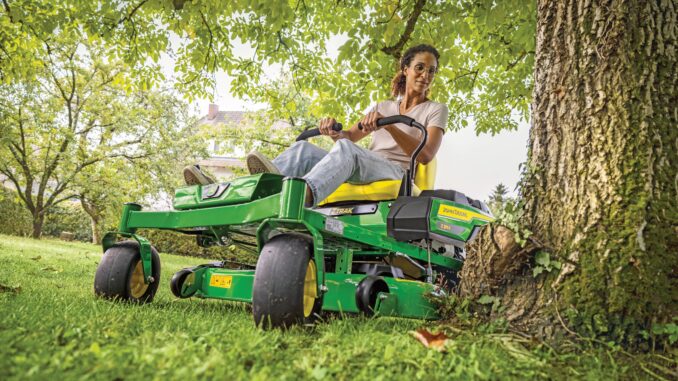
Introduction to the John Deere Z545R
The John Deere Z545R is a residential zero‑turn mower built for larger home lawns and acreages, combining a 48‑ or 54‑inch mower deck with a high‑capacity V‑twin EFI engine and dual hydrostatic transmissions. It is aimed at homeowners who want faster mowing, better cut quality, and more comfort features than entry‑level ZTrak models.
This guide focuses on practical, DIY‑friendly repair, troubleshooting, and maintenance for the John Deere Z545R, with clear boundaries on when to stop and involve a dealer. You will find symptom‑based troubleshooting, common failure points, key service parts and part numbers, links to manuals and diagrams, and a large FAQ section tailored to the Z545R.
John Deere Z545R model overview
The John Deere Z545R sits near the top of Deere’s residential Z500 series, above lighter Z300 models and below the fully commercial Z900 line. It is powered by a high‑displacement EFI V‑twin engine driving dual hydrostatic transaxles, with a heavy-duty mower deck and optional collection and mulching packages.
For most owners, the Z545R is used to maintain 1–5 acres of lawn, fields, and rougher grass where maneuverability and mowing speed matter. The combination of a fabricated or heavy-duty deck, higher blade tip speed, and zero‑turn steering makes it ideal for home acreages, orchards, tree‑lined lawns, and properties with lots of landscaping obstacles.
Key systems on the John Deere Z545R
To troubleshoot and service a John Deere Z545R effectively, it helps to think in terms of systems instead of individual parts. The main systems you will deal with are:
-
Engine and fuel system (EFI V‑twin, fuel pump, fuel filter, injectors)
-
Air intake and cooling (dual‑stage air filter, shrouds, cooling fins, engine fan)
-
Electrical starting and safety interlock system (starter, battery, fuses, seat and control‑arm switches, PTO switch)
-
Mower deck and blade drive (deck shell, spindles, blade set, deck belt, idler pulleys, tensioner)
-
Traction drive and hydrostatics (drive belt, left/right transaxles, control linkage, parking brake)
Within these systems, owners most often replace consumables such as:
-
Engine oil and oil filter
-
Engine air filter primary/secondary elements
-
Fuel filter and spark plugs
-
Mower blades (full blade sets)
-
Mower deck drive belt and idler pulleys
-
Traction drive belt (engine to transaxles)
-
Seat switch, PTO switch, and starter relay
-
Battery (12 V lawn and garden or U1‑style)
Using your product identification number (PIN) and deck size, you can look up the exact OEM numbers for the Z545R’s belts, blades, filters, and common electrical parts.
Troubleshooting approach for the John Deere Z545R
When diagnosing a John Deere Z545R, always start with the symptom the owner sees, then work back through each system. Don’t jump straight to “bad engine” or “bad hydro” without checking basic fuel, spark, and safety interlock conditions.
For this mower, most owner‑level troubleshooting falls into these symptom groups:
-
Starting issues (no‑crank, click only, cranks but won’t start)
-
Running issues (stalls, surging, running on one cylinder, black or white smoke)
-
Cut quality problems (uneven cut, scalping, stragglers, uncut strips)
-
Vibration and noise (deck vibration, rattles, belt squeal)
-
Overheating and leaks (oil leaks, fuel leaks, engine running hot)
-
Transmission/drive problems (won’t move, weak drive, pulls to one side)
-
Electrical and safety switch issues (PTO won’t engage, engine dies when blades engaged, intermittent shutdown)
Work through each category using simple, safe checks first (fuel level, filter blockage, loose or damaged wiring, belt condition) before considering deeper engine or hydraulic failures.
John Deere Z545R emergency and immediate repair needs
Some problems on a John Deere Z545R must be addressed immediately because they can cause injury or rapid damage to expensive components. The sections below highlight what to watch for and what to check first.
Starting issues on a John Deere Z545R
Starting problems range from a total no‑crank condition to intermittent starting or an engine that cranks but never fires. They matter because repeated cranking can overheat the starter, flatten the battery, and leave you stranded mid‑season.
Common causes:
-
Parking brake not set or control levers not in neutral
-
Faulty seat switch or control‑arm safety switch
-
Weak or failing battery, corroded battery terminals
-
Blown fuse or faulty starter relay/ignition switch
-
Fuel shutoff closed, empty tank, or water/contamination in fuel
Basic checks:
-
Confirm parking brake is set and both steering levers are fully out in the park position.
-
Verify the PTO switch is fully disengaged and you are seated when starting.
-
Check battery terminals for corrosion, tightness, and damaged cables; charge or test the battery.
-
Inspect the fuse block and replace any blown fuses with the correct rating.
-
Listen for the fuel pump priming when you turn the key to “run”; if silent, check the fuel system and safety circuits.
Cut‑quality problems on the John Deere Z545R
Cut quality issues show up as uneven grass height, uncut strips between passes, scalping on slopes or bumps, or a ragged cut that looks torn rather than clean. Left uncorrected, these symptoms can stress the grass and damage the deck and spindle bearings.
Common causes:
-
Dull, bent, or mismatched blades
-
Wrong blade type for conditions (bagging vs mulching vs high‑lift)
-
Deck not leveled side‑to‑side and front‑to‑back
-
Clogged underside of deck with packed grass buildup
-
Incorrect tire pressures causing deck tilt
Basic checks:
-
Inspect blades for sharpness, bends, and nicks; replace as a matched set if damaged.
-
Check front and rear tire pressures and adjust to the recommended PSI.
-
Clean the underside of the deck thoroughly; remove built‑up grass and debris.
-
Use the deck‑leveling procedure (per owner’s manual) to set side‑to‑side and front pitch correctly.
-
Verify you are mowing at the correct ground speed and engine at full throttle.
Vibration and noise from the John Deere Z545R deck
Excessive vibration or abnormal noise usually comes from the deck, and is important to address quickly to avoid spindle failure or belt damage. Typical signs are a “buzzing” steering wheel, vibration in the seat and foot platform, or rattling and squealing sounds when the PTO is engaged.
Common causes:
-
Bent mower blade or unbalanced blade set
-
Worn spindle bearings or loose spindle pulley nut
-
Damaged deck belt or seized idler pulleys
-
Debris wrapped around spindles or jammed in pulleys
Basic checks:
-
Safely disable the mower (key off, plugs off, blades stopped) and inspect each blade for bends and damage.
-
Spin each blade by hand with the deck raised and engine off; feel for roughness or play in spindle bearings.
-
Check the deck belt and idler pulleys for cracks, fraying, or seized bearings.
-
Remove any twine, wire, or debris wrapped around spindles and pulleys.
-
If vibration persists with new blades and good pulleys, consider dealer inspection for spindle or crankshaft issues.
Overheating and fluid leaks on the Z545R
Overheating and visible leaks are never “minor” on a John Deere Z545R; running hot can damage the engine, while oil or fuel leaks are both fire risks and environmental hazards. Address these issues before putting the mower back into service.
Common causes:
-
Blocked cooling fins or debris packed around engine shrouds
-
Oil overfilled or severely low
-
Fuel filter or hose connections leaking
-
Valve cover, oil filter, or drain hose not sealed correctly
Basic checks:
-
Shut the mower down immediately if you see smoke, smell burning oil, or notice fuel dripping.
-
Clean grass clippings and debris from around the engine, cooling fins, and muffler guards.
-
Check the engine oil level and look for milky, gritty, or burnt oil.
-
Inspect fuel lines, filter, and connections for wetness or staining.
-
Tighten or replace leaking filters or drain hoses; if leaks persist from the engine case, involve a dealer.
Drive and transmission problems on the John Deere Z545R
Drive issues show up as the mower refusing to move, moving weakly, or pulling noticeably to one side when both levers are pushed equally. Ignoring these symptoms can lead to premature hydrostatic transmission failure.
Common causes:
-
Parking brake still partially engaged
-
Traction drive belt worn, loose, or off the pulleys
-
Transaxle bypass valves open (transport mode)
-
Low or contaminated hydraulic oil (sealed systems usually dealer‑service only)
-
Linkage misadjustment between levers and transaxles
Basic checks:
-
Confirm the parking brake is fully released and bypass valves are closed per the manual.
-
Inspect the traction drive belt for glazing, cracking, or derailment.
-
Check for sticks, rope, or debris wedged around transaxle pulleys.
-
Test drive on flat ground and note whether the problem is one side only or both.
-
If the mower still moves weakly or jerks after basic checks, schedule dealer service for the hydrostats.
Electrical and safety problems on the Z545R
Electrical and safety interlock issues on a John Deere Z545R may cause random shut‑downs, prevent blade engagement, or keep the starter from operating. Because these circuits directly affect safety, any intermittent behavior should be investigated and corrected.
Common causes:
-
Faulty seat switch or arm‑rest/control‑lever switch
-
PTO switch failure
-
Loose ground connections or corroded terminals
-
Damaged wiring harness where it flexes under the seat or frame rails
-
Blown fuses due to short circuit or incorrect accessory wiring
Basic checks:
-
Inspect the seat switch area; ensure the connector is secure and wiring is not pinched.
-
Confirm both steering levers fully contact their neutral‑position switches.
-
Check the PTO switch for play, burning, or intermittent operation; wiggle the switch gently to see if symptoms change (engine off).
-
Remove and inspect fuses; replace only with identical rating.
-
Look underneath for chafed or crushed wires, especially around the deck lift and steering levers.
John Deere Z545R DIY or dealer? Repair decision guide
For a John Deere Z545R, most routine maintenance and straightforward mechanical jobs are realistic for a careful DIY owner with basic tools. Anything involving internal engine work, hydraulic transaxle rebuilding, or advanced electrical diagnostics is usually best left to a John Deere dealer or experienced small‑engine shop.
Good DIY jobs on a Z545R
-
Engine oil and filter changes
-
Air filter and fuel filter replacement
-
Spark plug replacement and gap checks
-
Battery replacement and battery cable cleaning
-
Mower blade removal, sharpening, and replacement
-
Deck belt replacement and idler pulley replacement
-
Seat switch and PTO switch replacement
-
Cleaning and leveling the mower deck
Advanced DIY or dealer jobs
-
Hydrostatic transmission or transaxle replacement
-
Internal engine repairs (head gaskets, valve work, piston/ring issues)
-
EFI diagnostics and injector replacement
-
Major wiring harness repair and module replacement
-
Frame, steering lever, or deck weld repairs
Skill level guide for John Deere Z545R repairs
-
Beginner: Oil change, air filter, fuel filter, blade swap, battery replacement.
-
Intermediate: Deck belt and drive belt replacement, spindle replacement, electrical switch replacement, deck leveling.
-
Advanced: Engine internal repairs, EFI troubleshooting, hydrostat replacement, full wiring harness work.
If you are unsure, treat anything that requires engine disassembly, hydraulic line opening, or specialized electronic test gear as dealer‑level work.
John Deere Z545R parts, OEM vs aftermarket, and information you need
Before you order parts for a John Deere Z545R, always gather the key identifiers so that the parts diagrams you use match your exact machine. Small differences in PIN range or deck size can change belt length, blade style, and filter specifications.
You will need:
-
Full model name: “John Deere Z545R”
-
Product Identification Number (PIN) from the mower frame plate
-
Engine model and specification code (from the engine decal)
-
Deck size and style (48″ or 54″ deck; mulching, bagging, or side‑discharge configuration)
Key John Deere Z545R service parts (typical)
Use this table as a starting checklist and then confirm exact OEM numbers against your PIN and deck size before ordering:
For belts, safety‑critical parts (PTO switch, seat switch, brake components), and parts where fit is very precise (deck belts, hydro drive belts, spindles), OEM parts are strongly recommended. Aftermarket parts can be cost‑effective for air and fuel filters, some blades, and batteries, provided they cross‑reference correctly to John Deere numbers and are from a reputable manufacturer.
Where to find John Deere Z545R parts diagrams and manuals
Accurate parts diagrams and service information are essential when working on a John Deere Z545R, especially for belt routing, deck components, and safety switch locations. Use the following resources as your primary references:
-
John Deere “Z545R Owner Information” page – This model‑specific page provides links to the operator’s manual, parts catalogs, and maintenance charts, plus safety information and service reminders.
-
JDParts / John Deere online parts catalog – Lets you enter “Z545R” and your PIN, then view exploded diagrams of the mower, deck, and engine‑related components, with official part numbers.
-
John Deere Technical Publications – Source for downloadable or printed technical manuals (TM) and detailed service manuals for dealer‑level diagnostics and repair procedures.
-
Reputable Deere‑focused parts retailers – Many have dedicated Z545R landing pages that group common filters, belts, and blade kits so owners can quickly purchase maintenance packages.
Keep the operator’s manual PDF on your phone or tablet for quick reference to safety procedures, torque specs, and maintenance intervals while working on the mower.
How to locate John Deere Z545R model, serial, and engine numbers
Model and serial numbers ensure you’re looking at the correct diagrams and ordering the correct parts for your John Deere Z545R. Changes within a model run can alter belt length, pulley design, or engine configuration.
Follow these steps:
-
Locate the mower PIN plate: Look for the metal or decal identification tag on the frame, usually near the rear of the mower or under the seat area. It will show “Z545R” and the serial (PIN).
-
Record the entire PIN: Copy the full alphanumeric code, including any leading zeros; some online parts catalogs require it.
-
Find the engine model decal: On the side or top of the EFI V‑twin engine, you will see a sticker or plate with the engine manufacturer, model, and spec or type number.
-
Note deck size and configuration: Check the decals on the mower deck or measure the cutting width (48″ or 54″), and note if you have a MulchControl kit or bagger fitted.
-
Store these numbers: Keep photos or notes in your phone so you don’t need to crawl under the mower every time you order parts.
Buying John Deere Z545R parts online and in stores
A good strategy is to buy model‑specific, PIN‑sensitive parts either from John Deere directly or from trusted Deere‑focused aftermarket suppliers, while using local retail and farm stores for generic consumables once you know the correct spec.
-
Online: Use the Z545R owner information page or JDParts to confirm OEM numbers, then buy from Deere directly or from high‑quality aftermarket sites that reference those same numbers.
-
Dealer counter: Best choice for complex items, serial‑break parts, warranty concerns, and anything affecting safety or hydraulics. Bring your PIN and engine model.
-
Retail stores: Often fine for oils, grease, generic batteries, and some filters and blades, but only if the packaging lists “John Deere Z545R” or the correct OEM cross‑reference.
You can also maintain a “Z545R maintenance kit” link or wish list with your preferred retailer so that you can reorder common service items quickly each season.
Fitting guide: John Deere Z545R engine oil and filter change
Changing the oil and filter on a John Deere Z545R is one of the highest‑impact maintenance jobs you can do to extend engine life. Warm, clean oil protects the EFI V‑twin under heavy summer loads and during cold starts.
Steps:
-
Run the engine for 3–5 minutes to warm the oil, then park on a level surface, set the brake, and stop the engine.
-
Locate the oil drain hose and cap; route the hose to a suitable drain pan, taking care to avoid the hot muffler.
-
Remove the drain cap and allow the oil to flow completely into the pan; opening the fill cap/dipstick will speed draining.
-
While oil drains, use an oil‑filter wrench to remove the old filter; let residual oil drip into the pan.
-
Lightly oil the gasket on the new filter, spin it on by hand until the gasket contacts the base, then tighten per the filter instructions.
-
Replace the drain cap, add the specified amount and grade of oil through the fill tube, then check the dipstick and run the engine briefly before a final level check.
Fitting guide: John Deere Z545R air filter replacement
A dirty air filter can cause loss of power, poor fuel economy, and plug fouling on the John Deere Z545R. Replacing the air filter is quick and requires no special tools.
Steps:
-
Park the mower, shut it off, and let the engine cool; remove the key.
-
Locate the air filter housing on top or side of the engine and undo the latches or hand‑twist knobs.
-
Lift off the cover, carefully remove the primary air filter, and then the inner safety filter if fitted; avoid knocking dirt into the intake.
-
Wipe the inside of the housing with a clean, dry cloth; do not use compressed air inside the engine intake.
-
Install the new inner safety element (if used), then the new primary filter, making sure it seats fully and evenly.
-
Refit the housing cover and latches, then check that the seal is even all around the filter.
Fitting guide: John Deere Z545R fuel filter replacement
Replacing the fuel filter on a John Deere Z545R protects the EFI system from debris and water contamination, reducing stalling and hard‑start complaints. Expect a small amount of fuel spillage, so work in a ventilated area away from ignition sources.
Steps:
-
Park the machine, shut off the engine, engage the brake, and remove the key; if your tank has a shutoff valve, close it.
-
Place a shop towel under the existing fuel filter to catch drips.
-
Use pliers to move the spring clamps away from the filter ends and onto the hoses.
-
Gently twist and pull the fuel hoses off the old filter, noting the direction‑of‑flow arrow on the filter body.
-
Install the new filter with the arrow pointing from the tank toward the engine, then push the hoses fully onto the barbs.
-
Slide the hose clamps back over the filter ends, open the fuel shutoff (if fitted), and check for leaks while briefly running the engine.
Fitting guide: John Deere Z545R mower blade replacement
Sharp blades are essential for cut quality on the John Deere Z545R; running dull or damaged blades can shred grass, leave stragglers, and worsen vibration. Always replace blades as a full set on the deck.
Steps:
-
Park on level ground, lower the deck, set the brake, and remove the ignition key; block the wheels if on a slight slope.
-
Use a jack and stands or a drive‑on ramp designed for mowers to safely access the underside of the deck.
-
Wearing gloves, hold each blade securely with a block of wood and remove the blade bolt with a suitable socket and breaker bar.
-
Note the orientation of the old blade (“lift” wings face upward toward the deck) and match that orientation when installing new blades.
-
Clean any built‑up debris from the blade mounting surfaces, then install the new blades with bolts torqued to the specification in the manual.
-
Lower the mower, remove stands or ramps, and perform a brief test mow to confirm smooth operation and improved cut quality.
John Deere Z545R maintenance to prevent recurring problems
Most recurring problems on a John Deere Z545R can be significantly reduced with a consistent maintenance routine. Regular inspections and fluid/filter changes keep the engine, deck, and hydraulics working reliably in tough mowing conditions.
Key focus areas:
-
Starting reliability: Keep the battery healthy, terminals clean, fuel fresh, and filters changed at recommended intervals.
-
Cut quality: Sharpen or replace blades regularly, keep the deck clean, and check tire pressures and deck level several times per season.
-
Fire and overheating prevention: Remove dry grass from around the engine, muffler, and deck pulleys after each use, and fix fluid leaks immediately.
-
Drive performance: Inspect the traction belt and hydro pulleys periodically, and avoid towing or pushing heavy loads that can overheat the hydrostats.
-
Electrical reliability: Keep wiring looms off sharp edges, ensure safety switches are firm and protected, and replace failing switches at the first sign of intermittent operation.
John Deere Z545R maintenance schedule and year‑round checklist
Base your John Deere Z545R maintenance program on the intervals in the official operator’s manual, then adjust for heavy or dusty use. The schedule below gives a practical homeowner view of those tasks.
Daily / before each use
-
Check engine oil level and top up if needed.
-
Inspect for fuel or oil leaks under the mower and around the engine.
-
Clear grass and debris from the engine shrouds, air intake, and deck top.
-
Confirm tire pressures are within the recommended range.
Every 8–10 hours
-
Visually check the mower blades and deck belt for damage or excessive wear.
-
Inspect safety switches and wiring in high‑movement areas for looseness or chafing.
-
Clean or blow off the air pre‑cleaner screen if fitted.
Every 25 hours
-
Grease all deck and steering zerks per the lubrication chart.
-
Check battery terminals for corrosion and clean if needed.
-
Recheck deck level and anti‑scalp wheel settings, especially after hitting obstacles.
Every 50 hours or yearly
-
Change engine oil and replace the oil filter.
-
Inspect the traction drive belt and idler pulleys; replace if cracked or glazing.
-
Inspect hydrostatic transaxles for leaks and clean around cooling fans and housings.
Every 100 hours or yearly
-
Replace primary and secondary air filter elements as specified for the Z545R engine.
-
Replace the fuel filter.
-
Replace spark plugs and verify gap per the engine manufacturer’s recommendation.
Seasonal checklist (pre‑season, mid‑season, end‑of‑season)
Pre‑season:
-
Perform an oil and filter change if not done at end of last season.
-
Install new blades or sharpen existing ones; confirm deck level.
-
Fully charge and test the battery after winter storage.
Mid‑season:
-
Inspect belts and pulleys; replace any borderline components before they fail mid‑mow.
-
Re‑grease all points and recheck fasteners on the deck and frame.
End‑of‑season:
-
Add fuel stabilizer and run the engine to distribute it, or drain old fuel.
-
Clean the mower thoroughly, especially around the engine and deck, and touch up bare metal.
-
Store the Z545R under cover, battery maintained or on a smart charger if possible.
John Deere Z545R: repair, upgrade, or replace?
For most John Deere Z545R owners, repairs and modest upgrades will keep the mower productive for many years. Because it is a higher‑end residential zero‑turn, it generally makes sense to repair major components if the machine is structurally sound and has not been severely neglected.
Repair if…
-
The frame, deck shell, and engine block are solid with no major cracks.
-
Problems are limited to belts, blades, pulleys, switches, battery, or moderate engine repairs.
-
The hours are reasonable for its age and you are satisfied with the mower’s performance.
Upgrade if…
-
You want better cut quality (e.g., upgraded blades, MulchControl kit, or a better seat).
-
Your lawn conditions have changed (more leaves, steeper slopes, rougher ground) that would benefit from different tires or accessories.
-
You’re adding a bagger, tow‑behind tools, or lighting for extended use.
Replace if…
-
The Z545R has severe frame or deck shell damage that would cost nearly as much as a replacement mower to repair.
-
The engine or hydrostats require replacement and the combined cost approaches or exceeds the mower’s replacement value.
-
Your property size or commercial usage has outgrown the Z545R’s residential‑duty build.
Expanded troubleshooting FAQ – John Deere Z545R (30+ questions)
1. Why will my John Deere Z545R not start at all?
If the Z545R will not crank, start with the basics: parking brake must be set, both steering levers in the outward park position, and PTO disengaged. Check the battery voltage and terminals, then inspect fuses and the seat switch connection; a failed ignition switch or starter relay is also common after a few seasons.
2. Why does my John Deere Z545R click but not crank?
A click usually means the starter solenoid is energizing but the starter motor is not turning. This can be caused by a weak battery, poor ground connection, corroded terminals, or a failing starter motor; clean and tighten connections, load‑test the battery, and if the click persists with good voltage, consider starter replacement.
3. Why does my John Deere Z545R crank but not fire?
If the engine cranks but won’t start, suspect fuel and spark. Ensure there is fresh fuel in the tank, verify the fuel pump primes when you turn the key, and check the fuel filter for blockage; inspect spark plugs for fouling and verify the safety interlocks are not cutting spark or fuel when you attempt to start.
4. Why does my John Deere Z545R only start with the choke or multiple tries?
Hard starting can be caused by old fuel, a partially clogged fuel filter, or dirty spark plugs. Replace the fuel and filter, verify the air filter is clean, and inspect plug gap and condition; EFI models also react badly to weak batteries, so ensure the battery is fully charged and in good condition.
5. Why does my John Deere Z545R stall after a few minutes of mowing?
Stalling under load is often caused by fuel starvation, overheating, or safety switches being triggered by vibration. Check for a clogged fuel filter, blocked tank vent, or debris around the engine cooling fins; also inspect the seat switch and PTO switch wiring for intermittent connections that might open when the machine vibrates.
6. Why is my John Deere Z545R running rough or surging?
Surging at idle or under light load points to fuel or air issues. Make sure the air filter is clean, the fuel is fresh and ethanol‑free if possible, and the fuel filter is not restricted; a partially blocked injector or vacuum leak on EFI models can also cause surging and may require dealer diagnostics.
7. Why is my John Deere Z545R blowing black smoke?
Black smoke typically indicates a too‑rich mixture. Check for a severely clogged air filter, excessive choking, or a flooded intake; on EFI models, black smoke combined with rough running can point to injector problems or an engine temperature sensor issue, which are best handled by a dealer.
8. Why is my John Deere Z545R blowing white or bluish smoke?
White or bluish smoke suggests oil burning. Verify the oil level is not overfilled, avoid running the mower on extreme slopes, and inspect for oil in the air filter housing; if smoke continues when the engine is warm and level, internal engine wear or a failed head gasket may be present and needs professional attention.
9. Why does my John Deere Z545R lose power on hills?
Loss of power on slopes can come from both the engine and the hydrostatic drive. Confirm the engine is at full throttle with a clean air filter and fresh fuel, then check for slipping belts, low tire pressure, or hydrostatic transaxles overheating from clogged cooling fans; if the hydros whine and fade, dealer service is recommended.
10. Why is my John Deere Z545R cutting unevenly?
Uneven cutting is often due to deck level or tire pressure differences. Check and equalize tire pressures, clean the underside of the deck, inspect blades for damage, and then follow the deck leveling procedure to set side‑to‑side and front pitch; worn anti‑scalp wheels can also cause the deck to ride unevenly on rough ground.
11. Why does my John Deere Z545R leave uncut strips between passes?
Uncut strips typically come from bent blades, mismatched blade lengths, or a deck that is not aligned with the tractor. Replace the blades as a complete set, ensure they are installed correctly and torqued, and verify that the deck shell is not bent; also check for looseness in spindle assemblies that can let blades drop.
12. Why does my John Deere Z545R scalp the lawn?
Scalping occurs when the deck or anti‑scalp wheels strike high spots. Raise the cutting height, adjust anti‑scalp wheels so they just skim the turf, mow more slowly on uneven ground, and avoid tight turns at full speed; if the deck hangs lower on one side due to worn linkage bushings, repair those components.
13. Why is my John Deere Z545R leaving clumps of grass?
Clumping usually means you are mowing when the grass is too wet, cutting too much off in one pass, or the deck is packed with material. Mow when the grass is dry, raise the cutting height and mow more often, and clean the deck underside regularly; consider using appropriate blades or a mulching kit for your conditions.
14. Why is my John Deere Z545R vibrating badly when the blades are engaged?
Severe vibration with the PTO on is almost always deck‑related. Check for bent or unbalanced blades, debris stuck in the deck shell, cracked or loose pulleys, and worn spindle bearings; for safety, stop using the mower until you have identified and corrected the source of the vibration.
15. Why do the blades on my John Deere Z545R keep coming loose?
Blades that repeatedly loosen may not be torqued correctly or may be mounted on dirty or damaged hubs. Clean the mating surfaces thoroughly, use new OEM hardware if required, and tighten the bolts to the torque specification in the manual; avoid using impact tools alone, which can under‑ or over‑tighten bolts.
16. Why does the deck belt on my John Deere Z545R squeal or burn?
Squealing usually indicates slippage from a worn belt, seized idler pulley, or incorrect belt routing. Inspect the belt for glazing or cracks, make sure all pulleys spin freely, and follow the routing diagram when reinstalling; replace the belt with the correct OEM part if it shows any signs of heat damage.
17. Why does my John Deere Z545R deck belt keep jumping off?
A belt that jumps off is often caused by bent belt guides, damaged pulleys, or debris in the sheaves. Check that idler arms move freely, guides are in the correct position and not bent away, and that pulleys are aligned; if the deck shell itself is bent, it may require straightening or replacement for reliable belt tracking.
18. Why will the PTO on my John Deere Z545R not engage?
If the blades won’t engage, start with the PTO switch and safety system. Confirm you are seated with the parking brake released and the engine at proper speed, check the PTO fuse and wiring, and inspect the PTO switch for wear; on units with an electric PTO clutch, low voltage or a failed clutch can also prevent engagement.
19. Why does my John Deere Z545R engine die when I engage the blades?
Sudden shutdown when engaging the PTO suggests a safety switch problem or an engine overloaded by the deck. Make sure the seat switch is functioning and securely connected, verify there is no obstruction in the deck, and ensure the engine is at full throttle before engaging; if it still stalls, check for locked spindles or a seized idler pulley.
20. Why will my John Deere Z545R not move at all?
A Z545R that won’t move may have the parking brake engaged, the bypass valves open, or a failed traction drive belt. Confirm the brake is released, check that the transaxle bypass valves are fully closed, and inspect the drive belt routing and condition; if the belt is intact and bypass is closed but the mower still won’t move, the hydros may need professional diagnosis.
21. Why does my John Deere Z545R pull to one side?
Pulling to one side can be caused by uneven tire pressure, bent steering linkages, or uneven hydrostatic performance. First set tire pressures to spec, then test again; if the pull remains, look for obstructions around one hydro and consider tracking adjustment per the manual, or dealer evaluation if one hydro is weaker.
22. Why does my John Deere Z545R feel weak when hot?
Hydrostatic transmissions lose performance if they overheat or if fluid degrades. Clean the cooling fans and housings around the hydros, avoid long high‑load towing, and ensure the drive belt is not slipping; persistent weakness when hot may indicate internal wear, which is a dealer‑level repair.
23. Why is my John Deere Z545R battery always going flat?
Chronic battery drain can be due to a failing battery, poor charging, or parasitic draw. Test the battery with a load tester, check charging voltage at the battery while the engine is running, and inspect for aftermarket accessories wired directly to the battery; replace the battery or repair the charging system as needed.
24. Why do the fuses on my John Deere Z545R keep blowing?
Repeated fuse failures point to a short circuit or incorrect fuse size. Inspect wiring around moving parts (seat hinge, steering levers, deck lift) for chafing, check connectors for corrosion or bridging, and ensure you are using the correct amperage fuse; if the problem persists, a dealer can trace the fault with professional equipment.
25. Why do the headlights or accessories on my John Deere Z545R flicker?
Flickering lights usually indicate a poor ground, loose connector, or marginal charging output. Clean battery posts and ground points, secure loose connectors, and check for damaged wires; if voltage drops significantly with lights on, the charging system or battery may need service.
26. How often should I change the oil on my John Deere Z545R?
Most Z545R usage patterns call for changing the engine oil and filter every 50 hours or once per season, whichever comes first, with more frequent changes in very dusty conditions. Always follow the interval and oil grade recommended in your operator’s manual for your exact engine.
27. How often should I replace the air and fuel filters on my John Deere Z545R?
Air filters on a Z545R should typically be replaced every 100 hours or annually, with more frequent changes if you mow in dusty or sandy conditions. The fuel filter is usually replaced on the same 100‑hour or annual schedule; inspect more often if you experience stalling or suspect poor fuel quality.
28. Which oil type should I use in my John Deere Z545R?
Use the engine oil viscosity recommended in your operator’s manual, typically a high‑quality 10W‑30 or 5W‑30 oil rated for small engines or automotive use, depending on climate. Avoid mixing different oil types or additives, and maintain the oil level between the marks on the dipstick.
29. What tire pressure is correct for a John Deere Z545R?
Correct tire pressure is essential for even cutting and stable handling. Refer to the decal on your mower or the operator’s manual, but as a rule, rear tires are typically inflated to a higher PSI than the fronts; always set pressures when tires are cool and keep a record of your preferred settings for your lawn.
30. How can I reduce scalping and improve cut quality on my John Deere Z545R?
To minimize scalping, ensure the deck is level and not set lower than needed, adjust anti‑scalp wheels to just skim the turf, and keep tire pressures correct. Mow at full engine speed but moderate ground speed, avoid abrupt turns on uneven ground, and keep your blade set sharp and matched to your turf conditions.
31. How do I winterize my John Deere Z545R?
For winter storage, clean the mower thoroughly, change oil if due, and either drain the fuel system or add fuel stabilizer and run the engine briefly to circulate it. Store the Z545R in a dry, covered area, disconnecting or maintaining the battery on a smart charger, and protect exposed metal with light oil or protectant.
32. How do I troubleshoot a no‑spark issue on my John Deere Z545R?
Start by confirming that all safety switches are in the correct state (seat occupied, levers out, PTO off). Check fuses and wiring to the ignition system, inspect the coils and plug leads for damage, and test with a known good spark plug; on EFI models with electronic ignition, deeper no‑spark diagnostics are best left to a dealer.
33. How can I safely wash my John Deere Z545R without damaging it?
Avoid high‑pressure washing directly into bearings, electrical connectors, or the engine. Use a garden hose and mild detergent to clean the deck and bodywork, then run the mower briefly to dry belts and pulleys; afterward, lubricate pivot points and avoid storing the machine wet.
34. Why does my John Deere Z545R smell hot or like burning rubber?
A hot or burnt rubber smell often comes from slipping belts or grass packed against hot engine and exhaust components. Stop the mower, inspect belts for signs of slippage, and remove accumulated debris around the engine, muffler, and deck; if the smell persists, check for oil leaks onto the exhaust.
35. When should I take my John Deere Z545R to a dealer?
Plan to see a dealer if you encounter internal engine noise, persistent hydrostatic weakness, complex EFI or electrical issues you can’t easily trace, or repeated failures of the same part despite correct installation. Dealer diagnostics can save time and prevent costly mis‑diagnoses on high‑value components.