
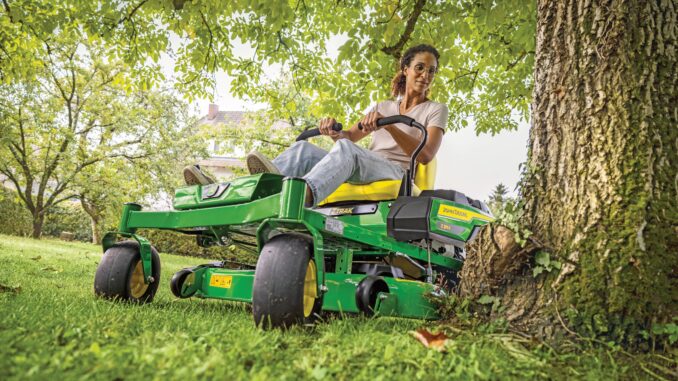
John Deere Z740R – Service and Repair Guide: Parts, Diagrams
Introduction to the John Deere Z740R
The John Deere Z740R is a residential and light‑commercial zero‑turn mower in the Z700 Series, designed for larger home lawns and small acreage that need fast, precise mowing with a high‑capacity deck. It pairs a 23.5 hp Kawasaki gasoline engine with a hydrostatic drive and independent mid‑PTO, giving you quick acceleration, smooth control and clean cut quality on open turf.
This guide is written for homeowners and DIY users who want to handle routine maintenance and common repairs on the John Deere Z740R, while knowing when a job should be left to a dealer. You’ll find symptom‑based troubleshooting, common service parts and numbers, pointers to parts diagrams and manuals, step‑by‑step fitting guides, and a large FAQ section covering starting, running, cut quality, vibration and drive issues.
John Deere Z740R general overview
In the John Deere lineup, the Z740R sits in the Z700 Series ZTrak zero‑turn family, above typical residential EZTrak units and below fully commercial Z900 machines. It’s built in Fuquay‑Varina, North Carolina, and is aimed at owners who want commercial‑style mowing performance with homeowner‑friendly controls and servicing. The Z740R is available with 48″, 54″, and 60″ high‑capacity mower decks, with the 60″ deck being the most common for larger properties.
Key systems you’ll deal with on the Z740R include the Kawasaki twin‑cylinder gasoline engine and fuel system, hydrostatic transmission and traction drive, mid‑mount mower deck and belt drive, blade system, and the electrical/safety interlock system. Common service points for owners are the engine oil and filter, air filters, fuel filter, spark plugs, hydraulic oil and filter, deck and traction belts, blades, battery, seat and safety switches, and deck gauge wheels.
Typical service parts owners buy for the John Deere Z740R include:
-
Engine oil filter – AM125424
-
Outer air filter – M131802
-
Inner/UltraGard air filter – M131803
-
Fuel filter – UC21217
-
Spark plug – M805853 (NGK BPR4ES 6578 type)
-
Hydraulic oil filter – MIU13018
-
Traction drive belt – UC15026
-
60″ deck drive belt – UC16435 (and mower deck SPB V‑belt UC16433 on some deck variants)
-
ZTrak mower blades – UC14208 or 21″ blades UC18055 for specific deck setups
Troubleshooting approach on a John Deere Z740R
Troubleshooting the John Deere Z740R should always start with what you see and feel as the operator, not with the part you think has failed. Begin with the symptom: does it fail to start, run poorly, cut badly, vibrate, overheat, or refuse to drive? From there, work through simple checks first (fuel, battery, safety switches) before assuming a major component failure.
For the Z740R, the main symptom categories to think about are:
-
Starting issues (won’t crank, cranks but won’t fire)
-
Running issues (stalling, surging, loss of power)
-
Cut‑quality problems (stripes, scalping, uneven or ragged cut)
-
Vibration and noise (deck shakes, loud belt or bearing noise)
-
Overheating, smells and leaks (engine heat, smoke, fuel or oil leaks)
-
Transmission/drive problems (won’t move, creeps, weak on slopes)
-
Electrical and safety switch issues (no crank, PTO won’t engage, intermittent shutdown)
By grouping problems this way, you can avoid chasing random parts and instead work through logical, repeatable checks.
Emergency and immediate repair needs on a John Deere Z740R
Some John Deere Z740R problems need to be addressed immediately because they affect safety or can quickly damage expensive parts. Anything involving fuel leaks, severe vibration, loss of steering/braking control, or overheated engine or hydraulics should be treated as urgent. If you see smoke, smell burning belts or oil, or the mower suddenly loses drive, stop and investigate before continuing.
Below are emergency‑focused subsections by symptom, with common causes and simple checks you can do before deciding on a full repair.
Starting issues on a John Deere Z740R
Starting issues show up as the Z740R not cranking at all when you turn the key, or cranking but failing to fire and run. This matters because forcing repeated cranking with underlying electrical or fuel problems can damage the starter, battery, or flood the engine.
Common causes:
-
Battery discharged or loose/corroded terminals
-
Safety switches not made (park brake, PTO off, control levers out)
-
Faulty key switch or PTO/safety interlock switch
-
Fuel turned off, stale fuel or blocked fuel filter
-
Failed spark plug or ignition issue
Basic checks:
-
Verify the park brake is set, PTO switch is off, and steering levers are in the “neutral/out” start position.
-
Check battery terminals for corrosion and tightness; clean and retighten if needed.
-
Confirm battery voltage with a multimeter or test light, and charge if low.
-
Inspect the fuel level, fuel shutoff position (if fitted), and condition of the fuel filter; replace if blocked.
-
Try starting with the seat firmly occupied and move controls slightly to ensure switches are making; if still no crank, consider dealer diagnosis of the safety circuit.
Cut‑quality problems on a John Deere Z740R
Cut‑quality issues on the Z740R appear as uneven mowing, missed strips, scalping, or excessively ragged grass tips. These problems matter because they indicate issues with deck leveling, blade condition, or mowing speed that will only get worse if ignored.
Common causes:
-
Dull, bent or mismatched blades
-
Deck not leveled side‑to‑side or front‑to‑rear
-
Deck cluttered with built‑up grass clippings
-
Incorrect mowing height or cutting too fast
-
Wrong blade type for conditions (mulch vs high‑lift)
Basic checks:
-
Park on a flat surface, lower the deck and visually inspect blades for damage or excessive wear.
-
Clean the deck underside safely to remove built‑up grass and debris.
-
Use a deck level gauge to check deck height side to side and adjust gauge wheels and linkages as needed.
-
Confirm blade type and sharpness; sharpen or replace blades if edges are rounded or chipped.
-
Adjust cutting speed and height for current conditions; avoid maximum speed in thick or wet grass.
Vibration and noise on a John Deere Z740R
Excess vibration or abnormal noise from the John Deere Z740R usually shows up when engaging the PTO or mowing at speed and may feel like a buzzing handlebar or shaking seat. This matters because severe vibration can quickly destroy bearings, belts and spindles, and can point to failing deck components.
Common causes:
-
Bent blades or blade imbalance
-
Loose or worn deck spindle bearings
-
Damaged or misrouted deck belt
-
Loose deck pulleys or idlers
-
Foreign objects stuck in the deck or around pulleys
Basic checks:
-
Disengage PTO, shut off engine, and remove the key before inspecting the deck.
-
Spin each blade by hand with gloves and check for wobble or roughness in spindle bearings.
-
Inspect deck belt routing and condition; look for cracks, missing chunks, or burn marks.
-
Check pulleys and idlers for secure mounting and smooth rotation.
-
Remove any debris lodged around the deck or pulleys and retest at low speed.
Overheating and leaks on a John Deere Z740R
Overheating or fluid leaks on the Z740R are serious because they can quickly lead to engine or hydraulic failure. You may notice strong hot smells, smoke, warning indicators, or visible oil or fuel on the frame or deck area.
Common causes:
-
Low engine oil or hydraulic fluid level
-
Blocked engine cooling fins or air intake screen
-
Fuel line or filter leak
-
Hydraulic hose or filter leak
-
Overloaded mowing (very tall, wet grass) causing belts to slip and overheat
Basic checks:
-
Check engine oil level on the dipstick and top up with the correct grade if low; investigate ongoing loss.
-
Clean cooling fins, engine shrouds, and air intake screens to restore airflow.
-
Inspect fuel lines, filter and tank area for wetness or smell; do not operate until leaks are fixed.
-
Check hydraulic hoses and the area around the hydraulic filter for seepage; tighten or replace components as necessary.
-
Reduce mowing load, increase deck height, and slow ground speed if belts are overheating or smoking.
Transmission and drive problems on a John Deere Z740R
Transmission or drive problems appear as the Z740R not moving when you release the park brake, weak drive on slopes, or creeping when levers should be in neutral. Drive issues matter because they impact safety on hills and can indicate low hydraulic performance or linkage problems.
Common causes:
-
Park brake still engaged or partially applied
-
Hydrostatic system low on Hy‑Gard oil or contaminated
-
Hydraulic filter restricted
-
Linkage misadjusted or damper issues affecting control levers
-
Traction drive belt worn or slipping
Basic checks:
-
Confirm the park brake is fully released before attempting to move.
-
Check hydraulic oil level and top up with Hy‑Gard if low.
-
Inspect the hydraulic filter (MIU13018) and service if hours or condition suggest restriction.
-
Verify that control levers return cleanly to neutral when released; consult the manual if creeping persists.
-
Inspect the traction drive belt UC15026 for wear, cracks, glazing or contamination and replace if slipping.
Electrical and safety switch problems on a John Deere Z740R
Electrical and safety switch problems typically show up as no‑crank, PTO not engaging, intermittent shutoff when you hit bumps, or warning lights. This matters because the Z740R relies on a chain of safety interlocks to protect the operator and bystanders.
Common causes:
-
Weak or failing battery
-
Damaged or loose wiring harness near the seat or control levers
-
Faulty rotary switch (AUC18708 or AUC15805 depending on unit)
-
Failing PTO switch or seat switch
-
Corroded grounding points
Basic checks:
-
Verify battery condition and clean all battery terminals and grounds.
-
Inspect wiring under the seat and around the control towers for chafing or disconnection.
-
Wiggle the PTO switch and key switch gently while watching for intermittent contact issues.
-
Confirm that the seat switch operates by testing for engine shutoff when leaving the seat with PTO engaged (as per manual).
-
If electrical troubleshooting goes beyond basic checks, plan for dealer diagnosis with proper test equipment.
DIY or dealer? John Deere Z740R repair decision guide
On the John Deere Z740R, the usual dividing line is that routine maintenance and bolt‑on parts replacement are good DIY jobs, while deep engine, hydrostatic system, structural and complex electrical work are best left to a dealer. If a job needs special lifting equipment, hydraulic flushing tools, or advanced electrical diagnosis, treat it as dealer territory. For most US and Canadian homeowners, if you can safely access the parts, follow the manual, and use standard hand tools, many jobs are realistic DIY.
Good DIY jobs on a Z740R:
-
Engine oil and filter changes
-
Air and fuel filter replacement
-
Spark plug replacement
-
Blade changes and sharpening
-
Deck belt replacement and deck leveling
-
Battery replacement and simple wiring repairs
-
Basic troubleshooting of safety switches (testing and replacement)
Advanced DIY or dealer jobs:
-
Engine internal repairs, carburetor or fuel injection service
-
Hydrostatic transmission repairs beyond fluid/filter changes
-
Hydraulic hose replacement in tight or high‑pressure areas
-
Structural repairs to the frame or ROPS
-
Complex electrical diagnostics on the safety circuit and PTO system
Skill level guide:
-
Beginner: Engine oil and filter service, air filter cleaning/replacement, blade removal with proper blocking, basic battery work.
-
Intermediate: Fuel filter changes, deck belt replacement, deck leveling, safety switch replacement, minor wiring repairs.
-
Advanced: Hydrostatic and hydraulic system repairs, in‑depth electrical troubleshooting, engine teardown, or major frame/ROPS work.
John Deere Z740R parts needed and information to gather
Before ordering parts for your John Deere Z740R, collect all identification details so you get the correct components. Write down the full model name (John Deere Z740R), the product identification number (PIN or serial number), the engine model and serial number for the Kawasaki engine, and the deck size (48″, 54″, or 60″ high‑capacity). These details are essential because some parts, especially belts, blades, switches and hydraulic components, vary by serial range and deck size.
When planning a maintenance or repair, also note your current hours on the machine and the type of work you do (light residential or heavier commercial‑style use). This helps you decide whether to buy upgraded components, such as heavy‑duty blades, MulchControl attachments or high‑capacity filters.
John Deere Z740R service parts table
For the John Deere Z740R, OEM parts are strongly recommended for belts, safety‑critical components, and fit‑sensitive items like hydraulic filters, fuel filters, and safety switches. OEM belts, in particular, are designed to match pulley profiles and load characteristics, reducing slip and premature wear. Aftermarket parts can work well for some filters, blades and batteries, as long as you use a reputable brand and cross‑reference models carefully against the Z740R and its engine and deck configuration.
Where to find John Deere Z740R parts diagrams and manuals
You’ll get the best technical information for your John Deere Z740R from official John Deere documentation and reputable parts sites. Start with the operator’s manual for the Z720E, Z730M, Z735E, Z735M and Z740R ZTrak Series Gas (OMUC23718), which covers daily maintenance, safety and basic troubleshooting. This is available as a PDF through John Deere Technical Publications.
Key sources to bookmark:
-
John Deere Technical Publications: search for “Z740R” to access operator and service information (techpubs.deere.com).
-
John Deere parts catalog: use the online parts catalog and enter “Z740R” to view diagrams and part lists for the mower and deck (typically via the JDParts portal).
-
John Deere Owners Support or Parts & Service pages for zero‑turn mowers: specific Z740R pages provide maintenance kits and recommended parts.
-
A strong Deere‑focused retailer with a Z740R replacement parts page, such as AKRS Equipment or similar, which lists common maintenance parts and their OEM numbers.
Use the manuals for torque values, procedures and safety rules, and use parts diagrams for visual confirmation of belt routing, spindle assemblies, and linkage layouts before you start any repair.
How to locate John Deere Z740R model, serial and engine numbers
Accurate model, serial and engine numbers are essential when buying parts or requesting dealer support for the John Deere Z740R. They help differentiate between deck sizes, serial ranges and any running changes Deere may have introduced.
To find your numbers:
-
Locate the main product identification label (PIN plate) for the Z740R on the frame, typically on or near the rear frame or side of the machine. Note the model (Z740R) and full PIN.
-
Check the deck identification tag mounted on the mower deck; it will show the deck size (e.g. 60″ High Capacity) and a specific deck part number or serial range.
-
Find the engine identification plate or sticker on the Kawasaki engine, usually on the engine block or near the fan shroud, listing the engine model and serial.
-
Record the battery and electrical specifications shown on tags or in the operator’s manual, especially if you plan electrical or battery replacement.
-
Keep all these numbers written down in your maintenance log so you don’t have to re‑check the machine every time you order parts.
Buying John Deere Z740R parts online and in stores
For the John Deere Z740R, a mixed strategy of online ordering and local sourcing works best. Use online parts catalogs to verify OEM numbers against your model and serial, then decide whether to buy direct from Deere, authorized dealers, or reputable third‑party retailers. For complex parts or anything tied to a serial range, the dealer counter is often the safest option. Common consumables such as oil, some filters, and batteries can be bought at retail stores, as long as the packaging clearly lists compatibility with the Z740R and its engine.
When buying:
-
Online: Use your PIN, deck size and engine model to confirm parts in the Deere parts catalog or on sites like the John Deere Shop or AKRS Equipment.
-
Dealer counter: Best for hydraulic components, switches, and serial‑specific items; staff can cross‑reference the Z740R PIN against current parts data.
-
Retail stores: Acceptable for oils, greases, some spark plugs and generic batteries, provided compatibility charts include the Kawasaki engine model and ZTrak application.
Useful URLs to bookmark:
-
John Deere Technical Publications: techpubs.deere.com
-
John Deere Parts & Service: main parts portal pages often include a search for Z740R
-
A Deere‑authorized parts retailer with a dedicated “Z740R replacement parts” page for quick ordering.
Step‑by‑step fitting guide: John Deere Z740R common DIY jobs
Below are simple fitting guides for some high‑impact DIY maintenance jobs on the John Deere Z740R. Always follow your operator’s manual for safety and torque specs, and use proper PPE.
Changing the engine oil and filter on a John Deere Z740R
This job improves engine life and starting reliability and should be done on schedule or whenever oil is dirty or diluted.
Steps:
-
Park the Z740R on level ground, set the park brake, shut off the engine and allow it to cool.
-
Place a suitable drain pan under the engine drain plug or hose and open the drain to let old oil flow out fully.
-
Remove the old engine oil filter (AM125424), checking that the old gasket comes off with it.
-
Lightly oil the new filter’s gasket, install and tighten it by hand to the recommended setting.
-
Close the drain, refill the engine with the specified grade of oil to the correct level, then run briefly and re‑check the level.
Replacing the air filters on a John Deere Z740R
Clean air filters protect the engine from dust and maintain power and fuel economy.
Steps:
-
Shut off the engine and allow it to cool; open the air filter housing as per the manual.
-
Remove the outer air filter element (M131802) and inspect; discard if dirty or damaged.
-
Check the inner/UltraGard filter (M131803) and replace if heavily contaminated or per schedule.
-
Clean out dust from the housing carefully without forcing debris into the intake.
-
Install new filters, ensuring proper seating and sealing, then close the housing securely.
Changing the fuel filter on a John Deere Z740R
A fresh fuel filter reduces starting and running issues caused by restricted fuel flow or contamination.
Steps:
-
Run the Z740R until fuel level is low or pinch off the fuel line to minimize spillage.
-
Locate the inline fuel filter (UC21217) and place a rag or small pan beneath it.
-
Remove hose clamps, pull the filter from the fuel lines, noting flow direction arrows.
-
Install the new filter in the correct orientation, slide hoses fully onto the barbs, and re‑fit clamps.
-
Restore fuel flow, check for leaks and test start the mower.
Replacing blades on a John Deere Z740R
Sharp blades are critical for cut quality and reduce strain on the deck belt and engine.
Steps:
-
Park on a flat surface, set the brake, disengage PTO and shut off the engine; block the deck securely.
-
Use appropriate blocking and, if needed, a jack to access blade bolts while keeping the mower stable.
-
With a suitable wrench, loosen and remove each blade bolt, noting blade orientation.
-
Inspect spindles and washers, install new blades (UC14208 or UC18055 as applicable) with correct orientation.
-
Tighten blade bolts to the torque specified in the manual and test cut at low speed to confirm smooth operation.
Replacing the 60″ deck drive belt on a John Deere Z740R
Replacing a worn deck belt restores PTO engagement, prevents slip, and reduces noise.
Steps:
-
Lower the deck, disengage PTO, shut off engine and remove the key.
-
Remove belt guards and shields to expose the deck belt routing; take a photo or consult diagrams.
-
Relieve tension at the idler and carefully remove the old deck belt UC16435 (or UC16433 if used).
-
Route the new belt following the original path around pulleys and idlers, ensuring it sits fully in grooves.
-
Re‑engage the tensioner, reinstall guards, and test PTO engagement at low throttle, checking for smooth operation and correct tracking.
Maintenance to prevent John Deere Z740R problems
Preventive maintenance on the John Deere Z740R reduces breakdowns and extends the life of expensive components like the engine, hydraulics and deck. By keeping filters, fluids and blades in good condition and watching belt and bearing wear, you’ll avoid many of the common symptoms described earlier.
Focus areas:
-
Starting reliability: Maintain battery charge, clean terminals, replace spark plugs when worn, and keep fuel fresh.
-
Cut quality: Sharpen or replace blades regularly, keep deck clean and level, and maintain belt condition.
-
Fire and overheating prevention: Clean engine cooling fins and intake screens, avoid debris accumulation near exhaust, and fix leaks promptly.
-
Drive performance: Change hydraulic filters and fluids as specified, keep traction drive belt in good condition, and avoid overloading hills beyond machine capability.
-
Electrical reliability: Inspect wiring harnesses for chafing, secure loose connectors, and replace failing switches before they cause intermittent faults.
John Deere Z740R maintenance schedule and year‑round checklist
Use the official chart in your operator’s manual as the primary guide, but the following is a practical checklist adapted for typical Z740R use.
Daily / before each use
-
Check engine oil level and top up if needed.
-
Inspect tires for damage and proper inflation.
-
Visually check the deck for debris buildup and clear if necessary.
-
Confirm safety devices (ROPS, seat switch, PTO switch) appear intact and operating.
After roughly 8 hours of mowing
-
Clean grass and debris from the deck and around the engine cooling areas.
-
Check blades for damage and sharpness; plan sharpening if cut quality declines.
Every 25 hours
-
Inspect the outer air filter and clean or replace if dusty.
-
Check fuel filter for contamination or discoloration.
-
Grease key pivot points and fittings using Deere‑approved grease (e.g. TY24416).
Every 50 hours or yearly
-
Change engine oil and replace the AM125424 oil filter.
-
Inspect deck and traction drive belts for wear and replace if cracked or glazed.
-
Check hydraulic system components for leaks and proper fluid level.
-
Inspect battery condition and clean terminals.
Every 200 hours (or as specified)
-
Replace hydraulic oil filter MIU13018.
-
Change hydraulic fluid with Hy‑Gard to maintain drive performance.
-
Perform a thorough inspection of deck spindles, idlers and pulleys, replacing any with play or noise.
Seasonal checklist (spring, mid‑season, fall)
-
Spring: Full inspection of belts, blades and filters; test start and short mowing run before first heavy use.
-
Mid‑season: Review cut quality, adjust deck level, and perform an extra oil change if heavily used.
-
Fall/end of season: Clean the mower thoroughly, perform scheduled fluid changes, stabilize fuel or drain tank, and store under cover.
John Deere Z740R – repair, upgrade or replace?
For the John Deere Z740R, the choice between repair, upgrade or replace depends on age, hours, and the type of failure. Under normal residential use in the USA and Canada, the Z740R is worth repairing when major components are still sound and the frame and deck are in good condition. Upgrade opportunities exist in blades, MulchControl systems and accessories, while replacement is considered when engine or hydrostatic systems require repeated major repairs and the machine is heavily worn.
Repair if…
-
Problems are limited to belts, blades, filters, batteries or single switches.
-
The engine starts and runs well with basic maintenance.
-
Hydraulics hold drive and steering without leaks or severe noise.
Upgrade if…
-
You want improved mulching or discharge (MulchControl kits, blade changes).
-
You need better lighting or work accessories (floodlamps, gauge wheels, comfort seat upgrades).
-
You are pushing the mower into heavier use and want more robust maintenance practices.
Replace if…
-
The engine or hydrostatic units need repeated major repairs and costs approach replacement value.
-
The frame, deck or ROPS are damaged beyond economical repair.
-
Your lawn or workload has grown beyond the Z740R’s capacity and a commercial‑grade machine is justified.
Expanded troubleshooting FAQ – John Deere Z740R (30+ questions)
1. Why will my John Deere Z740R not start?
If your Z740R won’t start, first check that the park brake is set, PTO is off, and control levers are in the neutral start position. A discharged battery or corroded terminals is a common cause, so test voltage and clean connections. If the engine cranks but doesn’t fire, look at fuel level, fuel filter condition and spark plug health. Persistent no‑start with all basic checks done usually points to a safety switch, key switch or deeper engine issue that may need dealer diagnosis.
2. Why does my John Deere Z740R crank but not fire?
Cranking without firing often means either no fuel or no spark reaching the engine. Confirm that the fuel is fresh and not stale from long storage, and inspect or replace the UC21217 fuel filter if you suspect restriction. Check the spark plug M805853 for fouling or damage and replace if needed. If fuel and spark seem fine, consider whether a safety interlock is cutting ignition, which may require electrical testing or dealer support.
3. Why does my John Deere Z740R stall while mowing?
Stalling under load can be caused by restricted fuel supply, dirty air filters or overloaded cutting conditions. Inspect and service the M131802/M131803 air filters, and ensure the fuel filter is clear and fuel tank vent is open. Slow your ground speed, raise deck height and avoid heavy, wet grass if stalling happens only in very tough conditions. If it stalls randomly even in light work, look for electrical issues or intermittent safety switch faults.
4. Why does my John Deere Z740R idle rough or surge?
Rough idle or surging usually points to fuel quality, carburetion issues or air leaks. Make sure the fuel is clean and within recommended age, and consider draining old fuel if the machine sat for months. Check air intake connections and clamps so there are no leaks between the filter housing and engine. If surging persists, a dealer may need to clean and adjust the carburetor or fuel system on the Kawasaki engine.
5. Why is the cut uneven on my John Deere Z740R?
Uneven cut almost always relates to deck leveling, blade condition or tire pressure differences. Verify tire pressures front and rear are set correctly and evenly. Then check deck level with a gauge, adjusting side‑to‑side and front‑to‑rear height per the manual. Replace or sharpen blades if they are dull, bent or mismatched, and remove buildup under the deck that can affect airflow and cut quality.
6. Why does my John Deere Z740R leave uncut strips?
Uncut strips indicate missing blade coverage, blade overlap issues or a deck belt problem. Inspect blades for correct installation and orientation; a reversed blade can cause gaps. Check the deck belt UC16435 or UC16433 for slip or misrouting so all spindles turn at full speed. Ensure you are overlapping passes appropriately, especially on slopes where the mower can drift slightly.
7. Why is the cut on my John Deere Z740R ragged or frayed?
Ragged grass tips point to dull blades, too high ground speed, or cutting wet grass. Sharpen or replace blades as edges round off, and slow down to give blades more time to cut cleanly. Avoid mowing very wet grass where blades tend to tear rather than slice. If ragged cuts continue with good blades, check deck RPM and belt condition to ensure proper blade speed.
8. Why does my John Deere Z740R scalps high spots?
Scalping happens when deck height is set too low for the terrain or gauge wheels and deck level are misadjusted. Raise the cutting height and set gauge wheels to just touch the ground on uneven areas. Ensure deck is level front‑to‑rear so the front isn’t tilted too low. On very bumpy lawns, you may need to mow at a higher setting or slower speed and consider rolling or leveling the lawn itself.
9. Why is my John Deere Z740R vibrating heavily when PTO is engaged?
Heavy vibration when engaging PTO often indicates bent blades, damaged spindles or a severely worn belt. Inspect blades for nicks and bends; replace rather than trying to straighten them. Spin spindles by hand to check bearings for roughness or play. Look at the deck belt UC16435 for flat spots, burned areas or missing chunks. If components appear sound but vibration remains, have a dealer check for subtle spindle or pulley imbalance.
10. Why do I hear squealing noises from the deck on my John Deere Z740R?
Squealing often comes from slipping belts or dry bearings. Check the deck belt tension and condition; a cracked or glazed belt may slip and squeal. Grease recommended deck points and idler pivots, and make sure idler pulleys spin freely. If a pulley or bearing is noisy even after lubrication, replacement is likely needed.
11. Why is my John Deere Z740R smoking near the engine?
Smoke near the engine usually means oil or debris contacting hot surfaces, or a more serious leak. Clean all debris from the engine area and cooling fins, and check for oil leaks at gaskets and seals. Verify engine oil level and correct any over‑fill, as excess oil can cause burning at the exhaust. If smoke is thick or continuous, shut down immediately and have a dealer inspect for internal engine problems.
12. Why is my John Deere Z740R losing hydraulic drive power?
Loss of drive power or weak performance on slopes can result from low hydraulic fluid, a restricted hydraulic filter or worn traction drive belt. Check hydraulic fluid level and top up with Hy‑Gard as specified. Replace the MIU13018 hydraulic filter if it’s due or if you suspect restriction. Inspect the UC15026 drive belt for wear or slip, and consider dealer diagnosis if power remains weak after basic servicing.
13. Why does my John Deere Z740R creep when levers are in neutral?
Creeping in neutral suggests that control levers or linkages need adjustment. Check that both levers return fully to the neutral detent when released. Consult the operator’s manual for neutral adjustment procedures and follow them carefully. If creep continues or is pronounced, a dealer can fine‑tune hydrostatic linkage settings with proper tools.
14. Why won’t my John Deere Z740R move even though the engine runs?
If the engine runs but the mower won’t move, check that the park brake is fully released and the control levers are in drive positions. Verify traction drive belt condition and routing from the engine to the hydrostatic units. Confirm that freewheel valves or bypass levers (if fitted) are in the operating position, not tow mode. If everything appears correct, there may be a deeper hydraulic fault that needs professional repair.
15. Why won’t the PTO engage on my John Deere Z740R?
A PTO that won’t engage can be caused by safety interlock issues, a failing PTO switch or electrical problems. Make sure you are sitting properly, the park brake is set as required and levers are positioned correctly per the starting and PTO rules. Check the PTO switch and wiring for obvious damage. If engagement is intermittent, the seat switch or rotary switch may be at fault. Persistent no‑PTO with good electrical connections may require dealer testing of the PTO clutch and circuit.
16. Why does the PTO on my John Deere Z740R drop out while mowing?
PTO dropout during mowing often points to a safety sensor being triggered, low voltage or a failing clutch. Confirm that the seat switch works properly and that you maintain contact on rough ground. Check battery condition and charging system output to ensure voltage stays within range under load. Inspect wiring around the PTO switch and clutch for loose connections. If dropout is random and not linked to seat movement, the PTO clutch or control module may need professional evaluation.
17. Why is my John Deere Z740R battery constantly going flat?
A battery that repeatedly goes flat can be undersized, failing, or suffering from parasitic drain or charging issues. Test battery capacity and replace if old or weak. Inspect charging system connections and belt drive to the alternator or charging source. Ensure accessories like lights are switched off when not in use. If drain persists, a dealer can use test instruments to identify hidden electrical draws.
18. Which oil should I use in my John Deere Z740R engine?
Use the grade specified in your operator’s manual for the Kawasaki engine, typically a high‑quality SAE 10W‑30 or similar suitable for the operating temperature. Deere‑branded oils such as Turf‑Gard or Plus‑50 II are formulated for these engines, but equivalent premium oils that meet or exceed the specifications can also be used. Always maintain the correct level and change at recommended intervals.
19. How often should I change the oil on my John Deere Z740R?
For typical home use, follow the manual’s interval, often around every 50 hours or once per season, whichever comes first. If you operate in dusty or heavy‑load conditions, consider more frequent changes. Also change the filter (AM125424) with each oil change to maintain cleanliness and protect the engine.
20. When should I replace the air filters on my John Deere Z740R?
Check the outer air filter M131802 and inner UltraGard M131803 at least every 25 hours, and more often in dusty environments. Replace the outer element whenever it shows heavy contamination or damage. Replace the inner element on schedule or if you see any signs of dust getting past the outer filter.
21. Which blades fit my John Deere Z740R 60″ deck?
The Z740R 60″ high‑capacity deck uses specific blades such as UC14208 or 21″ blades UC18055 depending on configuration. Always confirm blade part numbers against your deck’s identification tag or parts catalog entry for your exact model and serial. Using the correct blade ensures proper overlap, cut quality and safe operation.
22. How do I know which belts fit my John Deere Z740R?
Belts differ by deck size and configuration, so refer to your operator’s manual and parts diagrams for the Z740R. Common examples include UC15026 for the traction drive belt and UC16435 or UC16433 for the 60″ deck drive belts. Double‑check belt routing and lengths in diagrams before ordering and installing replacements.
23. Can I use aftermarket filters and blades on my John Deere Z740R?
You can use quality aftermarket filters and blades if they are properly cross‑referenced to the Z740R and its engine and deck size. However, OEM parts are recommended for critical items like hydraulic filters, fuel filters and belts. If in doubt, stick with Deere‑branded parts for best fit and performance, especially on the drive and safety systems.
24. How do I adjust the deck level on my John Deere Z740R?
Deck leveling involves adjusting the deck hangers and gauge wheels to set correct side‑to‑side and front‑to‑rear height. Park the mower on a level surface, measure deck height at specified blade positions, and adjust linkages per the manual. Use a deck level gauge (AM130907 or equivalent) to help. After adjustment, test cut and fine‑tune as necessary.
25. What should I do if my John Deere Z740R pulls to one side?
Pulling to one side can be caused by unequal tire pressures, misadjusted control levers or deck imbalance. First, ensure tyre pressures match left and right. Then check that both control levers move evenly and return to neutral together. If pulling persists, consider minor linkage adjustments per the manual or consult a dealer to calibrate hydrostatic responses.
26. How do I prepare my John Deere Z740R for winter storage?
For winter storage, clean the mower thoroughly and remove built‑up grass and debris. Change engine oil if due and check belts and blades, replacing any worn items so the machine is ready for spring. Stabilize the fuel with appropriate additives or drain the tank if recommended. Disconnect the battery or use a maintainer, and store the mower under cover in a dry location.
27. How do I safely jack or lift my John Deere Z740R for blade service?
Use a suitable lawn tractor jack or lifting device rated for the Z740R’s weight, and follow the manufacturer’s instructions. Always block the deck or frame securely before working underneath. Never rely solely on hydraulic jacks without additional support. Engage the park brake, chock rear wheels if necessary and keep hands clear of pinch points.
28. Why does my John Deere Z740R smell like fuel after mowing?
A persistent fuel smell can come from minor leaks at the fuel filter, lines, tank cap or connections. Inspect the UC21217 fuel filter and hoses for dampness or staining. Check the tank cap for damage or improper sealing. Any visible fuel leakage should be addressed immediately, and the machine taken out of service until repaired.
29. How often should I grease my John Deere Z740R?
Grease recommended fittings per the schedule in your manual, typically every 25 hours or more frequently under heavy use. Use Deere‑approved HD Lithium Complex Grease (TY24416) or equivalent. Over‑greasing is less of a problem than under‑greasing, but wipe off excess to avoid attracting dirt.
30. What’s the best way to clean the deck on my John Deere Z740R?
Clean the deck by first shutting off the engine, removing the key and blocking the deck safely. Use a scraper and brush to remove clumped grass and debris from the underside, avoiding metal damage. A low‑pressure wash can be used, but try not to direct high‑pressure water into spindle seals or bearings. Allow the deck to dry and consider a light coating in high‑corrosion areas if conditions are very wet.
31. How do I know if my John Deere Z740R needs a new hydraulic filter?
Signs include loss of drive power, noisy hydraulics or hitting the recommended hours in your manual. The MIU13018 filter should be replaced at the specified interval or sooner if contamination is suspected. After replacement, bleed air as directed and check for leaks.
32. What should I check before buying used John Deere Z740R parts?
When buying used parts, verify they match your Z740R model, deck size and serial range. Inspect for obvious wear or damage, especially on belts, blades, spindles and hydraulic components. Avoid used safety switches or electrical modules unless you’re confident in their history. Whenever possible, prioritize new OEM parts for critical systems.
Introduction to the John Deere Z740R
The John Deere Z740R is a residential and light‑commercial zero‑turn mower in the Z700 Series, designed for larger home lawns and small acreage that need fast, precise mowing with a high‑capacity deck. It pairs a 23.5 hp Kawasaki gasoline engine with a hydrostatic drive and independent mid‑PTO, giving you quick acceleration, smooth control and clean cut quality on open turf.
This guide is written for homeowners and DIY users who want to handle routine maintenance and common repairs on the John Deere Z740R, while knowing when a job should be left to a dealer. You’ll find symptom‑based troubleshooting, common service parts and numbers, pointers to parts diagrams and manuals, step‑by‑step fitting guides, and a large FAQ section covering starting, running, cut quality, vibration and drive issues.
John Deere Z740R general overview
In the John Deere lineup, the Z740R sits in the Z700 Series ZTrak zero‑turn family, above typical residential EZTrak units and below fully commercial Z900 machines. It’s built in Fuquay‑Varina, North Carolina, and is aimed at owners who want commercial‑style mowing performance with homeowner‑friendly controls and servicing. The Z740R is available with 48″, 54″, and 60″ high‑capacity mower decks, with the 60″ deck being the most common for larger properties.
Key systems you’ll deal with on the Z740R include the Kawasaki twin‑cylinder gasoline engine and fuel system, hydrostatic transmission and traction drive, mid‑mount mower deck and belt drive, blade system, and the electrical/safety interlock system. Common service points for owners are the engine oil and filter, air filters, fuel filter, spark plugs, hydraulic oil and filter, deck and traction belts, blades, battery, seat and safety switches, and deck gauge wheels.
Typical service parts owners buy for the John Deere Z740R include:
-
Engine oil filter – AM125424
-
Outer air filter – M131802
-
Inner/UltraGard air filter – M131803
-
Fuel filter – UC21217
-
Spark plug – M805853 (NGK BPR4ES 6578 type)
-
Hydraulic oil filter – MIU13018
-
Traction drive belt – UC15026
-
60″ deck drive belt – UC16435 (and mower deck SPB V‑belt UC16433 on some deck variants)
-
ZTrak mower blades – UC14208 or 21″ blades UC18055 for specific deck setups
Troubleshooting approach on a John Deere Z740R
Troubleshooting the John Deere Z740R should always start with what you see and feel as the operator, not with the part you think has failed. Begin with the symptom: does it fail to start, run poorly, cut badly, vibrate, overheat, or refuse to drive? From there, work through simple checks first (fuel, battery, safety switches) before assuming a major component failure.
For the Z740R, the main symptom categories to think about are:
-
Starting issues (won’t crank, cranks but won’t fire)
-
Running issues (stalling, surging, loss of power)
-
Cut‑quality problems (stripes, scalping, uneven or ragged cut)
-
Vibration and noise (deck shakes, loud belt or bearing noise)
-
Overheating, smells and leaks (engine heat, smoke, fuel or oil leaks)
-
Transmission/drive problems (won’t move, creeps, weak on slopes)
-
Electrical and safety switch issues (no crank, PTO won’t engage, intermittent shutdown)
By grouping problems this way, you can avoid chasing random parts and instead work through logical, repeatable checks.
Emergency and immediate repair needs on a John Deere Z740R
Some John Deere Z740R problems need to be addressed immediately because they affect safety or can quickly damage expensive parts. Anything involving fuel leaks, severe vibration, loss of steering/braking control, or overheated engine or hydraulics should be treated as urgent. If you see smoke, smell burning belts or oil, or the mower suddenly loses drive, stop and investigate before continuing.
Below are emergency‑focused subsections by symptom, with common causes and simple checks you can do before deciding on a full repair.
Starting issues on a John Deere Z740R
Starting issues show up as the Z740R not cranking at all when you turn the key, or cranking but failing to fire and run. This matters because forcing repeated cranking with underlying electrical or fuel problems can damage the starter, battery, or flood the engine.
Common causes:
-
Battery discharged or loose/corroded terminals
-
Safety switches not made (park brake, PTO off, control levers out)
-
Faulty key switch or PTO/safety interlock switch
-
Fuel turned off, stale fuel or blocked fuel filter
-
Failed spark plug or ignition issue
Basic checks:
-
Verify the park brake is set, PTO switch is off, and steering levers are in the “neutral/out” start position.
-
Check battery terminals for corrosion and tightness; clean and retighten if needed.
-
Confirm battery voltage with a multimeter or test light, and charge if low.
-
Inspect the fuel level, fuel shutoff position (if fitted), and condition of the fuel filter; replace if blocked.
-
Try starting with the seat firmly occupied and move controls slightly to ensure switches are making; if still no crank, consider dealer diagnosis of the safety circuit.
Cut‑quality problems on a John Deere Z740R
Cut‑quality issues on the Z740R appear as uneven mowing, missed strips, scalping, or excessively ragged grass tips. These problems matter because they indicate issues with deck leveling, blade condition, or mowing speed that will only get worse if ignored.
Common causes:
-
Dull, bent or mismatched blades
-
Deck not leveled side‑to‑side or front‑to‑rear
-
Deck cluttered with built‑up grass clippings
-
Incorrect mowing height or cutting too fast
-
Wrong blade type for conditions (mulch vs high‑lift)
Basic checks:
-
Park on a flat surface, lower the deck and visually inspect blades for damage or excessive wear.
-
Clean the deck underside safely to remove built‑up grass and debris.
-
Use a deck level gauge to check deck height side to side and adjust gauge wheels and linkages as needed.
-
Confirm blade type and sharpness; sharpen or replace blades if edges are rounded or chipped.
-
Adjust cutting speed and height for current conditions; avoid maximum speed in thick or wet grass.
Vibration and noise on a John Deere Z740R
Excess vibration or abnormal noise from the John Deere Z740R usually shows up when engaging the PTO or mowing at speed and may feel like a buzzing handlebar or shaking seat. This matters because severe vibration can quickly destroy bearings, belts and spindles, and can point to failing deck components.
Common causes:
-
Bent blades or blade imbalance
-
Loose or worn deck spindle bearings
-
Damaged or misrouted deck belt
-
Loose deck pulleys or idlers
-
Foreign objects stuck in the deck or around pulleys
Basic checks:
-
Disengage PTO, shut off engine, and remove the key before inspecting the deck.
-
Spin each blade by hand with gloves and check for wobble or roughness in spindle bearings.
-
Inspect deck belt routing and condition; look for cracks, missing chunks, or burn marks.
-
Check pulleys and idlers for secure mounting and smooth rotation.
-
Remove any debris lodged around the deck or pulleys and retest at low speed.
Overheating and leaks on a John Deere Z740R
Overheating or fluid leaks on the Z740R are serious because they can quickly lead to engine or hydraulic failure. You may notice strong hot smells, smoke, warning indicators, or visible oil or fuel on the frame or deck area.
Common causes:
-
Low engine oil or hydraulic fluid level
-
Blocked engine cooling fins or air intake screen
-
Fuel line or filter leak
-
Hydraulic hose or filter leak
-
Overloaded mowing (very tall, wet grass) causing belts to slip and overheat
Basic checks:
-
Check engine oil level on the dipstick and top up with the correct grade if low; investigate ongoing loss.
-
Clean cooling fins, engine shrouds, and air intake screens to restore airflow.
-
Inspect fuel lines, filter and tank area for wetness or smell; do not operate until leaks are fixed.
-
Check hydraulic hoses and the area around the hydraulic filter for seepage; tighten or replace components as necessary.
-
Reduce mowing load, increase deck height, and slow ground speed if belts are overheating or smoking.
Transmission and drive problems on a John Deere Z740R
Transmission or drive problems appear as the Z740R not moving when you release the park brake, weak drive on slopes, or creeping when levers should be in neutral. Drive issues matter because they impact safety on hills and can indicate low hydraulic performance or linkage problems.
Common causes:
-
Park brake still engaged or partially applied
-
Hydrostatic system low on Hy‑Gard oil or contaminated
-
Hydraulic filter restricted
-
Linkage misadjusted or damper issues affecting control levers
-
Traction drive belt worn or slipping
Basic checks:
-
Confirm the park brake is fully released before attempting to move.
-
Check hydraulic oil level and top up with Hy‑Gard if low.
-
Inspect the hydraulic filter (MIU13018) and service if hours or condition suggest restriction.
-
Verify that control levers return cleanly to neutral when released; consult the manual if creeping persists.
-
Inspect the traction drive belt UC15026 for wear, cracks, glazing or contamination and replace if slipping.
Electrical and safety switch problems on a John Deere Z740R
Electrical and safety switch problems typically show up as no‑crank, PTO not engaging, intermittent shutoff when you hit bumps, or warning lights. This matters because the Z740R relies on a chain of safety interlocks to protect the operator and bystanders.
Common causes:
-
Weak or failing battery
-
Damaged or loose wiring harness near the seat or control levers
-
Faulty rotary switch (AUC18708 or AUC15805 depending on unit)
-
Failing PTO switch or seat switch
-
Corroded grounding points
Basic checks:
-
Verify battery condition and clean all battery terminals and grounds.
-
Inspect wiring under the seat and around the control towers for chafing or disconnection.
-
Wiggle the PTO switch and key switch gently while watching for intermittent contact issues.
-
Confirm that the seat switch operates by testing for engine shutoff when leaving the seat with PTO engaged (as per manual).
-
If electrical troubleshooting goes beyond basic checks, plan for dealer diagnosis with proper test equipment.
DIY or dealer? John Deere Z740R repair decision guide
On the John Deere Z740R, the usual dividing line is that routine maintenance and bolt‑on parts replacement are good DIY jobs, while deep engine, hydrostatic system, structural and complex electrical work are best left to a dealer. If a job needs special lifting equipment, hydraulic flushing tools, or advanced electrical diagnosis, treat it as dealer territory. For most US and Canadian homeowners, if you can safely access the parts, follow the manual, and use standard hand tools, many jobs are realistic DIY.
Good DIY jobs on a Z740R:
-
Engine oil and filter changes
-
Air and fuel filter replacement
-
Spark plug replacement
-
Blade changes and sharpening
-
Deck belt replacement and deck leveling
-
Battery replacement and simple wiring repairs
-
Basic troubleshooting of safety switches (testing and replacement)
Advanced DIY or dealer jobs:
-
Engine internal repairs, carburetor or fuel injection service
-
Hydrostatic transmission repairs beyond fluid/filter changes
-
Hydraulic hose replacement in tight or high‑pressure areas
-
Structural repairs to the frame or ROPS
-
Complex electrical diagnostics on the safety circuit and PTO system
Skill level guide:
-
Beginner: Engine oil and filter service, air filter cleaning/replacement, blade removal with proper blocking, basic battery work.
-
Intermediate: Fuel filter changes, deck belt replacement, deck leveling, safety switch replacement, minor wiring repairs.
-
Advanced: Hydrostatic and hydraulic system repairs, in‑depth electrical troubleshooting, engine teardown, or major frame/ROPS work.
John Deere Z740R parts needed and information to gather
Before ordering parts for your John Deere Z740R, collect all identification details so you get the correct components. Write down the full model name (John Deere Z740R), the product identification number (PIN or serial number), the engine model and serial number for the Kawasaki engine, and the deck size (48″, 54″, or 60″ high‑capacity). These details are essential because some parts, especially belts, blades, switches and hydraulic components, vary by serial range and deck size.
When planning a maintenance or repair, also note your current hours on the machine and the type of work you do (light residential or heavier commercial‑style use). This helps you decide whether to buy upgraded components, such as heavy‑duty blades, MulchControl attachments or high‑capacity filters.
John Deere Z740R service parts table
For the John Deere Z740R, OEM parts are strongly recommended for belts, safety‑critical components, and fit‑sensitive items like hydraulic filters, fuel filters, and safety switches. OEM belts, in particular, are designed to match pulley profiles and load characteristics, reducing slip and premature wear. Aftermarket parts can work well for some filters, blades and batteries, as long as you use a reputable brand and cross‑reference models carefully against the Z740R and its engine and deck configuration.
Where to find John Deere Z740R parts diagrams and manuals
You’ll get the best technical information for your John Deere Z740R from official John Deere documentation and reputable parts sites. Start with the operator’s manual for the Z720E, Z730M, Z735E, Z735M and Z740R ZTrak Series Gas (OMUC23718), which covers daily maintenance, safety and basic troubleshooting. This is available as a PDF through John Deere Technical Publications.
Key sources to bookmark:
-
John Deere Technical Publications: search for “Z740R” to access operator and service information (techpubs.deere.com).
-
John Deere parts catalog: use the online parts catalog and enter “Z740R” to view diagrams and part lists for the mower and deck (typically via the JDParts portal).
-
John Deere Owners Support or Parts & Service pages for zero‑turn mowers: specific Z740R pages provide maintenance kits and recommended parts.
-
A strong Deere‑focused retailer with a Z740R replacement parts page, such as AKRS Equipment or similar, which lists common maintenance parts and their OEM numbers.
Use the manuals for torque values, procedures and safety rules, and use parts diagrams for visual confirmation of belt routing, spindle assemblies, and linkage layouts before you start any repair.
How to locate John Deere Z740R model, serial and engine numbers
Accurate model, serial and engine numbers are essential when buying parts or requesting dealer support for the John Deere Z740R. They help differentiate between deck sizes, serial ranges and any running changes Deere may have introduced.
To find your numbers:
-
Locate the main product identification label (PIN plate) for the Z740R on the frame, typically on or near the rear frame or side of the machine. Note the model (Z740R) and full PIN.
-
Check the deck identification tag mounted on the mower deck; it will show the deck size (e.g. 60″ High Capacity) and a specific deck part number or serial range.
-
Find the engine identification plate or sticker on the Kawasaki engine, usually on the engine block or near the fan shroud, listing the engine model and serial.
-
Record the battery and electrical specifications shown on tags or in the operator’s manual, especially if you plan electrical or battery replacement.
-
Keep all these numbers written down in your maintenance log so you don’t have to re‑check the machine every time you order parts.
Buying John Deere Z740R parts online and in stores
For the John Deere Z740R, a mixed strategy of online ordering and local sourcing works best. Use online parts catalogs to verify OEM numbers against your model and serial, then decide whether to buy direct from Deere, authorized dealers, or reputable third‑party retailers. For complex parts or anything tied to a serial range, the dealer counter is often the safest option. Common consumables such as oil, some filters, and batteries can be bought at retail stores, as long as the packaging clearly lists compatibility with the Z740R and its engine.
When buying:
-
Online: Use your PIN, deck size and engine model to confirm parts in the Deere parts catalog or on sites like the John Deere Shop or AKRS Equipment.
-
Dealer counter: Best for hydraulic components, switches, and serial‑specific items; staff can cross‑reference the Z740R PIN against current parts data.
-
Retail stores: Acceptable for oils, greases, some spark plugs and generic batteries, provided compatibility charts include the Kawasaki engine model and ZTrak application.
Useful URLs to bookmark:
-
John Deere Technical Publications: techpubs.deere.com
-
John Deere Parts & Service: main parts portal pages often include a search for Z740R
-
A Deere‑authorized parts retailer with a dedicated “Z740R replacement parts” page for quick ordering.
Step‑by‑step fitting guide: John Deere Z740R common DIY jobs
Below are simple fitting guides for some high‑impact DIY maintenance jobs on the John Deere Z740R. Always follow your operator’s manual for safety and torque specs, and use proper PPE.
Changing the engine oil and filter on a John Deere Z740R
This job improves engine life and starting reliability and should be done on schedule or whenever oil is dirty or diluted.
Steps:
-
Park the Z740R on level ground, set the park brake, shut off the engine and allow it to cool.
-
Place a suitable drain pan under the engine drain plug or hose and open the drain to let old oil flow out fully.
-
Remove the old engine oil filter (AM125424), checking that the old gasket comes off with it.
-
Lightly oil the new filter’s gasket, install and tighten it by hand to the recommended setting.
-
Close the drain, refill the engine with the specified grade of oil to the correct level, then run briefly and re‑check the level.
Replacing the air filters on a John Deere Z740R
Clean air filters protect the engine from dust and maintain power and fuel economy.
Steps:
-
Shut off the engine and allow it to cool; open the air filter housing as per the manual.
-
Remove the outer air filter element (M131802) and inspect; discard if dirty or damaged.
-
Check the inner/UltraGard filter (M131803) and replace if heavily contaminated or per schedule.
-
Clean out dust from the housing carefully without forcing debris into the intake.
-
Install new filters, ensuring proper seating and sealing, then close the housing securely.
Changing the fuel filter on a John Deere Z740R
A fresh fuel filter reduces starting and running issues caused by restricted fuel flow or contamination.
Steps:
-
Run the Z740R until fuel level is low or pinch off the fuel line to minimize spillage.
-
Locate the inline fuel filter (UC21217) and place a rag or small pan beneath it.
-
Remove hose clamps, pull the filter from the fuel lines, noting flow direction arrows.
-
Install the new filter in the correct orientation, slide hoses fully onto the barbs, and re‑fit clamps.
-
Restore fuel flow, check for leaks and test start the mower.
Replacing blades on a John Deere Z740R
Sharp blades are critical for cut quality and reduce strain on the deck belt and engine.
Steps:
-
Park on a flat surface, set the brake, disengage PTO and shut off the engine; block the deck securely.
-
Use appropriate blocking and, if needed, a jack to access blade bolts while keeping the mower stable.
-
With a suitable wrench, loosen and remove each blade bolt, noting blade orientation.
-
Inspect spindles and washers, install new blades (UC14208 or UC18055 as applicable) with correct orientation.
-
Tighten blade bolts to the torque specified in the manual and test cut at low speed to confirm smooth operation.
Replacing the 60″ deck drive belt on a John Deere Z740R
Replacing a worn deck belt restores PTO engagement, prevents slip, and reduces noise.
Steps:
-
Lower the deck, disengage PTO, shut off engine and remove the key.
-
Remove belt guards and shields to expose the deck belt routing; take a photo or consult diagrams.
-
Relieve tension at the idler and carefully remove the old deck belt UC16435 (or UC16433 if used).
-
Route the new belt following the original path around pulleys and idlers, ensuring it sits fully in grooves.
-
Re‑engage the tensioner, reinstall guards, and test PTO engagement at low throttle, checking for smooth operation and correct tracking.
Maintenance to prevent John Deere Z740R problems
Preventive maintenance on the John Deere Z740R reduces breakdowns and extends the life of expensive components like the engine, hydraulics and deck. By keeping filters, fluids and blades in good condition and watching belt and bearing wear, you’ll avoid many of the common symptoms described earlier.
Focus areas:
-
Starting reliability: Maintain battery charge, clean terminals, replace spark plugs when worn, and keep fuel fresh.
-
Cut quality: Sharpen or replace blades regularly, keep deck clean and level, and maintain belt condition.
-
Fire and overheating prevention: Clean engine cooling fins and intake screens, avoid debris accumulation near exhaust, and fix leaks promptly.
-
Drive performance: Change hydraulic filters and fluids as specified, keep traction drive belt in good condition, and avoid overloading hills beyond machine capability.
-
Electrical reliability: Inspect wiring harnesses for chafing, secure loose connectors, and replace failing switches before they cause intermittent faults.
John Deere Z740R maintenance schedule and year‑round checklist
Use the official chart in your operator’s manual as the primary guide, but the following is a practical checklist adapted for typical Z740R use.
Daily / before each use
-
Check engine oil level and top up if needed.
-
Inspect tires for damage and proper inflation.
-
Visually check the deck for debris buildup and clear if necessary.
-
Confirm safety devices (ROPS, seat switch, PTO switch) appear intact and operating.
After roughly 8 hours of mowing
-
Clean grass and debris from the deck and around the engine cooling areas.
-
Check blades for damage and sharpness; plan sharpening if cut quality declines.
Every 25 hours
-
Inspect the outer air filter and clean or replace if dusty.
-
Check fuel filter for contamination or discoloration.
-
Grease key pivot points and fittings using Deere‑approved grease (e.g. TY24416).
Every 50 hours or yearly
-
Change engine oil and replace the AM125424 oil filter.
-
Inspect deck and traction drive belts for wear and replace if cracked or glazed.
-
Check hydraulic system components for leaks and proper fluid level.
-
Inspect battery condition and clean terminals.
Every 200 hours (or as specified)
-
Replace hydraulic oil filter MIU13018.
-
Change hydraulic fluid with Hy‑Gard to maintain drive performance.
-
Perform a thorough inspection of deck spindles, idlers and pulleys, replacing any with play or noise.
Seasonal checklist (spring, mid‑season, fall)
-
Spring: Full inspection of belts, blades and filters; test start and short mowing run before first heavy use.
-
Mid‑season: Review cut quality, adjust deck level, and perform an extra oil change if heavily used.
-
Fall/end of season: Clean the mower thoroughly, perform scheduled fluid changes, stabilize fuel or drain tank, and store under cover.
John Deere Z740R – repair, upgrade or replace?
For the John Deere Z740R, the choice between repair, upgrade or replace depends on age, hours, and the type of failure. Under normal residential use in the USA and Canada, the Z740R is worth repairing when major components are still sound and the frame and deck are in good condition. Upgrade opportunities exist in blades, MulchControl systems and accessories, while replacement is considered when engine or hydrostatic systems require repeated major repairs and the machine is heavily worn.
Repair if…
-
Problems are limited to belts, blades, filters, batteries or single switches.
-
The engine starts and runs well with basic maintenance.
-
Hydraulics hold drive and steering without leaks or severe noise.
Upgrade if…
-
You want improved mulching or discharge (MulchControl kits, blade changes).
-
You need better lighting or work accessories (floodlamps, gauge wheels, comfort seat upgrades).
-
You are pushing the mower into heavier use and want more robust maintenance practices.
Replace if…
-
The engine or hydrostatic units need repeated major repairs and costs approach replacement value.
-
The frame, deck or ROPS are damaged beyond economical repair.
-
Your lawn or workload has grown beyond the Z740R’s capacity and a commercial‑grade machine is justified.
Expanded troubleshooting FAQ – John Deere Z740R (30+ questions)
1. Why will my John Deere Z740R not start?
If your Z740R won’t start, first check that the park brake is set, PTO is off, and control levers are in the neutral start position. A discharged battery or corroded terminals is a common cause, so test voltage and clean connections. If the engine cranks but doesn’t fire, look at fuel level, fuel filter condition and spark plug health. Persistent no‑start with all basic checks done usually points to a safety switch, key switch or deeper engine issue that may need dealer diagnosis.
2. Why does my John Deere Z740R crank but not fire?
Cranking without firing often means either no fuel or no spark reaching the engine. Confirm that the fuel is fresh and not stale from long storage, and inspect or replace the UC21217 fuel filter if you suspect restriction. Check the spark plug M805853 for fouling or damage and replace if needed. If fuel and spark seem fine, consider whether a safety interlock is cutting ignition, which may require electrical testing or dealer support.
3. Why does my John Deere Z740R stall while mowing?
Stalling under load can be caused by restricted fuel supply, dirty air filters or overloaded cutting conditions. Inspect and service the M131802/M131803 air filters, and ensure the fuel filter is clear and fuel tank vent is open. Slow your ground speed, raise deck height and avoid heavy, wet grass if stalling happens only in very tough conditions. If it stalls randomly even in light work, look for electrical issues or intermittent safety switch faults.
4. Why does my John Deere Z740R idle rough or surge?
Rough idle or surging usually points to fuel quality, carburetion issues or air leaks. Make sure the fuel is clean and within recommended age, and consider draining old fuel if the machine sat for months. Check air intake connections and clamps so there are no leaks between the filter housing and engine. If surging persists, a dealer may need to clean and adjust the carburetor or fuel system on the Kawasaki engine.
5. Why is the cut uneven on my John Deere Z740R?
Uneven cut almost always relates to deck leveling, blade condition or tire pressure differences. Verify tire pressures front and rear are set correctly and evenly. Then check deck level with a gauge, adjusting side‑to‑side and front‑to‑rear height per the manual. Replace or sharpen blades if they are dull, bent or mismatched, and remove buildup under the deck that can affect airflow and cut quality.
6. Why does my John Deere Z740R leave uncut strips?
Uncut strips indicate missing blade coverage, blade overlap issues or a deck belt problem. Inspect blades for correct installation and orientation; a reversed blade can cause gaps. Check the deck belt UC16435 or UC16433 for slip or misrouting so all spindles turn at full speed. Ensure you are overlapping passes appropriately, especially on slopes where the mower can drift slightly.
7. Why is the cut on my John Deere Z740R ragged or frayed?
Ragged grass tips point to dull blades, too high ground speed, or cutting wet grass. Sharpen or replace blades as edges round off, and slow down to give blades more time to cut cleanly. Avoid mowing very wet grass where blades tend to tear rather than slice. If ragged cuts continue with good blades, check deck RPM and belt condition to ensure proper blade speed.
8. Why does my John Deere Z740R scalps high spots?
Scalping happens when deck height is set too low for the terrain or gauge wheels and deck level are misadjusted. Raise the cutting height and set gauge wheels to just touch the ground on uneven areas. Ensure deck is level front‑to‑rear so the front isn’t tilted too low. On very bumpy lawns, you may need to mow at a higher setting or slower speed and consider rolling or leveling the lawn itself.
9. Why is my John Deere Z740R vibrating heavily when PTO is engaged?
Heavy vibration when engaging PTO often indicates bent blades, damaged spindles or a severely worn belt. Inspect blades for nicks and bends; replace rather than trying to straighten them. Spin spindles by hand to check bearings for roughness or play. Look at the deck belt UC16435 for flat spots, burned areas or missing chunks. If components appear sound but vibration remains, have a dealer check for subtle spindle or pulley imbalance.
10. Why do I hear squealing noises from the deck on my John Deere Z740R?
Squealing often comes from slipping belts or dry bearings. Check the deck belt tension and condition; a cracked or glazed belt may slip and squeal. Grease recommended deck points and idler pivots, and make sure idler pulleys spin freely. If a pulley or bearing is noisy even after lubrication, replacement is likely needed.
11. Why is my John Deere Z740R smoking near the engine?
Smoke near the engine usually means oil or debris contacting hot surfaces, or a more serious leak. Clean all debris from the engine area and cooling fins, and check for oil leaks at gaskets and seals. Verify engine oil level and correct any over‑fill, as excess oil can cause burning at the exhaust. If smoke is thick or continuous, shut down immediately and have a dealer inspect for internal engine problems.
12. Why is my John Deere Z740R losing hydraulic drive power?
Loss of drive power or weak performance on slopes can result from low hydraulic fluid, a restricted hydraulic filter or worn traction drive belt. Check hydraulic fluid level and top up with Hy‑Gard as specified. Replace the MIU13018 hydraulic filter if it’s due or if you suspect restriction. Inspect the UC15026 drive belt for wear or slip, and consider dealer diagnosis if power remains weak after basic servicing.
13. Why does my John Deere Z740R creep when levers are in neutral?
Creeping in neutral suggests that control levers or linkages need adjustment. Check that both levers return fully to the neutral detent when released. Consult the operator’s manual for neutral adjustment procedures and follow them carefully. If creep continues or is pronounced, a dealer can fine‑tune hydrostatic linkage settings with proper tools.
14. Why won’t my John Deere Z740R move even though the engine runs?
If the engine runs but the mower won’t move, check that the park brake is fully released and the control levers are in drive positions. Verify traction drive belt condition and routing from the engine to the hydrostatic units. Confirm that freewheel valves or bypass levers (if fitted) are in the operating position, not tow mode. If everything appears correct, there may be a deeper hydraulic fault that needs professional repair.
15. Why won’t the PTO engage on my John Deere Z740R?
A PTO that won’t engage can be caused by safety interlock issues, a failing PTO switch or electrical problems. Make sure you are sitting properly, the park brake is set as required and levers are positioned correctly per the starting and PTO rules. Check the PTO switch and wiring for obvious damage. If engagement is intermittent, the seat switch or rotary switch may be at fault. Persistent no‑PTO with good electrical connections may require dealer testing of the PTO clutch and circuit.
16. Why does the PTO on my John Deere Z740R drop out while mowing?
PTO dropout during mowing often points to a safety sensor being triggered, low voltage or a failing clutch. Confirm that the seat switch works properly and that you maintain contact on rough ground. Check battery condition and charging system output to ensure voltage stays within range under load. Inspect wiring around the PTO switch and clutch for loose connections. If dropout is random and not linked to seat movement, the PTO clutch or control module may need professional evaluation.
17. Why is my John Deere Z740R battery constantly going flat?
A battery that repeatedly goes flat can be undersized, failing, or suffering from parasitic drain or charging issues. Test battery capacity and replace if old or weak. Inspect charging system connections and belt drive to the alternator or charging source. Ensure accessories like lights are switched off when not in use. If drain persists, a dealer can use test instruments to identify hidden electrical draws.
18. Which oil should I use in my John Deere Z740R engine?
Use the grade specified in your operator’s manual for the Kawasaki engine, typically a high‑quality SAE 10W‑30 or similar suitable for the operating temperature. Deere‑branded oils such as Turf‑Gard or Plus‑50 II are formulated for these engines, but equivalent premium oils that meet or exceed the specifications can also be used. Always maintain the correct level and change at recommended intervals.
19. How often should I change the oil on my John Deere Z740R?
For typical home use, follow the manual’s interval, often around every 50 hours or once per season, whichever comes first. If you operate in dusty or heavy‑load conditions, consider more frequent changes. Also change the filter (AM125424) with each oil change to maintain cleanliness and protect the engine.
20. When should I replace the air filters on my John Deere Z740R?
Check the outer air filter M131802 and inner UltraGard M131803 at least every 25 hours, and more often in dusty environments. Replace the outer element whenever it shows heavy contamination or damage. Replace the inner element on schedule or if you see any signs of dust getting past the outer filter.
21. Which blades fit my John Deere Z740R 60″ deck?
The Z740R 60″ high‑capacity deck uses specific blades such as UC14208 or 21″ blades UC18055 depending on configuration. Always confirm blade part numbers against your deck’s identification tag or parts catalog entry for your exact model and serial. Using the correct blade ensures proper overlap, cut quality and safe operation.
22. How do I know which belts fit my John Deere Z740R?
Belts differ by deck size and configuration, so refer to your operator’s manual and parts diagrams for the Z740R. Common examples include UC15026 for the traction drive belt and UC16435 or UC16433 for the 60″ deck drive belts. Double‑check belt routing and lengths in diagrams before ordering and installing replacements.
23. Can I use aftermarket filters and blades on my John Deere Z740R?
You can use quality aftermarket filters and blades if they are properly cross‑referenced to the Z740R and its engine and deck size. However, OEM parts are recommended for critical items like hydraulic filters, fuel filters and belts. If in doubt, stick with Deere‑branded parts for best fit and performance, especially on the drive and safety systems.
24. How do I adjust the deck level on my John Deere Z740R?
Deck leveling involves adjusting the deck hangers and gauge wheels to set correct side‑to‑side and front‑to‑rear height. Park the mower on a level surface, measure deck height at specified blade positions, and adjust linkages per the manual. Use a deck level gauge (AM130907 or equivalent) to help. After adjustment, test cut and fine‑tune as necessary.
25. What should I do if my John Deere Z740R pulls to one side?
Pulling to one side can be caused by unequal tire pressures, misadjusted control levers or deck imbalance. First, ensure tyre pressures match left and right. Then check that both control levers move evenly and return to neutral together. If pulling persists, consider minor linkage adjustments per the manual or consult a dealer to calibrate hydrostatic responses.
26. How do I prepare my John Deere Z740R for winter storage?
For winter storage, clean the mower thoroughly and remove built‑up grass and debris. Change engine oil if due and check belts and blades, replacing any worn items so the machine is ready for spring. Stabilize the fuel with appropriate additives or drain the tank if recommended. Disconnect the battery or use a maintainer, and store the mower under cover in a dry location.
27. How do I safely jack or lift my John Deere Z740R for blade service?
Use a suitable lawn tractor jack or lifting device rated for the Z740R’s weight, and follow the manufacturer’s instructions. Always block the deck or frame securely before working underneath. Never rely solely on hydraulic jacks without additional support. Engage the park brake, chock rear wheels if necessary and keep hands clear of pinch points.
28. Why does my John Deere Z740R smell like fuel after mowing?
A persistent fuel smell can come from minor leaks at the fuel filter, lines, tank cap or connections. Inspect the UC21217 fuel filter and hoses for dampness or staining. Check the tank cap for damage or improper sealing. Any visible fuel leakage should be addressed immediately, and the machine taken out of service until repaired.
29. How often should I grease my John Deere Z740R?
Grease recommended fittings per the schedule in your manual, typically every 25 hours or more frequently under heavy use. Use Deere‑approved HD Lithium Complex Grease (TY24416) or equivalent. Over‑greasing is less of a problem than under‑greasing, but wipe off excess to avoid attracting dirt.
30. What’s the best way to clean the deck on my John Deere Z740R?
Clean the deck by first shutting off the engine, removing the key and blocking the deck safely. Use a scraper and brush to remove clumped grass and debris from the underside, avoiding metal damage. A low‑pressure wash can be used, but try not to direct high‑pressure water into spindle seals or bearings. Allow the deck to dry and consider a light coating in high‑corrosion areas if conditions are very wet.
31. How do I know if my John Deere Z740R needs a new hydraulic filter?
Signs include loss of drive power, noisy hydraulics or hitting the recommended hours in your manual. The MIU13018 filter should be replaced at the specified interval or sooner if contamination is suspected. After replacement, bleed air as directed and check for leaks.
32. What should I check before buying used John Deere Z740R parts?
When buying used parts, verify they match your Z740R model, deck size and serial range. Inspect for obvious wear or damage, especially on belts, blades, spindles and hydraulic components. Avoid used safety switches or electrical modules unless you’re confident in their history. Whenever possible, prioritize new OEM parts for critical systems.