
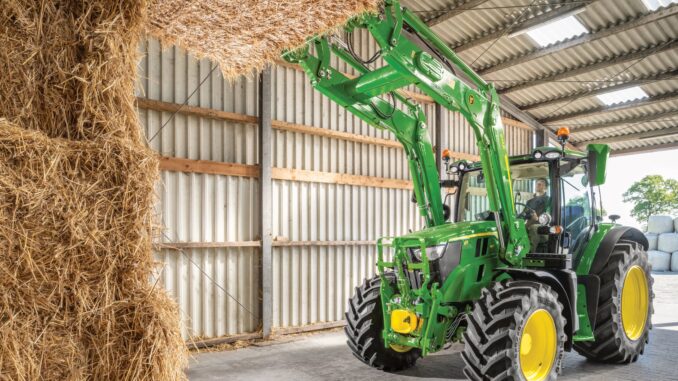
Introduction: John Deere 5105 overview
The John Deere 5105 is a compact utility tractor commonly used on small farms, acreages, and large properties for mowing, loader work, light tillage, and general chores. It sits in the 5 Series utility line, offering enough power for rotary cutters, loaders and light implements while still being manageable for owner‑operators.
This guide is written for homeowner and small‑farm users in the USA and Canada who handle their own basic maintenance and occasional repairs. It walks through practical troubleshooting, service parts, maintenance intervals, and clear boundaries between realistic DIY work and jobs that should go to a John Deere dealer.
General overview of the John Deere 5105
In the Deere lineup, the John Deere 5105 is part of the 5 Series utility tractors, positioned above lawn and garden tractors but below larger row‑crop machines. It typically features a diesel engine, mechanical front‑wheel drive option (MFWD on some units), live or independent PTO, and a category‑2 (or convertible) three‑point hitch.
For most owner‑operators, the key systems you’ll interact with on the John Deere 5105 are:
-
Engine and fuel system (diesel injection, filters, glow plugs)
-
Cooling system (radiator, hoses, thermostat, coolant)
-
Hydraulic system (steering, rear SCVs, loader if fitted)
-
Transmission and clutch (synchro or collar‑shift gearbox, reverser)
-
PTO drive (rear PTO shafts and engagement mechanism)
-
Electrical system (battery, alternator, fuses, safety switches, lights)
Common service parts that owners regularly buy for the John Deere 5105 include:
-
Engine oil filter
-
Fuel filter(s)
-
Primary and secondary air filters
-
Hydraulic filter element
-
Fan/drive belts
-
Thermostat and gasket
-
Radiator hoses
-
Ignition or start switches and keys
-
Battery (appropriate CCA for your climate)
-
Bulbs for headlights and warning lights
Troubleshooting approach for the John Deere 5105
Always start from the symptom you see and hear before trying to guess which part has failed. Ask yourself: what changed just before the problem appeared (fuel, weather, load, recent work)?
Main symptom categories for the John Deere 5105:
-
Starting issues (won’t crank, slow crank, won’t fire)
-
Running issues (loss of power, stalling, smoking)
-
Hydraulic and steering issues (slow loader, hard steering)
-
PTO and implement drive problems
-
Vibration and unusual noises
-
Overheating, leaks, coolant loss
-
Transmission and drive issues (won’t move, difficult shifting)
-
Electrical and safety switch problems (no dash power, interlock not allowing start)
Work through each category methodically. Start with simple checks that don’t require special tools (fluids, filters, fuses, obvious damage) before moving on to deeper diagnostics.
Emergency and immediate repair needs: John Deere 5105
Some problems on a John Deere 5105 must be dealt with immediately because they make the tractor unsafe or will quickly damage expensive components. In this section, focus on what the owner sees, why it matters, and what basic checks they can do before calling a dealer if needed.
1. John Deere 5105 starting issues
When the tractor refuses to crank, cranks very slowly, or cranks but never fires, you have a starting issue. This matters because repeated cranking can overheat the starter and drain the battery, and using starting aids incorrectly can damage the engine.
Common causes:
-
Weak or failing battery
-
Corroded or loose battery cables and ground connections
-
Faulty key switch or starter solenoid
-
Safety interlock not satisfied (clutch, PTO, seat, neutral switches)
-
Air in fuel system after filter change or running out of fuel
-
Glow plug or cold‑start aid not functioning in cold weather
Owner checklist:
-
Verify the transmission is in neutral, PTO disengaged, and clutch pressed fully.
-
Check battery terminals for corrosion and tightness; clean and retighten if needed.
-
Try the lights and dash indicators; if they are weak or dead, suspect the battery.
-
Confirm that any safety switches (seat, clutch, PTO) are not obviously damaged or disconnected.
-
If cranking is normal but engine will not fire after a recent fuel or filter change, bleed the fuel system per the operator’s manual.
2. John Deere 5105 running and power problems
Running issues show up as loss of power, surging, stalling under load, or unusual smoke. These matter because continuing to work a struggling engine can cause overheating, accelerated wear, and, in severe cases, internal damage.
Common causes:
-
Clogged fuel filters or restricted fuel lines
-
Contaminated fuel (water, algae)
-
Blocked air filters
-
Failing injection pump or injectors
-
Low engine compression or internal wear
-
PTO or hydraulic load that is too heavy or binding
Owner checklist:
-
Replace the primary and secondary fuel filters if they are due or suspect.
-
Drain water separators and check for signs of contaminated fuel.
-
Inspect and clean/replace engine air filters.
-
Try operating with lighter loads to see if symptoms improve.
-
Listen for unusual knocking or metallic noises and stop immediately if heard.
3. John Deere 5105 vibration and noise
Excessive vibration or new noises (grinding, clunking, knocking) are early warnings of mechanical failure. Ignoring them can lead to broken shafts, failed bearings, or damage to the transmission or PTO.
Common causes:
-
Loose or damaged engine or transmission mounts
-
Worn universal joints in the driveline
-
Loose loader frames or mounting hardware
-
Failing bearings in auxiliary equipment (mowers, cutters)
-
Misaligned or damaged PTO shafts
Owner checklist:
-
Stop the tractor and inspect external driveline components and PTO shafts.
-
Check for visible loose bolts on loader mounts, axle housings, and drawbar.
-
Note whether noise occurs only when PTO or hydraulics are engaged.
-
Reduce engine speed and see if vibration changes with RPM.
-
If vibration is severe or noise is metallic, stop use and schedule dealer inspection.
4. John Deere 5105 overheating and leaks
Overheating, visible coolant leaks, or oil leaks are urgent because they can lead to engine failure or fires. Never keep running a 5105 that is in the red temperature zone.
Common causes:
-
Low coolant level or coolant leak (radiator, hoses, water pump)
-
Blocked radiator fins or external debris
-
Faulty thermostat or radiator cap
-
Low engine oil level or leaking seals/gaskets
-
Hydraulic leaks from hoses or fittings
Owner checklist:
-
Shut down and allow the tractor to cool fully before opening the radiator cap.
-
Check coolant level in the overflow tank and top up with the correct coolant mix if needed.
-
Inspect radiator fins for dirt, chaff, or mud; clean gently with air or water.
-
Check engine oil level and look for fresh oil spots under the tractor.
-
If leaks are large or overheating recurs quickly, avoid use until repaired.
5. Transmission and drive problems on John Deere 5105
If the tractor won’t move, slips under load, or becomes hard to shift, you’re dealing with transmission or clutch issues. Continuing to force gears or work under heavy load can damage the clutch, gears, or differential.
Common causes:
-
Low or incorrect transmission/hydraulic oil
-
Worn clutch disc or misadjusted linkage
-
Damaged shift linkage or internal shift components
-
Failing front drive components on MFWD units
Owner checklist:
-
Verify transmission/hydraulic fluid level and condition.
-
Check clutch pedal free play and adjust per the operator’s manual if accessible.
-
Try different ranges/gears to see if the issue is isolated.
-
Listen for grinding when shifting; if present, reduce use and plan service.
-
Avoid heavy loads or road speeds until a technician has inspected the tractor.
6. Electrical and safety switch problems on John Deere 5105
Electrical issues show as dead dash, intermittent operation, or inability to start despite apparent good battery. Safety switches can also prevent starting or engagement.
Common causes:
-
Corroded battery cables and grounds
-
Worn ignition switch or poor connections
-
Blown fuses or damaged wiring looms
-
Faulty seat, PTO, neutral, or clutch safety switches
Owner checklist:
-
Inspect and clean battery and ground connections.
-
Check fuse panel for blown fuses; replace with correct rating only.
-
Wiggle the key switch gently; if power cuts in and out, suspect the switch.
-
Verify harnesses to safety switches are firmly plugged in and not damaged.
-
If you’re not comfortable with wiring diagnosis, stop here and use a dealer.
DIY or dealer? John Deere 5105 repair decision guide
On a John Deere 5105, the line between DIY and dealer work usually falls where special tools, lifting equipment, or calibration procedures are required. Most owners can handle routine maintenance and simple bolt‑on part replacement, but internal engine, transmission, and hydraulic repairs should go to an experienced technician.
Good DIY jobs on a John Deere 5105:
-
Engine oil and filter changes
-
Fuel and air filter replacement
-
Battery and bulb replacement
-
Radiator hose, fan belt, and thermostat replacement (for confident DIYers)
-
Basic clutch linkage and brake pedal adjustments (following the manual)
Advanced DIY or dealer jobs:
-
Clutch replacement or internal transmission work
-
Injection pump timing and injector replacement
-
Hydraulic pump replacement or major leak repairs
-
Rear axle and differential repairs
-
PTO clutch or shaft internal repairs
Skill level guide:
-
Beginner: Fluid checks, greasing, battery work, light bulb replacement.
-
Intermediate: Oil/fuel/air filter changes, belts, hoses, basic linkage adjustments.
-
Advanced: Engine, transmission, hydraulic internals—typically dealer‑level unless you have experience and tools.
Parts needed for John Deere 5105: OEM vs aftermarket
Before ordering parts for your John Deere 5105, gather the following information:
-
Full model designation (John Deere 5105 utility tractor)
-
Product Identification Number (PIN) / serial number
-
Engine model and serial number (for engine‑specific parts)
-
Any installed options (MFWD, cab, loader model) that might affect parts
-
Region (USA vs Canada) for correct manuals and kits
Key John Deere 5105 service parts
OEM vs aftermarket guidance:
-
Use OEM parts for belts, filters in critical systems, safety‑related components, and anything with tight tolerances or compatibility concerns.
-
Quality aftermarket parts can work well for some filters, bulbs, and batteries, as long as you cross‑reference the OEM part numbers and ensure they list the John Deere 5105 explicitly.
Where to find John Deere 5105 parts diagrams and manuals
Good online sources for parts diagrams and manuals for the John Deere 5105 include:
-
John Deere “Manuals and Training” portal – operator’s manuals and technical publications, searchable by model and PIN.
-
JDParts or the John Deere online parts catalog – exploded diagrams and part numbers for the 5105 systems.
-
A reputable Deere‑focused parts site (for example, Green Farm Parts or similar) with a dedicated John Deere 5105 maintenance guide page for service kits and commonly used parts.
-
Your local John Deere dealer website, which may host links to manuals and parts lookups tied to your specific serial number.
Use the operator’s manual for daily and periodic maintenance instructions, fluid capacities, and safety information. Use the technical manual and parts catalog for deeper troubleshooting, removal/installation procedures, and diagram‑based part identification.
How to locate John Deere 5105 model, serial and engine numbers
Correct model and serial numbers ensure you get compatible parts and accurate diagrams. The John Deere 5105 has multiple identification plates and stamps, and you should note them all before ordering parts or manuals.
Step‑by‑step:
-
Locate the tractor PIN plate on the main frame, typically on the right‑hand side of the frame or under the hood near the engine compartment.
-
Write down the full model (5105) and PIN, including any prefix/suffix letters that identify configuration and region.
-
Find the engine identification plate or stamp, usually on the side of the engine block or valve cover area; record the engine model and serial.
-
Check for any additional stickers on the cab or fender indicating options like MFWD, transmission type, or loader package.
-
Store these numbers safely (phone photos and written notes) so you can reference them when ordering parts or manuals.
Buying John Deere 5105 parts online and in stores
The best strategy is to combine online research with dealer expertise. Look up part numbers online using your PIN, then decide whether to buy OEM or high‑quality aftermarket based on the part type and availability.
-
Online: Use the official John Deere parts catalog or trusted parts sites, and always verify the part listing references the John Deere 5105 and your PIN range.
-
Dealer counter: Ideal for complex parts, clutch or hydraulic components, and when your tractor falls into specific serial ranges with mid‑production changes.
-
Retail stores: Suitable for generic consumables (oil, grease, some filters, batteries) if packaging clearly lists compatibility with John Deere 5105 or equivalent models.
You can typically find John Deere manuals and parts resources via the main Deere site’s “Parts & Service” section, and many independent parts suppliers host 5105‑specific maintenance kits and curated parts lists.
John Deere 5105 step‑by‑step fitting guide for common jobs
Below are practical DIY jobs that give good reliability returns without requiring advanced tools. Always follow safety procedures: park on level ground, lower implements, chock wheels, and disconnect battery when working near electrical or rotating parts.
1. Engine oil and filter change on John Deere 5105
Changing engine oil and filter protects the diesel engine from wear and contamination.
-
Warm the engine briefly, then shut down and allow oil to drain back for a few minutes.
-
Place a drain pan under the oil pan drain plug; remove the plug and let the oil fully drain.
-
Remove the old oil filter, ensuring the old gasket comes off with it.
-
Lightly oil the gasket on the new filter and spin it on by hand until the gasket seats, then tighten per instructions.
-
Reinstall the drain plug with a good washer, then refill with the specified oil grade and capacity.
-
Start the engine, check for leaks, and recheck oil level after a few minutes.
2. Fuel filter replacement on John Deere 5105
Fresh fuel filters help prevent stalling, power loss, and injector wear.
-
Clean around the filter housings to prevent dirt entering the system.
-
Close any fuel shutoff valves if fitted.
-
Remove the old filter(s) and seals, catching any fuel in a safe container.
-
Install new filters with fresh seals, following arrow and position markings.
-
Use the hand primer or bleed screws per the manual to purge air from the system.
-
Crank and start the engine, watching for leaks and confirming smooth running.
3. Air filter service on John Deere 5105
Proper air filtration protects the engine from dust and debris, especially in fieldwork.
-
Open the air cleaner housing, noting the orientation of primary and secondary elements.
-
Remove the primary filter and inspect; replace if dirty or per the schedule.
-
Do not blow out or wash the inner safety (secondary) element; replace it on schedule.
-
Clean the inside of the housing with a clean cloth; avoid introducing dust.
-
Reinstall the elements correctly and ensure the housing is sealed properly.
4. Fan belt replacement on John Deere 5105
A healthy fan belt keeps the alternator charging and coolant circulation consistent.
-
Disconnect the battery negative terminal.
-
Note the belt routing or take a photo before removal.
-
Loosen the belt tensioner or alternator mounting bolts as specified.
-
Remove the old belt and inspect pulleys for wear or damage.
-
Install the new belt, routing it correctly, then tension to the recommended deflection.
-
Tighten all mounting hardware, reconnect the battery, and run the engine to check operation.
Maintenance to prevent John Deere 5105 problems
Most common John Deere 5105 issues can be prevented with consistent basic maintenance. Focus on a few key areas and you’ll reduce breakdowns, downtime, and repair costs.
Key focus areas:
-
Starting reliability: Keep battery, cables, and fuel system in good condition; replace filters on time.
-
Engine health: Use the correct oil grade, change oil and filters per schedule, and keep air filters clean.
-
Cooling and fire prevention: Maintain coolant levels, clean radiator fins, and monitor for oil/fuel leaks.
-
Drive and PTO performance: Maintain transmission/hydraulic fluid, inspect PTO shafts, and service clutches/linkages.
-
Electrical reliability: Protect wiring, check fuses, and ensure safety switches and ignition components are in good condition.
John Deere 5105 maintenance schedule and year‑round checklist
Adapt this outline to the specific maintenance chart in your operator’s manual. It provides a practical way to structure your maintenance through the year.
Daily / before each use
-
Walk‑around inspection for leaks, damaged hoses, or loose hardware.
-
Check engine oil level and coolant level.
-
Check fuel level and drain water separator if fitted.
-
Verify tire pressures and look for obvious damage.
-
Test brakes and steering briefly at low speed.
After 8–10 hours of operation
-
Grease all recommended lubrication points (steering, loader pins, hitch).
-
Clean radiator screen and air intake grills.
-
Inspect PTO and implement driveline components for wear or damage.
Every 25 hours
-
Inspect engine air filter and service if operating in dusty conditions.
-
Check battery electrolyte (if serviceable) and cable condition.
-
Inspect fan belt condition and tension.
Every 50 hours or yearly
-
Change engine oil and replace engine oil filter.
-
Inspect fuel filters and replace if due or if contamination is suspected.
-
Check transmission/hydraulic oil level and top up if needed.
-
Inspect brake and clutch linkages for wear and free play.
Every 100–250 hours
-
Replace hydraulic filter element as specified.
-
Replace engine fuel filter(s) per schedule.
-
Grease front axle pivots, steering components, and loader pins thoroughly.
Every 200+ hours or as specified
-
Replace primary and secondary air filters (at least annually, more often in dusty conditions).
-
Check and adjust valve lash if specified by the manual or technician.
-
Inspect front axle, steering, and driveline components for wear and play.
Seasonal checklist (USA & Canada)
Spring:
-
Complete full engine service (oil, filters, coolant check).
-
Inspect tires and ballast for upcoming fieldwork.
-
Check and service PTO and implement hookups.
Mid‑season:
-
Re‑inspect filters and cooling system; clean radiator thoroughly.
-
Grease all lubrication points; verify steering and brakes.
Fall/end‑of‑season:
-
Change oil if hours are close to the interval.
-
Treat fuel for winter, or fill with winter‑grade diesel.
-
Store tractor under cover if possible; maintain battery on a tender.
John Deere 5105: repair, upgrade, or replace?
The John Deere 5105 is designed for long service life, and most problems are worth repairing if the tractor’s overall condition is sound. Upgrades can improve comfort, safety, or productivity, while replacement only becomes necessary when major components fail and repair costs exceed the tractor’s realistic value.
Repair if…
-
The issue is confined to one system (e.g., clutch, hydraulics, cooling) and the rest of the tractor is solid.
-
Parts are readily available and labor costs are reasonable relative to value.
-
You need the tractor’s existing capabilities and have attachments matched to it.
Upgrade if…
-
You want better lighting (LED conversions), improved seat comfort, or additional hydraulic remotes.
-
You add a compatible loader or change tire setup for better traction.
-
You need minor performance improvements but the base tractor is sound.
Replace if…
-
Multiple major systems (engine, transmission, hydraulics) need overhaul at once.
-
The tractor’s hours, wear, or corrosion make ongoing repairs uneconomical.
-
Your operation has outgrown the 5105’s power or hydraulic capacity.
Expanded troubleshooting FAQ: John Deere 5105 (30+ questions)
1. Why will my John Deere 5105 not start at all?
If the 5105 will not crank, first suspect battery, cables, or safety interlocks. Check that the transmission is in neutral, PTO is off, and clutch is fully depressed. Inspect battery terminals for corrosion and ensure clamps are tight. If the dash stays dark or starter does not click, fuses, key switch, or starter solenoid may need diagnosis by a technician.
2. Why does my John Deere 5105 crank but not fire?
Cranking with no start usually points to fuel delivery or air in the fuel system. Confirm you have clean fuel and that the filters are not clogged. If filters were recently changed or the tractor ran out of fuel, bleed the system at the injectors or bleed screws per the manual. In cold weather, ensure glow plugs or cold‑start aids are working to help ignition.
3. Why does my John Deere 5105 start but stall shortly after?
Stalling soon after start can result from restricted fuel flow or water in the fuel. Check for water in the separator, replace fuel filters, and inspect lines for kinks. Stalling under load can also indicate clogged filters or failing injection components. If symptoms persist after filter service, have a technician check injection pump pressure and injector performance.
4. What causes hard starting on a cold John Deere 5105?
Cold starts stress diesel engines and expose weak batteries, glow plugs, and fuel quality issues. Make sure you use winter‑grade diesel or proper additives. Check battery health and glow plug function, and allow the plugs to preheat per the manual before cranking. Avoid excessive cranking; if it’s still hard to start, a dealer can test compression and glow system wiring.
5. Why is my John Deere 5105 losing power under load?
Loss of power is often a fuel or air restriction. Inspect and replace fuel filters, clean the air filters, and check for blocked intake or exhaust paths. Heavy implements or PTO loads that exceed the tractor’s capacity will also exaggerate power loss. Persistent power issues after filter service may require injector or turbo (if fitted) checks by a technician.
6. What does excessive black smoke from my John Deere 5105 mean?
Black smoke indicates incomplete combustion, usually from too much fuel or too little air. Check that the air intake path and filters are clear. Overloading the tractor with excessively heavy implements or running at low RPM with high load can also cause black smoke. If smoke continues, have the injection system and turbocharger (if equipped) inspected.
7. Why is my John Deere 5105 producing white or grey smoke?
White or grey smoke, especially at startup, may be normal in cold conditions, but persistent smoke can indicate fuel or engine issues. Low compression, poor injector spray or coolant entering the combustion chamber can all cause smoke. Monitor coolant level for unexplained loss and oil for contamination. If smoke remains heavy, schedule compression and leak‑down testing.
8. Why does my John Deere 5105 overheat when working?
Overheating typically comes from low coolant, blocked radiator fins, or a failed thermostat. Check coolant level and inspect the radiator for debris; clean it thoroughly. Confirm that the fan belt is tight and the fan is turning properly. If the tractor continues to run hot under normal load, have the cooling system, thermostat, and water pump assessed by a dealer.
9. What should I do if my John Deere 5105 is leaking coolant?
Coolant leaks can come from hoses, the radiator, the water pump or gaskets. Locate the source by inspecting around the engine, radiator, and under the tractor after parking. Small hose leaks might be DIY‑repairable with hose and clamp replacement. Radiator or water pump leaks, especially on high‑hour tractors, are best handled by a dealer or radiator specialist.
10. Why is hydraulic power weak on my John Deere 5105?
Weak hydraulics show up as slow loader movement or poor steering assist. First, check hydraulic/transmission fluid level and condition. Replace the hydraulic filter on schedule and ensure it’s not clogged. Air in the system or a failing hydraulic pump can also cause weakness. If fluid is correct and filters are fresh, professional pressure testing will pinpoint the fault.
11. Why won’t the loader on my John Deere 5105 lift like it used to?
Loader performance depends on hydraulic pressure, fluid flow, and mechanical condition. Check for hydraulic leaks, damaged hoses, or loose quick‑couplers. Make sure the loader control valves are correctly connected and not partially blocked. If the loader still lacks power, pump output and relief valve settings should be checked with gauges by a technician.
12. Why is the steering heavy on my John Deere 5105?
Heavy steering can signal low hydraulic pressure or steer‑system wear. Confirm the hydraulic fluid is at the proper level and that the filter is not overdue. Inspect front axle components, tie rod ends, and steering joints for mechanical binding. If fluid and hardware look fine, a dealer can test steering valve operation and pump pressure.
13. Why won’t my John Deere 5105 move when in gear?
A 5105 that won’t move can have clutch, transmission, or driveline issues. Verify that the parking brake is fully released and that gears are properly engaged. Low transmission/hydraulic fluid or a severely worn clutch can also cause loss of drive. Avoid forcing gears or continuing to rev the engine; have the clutch and gearbox inspected promptly.
14. Why are gears hard to shift on my John Deere 5105?
Hard shifting usually relates to clutch adjustment, linkage wear, or internal synchro problems. Check clutch pedal free play and adjust if accessible per the operator’s manual. Listen for grinding while shifting; if present, stop forcing it. Worn synchros and internal components should be evaluated by a transmission specialist or John Deere dealer.
15. Why won’t the PTO engage on my John Deere 5105?
PTO engagement issues may stem from linkage, internal clutches, or safety circuits. Confirm that the PTO lever or switch is functioning and cables/rods move correctly. Ensure all safety conditions (seat, PTO guards, etc.) are satisfied for electric‑actuated systems. If mechanical PTO clutch components are worn or damaged, a dealer will need to open the PTO housing.
16. Why does my John Deere 5105 PTO stop under load?
A PTO that disengages or slows under load suggests clutch slip or hydraulic pressure problems. Check that the tractor is not being overloaded with an implement beyond specification. Inspect fluid levels and filters, and listen for unusual noises from the PTO area. If PTO continues to slip, internal clutch plates or pressure systems likely require professional repair.
17. Why is my John Deere 5105 vibrating at certain RPMs?
RPM‑specific vibration often comes from driveline imbalance or loose mounts. Examine PTO shafts, universal joints, and loader frames for looseness or damage. Check that tires are properly inflated and not badly worn. If vibration persists, engine or transmission mounts and internal rotating components may need detailed inspection.
18. What causes a clunking noise in the rear of my John Deere 5105?
Clunking from the rear could indicate worn hitch components, loose drawbar, or internal differential or axle problems. Verify that the drawbar and hitch pins are tight and correctly installed. Look for excessive play in the three‑point arms and stabilizers. Loud or repetitive clunks under load warrant a dealer inspection of internal gears and bearings.
19. Why do the lights on my John Deere 5105 flicker or fail?
Flickering lights usually arise from poor electrical connections or failing bulbs. Check bulb sockets and harness plugs for corrosion or looseness. Inspect the battery and alternator connections, as low voltage can cause inconsistent lighting. If multiple electrical functions are affected, the ignition switch or main harness may be at fault.
20. Why does the battery keep going flat on my John Deere 5105?
Repeated battery drain can be caused by a failing alternator, parasitic draw, or an old battery. Test charging output with a multimeter or have a dealer perform a load test. Ensure lights and accessories are shut off before storage. If the tractor sits for long periods, a battery maintainer and periodic starting can help prevent deep discharge.
21. Why does my John Deere 5105 shut down when I leave the seat?
Many tractors use safety switches that cut power if the operator leaves the seat with PTO engaged or transmission in gear. Check the operator’s manual to understand your specific safety logic. If the tractor shuts down even in neutral or with PTO off, the seat or safety switch wiring may be faulty. Avoid bypassing safety devices; have them repaired properly.
22. Why is diesel fuel leaking around the filters on my John Deere 5105?
Leaks around fuel filters usually mean seals were not seated correctly or housings are damaged. Remove and inspect the filters; confirm the O‑rings are in place and not twisted. Clean the sealing surfaces and reinstall carefully, using only the correct filters. If housings are cracked or threads damaged, replace the assembly and re‑bleed the system.
23. Why is my John Deere 5105 air filter clogging quickly?
Rapid clogging can occur in very dusty conditions, during harvest, or when operating near fine materials. Make sure the intake pre‑cleaner and screens are working properly and not obstructed. You may need more frequent inspections and replacements than the base schedule suggests. Avoid running without filters; this can cause severe engine damage.
24. Why do I see oil around the front axle of my John Deere 5105?
Oil around the front axle can be from hub seals, steering components, or axle housing leaks. Clean the area and monitor to find the exact source. Minor seepage might be manageable with seal and gasket replacement; larger leaks affecting lubrication levels require prompt repair. Running the front axle with low oil can lead to expensive failures.
25. Why is my John Deere 5105 three‑point hitch jerky or slow?
Jerky or slow hitch movement can come from air in the hydraulic system, worn valves or low fluid. Check fluid levels and replace filters on schedule. Bleeding or cycling the hitch through its full range may help clear air. If motion remains uneven, internal valve components or hitch cylinders may need professional attention.
26. Why is the parking brake on my John Deere 5105 not holding?
A weak parking brake may be due to cable or linkage adjustment, worn brake components, or contamination. Inspect linkage parts for wear or damage and adjust per the manual if possible. If adjustments cannot restore holding power, brake linings or discs may be worn and require replacement. Until fixed, use wheel chocks on slopes for safety.
27. Why is the clutch pedal on my John Deere 5105 sticking or stiff?
Sticking or stiff clutch operation can arise from dry linkage, corrosion, or internal clutch issues. Lubricate external linkage points and pivot pins. Check for bent rods or interference. If the pedal still feels abnormal or clutch engagement is harsh, internal inspection and possible clutch replacement are likely dealer‑level jobs.
28. Can I adjust the clutch on my John Deere 5105 myself?
Basic clutch free‑play adjustments may be within reach for intermediate DIYers, using the operator’s or technical manual instructions. You will adjust linkage length or stops to achieve the recommended free play. However, internal clutch service, split‑tractor procedures, and alignment require special tools and experience and should be left to a dealer.
29. How often should I change engine oil on my John Deere 5105?
Oil change intervals depend on hours and operating conditions, but many 5105 schedules specify roughly every 100–250 hours or at least annually. If you work in dusty, hot, or heavy‑load environments, stay closer to the shorter interval. Always use oil grade and capacity specified in the operator’s manual and replace the filter each time.
30. How often should I replace fuel filters on my John Deere 5105?
Fuel filters are typically changed at defined hour intervals, often around every 500 hours, but more often is wise if fuel quality is uncertain. If you experience power loss, stalling or contamination, replace filters immediately. Bleed the fuel system properly after replacement to ensure reliable starting and running.
31. How often should I service the air filters on my John Deere 5105?
Air filters usually need inspection at 25‑hour intervals and replacement at longer service points or annually. In heavy dust, shorten inspection intervals significantly. Replace both primary and secondary elements according to the chart; never leave an inner safety element past its recommended life.
32. What hydraulic fluid should I use in my John Deere 5105?
Use the fluid type specified by John Deere for the 5105, often a Hy‑Gard or similar multi‑function oil suitable for transmission, hydraulics and wet brakes. Mixing incompatible fluids can cause clutch and brake problems. If you’re unsure, consult your dealer with your PIN and follow the manual’s capacity and viscosity guidelines.
33. Can I use aftermarket filters on my John Deere 5105?
Quality aftermarket filters can be acceptable for certain systems if they meet or exceed OEM specifications and explicitly list the John Deere 5105 as compatible. For hydraulic, fuel, and critical engine filters, many owners prefer OEM to avoid fit and performance issues. Stick to trusted brands and cross‑reference with OEM part numbers.
34. How do I know when it’s time for professional service on my John Deere 5105?
If basic checks and routine maintenance do not resolve symptoms—or if you encounter internal engine noises, severe vibration, or repeated system faults—it’s time for professional service. Likewise, any job that requires splitting the tractor, special diagnostic tools, or safety‑critical systems should go to a dealer. Keep records of symptoms and your checks to help the technician.
35. How can I keep my John Deere 5105 reliable for years?
Reliability comes from consistent maintenance, sensible loading, and prompt attention to small issues. Follow the maintenance schedule closely, use clean fuel and correct fluids, and keep radiators and filters clean. Avoid overloading implements or ignoring warning signs like smoke, noise, or leaks. With steady care, the John Deere 5105 remains a dependable small‑farm workhorse.