
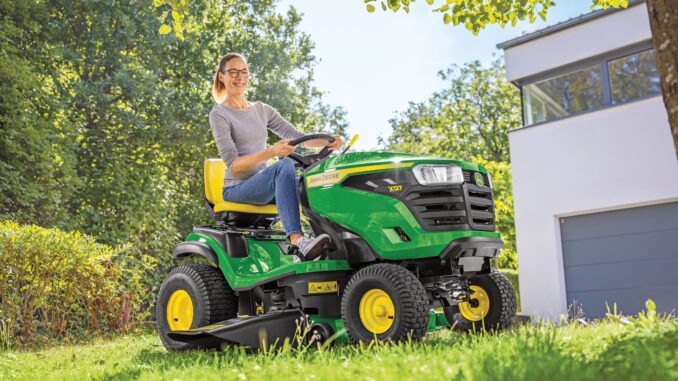
The John Deere X500 is a Select Series garden tractor built around Deere’s iTorque power system and supported in the operator’s literature as an X500 Multi-Terrain Series tractor with service procedures for engine, transmission, mower, electrical, and storage systems. For homeowners in the USA and Canada, it sits above basic lawn tractors and is better suited to larger properties, heavier mowing loads, towing, and more regular seasonal use than entry-level machines.
This guide is written as a symptom-first, owner-focused reference covering John Deere X500 repair basics, troubleshooting paths, maintenance tasks, parts lookup strategy, manuals, diagrams, and a practical FAQ. It follows the same structure most DIY owners need when deciding whether a problem is a quick service issue, a realistic home repair, or a dealer-level job.
John Deere X500 model overview
The John Deere X500 is part of the Select Series / X500 Multi-Terrain tractor family, and Deere’s operator documentation groups it with closely related premium lawn and garden models that share many service concepts but not always the same exact parts. The machine typically uses a gasoline V-twin Kawasaki engine with carburetion, 12‑volt starting, and a hydrostatic drivetrain, and X500 setups commonly run 48‑inch or 54‑inch mower systems.
Typical use for the John Deere X500 includes mowing larger home lawns, maintaining mixed terrain, towing light yard carts, and handling repeated weekly cutting through the season. Owners usually care most about starting reliability, clean cut quality, stable traction, and keeping the deck drive system and engine breathing system in good condition.
General overview of the John Deere X500
From a repair standpoint, the main John Deere X500 systems are the engine and fuel system, mower system, hydrostatic drive system, and electrical/safety system. Owner and service documentation includes sections for engine oil and filter service, air cleaner elements, spark plugs, fuel filter replacement, transaxle oil service, mower belt replacement, blade service, battery care, fuse replacement, and troubleshooting charts for engine, electrical, machine, and mower faults.
Common service parts owners regularly buy for the John Deere X500 include the oil filter, fuel filter, paper air element, foam pre‑cleaner, and spark plugs. For deck service, X500 tractors use mower deck drive belts and blades specific to their 48‑inch or 54‑inch decks, and belt part numbers can vary by deck version, so owners should always confirm by tractor PIN and deck tag before ordering.
John Deere X500 troubleshooting approach
The best way to troubleshoot a John Deere X500 is to start with the symptom the owner actually sees: no crank, hard starting, uneven cutting, vibration, poor drive response, or an electrical shutdown. Manufacturer troubleshooting support follows the same pattern by separating issues into engine, electrical, machine, and mower categories.
Most John Deere X500 problems fit into these symptom groups:
-
Starting issues, such as no crank, cranks but will not start, or starts then stalls.
-
Running issues, such as surging, loss of power, rich running, or hot restarting trouble.
-
Cut-quality issues, such as streaking, scalping, uneven height, or poor discharge.
-
Vibration and noise, especially from bent blades, worn deck parts, loose hardware, or failing bearings.
-
Overheating and leaks, often linked to dirty cooling fins, restricted air intake areas, oil leaks, or fuel seepage.
-
Transmission and drive complaints, such as weak hill performance, poor response, or overdue hydrostatic service.
-
Electrical and safety-switch faults involving the seat switch, PTO switch, park brake switch, battery, or fuse.
Immediate John Deere X500 repairs
Some John Deere X500 faults should be addressed right away because they create a safety risk or can damage expensive components quickly. The big red‑flag categories are blade vibration, fuel leakage, overheating from blocked cooling fins, PTO or safety‑switch faults that create unpredictable operation, and drive issues severe enough to leave the tractor unable to hold or control movement.
Starting issues on a John Deere X500
A no‑start John Deere X500 matters because repeated cranking can drain the battery, foul plugs, and hide a basic interlock or fuel issue that is quick to fix if checked early. Common causes include a weak battery, dirty terminals, failed seat/PTO/park‑brake switch logic, stale fuel, plugged fuel filter, fouled spark plugs, or restricted air intake.
-
Confirm the brake is fully applied and PTO is off, then repeat the start sequence exactly as shown in the controls section of the manual.
-
Check battery terminal tightness and corrosion, then inspect the fuse.
-
Inspect the fuel filter and confirm fresh fuel is present.
-
Remove and inspect spark plugs if the engine cranks but will not fire.
-
If safety‑switch testing points to a switch fault, use systematic test procedures before replacing parts.
John Deere X500 cut-quality problems
Poor cut quality on a John Deere X500 usually shows up as uneven stripes, uncut grass lines, scalping, or clumping, and it often gets worse if the deck is left dirty or blades are dull. Common causes include dull or bent blades, incorrect deck leveling, low tire pressure, a slipping mower belt, and deck buildup under the shell.
-
Check tire pressure first because the deck cannot cut level if the tractor sits unevenly.
-
Clean the underside of the deck and inspect blade condition.
-
Verify deck level and anti‑scalp wheel adjustment.
-
Inspect the mower drive belt for glazing, cracking, or low tension.
-
Replace bent blades rather than trying to straighten them.
Vibration and noise in the John Deere X500
Serious vibration on a John Deere X500 should never be ignored because it can damage spindle assemblies, deck hardware, and even the engine PTO area if the source is in the rotating deck system. Common causes include bent blades, unbalanced blades after sharpening, loose mounting hardware, bad spindle bearings, damaged pulleys, or debris wrapped around shafts.
-
Stop mowing immediately and inspect blades for impact damage.
-
Check blade balance if the vibration started after sharpening.
-
Inspect spindle areas and pulleys for heat, wobble, or noise.
-
Tighten visible deck hardware to specification.
-
Use dealer support if the vibration appears to come from the engine or hydrostatic drive rather than the deck.
John Deere X500 overheating and leaks
Overheating or burnt‑oil smell on a John Deere X500 usually points to an airflow problem before it points to a major engine failure. Neglected debris in the air‑intake and cooling‑fin areas is one of the fastest ways to create heat‑related trouble on air‑cooled versions.
-
Common causes: plugged cooling fins, grass packed around the engine screen, low oil, old oil, leaking fuel lines, loose oil filter, or dirt buildup around hot engine parts.
-
Basic checks: shut down and cool the machine, inspect for active leaks, clean cooling areas, verify oil level, and check the fuel filter and line connections.
-
Dealer line: persistent overheating after cleaning, suspected head‑gasket issues, internal engine noise, or valve‑clearance‑related running problems should move beyond basic DIY.
John Deere X500 transmission and drive problems
Weak traction or slow response on a John Deere X500 can come from basic operating issues, but it can also point to overdue transaxle service. The service schedule includes transaxle oil changes at break‑in and again at a set hour interval, showing that hydro service is a real maintenance item rather than a lifetime‑fill assumption.
-
Common causes: low or aged transaxle oil, drive‑system wear, traction loss on slopes, rear wheel hardware issues, or owner expectations beyond safe operating limits.
-
Basic checks: review operating controls, inspect rear wheel hardware, verify service history, and look for leaks around the transaxle area.
-
Dealer line: internal hydrostatic performance issues, pressure loss, unusual whining under load, or repeated loss of drive after correct maintenance usually justify dealer diagnosis.
Electrical faults on the John Deere X500
Electrical problems on a John Deere X500 often look random to owners, but many trace back to the battery, fuse, dirty terminals, or one of the safety switches for seat, brake, PTO, and reverse implement operation. Those faults matter because they can mimic carburetor, starter, or PTO problems and lead to wasted parts swapping.
-
Clean and tighten battery terminals.
-
Check the fuse before replacing larger components.
-
Test the seat, park brake, and PTO switch functions in a logical order.
-
Inspect visible wiring around the battery tray and under‑seat area.
-
Escalate to dealer diagnosis for repeated blown fuses or harness damage.
DIY or dealer for the John Deere X500?
The John Deere X500 is very friendly for routine homeowner maintenance, but the line usually falls at tasks involving hydrostatic internals, valve adjustment, deep electrical tracing, or repairs where deck timing/alignment and torque accuracy matter. Owner literature covers many service procedures, but it also clearly pushes some work, such as valve‑clearance adjustment and in‑depth diagnostics, toward dealer service.
Good DIY jobs
-
Engine oil and filter changes.
-
Air filter and foam pre‑cleaner replacement.
-
Fuel filter replacement.
-
Spark plug replacement.
-
Blade sharpening or blade replacement, if done safely and balanced correctly.
-
Deck cleaning, leveling checks, and mower belt inspection.
-
Battery cleaning and fuse replacement.
Advanced DIY or dealer jobs
-
Mower deck belt replacement, especially if routing differs by deck version.
-
Transaxle oil service.
-
Spindle replacement and deck teardown.
-
Safety‑switch diagnosis with a meter.
-
Carburetor adjustment or fuel‑system troubleshooting beyond basic filter replacement.
Skill level guide
-
Beginner: oil, filter, battery, spark plugs, deck cleaning, tire pressure.
-
Intermediate: blade service, deck leveling, fuel filter, belt inspection, basic switch testing.
-
Advanced: deck belt replacement, transaxle service, wiring diagnosis, spindle work, valve‑clearance preparation.
John Deere X500 parts and OEM numbers
Before ordering John Deere X500 parts, gather the full model name, tractor PIN, engine model and serial, and deck size or deck version tag. Dealers and good online sellers rely on these because deck, belt, and running changes can alter what fits.
For the John Deere X500, OEM parts are usually the safest choice for belts, safety switches, and any fit‑sensitive deck or drive item because routing, length, and pulley grip matter. Aftermarket parts are more reasonable for batteries, some filters, and some blades, but only when the listing clearly cross‑references the exact X500 and the exact deck version.
John Deere X500 diagrams and manuals
The most useful John Deere X500 document sources are:
-
The official operator’s manual – best for controls, basic repair, maintenance intervals, deck removal/installation, lubrication points, troubleshooting charts, and storage procedures.
-
The maintenance/service‑interval charts – a fast reference for break‑in, 50‑hour, 100‑hour, and 200‑hour tasks.
-
Parts catalogs / online parts lookup – essential for OEM number confirmation, serial‑specific parts, and exploded views.
-
A reputable third‑party parts site – useful for exploded diagrams and visual confirmation of deck, spindle, and hardware layouts.
Each of these is useful in a different way: the operator manual for how‑to, the interval charts for when, the parts catalog for what part number, and the diagram site for what it looks like and how it goes together.
John Deere X500 serial number locations
The John Deere X500 model, serial, and engine numbers matter because they separate one tractor build from another and prevent ordering the wrong belt, blade, switch, or engine service part. Identification and record‑keeping sections in the manuals exist for exactly this reason.
-
Find the tractor Product Identification Number label on the main frame (location shown in the manual diagrams).
-
Record the exact model as shown on the tractor, not just “X500 series.”
-
Check the mower deck tag to confirm whether you have a 48‑inch or 54‑inch deck and which deck version is installed.
-
Locate the engine model and serial on the engine labeling before buying engine‑specific service parts.
-
Keep all numbers in a phone note or maintenance log before ordering online or visiting the dealer counter.
Buying John Deere X500 parts
A smart John Deere X500 parts‑buying strategy is to confirm the OEM number first, then compare dealer, John‑Deere‑linked, and reputable aftermarket sources rather than buying from vague “fits many models” listings. That is especially important for belt‑driven and serial‑sensitive parts.
-
Online: use Deere references first, then cross‑check against a model‑specific diagram page before purchase.
-
Dealer counter: best for deck belts, switches, transaxle‑related items, and any part tied to a production break or attachment version.
-
Retail stores: acceptable for oil, grease, batteries, and some tune‑up consumables if packaging clearly lists the X500 or the exact Deere cross‑reference.
John Deere X500 fitting guide
These are high‑impact John Deere X500 DIY jobs that fix common owner complaints and are directly supported by basic maintenance procedures. Always remove the key, park safely, and let hot parts cool before working.
Changing the John Deere X500 air filter
A dirty air filter can cause rich running, power loss, and hard starting on the John Deere X500.
-
Park on level ground, switch off, and open the air‑cleaner housing.
-
Remove the foam pre‑cleaner and paper element.
-
Wipe the housing clean without forcing dirt into the intake.
-
Install the new foam and paper elements in the same orientation.
-
Refit the cover and check for a proper seal.
Replacing John Deere X500 spark plugs
Fresh spark plugs often cure hard starting, rough idle, and weak running under load on the John Deere X500.
-
Let the engine cool fully and remove both plug caps by the boot, not the wire.
-
Remove the old plugs and compare condition side to side.
-
Confirm the replacement plug number matches your parts listing.
-
Install by hand first to avoid cross‑threading, then tighten correctly.
-
Refit the caps firmly and test start the engine.
John Deere X500 mower blade service
Sharp, balanced blades are one of the biggest factors in cut quality and vibration control on the X500.
-
Remove the deck or safely access the blades as outlined in the manual.
-
Inspect each blade for bends, cracks, and edge wear.
-
Sharpen only if the blade is structurally sound.
-
Balance each blade before reinstalling.
-
Replace damaged blades in matched sets where needed.
Replacing a John Deere X500 deck belt
A worn deck belt can cause weak blade speed, poor discharge, squealing, or a deck that stops under load.
-
Confirm the exact deck size and belt number from the deck tag and parts diagram before removal.
-
Lower or remove the deck as needed for safe access.
-
Photograph the old routing before pulling the belt off the pulleys.
-
Inspect idlers and pulleys while the belt is off.
-
Route the new belt exactly as shown for the deck version, then test engagement at low risk before mowing.
Preventing repeat John Deere X500 problems
Most recurring John Deere X500 faults come from skipped service, dirty cooling areas, ignored blade wear, or deck cleanup that gets postponed too long. The service chart makes it clear that oil, air, fuel, spark, belt, blade, cooling‑fin, and lubrication tasks are part of normal ownership, not occasional extras.
Focus areas:
-
Starting reliability: keep the battery clean, use fresh fuel, replace the fuel filter, and renew spark plugs on schedule.
-
Cut quality: keep blades sharp, deck underside clean, tire pressure correct, and belt condition monitored.
-
Fire and overheating prevention: clear grass and debris from cooling fins and hot engine areas regularly.
-
Drive performance: keep up with transaxle service intervals and inspect for leaks or wheel‑hardware problems.
-
Electrical reliability: test safety functions periodically and clean the battery connections before corrosion becomes severe.
John Deere X500 maintenance schedule
The official John Deere X500‑family service chart is the best base for preventative maintenance because it links tasks to real operating hours rather than guesswork. Severe heat, dust, and heavy mowing loads can justify more frequent service than the minimum schedule.
Daily or before each use
-
Check engine oil level.
-
Inspect the machine for loose hardware, leaks, and obvious damage.
-
Check the mowing area and deck condition before use.
-
Clean heavy grass buildup from the deck and engine intake areas if present.
Break‑in after 8 hours
-
Change engine oil and filter.
Every 50 hours or annually
-
Lubricate front axle pivot and axle spindles.
-
Lubricate mower deck spindles (if applicable).
-
Lubricate the lift pedal and other grease points called out in the manual.
Every 100 hours or annually
-
Change engine oil and filter.
-
Replace spark plugs.
-
Replace air‑filter elements, both foam and paper.
-
Replace fuel filter.
-
Clean engine cooling fins.
-
Check mower belt, sharpen or replace blades, clean underside of deck, and check tire pressure.
Every 200 hours
-
Change transaxle oil (where specified).
-
Check and adjust valve clearance through a dealer service visit.
Seasonal checklist
-
Spring: change overdue oil and filter, inspect fuel filter, install sharp blades, and verify deck level.
-
Mid‑season: clean cooling fins, inspect belt condition, grease fittings, and check tire pressure.
-
Fall or end of season: clean the machine thoroughly, sharpen or replace blades, stabilize fuel as needed, and follow storage steps from the manual.
Repair, upgrade, or replace the John Deere X500?
For most homeowners, the John Deere X500 is worth repairing when the frame, engine, and transmission are fundamentally sound because many common faults are still normal wear items rather than end‑of‑life failures. The decision gets harder when repair costs stack across deck, hydrostatic, and electrical systems at the same time.
Repair if…
-
The issue is limited to service parts, blades, belts, battery, switches, or tune‑up items.
-
The engine starts and runs well after normal maintenance.
-
The deck shell and major drivetrain components are still solid.
Upgrade if…
-
You need more deck options, more features, or a newer X500‑family machine with capabilities closer to your property needs.
-
Repeated mowing load exposes limits in your current deck setup or attachment mix.
Replace if…
-
The machine has major hydrostatic problems, severe deck rust, and engine wear all at once.
-
Required repairs exceed the value of a well‑maintained replacement tractor in your market.
-
Parts chasing has become serial‑number‑sensitive and uneconomical across several systems.
John Deere X500 FAQ
1. Why will my John Deere X500 not start?
The most common John Deere X500 no‑start causes are battery problems, dirty terminals, interlock issues, stale fuel, clogged fuel filter, or worn spark plugs. Start with brake/PTO position, then battery, fuse, and fuel flow before assuming a major engine problem. Safety‑interlock issues can completely block starting even when the engine is healthy.
2. Why does my John Deere X500 crank but not fire?
If the engine cranks but will not fire, think fuel, spark, or air. A clogged fuel filter, fouled spark plugs, stale gasoline, or a heavily restricted air filter are all realistic causes on this model. Checking those items first is faster and cheaper than jumping straight to carburetor work.
3. Why does my John Deere X500 start and then stall?
A stall‑after‑start problem often points to fuel delivery, contaminated fuel, partial filter blockage, or a carburetor issue. It can also happen when a safety circuit cuts the engine because the operator conditions are not being met. Start with the easy checks before chasing deeper fuel‑system faults.
4. Why is my John Deere X500 battery always dead?
Repeated dead‑battery complaints usually come from loose or corroded terminals, a weak battery, poor charging, or long storage without maintenance. Basic battery cleaning and load‑testing will often reveal whether you have a charging-system fault or a battery that is simply at the end of its life. Long periods of storage without a maintainer are hard on small‑engine batteries.
5. What safety switches can stop a John Deere X500 from starting?
The John Deere X500 uses at least the seat switch, PTO switch, and park‑brake switch in its safety logic. If one of these fails or does not fully actuate, the tractor may not crank or may shut off unexpectedly. Owners should test functions methodically rather than bypassing them, both for safety and for good diagnostics.
6. Why does my John Deere X500 run rough?
Rough running usually comes from plug wear, air restriction, fuel contamination, or carburetion problems. Since the scheduled maintenance includes replacing spark plugs, air elements, and the fuel filter, a rough‑running machine that is overdue for service often improves with a proper tune‑up first. Dirty cooling areas and overheating can also contribute to roughness after running hot.
7. Why is my John Deere X500 losing power in tall grass?
Loss of power under load is often a mix of dull blades, grass buildup under the deck, weak belt grip, or an engine that is overdue for air and fuel service. Tall or wet grass magnifies those issues because the deck needs more blade‑tip speed and discharge flow. Restore the basics before blaming the engine itself.
8. Why does my John Deere X500 backfire?
Backfiring can come from fuel quality issues, ignition problems, carburetor settings, or shutdown habits that leave unburned fuel in the exhaust. Spark‑plug condition and fuel quality are easy starting points. If backfiring continues after normal service, deeper engine tuning or inspection may be needed.
9. Why is my John Deere X500 hard to start when hot?
Hot‑start trouble can be linked to plug condition, fuel‑system vapor issues, carburetor tuning, or overheating from dirty cooling fins. Cleaning cooling fins and engine‑air intake areas is especially important on engines that work hard in summer heat. Ignoring heat‑related symptoms can make the problem feel random when it is actually maintenance‑related.
10. Why is the John Deere X500 cutting unevenly?
Uneven cutting is usually caused by incorrect tire pressure, poor deck leveling, worn blades, or bent blades. Setup is just as important as sharp parts, so verifying tractor stance and deck level is essential. In many cases, simply correcting tire pressures and deck height fixes what looks like a bigger problem.
11. Why does my John Deere X500 leave strips of grass?
Thin uncut lines usually mean blades are dull, the deck is dirty underneath, or blade speed is dropping because the belt is worn. Grass condition also matters, especially when it is wet or very tall. Clean the deck and inspect the blade edges before replacing major parts.
12. Why does my John Deere X500 scalp the lawn?
Scalping happens when deck height is too low for the terrain, anti‑scalp wheels are not adjusted properly, or the deck is not level across uneven ground. Correct cutting‑height and anti‑scalp‑wheel settings are key to avoiding this. Slowing down over rough spots and raising the deck slightly helps on lumpy lawns.
13. Why does the John Deere X500 clump grass badly?
Clumping usually means the deck is overloaded by wet grass, restricted by buildup underneath, or using dull blades that are not creating clean airflow. A slipping deck belt can worsen discharge because blade speed falls off. Regular deck cleaning and sharp blades make the biggest difference.
14. Why does my John Deere X500 deck shake?
Deck shake points first to blade damage, blade imbalance, spindle wear, or loose deck hardware. A sudden shake right after hitting an object almost always signals bent or damaged blades. Stop mowing immediately and inspect before continuing.
15. What causes vibration through the whole John Deere X500?
Whole‑machine vibration can still be deck‑related, but it may also come from wheel issues, loose hardware, or drivetrain‑related faults. The first question is whether the vibration appears only with PTO engaged or all the time. That simple split helps separate mower faults from tractor faults quickly.
16. Can I keep using a bent blade on a John Deere X500?
No, a bent blade should be treated as a stop‑and‑repair issue. It can destroy spindles, damage the deck shell, and create dangerous vibration. Replacement is the correct fix; attempting to straighten blades is unsafe and not recommended.
17. How often should I sharpen John Deere X500 blades?
A typical guideline is every 100 hours or annually, but many homeowners will need sharpening sooner depending on acreage, soil, sticks, and sandy conditions. If cut quality drops or the edges are obviously rounded, sharpen earlier. Visual inspection is just as important as the hour meter.
18. Why does my John Deere X500 mower belt squeal?
Belt squeal usually means glazing, wear, contamination, poor tension, or pulley problems. A belt that slips under load will also reduce cut quality and can overheat quickly. Inspect both the belt and the pulleys instead of assuming the belt alone is at fault.
19. How do I know which John Deere X500 deck belt I need?
You need the exact deck size and deck version, not just the tractor model. Procedures and parts lists separate 48‑inch and 54‑inch deck designs, and aftermarket listings do the same. Always confirm from the deck tag and parts diagram before ordering.
20. Are John Deere X500 belts better as OEM parts?
Usually yes. Belts are a fit‑sensitive item where length, width, side profile, and heat resistance matter, especially on deck‑drive systems. Aftermarket belts can work, but OEM or top‑tier cross‑referenced belts reduce the chance of poor fit and repeat removal.
21. Why does my John Deere X500 have poor traction uphill?
Poor uphill performance can come from tire condition, low traction, improper operating technique, or hydrostatic wear and service neglect. Transaxle oil service is part of the maintenance chart, so ignoring it is not wise. If traction loss is sudden, inspect for leaks and rear wheel hardware problems.
22. Does the John Deere X500 need transaxle oil service?
Yes. The X500‑family service schedules call out transaxle oil changes at specific hour intervals. Treating the hydro as “maintenance‑free” is a common but incorrect assumption.
23. Why won’t my John Deere X500 move properly?
If the tractor barely moves or responds weakly, start with obvious checks such as brake release, control operation, and service history. A failing hydrostatic system is possible, but simple issues like low oil, air in the system, or control linkage problems should be ruled out first. Persistent weak drive after proper checks is usually dealer territory.
24. Why does my John Deere X500 blow fuses?
A blown fuse points to an electrical overload or short, not just a “bad fuse.” Common sources include rubbed wiring, moisture in connectors, or component failure in a switched circuit. Replace the fuse with the correct rating and inspect visible harness sections before trying again.
25. Why do the headlights on my John Deere X500 not work?
Headlight failure may be as simple as a bulb or fuse. If both lamps fail together, check the fuse and headlight switch before replacing bulbs. Corrosion or loose connectors at the front harness can also contribute on older machines.
26. What oil filter fits the John Deere X500?
The typical John Deere X500 oil filter is the AM125424 used in many X‑series tune‑up kits. This is widely referenced in X300/X500 maintenance kits. Always confirm against your tractor’s engine and serial data when buying from third‑party sellers.
27. What air filter fits the John Deere X500?
A common pairing for the X500 is a panel‑style paper element with a matching foam pre‑filter, often listed under MIU‑series numbers in service kits. Many tune‑up kits bundle both together because they should be replaced as a set. Using only the paper element and reusing a worn foam element is a false economy.
28. What spark plug does the John Deere X500 use?
A frequently listed plug for the X500’s Kawasaki V‑twin is M805853 (or equivalent cross‑reference). The safest route is to order by the Deere number or a confirmed NGK/Cross reference that explicitly lists X500 compatibility. Always check gap and follow torque guidance.
29. Where can I find a John Deere X500 parts diagram?
Start with Deere’s online parts lookup for exact OEM references, then compare against a reputable model‑specific diagram page for visuals. Exploded diagrams are especially useful for deck belts, spindle assemblies, and external hardware orientation. They also help spot whether a kit or bundle includes everything needed.
30. Where can I get a John Deere X500 manual?
The official John Deere online operator manual is the best first stop. It brings together controls, maintenance, troubleshooting, and many owner‑service procedures in a single, searchable document. For in‑depth mechanical repair beyond the owner scope, Deere technical or service manuals are the next step.
31. How often should I change oil on a John Deere X500?
A good guideline is an oil and filter change after the first 8 hours of break‑in and then every 100 hours or annually. If the tractor works in extreme heat, dust, or heavy mowing conditions, more frequent oil changes provide extra protection. Clean oil is critical for long V‑twin life.
32. How often should I replace the fuel filter on a John Deere X500?
Fuel filter replacement at about every 100 hours or annually is typical for this platform. If fuel quality has been questionable or the machine sat with old gasoline, replacing the filter sooner is inexpensive insurance. Restricted fuel flow can mimic carburetor and ignition issues.
33. When should I replace spark plugs on a John Deere X500?
Spark plugs are usually replaced every 100 hours or annually in the standard service schedule. This aligns with other tune‑up items and helps keep starting and running quality consistent. Short‑run and seasonal‑storage patterns can make regular plug renewal even more valuable.
34. Is the John Deere X500 a DIY‑friendly tractor?
Yes, for regular maintenance and many moderate repairs. The X500 is designed so owners can access oil and filters, air cleaners, spark plugs, belts, and blades without special tools. It becomes less DIY‑friendly when work involves hydrostatic internals, valve adjustment, or complex electrical diagnostics.
35. When should I take my John Deere X500 to a dealer?
Dealer service makes the most sense when the problem involves valve clearance, persistent hydrostatic weakness, repeated electrical failures, internal engine noise, or any repair where correct diagnosis requires specialized tools or model‑specific expertise. It is also wise to use a dealer when parts identification is unclear because of serial‑number breaks or undocumented modifications. One accurate professional diagnosis often costs less than a long string of guesswork repairs.