
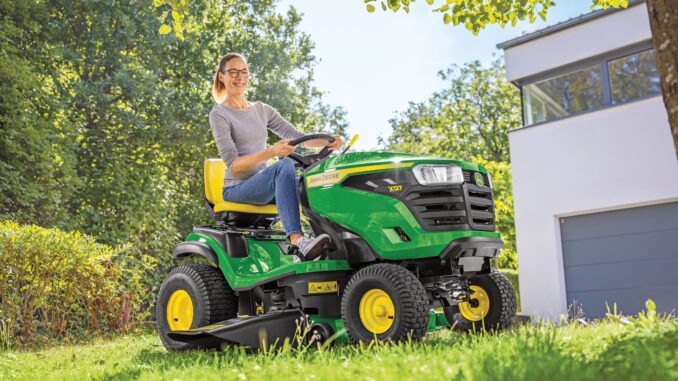
The John Deere X750 is a diesel-powered X700 Signature Series lawn tractor built for homeowners who want a heavier-duty machine than a typical lawn tractor, especially when mowing larger properties or using front and rear attachments. This guide is written for USA and Canada owners and covers practical repair decisions, symptom-based troubleshooting, maintenance planning, common service parts, and a detailed FAQ in a WordPress-ready format.
John Deere X750 model overview
The John Deere X750 sits in the X700 Signature Series, which places it above lighter lawn tractors and closer to the “garden tractor” end of the residential Deere lineup in terms of build, traction, and attachment capability. Deere’s owner page for the X750 also separates support by deck size, with 48-inch, 54-inch High Capacity, and 60-inch High Capacity mower-deck options, which matters when ordering belts, blades, and deck-specific hardware.
For most owners, the John Deere X750 is used as a premium mowing tractor for larger home lawns, acreages, estate properties, and properties where towing, snow work, or year-round attachment use is realistic. In plain English, it is more machine than an entry-level mower, but still owner-serviceable for a lot of routine work if you stay within sensible DIY limits.
General overview of the John Deere X750
The systems that matter most on the John Deere X750 are the engine and fuel system, the mower deck and blade-drive system, the transmission and hydraulic system, and the electrical/safety-interlock system. When owners talk about “repair problems” on an X750, most real-world complaints usually fall into one of those four areas.
The engine side includes the diesel fuel filter, air filters, glow-plug starting system, battery, and engine-oil service parts. The mowing side depends heavily on deck-specific items such as blades, spindle hardware, deck belt routing, gauge wheels, and deck-level adjustment.
Typical John Deere X750 service parts owners commonly buy include the engine oil filter M806418, fuel filter M801101, primary air filter M113621, secondary air filter M123378, transaxle filter AM131054, and Hy-Gard low-viscosity transmission oil. Deere-related parts listings also show common support items such as service kit AUC17071, glow plug MIU802457, and various deck-specific parts depending on whether the tractor has the 48-inch, 54-inch HC, or 60-inch HC deck.
John Deere X750 troubleshooting approach
The best way to diagnose the John Deere X750 is to start with the symptom the owner actually sees, not the part they suspect is bad. That matters because a no-start problem, weak cut, vibration complaint, or loss of drive can each be caused by several different issues, and guessing at parts usually costs more than a few careful checks.
Main symptom groups on the John Deere X750 usually include:
-
Starting problems, such as slow cranking, no crank, hard cold starts, or cranks-but-won’t-start issues.
-
Running problems, such as low power, surging, smoking, or stalling under load.
-
Cut-quality problems, such as uneven mowing, scalping, streaking, or poor discharge.
-
Vibration and noise, including deck vibration, spindle noise, and rattles from shields, belts, or driveline components.
-
Overheating and leak issues, especially plugged screens, dirty cooling areas, fuel seepage, and hydraulic leaks.
-
Transmission and drive complaints, such as weak traction, erratic response, or fluid/filter-related service issues.
-
Electrical and safety-switch faults, including PTO-interlock, seat-switch, battery, fuse, and glow-plug circuit problems.
Emergency John Deere X750 repair needs
Some John Deere X750 problems need immediate attention because they affect safe operation or can damage expensive parts quickly. The basic rule is simple: if the tractor is leaking fuel, overheating, making heavy mechanical noise, losing steering or braking control, or vibrating badly enough to shake the deck or operator platform, stop using it until the cause is found.
John Deere X750 starting issues
A starting problem on the John Deere X750 usually shows up as no crank, weak crank, repeated clicking, or an engine that turns over but will not fire cleanly. This matters because repeated cranking can flatten the battery, overheat cables, and mask a fuel or interlock issue that is actually straightforward to identify.
Common causes:
-
Weak or failing battery.
-
Dirty or loose battery terminals.
-
Safety switch or interlock problem at the brake, PTO, or seat circuit.
-
Glow-plug or cold-start issue on the diesel engine.
-
Restricted fuel filter or fuel-supply issue.
Basic checks:
-
Confirm the PTO is off, brake is fully applied, and all start-interlock conditions are correct.
-
Inspect battery terminals for corrosion and confirm cable connections are tight.
-
Check whether the engine cranks normally, slowly, or not at all before replacing parts.
-
Inspect the fuel filter and fuel condition if the tractor cranks but will not start.
-
If cold-start performance is poor, verify the glow-plug system and battery condition before assuming a major engine fault.
John Deere X750 cut-quality problems
Cut-quality complaints on a John Deere X750 usually look like streaks, scalping, ragged grass tips, clumps, or one side cutting lower than the other. These issues matter because many owners blame the deck belt or spindle first, when the cause is often blade condition, deck level, ground speed, or buildup under the deck.
Common causes:
-
Dull, bent, or incorrectly installed blades.
-
Deck out of level.
-
Grass buildup under the deck shell.
-
Wrong deck belt routing or belt wear.
-
Mowing too fast for conditions.
Basic checks:
-
Park safely and inspect the blades for sharpness, bending, and matched condition side to side.
-
Clean packed grass from the underside of the deck.
-
Check tire pressures before leveling the deck, because uneven tires can mimic deck misadjustment.
-
Confirm the deck is level and the blades are appropriate for the deck fitted to the tractor.
-
If the belt looks glazed, cracked, or loose, compare it against the correct deck-specific part listing before ordering.
John Deere X750 vibration and noise
Unusual vibration on a John Deere X750 should be treated seriously because it can point to blade imbalance, spindle-bearing wear, loose hardware, or a damaged pulley or belt. Continued mowing with a vibrating deck can quickly turn a simple blade job into spindle, deck-shell, or belt damage.
Common causes:
-
Bent or unbalanced blade.
-
Loose blade hardware or pulley hardware.
-
Worn spindle bearings.
-
Damaged deck belt or idler pulley.
-
Debris wrapped around spindle areas.
Basic checks:
-
Stop mowing immediately if vibration starts suddenly.
-
Inspect blades and blade bolts first, because they are the most common fast check.
-
Spin spindle areas by hand with the engine off and key removed to feel for roughness or play.
-
Look for belt damage, heat glazing, or pulley wobble.
-
Do not keep “testing” a heavily vibrating deck, because that can worsen the damage.
John Deere X750 overheating and leaks
Overheating or visible leaks on the John Deere X750 need prompt action because heat and fluid loss can damage the engine or transmission faster than many owners expect. On mowing tractors, blocked screens and dirty cooling areas are often a more likely cause than a catastrophic engine fault, so cleaning comes early in the diagnostic process.
Common causes:
-
Clogged cooling screen or debris around the engine cooling area.
-
Low engine-oil level.
-
Fuel seepage from aged lines or loose clamps.
-
Hydraulic/transaxle seepage near filters or hoses.
-
Excessive dirt buildup from dusty mowing conditions.
Basic checks:
-
Shut the tractor down and allow it to cool before inspection.
-
Clean external screens, grille areas, and visible debris around the engine cooling path.
-
Check oil level and look underneath for fresh drips.
-
Inspect around the fuel filter and hose connections for wetness or diesel smell.
-
If a hydraulic leak or repeated overheat condition is found, avoid continued use until repaired.
John Deere X750 transmission and drive problems
Drive complaints on the John Deere X750 usually show up as weak pulling power, delayed response, unusual noise, or a machine that moves but feels lazy under load. These problems matter because contaminated fluid, overdue filter service, or low fluid can shorten transmission life if ignored.
Common causes:
-
Overdue transaxle fluid or filter service.
-
Low hydraulic/transmission fluid.
-
External leakage.
-
Linkage adjustment or control issue.
-
Internal transmission wear requiring dealer-level diagnosis.
Basic checks:
-
Check maintenance history before assuming the transmission is failing.
-
Inspect for leaks and verify the correct filter and fluid were used previously.
-
Confirm the tractor is not being tested with other unresolved issues such as dragging brakes or deck load.
-
If drive remains weak after proper service checks, dealer diagnosis becomes more sensible than parts guessing.
John Deere X750 electrical problems
Electrical faults on the John Deere X750 often appear as intermittent starting, dead lights, PTO refusal, or shutdowns that seem random. In many cases the cause is simpler than owners fear, such as weak battery voltage, corroded terminals, blown fuses, or a faulty safety-switch circuit.
Common causes:
-
Battery or cable issues.
-
Fuse or connection problems.
-
Seat, brake, or PTO safety-switch faults.
-
Glow-plug circuit issues affecting cold starts.
-
Corrosion from storage or moisture exposure.
Basic checks:
-
Start with battery state and cable cleanliness.
-
Check fuses before replacing switches.
-
Test one symptom at a time rather than chasing the whole wiring harness.
-
If multiple circuits fail together, look for power/ground problems before blaming components.
DIY or dealer for John Deere X750 repairs?
The John Deere X750 is very owner-serviceable for routine work, but the sensible DIY line is where jobs begin to involve internal transmission work, major electrical diagnosis, engine internals, or expensive deck rebuilds that require special tools and accurate torque procedures. A homeowner with basic tools can do a lot on this model, but not every repair is worth learning on an expensive tractor.
Good DIY jobs on a John Deere X750
-
Engine oil and filter service.
-
Air-filter and fuel-filter replacement.
-
Battery service and terminal cleaning.
-
Blade removal, sharpening, and replacement.
-
Deck cleaning, belt inspection, and deck leveling.
-
Greasing and basic pre-season inspection.
Advanced DIY or dealer jobs on a John Deere X750
-
Transmission fluid and filter service if you are not confident with fluid handling and exact specs.
-
Spindle replacement, pulley-system diagnosis, and deck-drive troubleshooting beyond simple belt replacement.
-
Glow-plug circuit testing and electrical fault tracing.
-
Internal engine repair, injector issues, or compression-related diagnosis.
-
Hydrostatic/transaxle performance diagnosis beyond routine service.
John Deere X750 skill level guide
-
Beginner: Oil and filter changes, air filter replacement, battery checks, deck cleaning, tire-pressure checks.
-
Intermediate: Fuel filter replacement, blade service, deck leveling, belt inspection and deck-belt replacement.
-
Advanced: Electrical diagnosis with a meter, spindle replacement, hydraulic/transmission service, deeper drive-system diagnosis.
John Deere X750 parts needed, OEM numbers, and fit details
Before ordering any John Deere X750 parts, gather the full model name, tractor PIN, engine model/serial, and the exact mower-deck size fitted to the tractor. That is especially important because Deere separates owner support and maintenance reminder sheets by deck size, and deck-specific parts such as belts and blades are not safely interchangeable just because the tractor model is the same.
For the John Deere X750, OEM parts are usually the safer choice for belts, safety switches, deck-drive items, and any fit-sensitive part where routing, length, or switch calibration matters. Good aftermarket parts can be perfectly reasonable for some filters, blades, batteries, and general consumables, but only if the cross-reference is exact for the X750 and the specific deck or serial range involved.
John Deere X750 manuals and parts diagrams
The best official starting point is Deere’s X750 owner-information page, which links owners toward manuals, service information, and deck-specific maintenance reminder sheets. For an owner writing down parts numbers or planning routine maintenance, that is the most useful hub page.
Useful sources include:
-
John Deere X750 owner information — official Deere owner hub for manuals, support, and deck-size maintenance references.
-
John Deere operator’s manual page — operator information for X750/X754/X758 family coverage and routine operating guidance.
-
Green Farm Parts X750 maintenance guide — useful for common service-part numbers and interval planning, though it should be checked against the official manual for final confirmation.
-
Green Farm Parts X750 illustrated parts catalog — helpful for visual parts lookup by category when identifying common wear items.
How to locate John Deere X750 serial and engine numbers
These numbers matter because Deere parts can change by serial range, deck size, and engine specification, and ordering from the model name alone can easily produce the wrong belt, blade, filter, or electrical part. Owners should collect the numbers before ordering online, before visiting the dealer counter, and before comparing aftermarket cross-references.
-
Locate the tractor Product Identification Number (PIN) plate on the tractor frame in the area specified by the operator information for your machine family.
-
Write down the full model designation exactly as shown, including X750 and any serial-range detail.
-
Note the mower-deck model and size from the deck tag or deck identification label, because Deere separates support by 48-inch, 54-inch HC, and 60-inch HC deck variants.
-
Record the engine model and serial information from the engine identification label before ordering engine-related parts.
-
Keep photos of all tags on your phone so you can match them while ordering online or at the parts counter.
Buying John Deere X750 parts online and in stores
The smartest buying strategy for John Deere X750 parts is to confirm the exact OEM number first, then compare sources rather than shopping by vague product title alone. That is especially true for deck belts, blades, transmission filters, and electrical parts that may look similar across several X700-series machines.
-
Online: Best for price checking and diagram-based ordering, but always match the OEM number and confirm whether the part is tied to a specific deck or serial range.
-
Dealer counter: Best for PIN-sensitive items, updated superseded part numbers, and any repair where several linked parts may need to be ordered together.
-
Retail stores: Fine for oil, batteries, some filters, and general consumables, but only when packaging clearly cross-references the John Deere X750 or the exact OEM number.
Useful sources:
John Deere X750 fitting guide for common DIY parts
These are the highest-value DIY jobs for many John Deere X750 owners because they directly affect starting reliability, engine life, and mowing quality. Always work on level ground, remove the key, and allow hot components to cool before starting service work.
John Deere X750 engine oil and oil filter change
Fresh oil and a new filter help protect the diesel engine and are among the most realistic DIY jobs on this tractor.
-
Warm the engine briefly so the oil drains more completely, then park safely, shut down, and remove the key.
-
Drain the engine oil into a suitable pan and replace the drain plug or close the drain point securely.
-
Remove the old oil filter and install the correct replacement filter, commonly listed as M806418 for the X750 maintenance guide.
-
Refill with the correct oil type and quantity from the operator manual, then start and recheck for leaks and proper level.
John Deere X750 air filter replacement
Changing dirty air filters helps the X750 maintain power and cleaner combustion, especially in dusty mowing conditions.
-
Open the air-cleaner housing and remove the primary and, if fitted, secondary elements.
-
Inspect the housing for dust buildup and wipe it clean without forcing dirt into the intake.
-
Install the correct filters, commonly listed as M113621 primary and M123378 secondary in X750 maintenance references.
-
Reassemble carefully so the housing seals properly and unfiltered air cannot bypass the element.
John Deere X750 fuel filter replacement
A restricted fuel filter can cause hard starting, weak running, and loss of power under load on the John Deere X750.
-
Shut the engine off and clean around the filter area before disconnecting anything.
-
Remove the old filter carefully and note the fuel-flow direction.
-
Install the correct replacement fuel filter, commonly listed as M801101 for the X750.
-
Recheck for leaks after startup and confirm the engine runs cleanly without hesitation.
John Deere X750 blade service
Blade service is one of the fastest ways to improve cut quality on the John Deere X750 if the lawn looks ragged or streaky.
-
Raise and secure the deck safely using proper support methods from the operator guidance.
-
Remove the blades and mark their orientation if needed.
-
Sharpen evenly or replace blades if bent, cracked, or badly worn.
-
Reinstall with correct orientation and torque to the specification in the deck service information.
-
Test cut quality only after confirming all hardware is tight and the deck area is clear.
John Deere X750 maintenance to prevent repeat problems
Regular maintenance on the John Deere X750 does more than preserve value; it also prevents the most common owner complaints from becoming repair jobs. Most recurring issues on this model trace back to neglected filters, dirty cooling areas, worn blades, stale inspections, or deck-specific parts being ignored until performance drops.
Focus areas:
-
Starting reliability: Keep the battery healthy, terminals clean, fuel filter fresh, and glow-plug system functioning properly.
-
Cut quality: Keep blades sharp, deck underside clean, and deck level correct for the fitted mower deck.
-
Fire and overheating prevention: Clean debris from screens, engine areas, and hot surfaces regularly during mowing season.
-
Drive performance: Follow the fluid and filter service schedule instead of treating the transmission as “sealed for life.”
-
Electrical reliability: Check cables, grounds, and fuses before minor electrical problems become intermittent no-start complaints.
John Deere X750 maintenance schedule
The John Deere X750 maintenance schedule should be based on the operator information and deck-specific maintenance reminder sheet for the exact mower deck installed. The intervals below reflect the service pattern repeatedly shown in Deere-related X750 maintenance sources, but owners should still confirm the exact chart for their serial range and deck.
Daily or before each use on a John Deere X750
-
Check engine-oil level.
-
Inspect for fuel, oil, or hydraulic leaks.
-
Clean debris from engine screens and visible cooling areas.
-
Check tire condition and general machine safety condition.
-
Inspect mower deck area for buildup or obvious damage.
After first 8 hours
-
Change engine oil and filter if specified by the maintenance reminder sheet for initial service on your configuration.
-
Reinspect the machine for loose hardware or early break-in issues.
Every 25 hours
-
Grease lubrication points as applicable.
-
Clean mower deck and inspect blades and belt condition more closely if mowing heavily.
Every 50 hours or yearly on a John Deere X750
-
Change engine oil and oil filter according to the common X750 service schedule references.
-
Inspect transmission/hydraulic service items and confirm no fluid leakage.
-
Check battery condition and clean terminals.
Every 200 hours on a John Deere X750
-
Replace transmission filter and service transmission oil as specified.
-
Replace primary and secondary air filters.
-
Replace fuel filter.
-
Replace engine oil and filter again as part of the scheduled service cycle.
-
Review deck wear items, spindle condition, and other attachment-service needs.
Seasonal checklist for the John Deere X750
-
Spring: Install sharp blades, inspect the deck belt, check battery condition, and start the season with a clean cooling system.
-
Mid-season: Recheck deck level, blade condition, and debris buildup if cut quality starts to drop.
-
Fall or end of mowing season: Clean thoroughly, inspect for leaks or worn belts, and address service items before storage rather than waiting for next year.
Repair, upgrade, or replace a John Deere X750?
For most owners, the John Deere X750 is worth repairing when the problem is limited to routine wear parts, deck service, filters, electrical basics, or one clearly identified subsystem, because it is a premium machine with long-term owner support. Upgrading or replacing makes more sense when repair costs stack up across multiple major systems or when your current deck, traction, or attachment setup no longer fits the work you actually do.
Repair if:
-
The issue is a belt, blade, filter, battery, switch, or deck-service problem.
-
The tractor is otherwise structurally sound and starts, drives, and cuts well after normal service.
-
You have a clear diagnosis and parts support is still easy to obtain.
Upgrade if:
-
You need a different deck width or higher-capacity setup for your property.
-
You are adding year-round attachment work and want the machine configured more effectively for it.
-
Repeated minor repairs point to neglected maintenance rather than true end-of-life wear.
Replace if:
-
The tractor has major engine, transmission, and deck issues at the same time.
-
Repair cost approaches the value of the machine in your market.
-
You cannot justify dealer-level repairs on multiple core systems.
John Deere X750 troubleshooting FAQ
1. Why will my John Deere X750 not start?
If the John Deere X750 will not start, begin with the basics: battery charge, cable condition, brake/PTO interlock position, and whether the tractor is cranking at normal speed. On a diesel X750, cold-start and glow-plug issues can also matter, especially if the engine turns over but does not fire cleanly. A restricted fuel filter is another realistic cause if cranking is normal but the engine will not catch.
2. Why does my John Deere X750 click but not crank?
A click without proper cranking usually points to low battery voltage, dirty cable ends, a poor ground, or a starter-circuit issue rather than a fuel problem. Check the battery terminals first because corrosion can create enough resistance to cause repeated clicking. It is also worth confirming the safety interlocks are fully satisfied before deeper electrical diagnosis.
3. Why is my John Deere X750 hard to start when cold?
Cold starting on the John Deere X750 depends heavily on battery condition and the glow-plug system, so weak cranking or incomplete preheat can make the tractor seem worse than it is. Dirty fuel filters or poor fuel quality can add to the problem. Start by checking the simple service items before assuming injector or internal engine trouble.
4. Why does my John Deere X750 crank but not fire?
If the engine cranks normally but does not fire, look at fuel delivery, filter restriction, and any glow-plug or electrical issue affecting diesel starting. Also confirm the machine is fully satisfying interlock conditions, because some safety-related faults can appear like a fuel issue at first glance. Avoid repeated long crank cycles until you have checked the basics.
5. Why does my John Deere X750 lose power while mowing?
Power loss while mowing often comes from restricted air or fuel flow, dull blades increasing load, or mowing conditions that overload the deck. Start with the air filters, fuel filter, blade condition, and deck cleanliness. If the tractor still lacks power after normal service, deeper engine diagnosis may be needed.
6. Why is my John Deere X750 smoking?
Smoke can point to an over-fueling issue, restricted air intake, or engine wear, depending on the color and when it happens. Dirty air filters are a practical first check because they are easy to inspect and commonly affect running quality. If smoke continues after normal service, dealer diagnosis is usually more sensible than guessing.
7. Why does my John Deere X750 stall under load?
Stalling under load often means the engine is being starved of fuel or air, or the deck load has become too high due to grass buildup, dull blades, or heavy mowing conditions. Check the fuel filter, air filters, and the underside of the deck first. Work from the symptom rather than replacing random electrical parts.
8. Why is my John Deere X750 cutting unevenly?
Uneven cutting usually comes from deck-level issues, mismatched tire pressure, bent blades, or worn blades that are no longer lifting and cutting evenly. Check tire pressures before adjusting the deck, because the tractor has to sit correctly for leveling to mean anything. Then inspect blades and deck cleanliness.
9. Why does my John Deere X750 leave streaks of uncut grass?
Streaking often means the blades are dull, the deck is clogged, or ground speed is too high for the grass conditions. It can also happen if the blades are the wrong type or installed incorrectly for the fitted deck. Start with blades and deck cleanliness before blaming the belt.
10. Why is my John Deere X750 scalping the lawn?
Scalping usually points to deck height being too low for the terrain, deck-level problems, or mowing ground that is more uneven than the setup allows. Tire pressure and deck adjustment should be checked together. A bent blade can make the problem look worse, so inspect the cutting hardware too.
11. Why does my John Deere X750 cut look ragged?
Ragged tips usually mean dull blades rather than a major tractor fault. Sharpen or replace the blades, then recheck the cut before chasing spindle or engine issues. Clean airflow under the deck matters too, because packed debris can hurt cut quality even with decent blades.
12. Why is the John Deere X750 mower deck vibrating?
Deck vibration is commonly caused by a bent blade, unbalanced blade, loose blade hardware, spindle-bearing wear, or a damaged pulley or belt. Sudden vibration after striking something strongly suggests blade or spindle-area damage. Stop using the deck until you inspect it because continued operation can multiply the repair cost.
13. Why is my John Deere X750 making a rattling noise?
A rattling noise can come from loose shields, belt guards, deck hardware, or wear in pulley and spindle components. The clue is when the noise happens: PTO engaged, mowing under load, or simply at engine speed. Narrowing down the condition is more useful than guessing from sound alone.
14. Why does my John Deere X750 deck belt keep failing?
Repeated deck-belt failure usually means there is an underlying cause such as pulley misalignment, seized spindle bearings, incorrect routing, debris damage, or simply using the wrong belt for the deck size. Because the X750 can use different decks, always verify the exact deck model before ordering a replacement. OEM belts are often worth it here because fit and length matter.
15. How do I know if my John Deere X750 blades are bent?
A bent blade often shows up as vibration, an uneven cut, or one blade tip sitting visibly different from the others when checked carefully. If the deck began vibrating after impact, remove and inspect the blades rather than continuing to mow. Rebalancing helps only if the blade is otherwise serviceable and not damaged.
16. Why does my John Deere X750 overheat?
On mowing tractors, overheating often starts with blocked cooling screens, debris buildup around the engine cooling path, or low oil level rather than an internal engine failure. Clean the machine thoroughly before assuming the worst. If overheating repeats after cleaning and fluid checks, stop and investigate further.
17. Why is my John Deere X750 leaking oil?
An oil leak may come from the engine-oil system, transmission area, or a poorly sealed filter after service. Look for fresh wetness around the filter, drain point, hose connections, and the ground under the parked tractor. Small leaks tend to become bigger problems on tractors that work hot and collect dust.
18. Why is my John Deere X750 leaking fuel?
Fuel leakage usually means a hose, clamp, filter connection, or related fitting needs attention. Because diesel leaks attract dirt and can become a fire risk around hot components, deal with them immediately. Do not keep using the tractor until the source is identified and repaired.
19. Why does my John Deere X750 move weakly uphill?
Weak uphill performance can point to overdue transmission service, low hydraulic fluid, external leakage, or deeper hydrostatic wear. Start with the maintenance history and fluid/filter condition rather than assuming the transmission is finished. If service is current and performance is still poor, professional diagnosis is justified.
20. Why is my John Deere X750 drive response delayed?
Delayed response can happen when hydraulic/transmission service is overdue, fluid is low, or linkage is not behaving as it should. It can also seem worse when the machine is cold. The key is to rule out service-related causes before considering internal transmission faults.
21. Should I change John Deere X750 transmission oil at 200 hours?
The Deere-related X750 maintenance references list transmission filter and oil service at 200 hours, and owner discussions around similar Deere equipment strongly favor following the book rather than stretching intervals. On a premium tractor, fluid is cheap compared with transmission repair. If the tractor works hard or in heat, being conservative is sensible.
22. Why does my John Deere X750 battery keep going flat?
A flat battery usually means poor charging, parasitic draw, dirty terminals, age-related battery weakness, or repeated short runs that never recharge properly. Start with terminal condition and charging-state checks. Replacing the battery without cleaning and testing the connections often fixes nothing.
23. Why won’t the PTO engage on my John Deere X750?
A PTO-engagement problem can come from the safety-interlock system, an electrical fault, low voltage, or switch-related issues. Check the obvious operating conditions first, especially brake, seat, and PTO controls. If the tractor has multiple electrical symptoms at once, think power and ground before replacing the PTO switch.
24. Why are the lights or electrical accessories not working on my John Deere X750?
When lights or accessories stop working, start with battery condition, fuse checks, and connection corrosion. If several functions fail together, the problem may be shared power supply rather than multiple bad components. That is why systematic electrical checks beat random parts replacement.
25. What oil filter does a John Deere X750 use?
The John Deere X750 maintenance guide from Green Farm Parts lists engine oil filter M806418 as the common service filter for this model. Even so, owners should still confirm by tractor PIN and engine data before ordering, especially if there has been a part-number supersession.
26. What fuel filter does a John Deere X750 use?
A commonly listed fuel filter for the John Deere X750 is M801101 in X750 maintenance references. As with all Deere parts ordering, confirm it against your tractor identification and current parts listing before purchase. That is the safest way to avoid ordering from a broad cross-reference that covers multiple machines.
27. What air filters does a John Deere X750 use?
The X750 maintenance guide lists primary air filter M113621 and secondary air filter M123378 as the regular service elements for this model. These are worth replacing on schedule if you mow in dusty conditions, because restricted air flow affects power and running quality. Always verify the listing against your current manual or parts source.
28. What transmission filter does a John Deere X750 use?
A commonly listed transmission or transaxle filter for the John Deere X750 is AM131054 in maintenance references. Because transmission service is more expensive than an engine-oil change, this is one area where exact part matching matters. Confirm the filter and fluid spec together before ordering.
29. How often should I service a John Deere X750?
At minimum, the John Deere X750 should be checked before each use, serviced on the routine oil/filter intervals, and given the larger transmission/air/fuel service at the stated longer interval, commonly shown as 200 hours in X750 maintenance references. The exact chart depends on the tractor and deck configuration, so the deck-specific reminder sheet is worth using. If the tractor operates in dust, heat, or heavy mowing conditions, inspect more often.
30. Is the John Deere X750 worth repairing?
In most cases, yes, if the problem is limited to wear parts, deck service, filter-related running issues, or straightforward electrical faults, because the X750 is a premium machine with ongoing owner support and parts availability. The answer changes when major engine, transmission, and deck repairs stack up at the same time. That is when replacement math becomes more realistic.
31. Can I use aftermarket parts on a John Deere X750?
Aftermarket parts can work well for some blades, filters, batteries, and consumables, but the cross-reference must be exact. For belts, safety-related electrical parts, and fit-sensitive deck-drive components, OEM is usually the safer choice. Cheap “fits many models” listings are where owners get into trouble.
32. Where can I find a John Deere X750 operator’s manual?
You can start with Deere’s official X750 owner-information page, which directs owners to manuals and support resources. There is also an online Deere operator-manual page covering the X750/X754/X758 tractor family. Use official Deere sources first whenever possible.
33. How do I know which deck is on my John Deere X750?
The simplest method is to read the deck identification tag and compare it with Deere’s support categories for the X750, which are organized by 48-inch, 54-inch High Capacity, and 60-inch High Capacity decks. This matters because deck belts, blades, and some hardware are deck-specific. Never order deck parts from the tractor model alone if you can avoid it.
34. When should I stop DIY repair on a John Deere X750?
Stop at the DIY line when the repair involves internal transmission issues, unresolved electrical faults beyond basic testing, engine-internal work, or deck damage that affects structural integrity. Those are the areas where wrong diagnosis gets expensive quickly. Routine service is owner-friendly, but deep fault tracing is not always worth doing at home.
35. What is the smartest first step when troubleshooting a John Deere X750?
Start with the exact symptom, then check the simplest and most common causes in that system before ordering parts. On the X750, that usually means battery and interlocks for starting issues, filters for running issues, and blades or deck condition for cut-quality complaints. That symptom-first approach is usually faster and cheaper than guessing.