
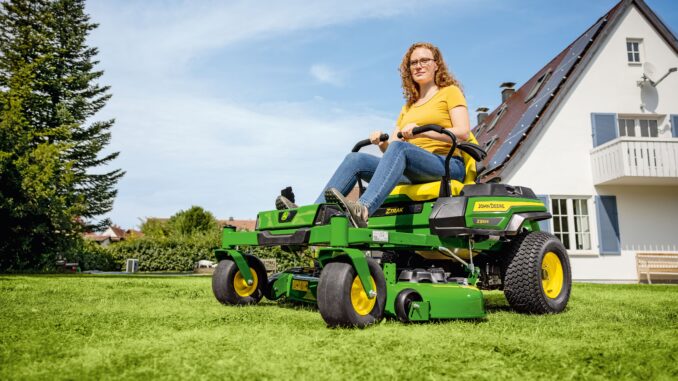
The John Deere Z535M is a residential ZTrak zero-turn mower built for homeowners who want faster mowing, strong maneuverability, and enough deck options to suit medium to larger lawns. Deere’s published materials for this model show support for 48-inch, 54-inch, and 62-inch deck configurations, along with a replacement-parts guide and operator manual support that make routine maintenance and parts lookup much easier for owners in the USA and Canada.
This guide is written for DIY owners who want a practical, symptom-first reference for repair, troubleshooting, maintenance, parts identification, and service planning. It focuses on the problems owners actually notice first—hard starting, rough running, poor cut quality, belt trouble, vibration, drive complaints, and electrical faults—before moving into parts, fitting steps, maintenance intervals, and a detailed FAQ.
John Deere Z535M overview
The John Deere Z535M sits in Deere’s residential ZTrak range as a higher-spec homeowner zero-turn mower rather than a garden tractor. Deere’s model documentation groups it with the Z525E, Z535R, Z540M, and Z540R family in the operator manual, while the replacement parts guide identifies the Z535M specifically with 48-inch, 54-inch, and 62-inch deck versions.
For owners, the key systems are straightforward: the engine and fuel system handle starting and power delivery; the mower deck, blades, and deck belt control cut quality; the traction belt and hydro drive system affect movement and steering response; and the battery, key switch, and safety circuits affect starting and electrical reliability. Deere’s replacement guide also highlights several common service parts owners regularly buy, including air filters UC10250 and MIU13120, fuel filter AM116304, spark plug MIU11020, oil filter AM125424, traction belt M172116, battery TY25221B, and deck belts or blades that change by deck size.
Troubleshooting the John Deere Z535M by symptom
The best way to diagnose a John Deere Z535M is to start with the symptom the owner can actually see, hear, or feel. For this mower, the main symptom groups are starting problems, engine performance issues, poor cut quality, vibration or noise, overheating or burning smell, transmission or drive complaints, and electrical or safety-switch faults.
That symptom-first approach matters because several faults overlap. A mower that cuts poorly may have dull blades, low engine speed, a dirty deck underside, the wrong deck pitch, or a worn deck belt; a mower that will not crank could have a weak battery, bad switch, poor cable connection, or a safety interlock issue rather than a major engine fault.
John Deere Z535M starting issues that need immediate attention
A no-start or no-crank condition matters right away because repeated failed starts can drain the battery, hide a safety-switch issue, and tempt owners into unsafe bypassing. Deere lists the battery, ignition switch, spark plugs, fuel filter, and air filters as routine service items or replacement parts, which makes them logical first-check components on this model.
Common causes
-
Weak or failing battery TY25221B.
-
Dirty, loose, or corroded battery terminals.
-
Failed or serial-number-specific ignition switch, either TCA22740 or AUC14659 depending on machine serial range.
-
Fouled spark plug MIU11020 or stale fuel affecting combustion.
-
Restricted fuel filter AM116304 or dirty air filters UC10250 and MIU13120.
-
Seat, brake, or PTO safety interlock not in the correct position.
Basic checks
-
Confirm the PTO is off, the parking brake is set, and the control levers are in the correct start position.
-
Check battery voltage and inspect both cable ends for corrosion or looseness.
-
Inspect the fuel level and fuel condition; replace old fuel if it smells stale.
-
Check the spark plugs, air filters, and fuel filter if the engine cranks but will not fire.
-
If the key feels inconsistent or intermittent, verify the correct ignition-switch part by serial number before ordering.
John Deere Z535M cut-quality problems
Cut-quality problems show up as stragglers, scalping, uneven height, clumping, or a ragged finish, and they should be corrected early because they usually worsen quickly once blades dull or belt grip drops. Deere’s Z535M parts guide confirms that blade and belt part numbers differ by deck size, so identifying the exact deck is essential before any repair.
Common causes
-
Dull, bent, or unbalanced blades.
-
Wrong blade type fitted for the deck or for mulching versus side discharge.
-
Worn or slipping deck V-belt, GX25998 on 48-inch and 54-inch decks or M172963 on the 62-inch deck.
-
Deck out of level.
-
Grass packed under the deck.
-
Ground speed too fast for grass height or moisture.
Basic checks
-
Match the deck size first: 48-inch, 54-inch, or 62-inch.
-
Inspect blade edges, bends, and mounting security.
-
Check the belt for glazing, cracking, frayed edges, or loss of tension.
-
Clean the deck underside and verify anti-scalp or gauge wheels are intact.
-
Recheck deck level with a gauge such as AM130907 if cut height looks uneven across the width.
Vibration and noise on the John Deere Z535M
Unusual vibration on a John Deere Z535M should never be ignored because it can damage spindle bearings, loosen hardware, and make the mower unsafe to run. Noise complaints are commonly tied to blade damage, pulley problems, worn belt components, loose hardware, or debris wrapped around rotating parts.
Common causes
-
Bent or badly worn blades.
-
Blade mounting hardware loose after impact.
-
Debris wound around spindle areas.
-
Damaged deck belt or traction belt.
-
Worn idler, pulley, or spindle bearings.
-
Tire pressure imbalance causing harsh ride or apparent deck vibration.
Basic checks
-
Shut the machine down and inspect blades after any impact.
-
Check for wrapped wire, roots, or string around spindle shafts and pulleys.
-
Inspect the deck belt and traction belt for damage or tracking issues.
-
Verify tire pressures match side to side.
-
If vibration remains after blade service, stop using the mower until spindle and pulley assemblies are checked more closely.
John Deere Z535M overheating, smoke, and burning smells
Heat-related complaints matter quickly because a blocked cooling area, oil leak, or slipping belt can escalate into engine damage or even a fire risk. Deere’s maintenance materials specifically call for cleaning engine cooling fins, cleaning air intake screens, and changing engine oil and oil filter on schedule, which shows how important airflow and lubrication are on this mower.
Common causes
-
Grass and debris blocking engine cooling fins or intake screens.
-
Low or degraded engine oil.
-
Oil filter overdue for replacement, AM125424.
-
Belt slippage creating a hot rubber smell.
-
Muffler-area debris buildup near component GY22304.
-
Heavy mowing load in wet or overgrown grass.
Basic checks
-
Stop mowing immediately if you smell burning rubber or see smoke.
-
Let the machine cool fully before inspecting around the engine and muffler.
-
Clean intake screens, cooling fins, and dry grass buildup from hot areas.
-
Check engine oil level and service history.
-
Inspect deck and traction belts for glazing or melted spots.
John Deere Z535M drive and steering problems
A zero-turn that loses drive, tracks unevenly, or feels weak on slopes becomes both a productivity issue and a safety concern. On this model, traction complaints often start with the traction belt, tire condition, drive-system wear, or operator-control linkage issues rather than the deck system.
Common causes
-
Worn or damaged traction belt M172116.
-
Tire pressure mismatch affecting tracking.
-
Linkage out of adjustment.
-
Hydro drive wear or internal transmission issues.
-
Excessive heat from blocked cooling areas around the machine.
Basic checks
-
Inspect the traction belt for wear, cracking, or contamination with oil.
-
Confirm tire pressures are equal and tires are not damaged.
-
Test whether the mower pulls evenly in open space.
-
Look for any obvious linkage looseness at the control levers.
-
If drive is weak on one side after these checks, that usually moves into advanced DIY or dealer territory.
John Deere Z535M electrical and safety-switch faults
Electrical faults on the John Deere Z535M often appear as intermittent starting, dead headlights, sudden shutdown, or a mower that will not engage properly. Deere’s parts guide identifies the key electrical consumables owners commonly replace, including the battery, ignition switch, and headlight bulb BUC10071.
Common causes
-
Weak battery or poor cable connections.
-
Failing ignition switch, with part selection dependent on serial number.
-
Blown light bulb BUC10071.
-
Dirty or damaged safety-switch connectors.
-
Corroded wiring terminals from moisture exposure.
Basic checks
-
Start with battery health and cable tightness.
-
Confirm the machine behaves consistently with brake, PTO, and operator-seat positions.
-
Inspect visible connectors for looseness, corrosion, or damage.
-
Match the ignition switch to the machine serial range before replacement.
-
Avoid bypassing safety switches; trace the fault instead.
DIY or dealer for the John Deere Z535M?
For the John Deere Z535M, the line is usually simple: routine service and external bolt-on parts are reasonable DIY jobs, while hydro drive faults, persistent electrical diagnosis, internal engine work, and major spindle or transmission repairs are better handled by an experienced technician. Deere’s own materials support a routine-owner maintenance approach for filters, oil, spark plugs, belts, blades, greasing, and deck checks, while more technical items such as valve-clearance checks are specifically pushed toward dealer service.
Good DIY jobs
-
Engine oil and oil filter changes using TY22029 oil and AM125424 filter.
-
Air filter, fuel filter, and spark plug replacement.
-
Blade removal, sharpening, balancing, and replacement.
-
Deck cleaning, belt inspection, and deck-level checks.
-
Battery replacement and terminal cleaning.
Advanced DIY or dealer jobs
-
Traction-belt replacement if access is limited or routing is unclear.
-
Spindle, pulley, or idler diagnosis after persistent vibration.
-
Electrical fault tracing beyond obvious battery or switch issues.
-
Hydro drive performance problems.
-
Valve-clearance inspection or adjustment, which Deere’s schedule points to dealer service at 200 hours.
Skill level guide
-
Beginner: Air filter, spark plug, battery, blade inspection, deck cleaning.
-
Intermediate: Oil service, fuel filter replacement, blade replacement, deck-belt replacement, deck leveling.
-
Advanced: Traction-belt work, electrical diagnosis, spindle replacement, hydro drive diagnosis.
Parts for the John Deere Z535M: OEM, aftermarket, and what you need first
Before ordering anything for a John Deere Z535M, gather the full model name, the Product Identification Number (PIN), the exact deck size, and any serial-sensitive details that affect part selection. Deere’s own replacement guide shows that some parts vary by deck size and some, like the ignition switch, vary by serial number, so guessing from appearance alone is risky.
For most owners, OEM parts are the safest choice for belts, ignition parts, fit-sensitive deck items, and safety-related components. Aftermarket parts can be acceptable for common consumables such as batteries, some filters, and some blades, but only when the seller gives a clear cross-reference to the Deere number and the exact Z535M deck version.
John Deere Z535M diagrams and manuals
The strongest starting points for Z535M owners are Deere’s operator manual page, Deere’s replacement parts guide PDF, JDParts, and a Deere-focused parts lookup site. Together they cover safe operation, maintenance intervals, model-specific part numbers, deck-specific diagrams, and exploded views for ordering and repair planning.
-
Official operator manual — Good for controls, safety information, operating procedures, and routine maintenance guidance for the Z525E/Z535M family.
-
Official replacement parts guide PDF — Best quick-reference source for service parts, deck-specific blade and belt numbers, oil quantity, and maintenance intervals.
-
JDParts — Useful for exploded diagrams, current Deere parts supersessions, and serial-aware parts lookup.
-
Weingartz Z535M parts lookup — Helpful for Deere-focused diagrams and practical retail parts browsing.
How to find John Deere Z535M model and serial numbers
These numbers matter because deck parts, ignition parts, and some accessory-related items can change by configuration or serial range. Without the correct model and serial information, owners risk ordering the wrong belt, blade, switch, or attachment component.
-
Park the mower on a flat surface, switch it off, and remove the key.
-
Locate the mower’s Product Identification Number tag on the machine frame area, then photograph it clearly for records.
-
Confirm the deck size physically or from the mower tag so you know whether it is a 48-inch, 54-inch, or 62-inch version.
-
Record any engine model and serial information from the engine shroud or engine label for engine-service parts.
-
Take those numbers with you when ordering online or at the dealer counter.
Buying John Deere Z535M parts online and in stores
The safest buying strategy is to identify the Deere number first, then compare sellers second. That reduces the risk of buying a visually similar but incorrect belt, blade, or ignition part—especially on a machine like the Z535M where deck size and serial breaks matter.
-
Online: check the Deere OEM number, verify deck size, and confirm serial-specific notes before checkout. Deere’s own guides and JDParts are the best cross-check sources.
-
Dealer counter: best for electrical parts, serial-sensitive parts, and anything where superseded numbers might exist.
-
Retail stores: acceptable for common oil, batteries, plugs, and some filters if the packaging clearly cross-references the Z535M and the exact Deere OEM number.
-
Useful sources include JDParts, Deere’s replacement guide PDF, and Weingartz’s Z535M lookup page.
John Deere Z535M fitting guide for common parts
These are the highest-value DIY jobs for most owners because they fix common starting, cutting, and reliability complaints without requiring deep teardown. Always remove the key, allow hot parts to cool, and disconnect the spark-plug leads before working around blades or belts.
Replacing the John Deere Z535M air filter
A clogged air filter can cause hard starting, black smoke, power loss, and poor fuel use. Deere lists UC10250 as the primary element and MIU13120 as the secondary element for the Z535M.
-
Open the air-cleaner housing and remove the old filter elements.
-
Wipe dust from the housing without pushing dirt into the intake.
-
Install the correct secondary and primary elements in the proper order.
-
Close the housing carefully so the seal sits evenly.
-
Recheck the housing clips before starting the mower.
Changing the John Deere Z535M spark plugs
Fresh spark plugs help cure hard starting, misfire, and rough running. Deere lists MIU11020 as the spark plug part number for this model.
-
Let the engine cool fully and remove the spark-plug leads.
-
Clean around the plug wells so dirt does not fall into the engine.
-
Remove the old plugs with the correct socket.
-
Install the new plugs to the correct specification from the operator manual.
-
Refit the leads securely and test start the mower.
Replacing John Deere Z535M blades
Blade service is one of the quickest ways to fix poor cut quality, stragglers, and excess vibration. The correct standard blade number depends on deck size: UC22009 for 48-inch, UC22010 for 54-inch, and M158112 for 62-inch decks.
-
Raise and secure the mower safely for blade access.
-
Mark blade orientation before removal.
-
Remove each blade and inspect for bends, cracks, or severe wear.
-
Install sharpened or new matched blades for the deck size.
-
Tighten hardware to the manual specification and check that blades rotate freely.
Replacing the John Deere Z535M deck belt
A worn deck belt causes weak blade speed, uneven cutting, squealing, and poor discharge performance. Deere lists GX25998 for the 48-inch and 54-inch decks, and M172963 for the 62-inch deck.
-
Confirm the deck size before ordering the belt.
-
Lower the deck and release belt tension according to the routing shown in the operator information or deck diagram.
-
Remove the old belt and inspect idlers and pulleys while access is open.
-
Route the new belt exactly as shown for the correct deck.
-
Reapply tension, rotate the system by hand, and test engagement briefly.
Maintenance for the John Deere Z535M
Regular maintenance prevents the most common Z535M complaints because nearly every recurring issue traces back to airflow, lubrication, blade condition, belt wear, fuel restriction, or debris buildup. Deere’s published maintenance points for this mower center on engine oil and filter service, air and fuel filtration, blade upkeep, greasing, deck cleaning, deck leveling, and cooling-system cleanliness.
-
Starting reliability: keep the battery healthy, replace fuel filter and spark plugs on schedule, and avoid stale fuel.
-
Cut quality: sharpen or replace blades, keep the deck underside clean, and inspect deck-belt condition regularly.
-
Fire and overheating prevention: clean engine cooling fins, air intake screens, and debris around the muffler area.
-
Drive performance: inspect the traction belt and keep tires properly inflated.
-
Electrical reliability: protect battery terminals and replace weak key-switch or lighting components with the correct serial-specific part.
John Deere Z535M maintenance schedule
Deere’s maintenance references for the Z535M show a mix of after-break-in, 50-hour, 100-hour, and 200-hour service items, plus annual checks where time-based service matters. The exact chart should always be confirmed against the operator manual for the machine’s serial range and engine version, but the published Deere parts-and-maintenance material gives owners a solid working schedule.
Daily or before each use
-
Check engine oil level.
-
Inspect mower for loose or damaged parts.
-
Clean visible grass buildup from deck and hot engine areas.
-
Verify tire condition and general safety function.
After 8 hours
-
Check mower deck level.
-
Change engine oil on the new machine break-in schedule if required by the maintenance chart.
-
Recheck visible hardware after early use.
Every 25 hours
-
Clean deck underside more thoroughly when mowing conditions are heavy or wet.
-
Reinspect blades and belt condition if cut quality has declined.
Every 50 hours or yearly
-
Change engine oil using TY22029.
-
Replace oil filter AM125424.
-
Check mower belt condition.
-
Sharpen or replace mower blades.
-
Lubricate mower deck spindles and idler arm.
-
Check tire pressure, deck level, engine cooling fins, and air intake screens.
Every 100 hours or yearly
-
Replace primary and secondary air filters as required.
-
Replace fuel filter AM116304.
-
Replace spark plugs MIU11020.
Every 200 hours
-
Check or adjust engine valve clearance; Deere indicates dealer service for this item.
Seasonal checklist
-
Spring: inspect battery condition, install sharp blades, inspect deck belt, and service oil and filter if due.
-
Mid-season: clean cooling areas, inspect belt wear, and recheck deck level if cut quality changes.
-
Fall or storage prep: clean the deck and engine areas, inspect fuel condition, and note any parts needed before next season.
Repair, upgrade, or replace the John Deere Z535M?
For most owners, repair makes sense when the problem is isolated to normal wear parts such as blades, belts, filters, battery, or switches. Upgrade makes sense when the mower is sound but the current deck setup, blade style, or attachment choice no longer matches the lawn conditions, while replacement becomes more realistic when drive-system problems, structural wear, and repeated major repairs start stacking up together.
Repair if…
-
The fault is limited to service parts, belts, blades, battery, filters, or switchgear.
-
The engine and drive system are otherwise strong.
-
The deck shell and frame remain structurally sound.
Upgrade if…
-
A different blade style or deck accessory would suit your grass conditions better.
-
You need better bagging or mulching performance rather than a whole new mower.
-
The mower still runs well but needs a setup change rather than a major repair.
Replace if…
-
Hydro drive problems, repeated electrical faults, and deck wear are all present together.
-
Repair cost is approaching the value of the mower.
-
Reliability has become too poor for regular weekly use.
John Deere Z535M troubleshooting FAQ
1. Why will my John Deere Z535M not start?
Start with the basics: battery charge, brake position, PTO off, and correct control-lever start position. On this mower, battery, ignition switch, spark plugs, fuel filter, and air filters are all common service or failure points, so they are the first places to look before assuming a bigger engine problem.
2. Why does my John Deere Z535M crank but not fire?
That usually points to fuel, spark, or air rather than the starter circuit. Old fuel, a blocked AM116304 fuel filter, dirty air filters, or worn MIU11020 spark plugs are common causes on the Z535M.
3. Why does the John Deere Z535M click but not crank?
A click with no crank often means low battery voltage, poor cable contact, or a failing starter circuit connection. Check the battery condition first, then clean and tighten both terminals before moving on to switch or safety-circuit diagnosis.
4. Can a bad ignition switch stop a John Deere Z535M from starting?
Yes, and Deere lists two different ignition-switch part numbers depending on serial range: TCA22740 and AUC14659. That means owners should confirm the mower serial number before ordering a replacement rather than choosing a switch by appearance alone.
5. Why does my John Deere Z535M run rough at full throttle?
Rough running usually comes from restricted airflow, old spark plugs, stale fuel, or a partly blocked fuel filter. If the mower has not had its annual 100-hour service items, the air filters, fuel filter, and plugs are smart first checks.
6. Why is my John Deere Z535M blowing black smoke?
Black smoke usually means the engine is getting too much fuel or not enough air. Dirty air filters are a common trigger, and mowing in heavy conditions can worsen the issue if the filter housing and cooling areas are already dusty.
7. Why does my John Deere Z535M stall when the blades engage?
That often happens when the deck is overloaded, the belt is slipping, or the blades are dragging through packed grass underneath the deck. Clean the deck underside, inspect blade condition, and check the deck belt for wear or glazing.
8. Why is the John Deere Z535M cutting unevenly?
An uneven cut usually comes down to deck level, tire pressure, blade condition, or blade mismatch. Deere’s maintenance information specifically includes deck-level checks and tire-pressure checks because both directly affect cut consistency.
9. Why does my John Deere Z535M leave strips of uncut grass?
That is commonly caused by dull blades, low blade tip speed from belt slip, or mowing too fast for the grass height. Matching the correct blade part number to the deck size matters as well, since the Z535M uses different blades across 48-inch, 54-inch, and 62-inch decks.
10. Why does the John Deere Z535M scalp the lawn?
Scalping usually means the deck height is too low, the deck is out of level, or gauge wheels are missing or incorrectly set. Deere lists gauge-wheel parts for the deck assemblies, which is a reminder that these small items matter more than many owners expect.
11. Why does my John Deere Z535M clump grass badly?
Clumping happens when the grass is too wet, too tall, or moving too slowly through a dirty deck. Sharp blades, a clean deck underside, and a sensible ground speed usually solve it faster than changing random parts.
12. How do I know which blade fits my John Deere Z535M?
You need the exact deck size first. Deere lists UC22009 for the 48-inch deck, UC22010 for the 54-inch deck, and M158112 for the 62-inch deck, so blade choice should never be made without confirming deck width.
13. What deck belt does the John Deere Z535M use?
It depends on deck size. Deere’s replacement guide shows GX25998 for the 48-inch and 54-inch decks, while the 62-inch Convertible deck uses M172963.
14. Why does my John Deere Z535M deck belt keep slipping?
The usual causes are belt wear, glazing, contamination, pulley problems, or weak tensioning hardware. If the belt has visible shine, cracks, or frayed edges, replacement is generally smarter than repeated adjustment.
15. Why is my John Deere Z535M vibrating when mowing?
Most mowing vibration starts with bent blades, damaged blade hardware, or debris wrapped around rotating parts. If vibration remains after blade inspection and cleaning, the next suspects are spindle bearings, pulleys, or belt damage.
16. Can dull blades damage my John Deere Z535M?
Yes, because dull blades strain the cut system, tear grass instead of slicing it cleanly, and can increase belt and spindle load. They also make the mower work harder in thick growth, which can worsen heat buildup and cut quality at the same time.
17. Why does my John Deere Z535M smell like burning rubber?
That usually points to a slipping deck or traction belt. Stop mowing, let the machine cool, and inspect the belts, pulleys, and deck underside before using it again.
18. What is the traction belt part number for the John Deere Z535M?
Deere lists M172116 as the traction belt for the Z535M. If the mower loses drive or feels weak under load, that belt is one of the first external drive parts to inspect.
19. Why does my John Deere Z535M lose drive on one side?
Uneven drive can come from tire-pressure mismatch, linkage issues, belt wear, or internal hydro problems. Start with external checks first, because they are faster and cheaper than assuming the hydro unit has failed.
20. Why does my John Deere Z535M track unevenly?
Tracking issues often come from uneven tire pressure or control-linkage imbalance. A zero-turn is sensitive to small differences side to side, so tire checks should happen before deeper drive diagnosis.
21. Why does my John Deere Z535M overheat in long grass?
Heavy mowing load raises heat, but blocked cooling fins and air intake screens make the problem much worse. Deere specifically includes cleaning these areas in its maintenance information, which tells owners they are not optional housekeeping tasks.
22. How much engine oil does the John Deere Z535M take?
Deere’s replacement guide lists Turf-Gard 10W-30 TY22029 and gives engine oil capacity as 1.9 L, or 2 qt. That figure is useful for planning service, but the final fill should always be confirmed by dipstick level rather than by pouring in a fixed amount blindly.
23. What oil filter fits the John Deere Z535M?
The engine oil filter listed for this mower is AM125424. Deere’s guide ties that filter to the 50-hour or annual oil-service interval.
24. What fuel filter fits the John Deere Z535M?
Deere lists AM116304 as the fuel filter for the Z535M. It is a routine replacement item at the 100-hour or annual interval in the published guide.
25. What spark plug fits the John Deere Z535M?
The listed spark plug is MIU11020. Replacing plugs on time helps with starting, idle quality, and full-throttle smoothness.
26. What battery does the John Deere Z535M use?
For USA and Canada units, Deere’s parts guide lists TY25221B as the 12-volt battery. That is the Deere number owners should use as the baseline when comparing aftermarket equivalents.
27. How often should I change oil in a John Deere Z535M?
Deere’s published parts and maintenance material points to every 50 hours or annually for engine oil and oil filter service, with an early break-in check around the first 8 hours referenced in related maintenance material. Owners who mow in dusty or heavy conditions should watch condition closely rather than stretching intervals.
28. How often should I replace the air filter on a John Deere Z535M?
The replacement guide lists the air filters at every 100 hours or annually. In dusty mowing conditions, inspection should happen sooner because restriction can build long before the calendar says service is due.
29. Does the John Deere Z535M have different parts by deck size?
Yes, and that is one of the biggest reasons owners order the wrong parts. Deere’s guide shows different blade and belt numbers across the 48-inch, 54-inch, and 62-inch decks, so deck size must be verified before ordering.
30. Are aftermarket parts okay for the John Deere Z535M?
They can be, but the safest rule is OEM for belts, ignition components, and fit-sensitive parts, while good aftermarket options are usually more acceptable for common consumables like batteries or some filters. The key is a trustworthy cross-reference to the Deere OEM number and the correct deck version.
31. Where can I find a John Deere Z535M parts diagram?
JDParts and Deere-focused lookup sites such as Weingartz provide exploded diagrams and model drill-down views for the Z535M. Deere’s own replacement guide is also useful, though it is more of a fast service-reference sheet than a full exploded catalog.
32. Where can I get a John Deere Z535M manual?
The official Deere operator manual page is the best starting point for safe operation, controls, and routine service guidance. For parts planning, pair that manual with Deere’s Z535M replacement parts guide PDF.
33. When should a John Deere Z535M go to the dealer?
Dealer service is usually the right move for hydro drive issues, persistent electrical faults, internal engine work, valve-clearance service, and any repair where the machine remains unsafe or unreliable after basic checks. Deere’s maintenance material specifically points valve-clearance work toward dealer service at the 200-hour interval.
34. Is the John Deere Z535M realistic for DIY maintenance?
Yes, for routine ownership tasks. Deere publishes clear maintenance parts and intervals for filters, oil, plugs, belts, blades, battery, and greasing, which makes the Z535M a practical mower for homeowners comfortable with basic service work.