
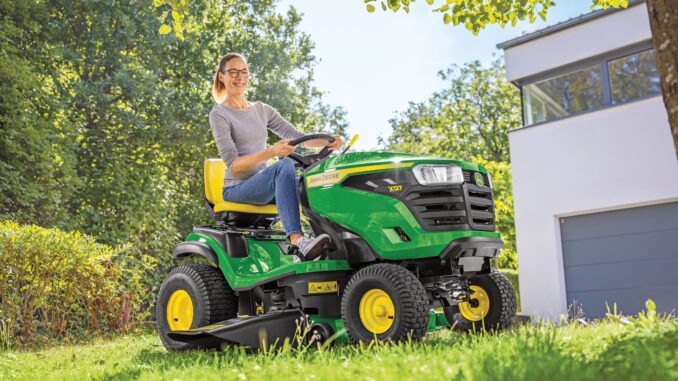
The John Deere 300 is a classic garden tractor aimed at homeowners who want more capability than a basic lawn tractor, with a 16 hp Kohler single-cylinder gasoline engine, hydrostatic drive, and common mower deck options including 46-inch and 48-inch decks. This guide is written for DIY owners in the USA and Canada and covers repair priorities, symptom-based troubleshooting, maintenance planning, parts lookup, and realistic boundaries between home repairs and dealer-level work.
John Deere 300 model overview
The John Deere 300 sits in Deere’s older garden tractor category rather than today’s light-duty lawn tractor class, which matters because owners often use it for mowing, towing, light ground-engaging work, and year-round attachment use. Compared with simpler riding mowers, the John Deere 300 is built around a stronger frame, hydrostatic transmission, and heavier overall platform at about 700 lb, making it worth repairing when the main systems are still sound.
For most owners, the key systems are the engine and fuel system, mower deck and blade drive, hydrostatic drive system, steering and chassis, and the electrical/safety interlock system. A practical repair plan starts by identifying which one of those systems matches the symptom you can actually see, hear, or feel.
General overview of the John Deere 300
On a working John Deere 300, the service parts owners most often buy are the spark plug, air filter, foam pre-cleaner, fuel filter, engine oil, engine oil filter, deck belts, mower blades, battery, and ignition or PTO-related electrical items. Deere’s parts and maintenance resources also direct owners to use parts diagrams and quick-reference sheets to confirm fit before ordering, especially when deck size and serial number can change the correct part.
Common service parts and widely referenced OEM numbers for the X300 with 42-inch deck include AM116304 fuel filter, MIU10999 or MIU12554 foam air filter, MIU10998 or MIU12555 paper air filter, and Turf-Gard 10W30 engine oil. Search results also show model-specific deck belt references such as M153160 for a 42-inch deck belt and M154958 for a 48-inch secondary deck drive belt, though deck configuration must be matched before ordering.
John Deere 300 troubleshooting approach
The best way to diagnose a John Deere 300 is to start with the symptom, not the first part you think might be bad. For example, a crank-no-start problem points you toward battery state, safety switches, spark, fuel flow, and air supply before it points you toward expensive carburetor or engine work.
Main symptom groups for this tractor are:
-
Starting issues, including no crank, slow crank, or crank-no-start.
-
Running issues, including surging, misfire, poor power, or stalling under load.
-
Cut-quality problems, including uneven grass, streaking, scalping, or poor discharge.
-
Vibration and noise, including deck rumble, blade imbalance, belt slap, or driveline noise.
-
Overheating and leaks, including oil seepage, hot running, or debris-packed cooling fins.
-
Transmission and drive complaints, such as weak ground speed or poor hill performance.
-
Electrical and safety-switch faults, including intermittent starting, PTO shutoff, or dead accessories.
John Deere 300 emergency repair needs
Some John Deere 300 faults should be handled immediately because they create a safety risk or can damage expensive parts quickly. Examples include severe vibration, fuel leaks, blade-drive problems, smoking belts, melted wiring, and any brake or steering issue that makes the tractor harder to control.
4.1 John Deere 300 starting issues
A starting problem usually shows up as a dead key response, a weak crank, or an engine that spins but does not fire. This matters because repeated cranking can flatten the battery, overheat cables, and hide the real fault.
Common causes:
-
Weak or failed battery.
-
Dirty or loose cable connections.
-
Bad seat, brake, or PTO safety switch.
-
Fouled spark plug.
-
Restricted fuel filter or stale fuel.
-
Dirty paper air filter or clogged foam pre-filter.
Basic owner checks:
-
Confirm the PTO is off and the brake/clutch position matches the starting procedure in the operator information.
-
Check battery terminals for corrosion and make sure connections are tight.
-
Remove and inspect the spark plug for fouling or heavy carbon.
-
Inspect the fuel filter and verify fresh fuel is reaching the carburetor.
-
Check both air filter elements and replace dirty components.
4.2 John Deere 300 cut-quality problems
Poor cut quality usually means the tractor still runs and drives, but the lawn looks uneven, ragged, or clumpy after mowing. If ignored, cut problems often become belt, spindle, or blade problems later.
Common causes:
-
Dull or bent blades.
-
Unequal tire pressure affecting deck pitch.
-
Grass buildup under the deck.
-
Worn or stretched deck belt.
-
Damaged spindle bearings or loose blade hardware.
Basic owner checks:
-
Check tire pressures first because uneven tires can mimic deck-adjustment issues.
-
Clean the deck underside and remove packed grass.
-
Inspect blades for sharpness, bends, and correct installation.
-
Check the deck belt for glazing, cracking, or fraying.
-
Spin the blades by hand with the engine off to feel for rough spindle bearings.
4.3 John Deere 300 vibration and noise
Vibration is one of the most important symptoms on a John Deere 300 because it can turn a small blade or belt issue into spindle, engine-mount, or deck-shell damage. Owners should stop mowing and inspect the machine before using it again.
Common causes:
-
Bent blade or unbalanced blade set.
-
Loose blade bolt or deck hardware.
-
Worn spindle bearings.
-
Damaged deck belt or pulley.
-
Engine mounting or chassis looseness.
Basic owner checks:
-
Shut the tractor down and inspect blades for impact damage.
-
Verify all blade bolts and visible deck fasteners are tight.
-
Inspect pulleys and the belt for wobble or shredded edges.
-
Check for roughness at each spindle by hand.
-
Do not keep mowing until the source is identified.
4.4 John Deere 300 overheating and leaks
Hot running on an air-cooled garden tractor often comes from restricted cooling airflow, incorrect oil level, or oil breakdown rather than a radiator-related issue. Oil or fuel leaks also need quick attention because they increase fire risk and attract dirt that speeds up wear.
Common causes:
-
Low or dirty engine oil.
-
Debris blocking cooling areas around the engine.
-
Dirty air filter causing rich running.
-
Oil filter seepage or drain-plug leak.
-
Fuel line or fuel filter leak.
Basic owner checks:
-
Check engine oil level before operation.
-
Clean debris from the engine and under-hood area.
-
Inspect the oil filter sealing area and drain point after service.
-
Replace brittle or leaking fuel line parts and confirm the filter is secure.
-
Stop using the tractor if fuel is dripping onto a hot engine.
4.5 John Deere 300 transmission and drive problems
A hydrostatic drive complaint usually feels like weak pulling power, slow response, or poor hill performance. On an older John Deere 300, that can come from belt or linkage issues just as easily as from internal transmission wear.
Common causes:
-
Worn drive belt or poor belt tension.
-
Sticking linkage or pedal return issues.
-
Brake drag.
-
Tire traction problems or mismatched pressures.
-
Internal hydro wear on a heavily used machine.
Basic owner checks:
-
Inspect the drive belt and pulleys for wear or glazing.
-
Make sure linkage moves freely through full travel.
-
Check that the brake is fully releasing.
-
Verify rear tires are inflated evenly and have usable tread.
-
If the tractor still slips or fades badly under load, move to advanced diagnosis.
4.6 John Deere 300 electrical problems
Electrical faults on a John Deere 300 often appear as intermittent starting, sudden PTO drop-out, weak charging, or a machine that dies when the operator shifts position. Safety-switch and connection problems are more common than major harness failure.
Common causes:
-
Weak battery or poor charging.
-
Corroded connectors or grounds.
-
Failed ignition switch.
-
Seat, brake, or PTO switch faults.
-
Wire damage from age, heat, or vibration.
Basic owner checks:
-
Charge-test or substitute a known-good battery first.
-
Clean grounds and visible harness connectors.
-
Test whether the symptom changes with PTO position or seat movement.
-
Compare your ignition switch by serial-number range before ordering a replacement.
-
Escalate to meter-based testing if the fault is intermittent.
DIY or dealer for John Deere 300 repairs
The normal DIY line on a John Deere 300 is simple: routine service, bolt-on wear parts, and basic deck work are realistic for most homeowners, while internal hydro work, engine teardown, and difficult electrical diagnosis are usually better handled by an experienced shop.
Good DIY jobs
-
Air filter, foam pre-filter, fuel filter, spark plug, and engine oil service.
-
Blade removal, sharpening, balancing, and replacement.
-
Deck cleaning, belt inspection, and many belt replacements if the routing is confirmed first.
-
Battery replacement and terminal cleaning.
Advanced DIY or dealer jobs
-
Carburetor rebuild or governor adjustment.
-
Hydrostatic transmission diagnosis and repair.
-
Spindle replacement when pulleys or housings are seized.
-
Intermittent electrical faults requiring a meter and wiring diagrams.
Skill level guide
-
Beginner: air filter, fuel filter, battery, spark plug, deck cleaning.
-
Intermediate: blade service, deck belt replacement, oil filter service, switch replacement.
-
Advanced: carburetor work, hydro drive repairs, wiring diagnosis, major engine repair.
Parts for the John Deere 300
Before ordering John Deere 300 parts, gather the full model name, the tractor identification number or serial tag information, the engine model and serial, and the mower deck size or attachment version. That matters because Deere’s own parts resources emphasize serial-number and configuration differences, and even the ignition switch and air filter references can vary by serial range or engine variant.
For John Deere 300 owners, OEM parts are usually the best choice for belts, switches, fit-sensitive deck components, and safety-related items because routing, pulley match, and switch function matter. Aftermarket parts are more acceptable for consumables like some batteries, blades, filters, and tune-up items when the cross-reference is exact and the supplier is reputable.
John Deere 300 diagrams and manuals
For manuals and diagrams, the most useful starting points are Deere’s operator-manual pages, Deere’s online parts catalog, Deere’s lawn mower parts hub, and a reputable model-specific parts supplier page.
Recommended sources:
-
John Deere operator manual page for operating controls, safety, and baseline service procedures.
-
John Deere parts catalog for exploded diagrams and serial-specific parts lookup.
-
John Deere lawn mower parts hub for quick-reference guides, maintenance kits, and model/serial locating help.
-
Example belt listing for X300 42-inch deck as a cross-check for one common wear item, not as a substitute for serial confirmation.
How to identify a John Deere 300 correctly
Correct identification matters because many ordering mistakes come from confusing the tractor model with the deck model or from skipping the engine spec numbers. Deere’s owner-support material states that the machine tag shows the model and serial, while the engine number is found directly on the engine itself.
-
Locate the tractor identification tag and record the full model and serial/PIN information shown on the machine.
-
Record the mower deck size and, if present, the deck model information separately.
-
Find the engine model and serial directly on the engine shroud or engine label.
-
Match those details against the parts catalog before ordering any electrical, belt, or engine part.
-
Keep a photo of each tag on your phone so future parts orders are faster and more accurate.
Buying John Deere 300 parts
The best buying strategy is to identify the OEM number first, then compare dealer, Deere online, and reputable aftermarket listings using that exact number rather than shopping by a broad model keyword alone.
-
Online: best for price checking and diagram lookup, but only after confirming the OEM part number and deck/engine fit.
-
Dealer counter: best for serial-specific parts, electrical pieces, and confusing superseded numbers.
-
Retail stores: acceptable for oil, spark plugs, some batteries, and universal maintenance items only when the packaging clearly matches the exact model or OEM cross-reference.
Useful sources include John Deere Parts Catalog, John Deere Lawn Mower Parts, and John Deere X300 42-inch deck belt listing for cross-checking one common belt reference.
John Deere 300 fitting guide for common parts
These are the highest-value DIY jobs for most John Deere 300 owners because they solve a large share of hard starting, rough running, and poor cut complaints.
Change the John Deere 300 air filter
A dirty air filter can cause rich running, weak performance, and extra carbon on the spark plug.
-
Park safely, shut the engine off, and let it cool.
-
Open the filter housing and remove the foam pre-filter and paper element.
-
Clean loose debris from the housing without pushing dirt into the intake.
-
Install the new foam and paper elements in the correct order.
-
Refit the cover securely and check that no edge of the paper filter is folded.
Replace the John Deere 300 fuel filter
A restricted fuel filter often shows up as surging, stalling, or poor running under load.
-
Clamp or control fuel flow if needed and work in a well-ventilated area away from ignition sources.
-
Move the hose clips and remove the old filter carefully.
-
Check the flow arrow on the new filter before installation.
-
Install the new filter with the arrow pointing in the direction of fuel flow.
-
Refit the clamps, inspect for leaks, and test-run the engine.
Service the John Deere 300 spark plug
Spark plug service is one of the fastest ways to improve starting and idle quality.
-
Pull off the plug lead and clean around the plug area first.
-
Remove the old plug with the correct socket.
-
Compare the new plug to the old one and set the gap to the engine specification from the manual or plug manufacturer.
-
Thread the new plug in by hand first to avoid cross-threading.
-
Tighten correctly, refit the lead, and test-start the tractor.
Replace John Deere 300 mower blades
Fresh, balanced blades improve cut quality and reduce deck vibration.
-
Disconnect the spark plug lead and secure the tractor before working under the deck.
-
Remove each blade and note its orientation.
-
Inspect for bends, cracks, or severe edge wear and replace if needed.
-
Sharpen and balance reusable blades, or install new matched blades.
-
Refit hardware securely and mow a small test area before full use.
John Deere 300 maintenance to prevent repeat faults
Most repeat failures on a John Deere 300 come from skipped routine service, dirty cooling and deck areas, and worn belts or blades that were left in service too long. A preventive approach is cheaper than reactive repair on an older garden tractor because one neglected wear part often damages the next part in line.
Focus areas:
-
Starting reliability: keep the battery charged, fuel fresh, and the plug and filters in serviceable condition.
-
Cut quality: keep blades sharp, deck clean, and tires correctly inflated.
-
Fire and overheating prevention: clear debris around the engine and fix fuel or oil leaks quickly.
-
Drive performance: inspect belts and linkage before they become failure points.
-
Electrical reliability: keep terminals and grounds clean and dry.
John Deere 300 maintenance schedule
Deere quick-reference information for the X300 with 42-inch deck lists engine oil service at 8, 100, and 200 hours, and lists air and fuel filter replacement intervals in the 100- and 200-hour range on that sheet. The Deere lawn mower support page also emphasizes checking oil daily, monitoring belts and hoses, and cleaning the deck and undercarriage regularly.
Daily or before each use
-
Check engine oil level.
-
Inspect for loose hardware, leaks, and damaged belts.
-
Check tire pressure and visible deck condition.
-
Clean major debris from the engine and mower deck area.
After 8 hours
-
Perform the initial engine oil service shown in Deere’s quick-reference information.
-
Recheck the machine for leaks or loose fittings after early operation.
-
Inspect belt tracking and general deck condition.
Every 25 hours
-
Clean the machine thoroughly, especially deck underside and engine area.
-
Inspect blades, belts, pulleys, and safety switches for wear or damage.
-
Check battery terminals and cable tightness.
Every 50 hours or yearly
-
Change engine oil at least yearly if hour accumulation is low, using Deere’s recommended oil guidance as the baseline.
-
Inspect spark plug condition and replace if wear or fouling is present.
-
Review belts and hoses closely for age cracking or glazing.
Every 100 hours
-
Replace the engine oil filter per Deere’s quick-reference sheet.
-
Replace foam and paper air filter elements.
-
Replace the fuel filter.
-
Inspect blades and deck-drive parts closely while service access is open.
Every 200 hours
-
Repeat oil, oil-filter, air-filter, and fuel-filter service per Deere quick-reference guidance.
-
Inspect the tractor for age-related wiring, spindle, and pulley wear before the next heavy season.
Seasonal checklist
-
Spring: service oil, filters, spark plug, blades, and battery before first regular mowing.
-
Mid-season: clean deck underside, check tire pressure, and inspect belts if cut quality changes.
-
Fall: clean thoroughly, correct leaks, stabilize fuel if stored, and replace clearly worn belts or blades before storage.
Repair, upgrade, or replace the John Deere 300
For many owners, a John Deere 300 is worth repairing when the engine has good compression, the hydro still drives consistently, and the frame, steering, and deck shell are structurally sound. Replacement becomes easier to justify when several major systems need work at the same time and the tractor can no longer be made reliable without major parts hunting.
Repair if
-
The issue is limited to normal wear parts like blades, belts, filters, battery, or switches.
-
The engine starts and runs well once basic tune-up items are corrected.
-
The deck and chassis are still solid.
Upgrade if
-
You want better blades, fresher tires, improved seat comfort, or attachment capability without replacing the whole tractor.
-
The machine is mechanically sound but needs catch-up maintenance.
Replace if
-
The engine, hydro, deck shell, and electrical system all need major work at once.
-
Parts identification is becoming too difficult because the machine is incomplete or heavily modified.
-
You need features the older platform does not offer, such as current dealer-supported compatibility and easier parts sourcing.
John Deere 300 troubleshooting FAQ
1. Why will my John Deere 300 not start?
The most common causes are a weak battery, dirty cable connections, an engaged PTO, a safety-switch issue, stale fuel, or a fouled spark plug. Start with the simple checks first because many no-start complaints are electrical interlock or tune-up related rather than serious engine failure.
2. Why does my John Deere 300 crank but not fire?
A crank-no-start condition usually means the starter circuit is working but spark, fuel delivery, or air supply is not. Check the spark plug, fuel filter, fresh fuel supply, and air filter before assuming the carburetor is bad.
3. Why is my John Deere 300 hard to start when cold?
Cold-start trouble often points to stale fuel, a marginal spark plug, weak battery output, or partial fuel restriction. It can also happen when the choke or starting procedure is not used exactly as intended in the operator instructions.
4. Why does my John Deere 300 stall after a few minutes?
That pattern often suggests a fuel-flow issue, venting problem, dirty filter, or ignition component fading as heat builds. Start by replacing the fuel filter and confirming clean fuel before moving deeper into carburetor or ignition diagnosis.
5. Why is my John Deere 300 surging at idle or under light load?
Surging usually means the air-fuel mixture is unstable, often because of restricted fuel flow, varnish in the carburetor, or an intake-side service issue. A fresh filter set and fuel check are sensible first steps.
6. Why does the John Deere 300 lose power in tall grass?
Tall grass exposes dull blades, dirty air filters, weak fuel flow, and worn deck belts quickly. It can also show that the mowing speed is too high for the condition of the blades and deck.
7. Why does my John Deere 300 cut unevenly?
Uneven cutting is commonly caused by incorrect tire pressure, dull blades, debris under the deck, or deck-level problems. Check tire pressure first because it is fast, free, and often overlooked.
8. Why does my John Deere 300 leave strips of uncut grass?
Streaking usually points to dull blades, weak blade speed from a worn belt, or a deck packed with clippings. It is also common when grass is wet or the tractor is moving too fast for conditions.
9. Why is the John Deere 300 mower deck vibrating?
Deck vibration often comes from a bent blade, unbalanced blade set, loose hardware, rough spindle bearings, or a damaged belt. Stop using the tractor until you find the cause because vibration can damage the deck and spindle assembly.
10. Why does my John Deere 300 make a rumbling deck noise?
A rumbling or growling sound usually points toward spindle bearings or pulley bearings rather than the engine itself. Inspect the deck with the engine off and rotate components by hand to find roughness.
11. Why does the John Deere 300 belt keep coming off?
A belt that jumps off usually means the wrong belt was fitted, a pulley is damaged, a keeper is bent, or belt routing is incorrect. Always confirm the exact deck version before ordering a replacement belt.
12. What is the correct John Deere 300 deck belt part number?
The correct number depends on deck size and deck design rather than the tractor name alone. Search results reference M153160 for one X300 42-inch deck application and M154958 for a 48-inch X-deck secondary belt, which shows why deck confirmation matters before ordering.
13. Why are my John Deere 300 blades not engaging properly?
Poor blade engagement can come from belt wear, PTO-switch problems, clutch-related issues, or mechanical drag in the deck. Begin with visual inspection and switch behavior before assuming the clutch assembly has failed.
14. Why does my John Deere 300 leave ragged grass tips?
Ragged tips almost always mean dull blades or mowing conditions that are too wet or too heavy for the current blade condition. Sharpen or replace blades and test again on dry grass.
15. Why is my John Deere 300 smoking?
Smoke can mean spilled oil after service, overfilled oil, debris on hot engine surfaces, or more serious engine wear. Shut it down and determine whether the smoke is oil-related, fuel-related, or coming from a slipping belt.
16. Why is the John Deere 300 running hot?
Air-cooled tractors run hot when cooling passages are dirty, oil is low, or the engine is overworked with poor airflow or poor tune. Clean debris thoroughly and verify oil level before deeper diagnosis.
17. Why does my John Deere 300 leak fuel?
Fuel leaks usually come from cracked hose, loose clamps, or a failing filter connection. Treat any fuel leak as urgent because it raises fire risk around a hot engine.
18. Why does my John Deere 300 leak oil?
Oil leaks often show up around the filter, drain point, or older engine seals. Clean the area first, then recheck after a short run so you can see the true source.
19. Why is my John Deere 300 battery always dead?
A repeatedly dead battery can be caused by age, poor charging, dirty terminals, or a tractor that sits too long between uses. Start with terminal cleaning and battery condition before testing the charging system.
20. What battery fits a John Deere 300?
Deere parts-catalog search results show a wet-charged battery listing under part number SWGT-XPL, but fit should still be checked against your exact machine configuration. Battery choice is one area where exact physical size and terminal layout matter as much as brand.
21. Why do the safety switches on my John Deere 300 keep acting up?
Safety-switch issues are often caused by vibration, dirt, moisture, worn contacts, or a switch that is slightly out of adjustment. They commonly appear as intermittent no-start or engine shutoff when the operator shifts position.
22. Why does my John Deere 300 die when I engage the PTO?
That symptom can point to a PTO-related electrical fault, excessive deck drag, seized spindle bearings, or a weak engine that cannot take the added load. Check whether the deck turns freely by hand before diving into electrical diagnosis.
23. Why is my John Deere 300 slow on hills?
Slow hill performance may come from hydro wear, a weak drive belt, brake drag, or simple traction loss. Inspect external causes first because older tractors often lose performance through wear in belts and linkage before the hydro unit itself fails.
24. Why won’t my John Deere 300 move properly?
If the engine runs but the tractor barely moves, look at the drive belt, linkage, brake release, and hydro behavior under load. A symptom that worsens as the tractor warms up can suggest deeper transmission wear.
25. Why is my John Deere 300 steering loose?
Loose steering is usually wear in steering linkage, bushings, or front-end components rather than an engine or deck issue. It should be corrected promptly because steering play makes mowing around obstacles less safe.
26. How often should I change John Deere 300 engine oil?
Deere quick-reference information for the X300 with 42-inch deck shows oil service at 8, 100, and 200 hours, while Deere’s lawn-mower maintenance guidance also supports at least seasonal oil attention depending on use. On a low-hour homeowner machine, yearly service is a practical minimum.
27. How often should I replace the John Deere 300 air filter?
The Deere quick-reference sheet lists the air filter elements in the 100- and 200-hour service pattern for the referenced X300 setup. In dusty mowing conditions, inspection and earlier replacement are sensible even if the formal interval has not arrived.
28. How often should I replace the John Deere 300 fuel filter?
The same Deere quick-reference information shows the fuel filter in the 100- and 200-hour service schedule for the referenced X300 configuration. Earlier replacement is smart when fuel quality is questionable or the machine has been sitting.
29. What oil should I use in a John Deere 300?
Deere quick-reference material lists Turf-Gard 10W30 engine oil for the X300 with 42-inch deck sheet that appears in search results. Always confirm oil specification against your exact manual and engine label before buying in bulk.
30. Where can I find a John Deere 300 manual?
A Deere operator-manual page is available online, and Deere’s support pages also direct owners to searchable operator manuals and maintenance resources. The online parts catalog is the better tool when you need exploded diagrams and part-number confirmation.
31. Where can I find John Deere 300 parts diagrams?
The Deere online parts catalog is the main source for parts diagrams and fit confirmation. It is especially useful when a deck, switch, or engine part changes by serial number.
32. Can I use aftermarket parts on a John Deere 300?
Yes, but aftermarket parts are safest when the cross-reference is exact and the part is not highly fit-sensitive or safety-critical. Belts, switches, and some deck-drive parts are usually better sourced as OEM because routing and function matter.
33. Is the John Deere 300 worth repairing?
It usually is if the tractor still has a solid frame, usable deck, healthy engine, and dependable hydro drive. Older garden tractors can justify repair because they are heavier-duty than many entry-level lawn tractors, but the math changes when multiple major systems are failing at once.
34. Should I repair or replace my John Deere 300 mower deck?
Repair makes sense when the problem is limited to blades, belts, spindles, or hardware, but replacement becomes more sensible when the deck shell is badly rusted or cracked. The deck shell condition often decides whether further spending is worthwhile.
35. What information do I need before ordering John Deere 300 parts online?
At minimum, gather the full tractor model, serial or PIN information, deck size or deck model, and engine model/serial. Those details prevent the most common ordering mistakes and make it far easier to match Deere diagrams and part supersessions correctly.
Common electrical problems in John Deere 300 series tractors
Common electrical problems in John Deere 300‑series lawn and garden tractors cluster around battery/charging issues, safety interlock circuits, fuses/relays, starter/solenoid faults, and (on newer X300‑series) ECU/ignition control failures.
Below is an owner-focused breakdown you can turn into content or a troubleshooting flow.
Battery and charging problems
Electrical issues often start with a weak battery or marginal charging system rather than a “mystery” fault. On X300‑series machines this shows up as slow cranking, clicking but no crank, or the machine going dead during mowing.
Typical problems:
-
Battery discharged from storage or short runs only.
-
Corroded or loose battery terminals and grounds causing voltage drop.
-
Failed cell in the battery so voltage collapses under load.
-
Charging system faults (stator/regulator) so the battery never recovers after starting.
Owner checks:
-
Clean and tighten battery posts and ground points, then load‑test the battery or substitute a known good one.
-
Measure voltage with engine off vs. at fast idle; no rise suggests a charging fault.
Safety switches and interlocks
The 300/X300 series has multiple safety interlocks (seat, brake, PTO, reverse, etc.), and many no‑start or sudden‑shutoff complaints trace back here.
Common symptoms:
-
No crank with only a faint click when turning the key.
-
Engine dies when PTO is engaged, released, or when the operator shifts on the seat.
-
Tractor will not crank in reverse or with PTO engaged (by design), but a misadjusted switch makes it behave that way all the time.
Typical causes:
-
Brake pedal not fully depressed or its switch out of adjustment.
-
PTO switch left “on,” or internal failure of the PTO switch contacts.
-
Worn or intermittent seat switch from vibration and moisture.
Owner checks:
-
Confirm parking brake is fully set and PTO switch is firmly in the OFF position before cranking.
-
Wiggle/check switch levers and observe whether the symptom changes; persistent issues may require switch replacement.
Fuses, relays, and harness faults
Blown fuses and poor connections in the start/run circuit are very common on X300‑series machines with “no power” or “click only” complaints.
Common issues:
-
Blown start‑circuit fuse leading to no crank or no power to the key circuit.
-
Corroded or loose fuse contacts and relay plugs from moisture under the hood.
-
Chafed or pinched wiring near the steering column or under the seat.
Owner checks:
-
Locate the fuse block under the hood and visually or meter‑check each fuse; on some X300s the top fuse is the main or start‑circuit feed.
-
Inspect visible wiring for rub‑through points and repair or secure as needed.
Starter, solenoid, and key switch faults
When the key is turned and there is either no response or just a loud click, the problem may be in the starter circuit.
Typical faults:
-
Worn ignition switch contacts, especially on older machines.
-
Failed starter solenoid or starter motor windings/brushes.
-
Low voltage to the solenoid from resistance in the key or safety circuits.
Owner checks:
-
After verifying battery and fuses, listen for solenoid clicking while turning the key; a single loud click with no crank can indicate a starter or high‑resistance connection.
-
Check key switch output and solenoid feed with a meter if available.
ECU/ignition module failures (newer X300‑series)
Later X300 models use an electronic control module (ECM/ECU) to manage ignition and PTO logic, and these can fail—especially after improper jump‑starting.
Key patterns:
-
Engine cranks strongly but will not start; spark is absent even though safety switches test ok.
-
Problem appeared right after jump‑starting from a car or jump box with a very low or dead battery.
Important points:
-
Jump‑starting with a dead battery can send a current surge that “fries” the ECU or the charging components under the flywheel.
-
A failed ECU can often be confirmed by lack of the expected carburetor‑solenoid click and no spark with all safety inputs satisfied.
Lighting and accessory electrical issues
Some 300/X300 owners also see problems isolated to lights or accessories rather than the start/ignition circuit.
Common causes:
-
Loose or disconnected light plug, or burned‑out bulbs.
-
Low engine speed or extended idling causing weak charging and dim lights.
Owner checks:
-
Inspect and reseat light connectors; test bulbs or swap with known‑good ones.
-
Run the tractor at mowing RPM to see if brightness improves, which indicates marginal charging.