
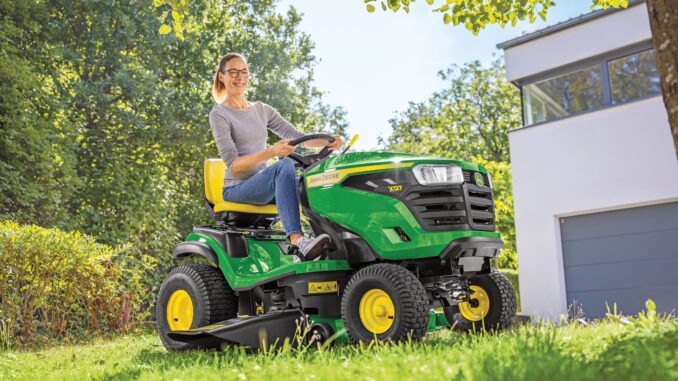
The John Deere E170 is a 48‑inch lawn tractor in the E100 series, aimed at homeowners who want a step‑up machine with a heavier frame, comfortable controls and straightforward service access.
This tractorsby.com guide walks you through practical John Deere E170 repair, troubleshooting, parts, diagrams, manuals and maintenance so you can make informed DIY vs dealer decisions and keep your mower working reliably.
Introduction to the John Deere E170
The John Deere E170 is a gas‑powered lawn tractor with a 48″ mower deck, foot‑pedal hydrostatic drive, and a mid‑range engine sized for larger residential lawns rather than commercial work. It’s commonly used on ½‑acre to multi‑acre properties where owners want a better ride quality, more deck width and stronger frame than an entry‑level lawn tractor.
In this John Deere E170 repair guide we focus on what you actually see as an owner: starting and running issues, cut quality, vibration and noise, overheating and leaks, drive and transmission problems, electrical and safety switch faults, plus parts, diagrams and manuals. The aim is to give you clear boundaries between realistic DIY tasks and jobs that usually belong with a John Deere dealer or experienced technician.
General overview of the John Deere E170
The E170 sits toward the upper end of the E100 lawn tractor lineup, above smaller 42″ deck models and below fully‑featured garden tractors with heavier duty transmissions and hydraulics. It combines a V‑twin gasoline engine, side‑discharge 48″ deck and hydrostatic transmission with operator‑friendly controls, making it a solid choice for regular lawn maintenance and light yard work.
Key systems on the John Deere E170 lawn tractor include:
-
Engine and fuel system (air‑cooled gasoline engine, carburetion or fuel delivery, ignition, fuel pump and tank)
-
Mower system (48″ deck, spindles, blades, belt, idlers, deck lift linkage)
-
Drive system (hydrostatic transmission, drive belt, rear axle, wheels and tires, brake linkage)
-
Electrical system (battery, alternator, starter, solenoid, ignition switch, interlock safety switches, wiring harness, lights if equipped)
Common John Deere E170 service parts owners buy regularly include engine oil filter, air filter elements, fuel filter, spark plugs, mower blades, mower deck belt, primary drive belt, deck wheels/anti‑scalp rollers, battery, key safety switches and occasionally front wheel bearings or tie rod ends. Having typical part numbers to hand when you speak to a dealer or parts site will speed up ordering and ensure you get the correct components for your serial number break and deck configuration.
John Deere E170 troubleshooting approach
With the John Deere E170, always begin diagnosis from the symptom the owner actually sees, not from an assumed failed part. Ask “What is it doing, or not doing?” and then map that symptom into a category.
For this model the main symptom categories are:
-
Starting issues – won’t crank, cranks but won’t fire, intermittent starting
-
Running issues – stalls, surges, lacks power, runs rough or smokes
-
Cut quality problems – uneven cut, scalping, missed strips, poor discharge or clumping
-
Vibration and noise – deck vibration, rattles, squeals, grinding noises
-
Overheating and leaks – oil leaks, fuel leaks, smoke or burning smells
-
Transmission and drive problems – won’t move, slow uphill, jerky drive, brake issues
-
Electrical and safety switch problems – dead key, intermittent shutdown, PTO won’t engage
For each of these categories you’ll find an “emergency” section below and more detailed FAQs later in the guide, so you can quickly decide whether you’re safe to keep operating, need immediate repair, or should stop and call a dealer.
Emergency and immediate repair needs on the John Deere E170
Certain symptoms on the John Deere E170 mean you should stop using the tractor immediately because they either compromise safety or risk expensive damage to the engine, transmission or deck. In general, anything involving fuel leaks, loss of braking, severe vibration, overheating or electrical shorts should be treated as urgent.
Below we break down the most important categories for fast triage.
1. John Deere E170 starting issues
When the E170 will not crank, cranks very slowly or repeatedly fails to start, you’re dealing with a starting system problem that can strand the tractor and occasionally point to deeper electrical or fuel issues. While a single no‑start is frustrating rather than dangerous, repeated cranking with fuel present can flood the engine and damage the starter or battery.
Common causes:
-
Weak or discharged battery
-
Loose or corroded battery cables and grounds
-
Faulty safety interlock switches (seat, brake, PTO)
-
Bad starter solenoid or starter motor
-
Fuel supply issues, stale fuel or clogged fuel filter
-
Fouled or worn spark plugs
Basic owner checklist:
-
Confirm the PTO is disengaged, brake fully set and you’re seated properly before turning the key.
-
Check battery terminals for corrosion, clean and tighten them; if possible, test voltage with a multimeter or charger.
-
Inspect the visible safety switches under the seat and on the brake/lever for broken mounts or disconnected wiring.
-
Verify there is fresh fuel in the tank; if fuel is old, plan to drain and replace it along with the fuel filter.
-
If cranking is strong but the engine won’t fire, remove and inspect spark plugs; replace if heavily fouled or worn.
If you smell fuel strongly, hear rapid clicking at the solenoid, or have no electrical power at all, stop and move to the FAQ section for more detail before attempting repeated starts.
2. John Deere E170 cut‑quality problems
Cut quality issues on the John Deere E170 show up as uneven or wavy cut, scalping patches, strips of uncut grass between passes or heavy clumping and poor discharge. These problems matter because they can indicate blunt blades, wrong deck setup or bent components, which in turn stress belts and spindles and can become safety issues if ignored.
Common causes:
-
Dull, nicked or unbalanced blades
-
Incorrect tire pressures causing deck tilt
-
Deck not level side‑to‑side or front‑to‑rear
-
Build‑up of grass under the deck reducing airflow
-
Worn or slipping deck belt and idler pulleys
Basic owner checklist:
-
Park safely, remove the key and inspect the deck for packed grass; clean with a brush or scraper (never with hands near blades).
-
Check tire pressures and inflate all four tires to the recommended PSI so the deck sits correctly.
-
Inspect blades for damage, bends and dull edges; sharpen or replace as required.
-
Sight along the deck front and sides to check for obvious tilt; refer to the operator’s manual for deck‑leveling procedure.
-
Listen for belt squeal or slippage when engaging the PTO; if present, inspect the belt and idlers for wear.
If the deck has struck an obstacle hard, or you can see a spindle housing visibly bent, treat that as an urgent repair and avoid further mowing until corrected.
3. John Deere E170 vibration and noise
Excessive vibration, rattling or grinding from the mower deck or under the tractor usually indicates worn rotating parts or loose hardware. On the John Deere E170 this can quickly lead to broken belts, damaged spindles or unsafe blade retention, so it shouldn’t be ignored.
Common causes:
-
Unbalanced or incorrectly installed blades
-
Worn spindle bearings or loose spindle nuts
-
Damaged deck belt or idler bearings
-
Loose engine or deck mounting bolts
-
Debris lodged in pulleys or around the deck
Basic owner checklist:
-
Disengage PTO, shut off the engine and wait for all movement to stop before investigating any noise.
-
Inspect blades for correct installation and tightness; ensure both blades are installed with the correct orientation.
-
Rotate pulleys by hand with the engine off to feel for rough bearings or grinding.
-
Check deck hangers and mounting hardware for looseness; tighten to spec where accessible.
-
If vibration persists, avoid further mowing until you or a dealer can inspect spindles and bearings more deeply.
Any grinding or metallic scraping noise from the transmission or rear axle is a stop‑now symptom – consult a dealer rather than continuing to drive.
4. John Deere E170 overheating and leaks
On the John Deere E170, overheating usually shows as smoke or a hot smell from under the hood, while leaks appear as visible oil, fuel or coolant (if equipped) under the tractor or on the deck. Fuel leaks and significant oil leaks are immediate safety issues; overheating can damage the engine.
Common causes:
-
Blocked engine cooling fins or dirty engine compartment
-
Low or old engine oil
-
Fuel line cracks or loose clamps
-
Leaking oil seals, filters or drain plugs
Basic owner checklist:
-
Shut the tractor down immediately if you see smoke, smell burning or spot dripping fuel.
-
Inspect around the fuel tank, fuel filter and hoses for visible wet areas; repair or replace damaged hoses before use.
-
Check engine oil level and condition; top up or change if low or very dark.
-
Clean grass and debris from the engine cooling fins and screens with a brush or low‑pressure air.
-
If an oil leak appears to be from a seal or crankcase, avoid further operation and plan for dealer diagnosis.
Never attempt to operate the tractor with an active fuel leak or without oil at the correct level; both can lead to fire or catastrophic engine failure.
5. John Deere E170 transmission and drive problems
Drive system issues on the John Deere E170 present as the tractor not moving, moving weakly, surging, or failing to hold on slopes. While minor drive complaints can be caused by linkage or belt issues, loss of drive can also indicate internal hydrostatic transmission problems that tend to be non‑DIY.
Common causes:
-
Drive belt worn, off, or broken
-
Debris packed around pulleys and linkages
-
Low tire pressure or traction issues
-
Misadjusted or sticking brake linkage
-
Internal transmission failure or fluid contamination
Basic owner checklist:
-
Confirm the parking brake is fully released and the free‑wheel lever is in the operating position.
-
Check tire pressures and tread; correct low pressure and avoid steep slopes if traction is poor.
-
From a safe position, inspect the drive belt path under the tractor for obvious damage or dislodgement.
-
Test the brake function; if the brake pedal sticks or fails to hold, avoid further use until repaired.
-
If the tractor suddenly stops moving without any visible belt issue, treat it as a likely internal problem and consult a dealer.
Hydrostatic units are generally not owner‑serviceable beyond linkage and belt replacement; internal repairs fall into advanced technician territory.
6. John Deere E170 electrical problems
Electrical faults on the John Deere E170 typically show as a dead key, intermittent shut‑off while mowing, PTO engagement problems or blown fuses. Many of these faults are related to safety interlock switches and wiring and can be intermittent.
Common causes:
-
Corroded battery terminals or weak battery
-
Loose ground connections
-
Failed safety switches (seat, brake, PTO)
-
Damaged wiring harness or rodent damage
-
Faulty ignition switch or relays
Basic owner checklist:
-
Inspect battery and cables; clean corrosion and secure all clamps firmly.
-
Wiggle the seat and brake while starting to see if interlocks are flaky; never bypass safety switches permanently.
-
Check main fuses if accessible; replace only with the correct type and rating.
-
Observe whether shutdown occurs when hitting bumps or moving on slopes; that often indicates a loose seat switch.
-
If you see chafed wiring, exposed conductors or evidence of rodent chewing, plan for repair or dealer assistance before further operation.
Persistent electrical faults are often best handled with wiring diagrams and dealer tools, though simple switch replacements can be realistic DIY jobs for careful owners.
John Deere E170 DIY or dealer? Repair decision guide
On the John Deere E170, the usual “line” between DIY and dealer work falls between simple bolt‑on part changes (filters, belts, blades, batteries) and jobs requiring specialized tools, lifting or internal engine/transmission work. If a job requires splitting the tractor, working inside the hydrostatic unit, or opening the engine, it is normally not a homeowner job.
Good DIY jobs on the John Deere E170:
-
Oil and filter changes
-
Air and fuel filter replacement
-
Spark plug replacement
-
Blade removal, sharpening and replacement
-
Deck belt inspection and replacement (if you can safely support the deck)
-
Battery replacement and basic terminal cleaning
-
Tire pressure and simple tire/wheel changes
Advanced DIY or dealer jobs:
-
Internal engine repairs (valves, head gaskets, internal seals)
-
Carburetor or fuel pump replacement and tuning
-
Hydraulic/hydrostatic transmission diagnosis and internal repair
-
Major electrical diagnostics involving harness testing and replacements
-
Steering and axle rebuilds beyond simple tie rod replacement
-
Frame repairs or straightening after impact
Skill level guide:
-
Beginner: Oil changes, checking fluids, cleaning deck, blade removal with the right tools, battery maintenance.
-
Intermediate: Deck belt changes, replacing filters, swapping simple switches or solenoids, adjusting deck level.
-
Advanced: Engine or transmission internals, complex wiring diagnosis, brake system overhaul, frame or axle repairs.
If you’re ever unsure, default to safety: stop, consult your operator’s manual, and lean toward a dealer when work affects steering, braking, structural integrity or internal powertrain components.
John Deere E170 parts needed, OEM vs aftermarket, and information to gather
Before you order John Deere E170 parts, collect key information so you get the right fit for your specific tractor and deck configuration. This matters because Deere often uses serial‑number breaks and deck‑specific belts and blades within the same model name.
Information to gather:
-
Full model name: John Deere E170 lawn tractor
-
Product Identification Number (PIN) or serial number from the tractor frame
-
Engine model and code from the engine label (often under the hood)
-
Deck size and configuration (48″ mower deck, side discharge, any specific deck code)
-
Any current attachments (bagger, mulch kit, front attachments) that may require specific parts
John Deere E170 key service and repair parts
Below is a typical parts table for common E170 service items. Always cross‑check OEM numbers against your PIN and deck code, as Deere occasionally updates part numbers and uses different belts for different serial ranges.
OEM vs aftermarket guidance for the John Deere E170:
-
Use OEM parts for belts, safety‑critical items (brakes, steering, key interlock switches) and parts where exact length or geometry matters (drive belts, deck belts, blades).
-
Aftermarket parts can be acceptable for filters, batteries and sometimes blades if they clearly cross‑reference to your model and match OEM specifications.
-
When in doubt, choose Deere‑branded or Deere‑approved parts, especially for anything in the drive system or safety circuits.
John Deere E170 parts diagrams and service manuals – where to find them
Good diagrams and manuals are essential for successful John Deere E170 repair. You’ll want both the operator’s manual and parts diagrams at minimum, and the technical/service manual if you plan intermediate‑level repairs.
Useful online sources include:
-
John Deere owner information page for the E170: this typically hosts the operator’s manual, quick‑reference guides, safety information and maintenance schedules in PDF form.
-
Deere Technical Publications or the “Technical Manuals” catalog: here you can purchase or access the E100‑series technical manual covering the E170, with detailed troubleshooting, specifications and wiring diagrams.
-
JDParts or equivalent official parts catalog: allows you to look up E170 by model and serial, view exploded parts diagrams and confirm OEM part numbers before ordering.
-
Reputable Deere‑focused parts sites: for example, a dedicated parts lookup site offering a John Deere E170 model page with diagrams and shopping cart integration for belts, blades, filters and common service parts.
Use the operator’s manual for daily operation, basic maintenance and safety; use parts diagrams when ordering components and understanding assembly order; and use the technical manual for deeper troubleshooting, torque specs and adjustment procedures.
How to locate John Deere E170 model, serial and engine numbers
Model, serial and engine numbers matter because many John Deere E170 parts are PIN‑specific and engine‑specific. Getting these numbers wrong is one of the most common reasons for incorrect belts, filters and switches.
Step‑by‑step location guide:
-
Tractor PIN (Product Identification Number): Look at the frame, typically on the right side below the seat or near the rear wheel area, for a metal or adhesive tag with “E170” and a serial number.
-
Model decal: The “E170” model name is usually printed on the hood or side panels; confirm this matches your manuals.
-
Engine identification: Open the hood and look for a sticker or stamped plate on the engine shroud or valve cover indicating engine model, type code and specification number.
-
Deck identification: On the 48″ deck, check for a decal or stamping indicating deck size and deck code; this helps when ordering deck parts.
-
Attachment serials: For baggers or other attachments, there may be a separate tag on the attachment frame with its own model and serial – note these if ordering attachment‑specific components.
Write these numbers down or take clear photos with your phone before calling the dealer or ordering online; they will often ask for PIN and engine code first.
Buying John Deere E170 parts online and in physical stores
A simple strategy for buying E170 parts is to use online catalogs to confirm OEM numbers, then choose the buying channel that fits the complexity and urgency of your repair.
Suggested approach:
-
Online sources: Use official Deere owner pages, JDParts or comprehensive aftermarket sites to look up your E170 by model and PIN, confirm OEM numbers and cross‑reference aftermarket options. Always ensure the listing explicitly includes “E170” and your deck size.
-
Dealer counter: For complex or serial‑specific parts (drive belts, electrical components, transmission‑related parts) and when you’re unsure, a local John Deere dealer parts counter is often the safest option. Bring your PIN and list of symptoms.
-
Retail stores: Big‑box or farm retailers are fine for generic consumables like engine oil, grease, some filters and batteries, as long as the packaging clearly lists compatibility with “John Deere E170” or the equivalent engine model.
When ordering online, double‑check that the part number and description match both your model and deck size, and keep return policies in mind in case a part doesn’t fit.
Step‑by‑step fitting guide – common John Deere E170 DIY jobs
Below are practical fitting guides for high‑impact DIY jobs on the John Deere E170. Always work on level ground, set the parking brake, remove the key and disconnect the spark plug(s) or battery where appropriate before working near moving parts.
1. Changing the engine oil and filter on a John Deere E170
Changing oil and filter improves starting, protects the engine and prevents premature wear.
Steps:
-
Run the engine for a few minutes to warm the oil slightly, then park on level ground and shut off the tractor.
-
Set the parking brake, remove the key and place a drain pan under the oil drain point.
-
Open the drain and allow oil to flow completely; remove the oil filter, catching any extra oil in the pan.
-
Lightly oil the seal of the new filter, install it hand‑tight, then snug per the filter instructions.
-
Close the drain, refill with the recommended grade and quantity of oil, then check the level with the dipstick.
-
Start the engine briefly, check for leaks, then re‑check oil level and adjust if necessary.
2. Replacing the air filter on a John Deere E170
A clean air filter improves starting, fuel economy and engine life.
Steps:
-
With the engine off and cool, open the hood and locate the air filter housing.
-
Release the housing clips or screws and remove the cover carefully.
-
Take out the old filter and any pre‑filter, noting their orientation.
-
Clean dust from the housing with a dry cloth or low‑pressure air, keeping debris out of the intake.
-
Install the new pre‑filter and main filter in the correct order, then refit the cover and secure it.
-
Close the hood and note the service date/hours so you can track filter life.
3. Changing the mower blades on a John Deere E170 48″ deck
Fresh, correctly balanced blades are key to good cut quality and reduced vibration.
Steps:
-
Park the tractor on a flat surface, disengage PTO, set brake and remove the key. If necessary, safely raise and support the front to access the deck.
-
Use a block of wood to hold each blade against rotation, then loosen the blade bolts with the correct socket or wrench.
-
Remove blades, noting orientation and any washers or spacers. Clean the underside of the deck while it’s accessible.
-
Install sharpened or new blades with the cutting edge facing the correct direction (usually “lift” wings up), re‑using any hardware.
-
Torque blade bolts to the specified value from your manual; do not overtighten or leave them loose.
-
Lower the tractor if raised, clear all tools and blocks, then perform a test run listening for unusual vibration.
4. Replacing the mower deck belt on a John Deere E170
A healthy deck belt is essential for blade drive and consistent cut quality.
Steps:
-
With the tractor off and parked safely, lower the deck fully and remove the key. If necessary, consult your manual for deck removal.
-
Release belt tension by moving the idler spring/arm to slacken the belt; note the routing around pulleys and guides.
-
Remove the old belt from all pulleys, checking each pulley for smooth rotation and inspecting guides for damage.
-
Route the new belt according to the diagram in your manual or deck sticker, ensuring it sits correctly in pulley grooves.
-
Re‑engage the idler spring/arm to apply tension, checking that the belt is centered and clear of obstructions.
-
Reinstall the deck if removed, then perform a brief test with PTO engaged, listening for squeal and confirming proper blade spin.
John Deere E170 maintenance to prevent recurring problems
Regular maintenance on the John Deere E170 is the single best way to avoid repeated starting issues, cut‑quality problems, vibration and unexpected breakdowns. Focus on a few critical areas that match typical failure modes for this tractor.
Key focus areas:
-
Starting reliability: Keep the battery charged and terminals clean; replace spark plugs and fuel filters at recommended intervals; use fresh fuel.
-
Cut quality: Maintain sharp blades, correct tire pressure and deck level; clean the deck underside regularly to preserve airflow.
-
Fire and overheating prevention: Clean grass and debris away from engine cooling fins, muffler and belts; maintain proper oil level and change at the correct intervals.
-
Drive performance: Inspect drive belts, pulleys and brake linkage; keep tires correctly inflated and avoid overloading or aggressive driving on slopes.
-
Electrical reliability: Periodically check safety switches for secure mounting and clean connections; avoid spliced or damaged wiring and store the tractor away from rodents where possible.
By staying ahead of wear and contamination, you’ll significantly reduce emergency repairs and unexpected downtime.
John Deere E170 maintenance schedule and year‑round checklist
Use the official E170 maintenance chart from your operator’s manual as your baseline. Below is a typical homeowner‑friendly schedule built around that style of chart; always adjust to match your exact manual.
Daily / before each use
-
Check engine oil level and top up if necessary.
-
Inspect for fuel and oil leaks around the tank, engine and hoses.
-
Confirm tire pressures visually and correct obvious low tires.
-
Ensure safety shields, guards and deflectors are in place and secure.
-
Verify brakes and PTO engagement/disengagement work correctly before mowing.
After approximately 8 hours of use
-
Brush or blow off grass and debris from the engine, deck and pulleys.
-
Inspect blades for obvious damage after mowing rough terrain.
-
Check deck belt tension and routing; correct any misalignment.
-
Look for loose hardware around the deck hangers and steering components.
Every 25 hours
-
Grease fittings as specified (steering, spindles, front axle points if applicable).
-
Inspect air filter; clean or replace if dirty.
-
Check battery terminals for corrosion; clean and protect with dielectric grease if needed.
-
Inspect drive belt for cracks and glazing; plan replacement if wear is advanced.
Every 50 hours or yearly (whichever comes first)
-
Change engine oil and replace the oil filter.
-
Replace fuel filter to help prevent starting and running issues.
-
Sharpen or replace mower blades; re‑balance if sharpening.
-
Perform full deck leveling check and adjust deck pitch if necessary.
Every 200 hours or as specified
-
Replace air filter elements (main and pre‑filter) if not already changed.
-
Inspect steering and front axle for wear; replace bushings or bearings as needed.
-
Check all safety switches and wiring harness connections thoroughly.
-
Have a dealer perform a more comprehensive inspection if you’re unsure of internal components.
Seasonal checklist (spring, mid‑season, fall)
Spring:
-
Perform oil and filter change if not done at end of last season.
-
Inspect and charge battery fully before first use.
-
Check and replace blades and belts as needed after winter storage.
Mid‑season:
-
Recheck deck level and tire pressures to maintain cut quality.
-
Clean cooling fins and engine compartment; inspect for developing leaks.
Fall/end‑of‑season:
-
Clean the tractor thoroughly, including deck and undercarriage.
-
Change oil or at least check condition before storage.
-
Stabilize fuel or run the tractor dry according to your preferred storage practice.
-
Store battery appropriately if you expect freezing temperatures.
Following this schedule closely will extend the life of your John Deere E170 and reduce the chance of major repairs.
John Deere E170 – repair, upgrade, or replace?
For the John Deere E170, the decision to repair, upgrade or replace usually comes down to tractor age, structural condition and the cost of required work versus the tractor’s value and your needs. A well‑maintained E170 can serve for many years; however, severe frame rust, transmission failure or major engine damage can tip the scales toward replacement.
Repair if…
-
The tractor is structurally sound with no significant frame cracks or rust.
-
Issues are limited to wear items (belts, blades, filters, battery, minor electrical switches).
-
Starting, cut quality or vibration problems are traceable to specific, affordable parts.
Upgrade if…
-
The tractor runs and drives well but you need better performance (e.g. adding a mulch kit, upgrading blades, fitting a bagger, installing tire chains or better seat).
-
You want enhanced comfort or functionality without changing the tractor (lighting, towing accessories, improved tires).
Replace if…
-
The hydrostatic transmission or engine requires major internal repair that approaches or exceeds the value of the tractor.
-
The frame or steering components are damaged in a way that compromises safety and would cost heavily to fix.
-
You’ve outgrown the E170’s capacity or need to move to a heavier garden tractor or compact utility tractor for your property.
Whenever you’re looking at a major repair quote, compare it against the cost of a newer or upgraded machine and your expected remaining years of use; sometimes a good repair is still cheaper and more practical, but not always.
Expanded troubleshooting FAQ – John Deere E170 (30–35 questions)
1. Why will my John Deere E170 not start at all?
If your E170 is completely dead at the key, start by checking the battery and cables for corrosion, looseness or low voltage. Ensure the PTO is disengaged, brake fully set and you’re seated, as safety interlocks can block starting if any condition is wrong. Inspect main fuses if accessible and look for chafed or damaged wiring near the ignition switch and seat area. If there is still no response, the ignition switch, solenoid or a safety switch may have failed and could require testing with a meter or dealer assistance.
2. Why does my John Deere E170 crank but not fire?
Cranking without firing often points to fuel or ignition issues rather than the battery. Confirm there is fresh fuel in the tank and that the fuel filter is not clogged, especially after long storage. Remove and inspect the spark plugs for fouling, oil or carbon build‑up and replace if necessary. If fuel and plugs appear fine, check the safety switches again, as some interlocks can allow cranking but prevent ignition if they’re faulty. Persistent no‑fire conditions are best addressed using the technical manual’s step‑by‑step tests.
3. Why does my John Deere E170 start but then stall?
Stalling shortly after start usually indicates fuel delivery, carburetion or choke issues. Make sure you’re following the recommended starting procedure and not leaving the choke fully on once the engine catches. Check for stale fuel, clogged fuel filter or restricted fuel line, especially if the tractor was stored over winter. A dirty air filter can also choke the engine; inspect and clean or replace it. If stalling occurs consistently under load, look for problems in deck load, drive belt drag or internal engine issues and consider a dealer diagnosis.
4. Why is my John Deere E170 hard to start when hot?
Hot‑start difficulties can be caused by marginal battery, poor electrical connections or vapor lock in the fuel system. Clean and tighten battery terminals and ensure the battery is in good condition. Confirm that the cooling system is clean, so the engine isn’t overheating excessively between starts. Avoid shutting the engine off immediately after heavy work; allow a brief cool‑down idle to stabilize temperatures. If hot‑start problems persist, have a technician check ignition components and fuel system behavior under heat.
5. Why does my John Deere E170 backfire or pop?
Backfiring through the intake or exhaust usually points to timing or mixture issues. Inspect spark plugs for wear and correct gap, and replace if old. Make sure fuel is fresh and the air filter is clean to avoid excessively rich or lean mixtures. Avoid abrupt throttle changes and ensure the governor and linkages are correctly connected. Repeated backfiring or loud pops can indicate valve or internal engine problems, in which case dealer inspection is recommended.
6. Why is my John Deere E170 smoking from the exhaust?
Blue or white smoke from the exhaust typically indicates oil burning or incomplete combustion. Check the oil level; an overfilled engine can force oil into the combustion chamber. Inspect air filter and ensure the engine is not choked with debris or excessive restriction. If smoke is heavy and persistent, particularly on a warm engine, internal issues like worn rings or valve seals may be present, and you should consult a dealer before continuing heavy use.
7. Why is the cut uneven on my John Deere E170?
Uneven cut often results from dull blades, incorrect deck level or mismatched tire pressures. Verify all tires are inflated to the recommended pressures so the frame and deck sit correctly. Inspect blades for bends or dull edges and replace or sharpen them, ensuring they’re balanced. Use your manual’s deck leveling procedure to adjust side‑to‑side and front‑to‑rear pitch. If the deck or frame has been bent by impact, more involved mechanical repair may be necessary.
8. Why is my John Deere E170 leaving strips of uncut grass?
Strips between passes usually arise from misaligned deck, incorrect overlap or damaged blades. First, adjust your mowing pattern to overlap passes by a few inches. Check blades to ensure all are present, correctly installed and not bent or short. Confirm deck belt tension and routing so all spindles spin at full speed. If strips persist, re‑level the deck and inspect spindle assemblies for play or damage.
9. Why does my John Deere E170 scalp the lawn on bumps?
Scalping is often an issue of deck height, tire pressure and ground speed. Raise the cutting height and slow down on rough terrain or near high spots. Confirm tire pressures are equal to avoid deck tilt and use anti‑scalp wheels on the deck correctly adjusted per your manual. If your lawn is particularly uneven, re‑grading or changing mowing direction (for example, diagonal patterns) can help reduce scalping.
10. Why does my John Deere E170 discharge grass poorly or clump?
Poor discharge and clumping can be caused by wet grass, dull blades or a dirty deck. Try to avoid mowing when grass is wet or heavily dewy, and if you must, use a higher cutting height and slower ground speed. Clean the underside of the deck to remove packed clippings, which disrupt airflow. Replace or sharpen blades and ensure you’re using the correct blade type for bagging or side discharge. Check that the discharge chute is clear and properly attached.
11. Why is there excessive vibration from the mower deck on my E170?
Deck vibration is commonly due to unbalanced blades, worn spindle bearings or damaged pulleys. Inspect blades for correct installation and orientation, and replace any that are bent or heavily nicked. Spin each spindle and pulley by hand; roughness, noise or play suggests worn bearings needing replacement. Check deck hangers and hardware for looseness and tighten as necessary. If vibration remains severe, have a professional check spindles, as running with badly worn bearings can be hazardous.
12. Why does my John Deere E170 squeal when I engage the PTO?
Squealing on PTO engagement usually indicates a slipping or misaligned deck belt or stiff pulleys. Inspect the belt for glazing, cracks or contamination and replace if worn. Verify the belt routing matches the diagram and that guides and keepers are correctly positioned. Spin idler pulleys to ensure they turn freely and silently. Adjust PTO engagement technique to avoid slamming it on at maximum engine speed; a brief lower‑RPM engagement followed by throttle increase can help.
13. Why is my John Deere E170 making a grinding noise when driving?
Grinding while driving can be a serious indicator of drive belt issues, axle or transmission problems. Stop driving immediately and inspect for debris or foreign objects caught around the belt or rear axle. Check wheel bearings and hub areas for looseness or scraping. If the noise appears to come from within the transmission or differential, do not continue operating; seek dealer assessment, as internal failures are not DIY‑friendly.
14. Why does my John Deere E170 struggle on hills?
Poor hill performance may be due to low tire pressure, worn drive belt, heavy load or normal limitations of the hydrostatic system. Ensure tire pressures are correct and avoid towing or carrying weights beyond the tractor’s rated limits. Inspect the drive belt for wear and replace if slipping. Adjust mowing pattern to traverse slopes across rather than straight up and down where possible. If drive remains weak, internal transmission issues may be present and should be checked professionally.
15. Why won’t my John Deere E170 move at all?
If the tractor won’t move, verify the free‑wheel or tow valve is in the operating position, not tow mode. Confirm the parking brake is fully released and not stuck on. Inspect the drive belt for breakage or dislodgement under the frame. If the belt and external linkages appear normal, the hydrostatic unit may have failed internally or lost fluid; internal transmission repairs are usually handled by a dealer.
16. Why are my John Deere E170 brakes weak or not holding?
Weak brakes can result from worn brake components, misadjusted linkages or contaminated surfaces. Check brake linkage for free movement and obvious damage. If adjustment is available per the manual, perform the specified procedure and re‑test. Avoid using the tractor on slopes until braking is reliable. If you suspect pad wear or internal brake issues, treat this as a safety repair best left to a qualified technician.
17. Why does my John Deere E170 battery keep going flat?
A battery that repeatedly goes flat may be old, undercharged or suffering from parasitic drains. Test the battery with a charger or at a parts store; replace if it no longer holds charge. Clean terminals and ensure charging system connections are solid. Check that accessories or lights are turned off when not in use and that no aftermarket wiring is causing drains. If the alternator or regulator is not charging properly, dealer diagnostics may be required.
18. Why do the lights on my John Deere E170 flicker or fail?
Flickering lights often indicate loose connections, corroded terminals or failing bulbs. Inspect wiring to the headlights or work lights, ensuring connectors are snug and free of corrosion. Clean and tighten ground connections connected to the frame. Replace bulbs if they appear dark or physically damaged. If flicker is tied to engine speed, charging system issues could be present and warrant further testing.
19. Why does my John Deere E170 shut off when I leave the seat?
This is usually normal operation of the seat safety switch, which is designed to prevent unattended running. If the tractor shuts off even when you’re seated correctly, the seat switch may be misaligned or failing. Check the switch mounting under the seat for looseness or damage and ensure the seat cushion properly engages it. Replace the switch if needed, following the manual and keeping all safety features intact.
20. Why won’t the PTO engage on my John Deere E170?
A PTO that won’t engage may be blocked by safety interlocks, bad PTO switch or electrical faults. Confirm you are seated, brake set or in the proper operating condition specified by your manual before engaging. Inspect the PTO switch for signs of wear, looseness or heat damage. Check related fuses and visible wiring. If mechanical engagement is attempted but no deck movement occurs, inspect the belt and pulleys; if the clutch itself fails, dealer replacement is often required.
21. Why is my John Deere E170 deck height adjustment stiff or not moving?
Stiff deck height adjustment may stem from debris, rust or bent linkage. Clean around the deck lift mechanism and pivot points, removing packed grass and dirt. Lubricate pivot points as recommended. Make small test movements up and down and avoid forcing the lever. If linkages are visibly bent or bind badly, parts replacement may be needed, and severe damage should be addressed before further mowing.
22. Why does my John Deere E170 feel loose in the steering?
Loose steering often indicates worn tie rods, bushings or wheel bearings. With the tractor off, wiggle each front wheel side‑to‑side and up‑down to feel for play. Inspect tie rods and steering arms for loose joints or obvious wear. Check the steering shaft and sector gear engagement if accessible. Mild wear may be acceptable but significant play requires parts replacement to maintain safe control.
23. Why is there fuel smell around my John Deere E170?
A strong fuel smell can mean small leaks or venting issues. Inspect the tank cap for cracks or poor sealing and replace if necessary. Trace fuel lines from tank to filter and carburetor, looking for dampness, cracks or loose clamps. Replace any suspect hoses promptly and avoid operating the tractor until leaks are corrected. Never ignore persistent fuel smells around hot engine components.
24. Why is there oil on the deck of my John Deere E170?
Oil on the deck might be from the engine, transmission or a leaking filter. Clean the deck thoroughly, then run the tractor briefly and re‑inspect to locate the source. Check around the oil filter, drain plug and seals for seepage. Inspect transmission area if your model has exposed components above the deck. Small seeps may be manageable with seal or gasket replacement, but larger leaks can require professional repair.
25. Why does my John Deere E170 shudder when I engage drive?
Shudder on drive engagement can result from worn or contaminated belts, stiff linkages or misadjusted brake release. Inspect the drive belt for wear, oil contamination or debris and replace if necessary. Ensure brake linkage moves freely and fully releases when you press the pedal. Avoid aggressive throttle when engaging drive; smooth acceleration reduces stress. Persistent shudder may indicate deeper transmission or clutch issues needing dealer attention.
26. Why is my John Deere E170 noisy under the hood?
Noises under the hood may arise from loose components, worn pulleys or cooling fan issues. With the engine off, inspect for loose hardware, missing fasteners or broken plastic pieces. Spin pulleys and any visible fans by hand to detect roughness. Ensure the hood and any internal shrouds are properly mounted, as vibration of loose panels can sound worse than it is. If noise changes with engine speed and appears metallic, stop and have it checked professionally.
27. Why does my John Deere E170 shake more at certain RPMs?
Resonant shaking at specific RPMs can be normal to a point but can also signal imbalance. Confirm blades are properly balanced and installed, as they are a major source of vibration. Check engine mounts and bolts for looseness. Try slightly adjusting mowing RPM within the recommended range to find smoother operation. If shaking remains severe across the range, deeper inspection of spindles and engine balance may be needed.
28. Why is my John Deere E170 deck not lowering or raising properly?
An unresponsive deck lift may be due to mechanical obstruction or linkage issues. Remove built‑up debris around the deck lift brackets and inspect for bent components. Lubricate joints where the manual specifies. Try gently moving the lever while observing the linkage to identify the sticking point. If the lift mechanism itself is damaged or rusted solid, parts replacement might be necessary.
29. Why won’t my John Deere E170 start after winter storage?
Post‑storage starting issues are commonly linked to stale fuel, weak battery and corroded connections. Drain old fuel if it smells sour or looks discolored and replace with fresh gas; change the fuel filter if needed. Fully charge or replace the battery, cleaning terminals and grounds. Inspect air filter and clean the engine compartment of dust and rodent debris. Follow the recommended starting procedure and avoid over‑cranking; if problems persist, check spark plugs and safety switches.
30. How often should I change oil on my John Deere E170?
Oil change intervals for the E170 are normally specified by hours of operation in your manual, often around every 50 hours or yearly for typical homeowner use. If you mow in dusty or heavy conditions, consider more frequent changes. Always use the recommended oil grade and replace the oil filter at the same time. After an initial break‑in period on a new engine, adhere to the regular interval schedule.
31. How often should I sharpen blades on my John Deere E170?
Blade sharpening frequency depends on lawn size and conditions, but many owners find that sharpening every 25–50 hours of mowing keeps cut quality high. If you hit rocks, roots or other debris, inspect and sharpen or replace blades sooner. Keep blades balanced and follow safety procedures when removing and reinstalling them. Dull blades tear grass instead of cutting, leading to poor appearance and possible disease.
32. What fuel should I use in my John Deere E170?
Use fresh gasoline of the octane rating specified in your operator’s manual, typically regular unleaded of sufficient quality. Avoid fuel with very high ethanol content and never use diesel or mixed fuels intended for two‑stroke engines. Store fuel in clean containers and avoid keeping it for long periods; add a stabilizer if you anticipate storage. Old, contaminated fuel is one of the most common causes of starting and running issues.
33. How do I safely store my John Deere E170 over winter?
For safe winter storage, clean the tractor thoroughly, including deck and engine area, to remove grass and debris. Change or at least verify oil condition, stabilize fuel or run the tank down per your preferred method, and disconnect or maintain the battery so it doesn’t discharge fully. Store the tractor in a dry, sheltered place, ideally off bare earth to reduce moisture exposure. Cover the unit if necessary but allow some ventilation.
34. Should I use a mulch kit on my John Deere E170?
A mulch kit can improve lawn health and appearance by finely chopping clippings, but it requires sharp blades and appropriate mowing practices. If you often mow tall or wet grass, side discharge may be more forgiving, whereas mulch kits work best on regularly maintained lawns. Ensure the kit is designed for the E170 48″ deck and install it according to instructions. Be prepared to adjust cut height and mowing speed for best results.
35. When should I consider replacing my John Deere E170 rather than repairing it?
Consider replacement when repair costs approach a significant portion of the tractor’s value, especially for major engine or transmission failures. Also weigh the age of the machine, frame and structural condition, and whether it still meets your property’s needs. If you frequently overload the E170 or need more capability (attachments, heavy towing, rough terrain), moving to a garden tractor or compact utility tractor might be wiser than continuing to invest in extensive repairs.